
inflearn logo

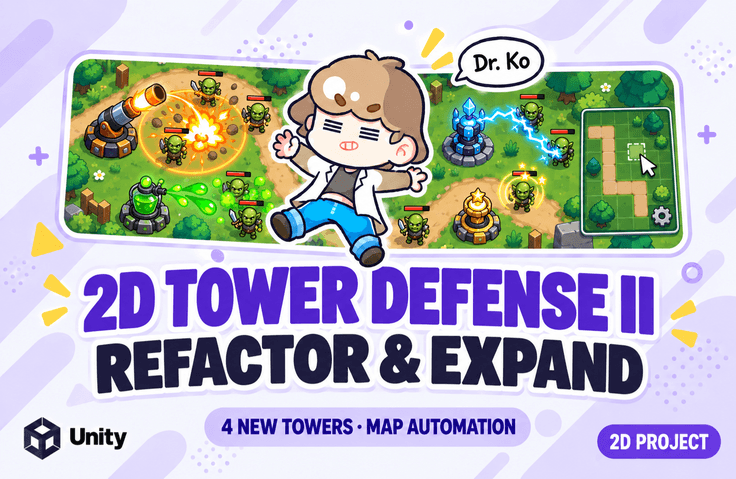
[Unity 6] Tower Defense Refactoring and Expansion - 4 New Tower Types and Map Creation Automation

This hands-on course focuses on building a code structure that is easy to modify and extend, based on a completed 2D tower defense game. Tower functionality that was previously concentrated in a single class is separated by responsibility, while object pooling, event-driven UI, and ScriptableObject-based data separation are introduced step by step. The course also examines issues that can arise when multiple systems work together, such as stacking buffs and slow effects, enemies being returned more than once, and waves starting multiple times. Using the improved structure, you will add area-of-effect, poison, chain-attack, and stun towers, as well as create an editor tool that automatically generates movement path data for the map. By modifying the code yourself and checking the results, you will learn the criteria for grouping common functionality and the reasons for dividing responsibilities.

9 learners are taking this course

Level Basic

Course period Unlimited

C#
C#
Unity
Unity
scriptable-object
scriptable-object
unity2d
unity2d
Unity6
Unity6
C#
C#
Unity
Unity
scriptable-object
scriptable-object
unity2d
unity2d
Unity6
Unity6

What you will gain after the course

  • You can separate common tower functionality from type-specific functionality and create a structure that makes it easy to add new towers.

  • You can apply object pooling and manage the initialization and return flow of reused enemies, projectiles, and health UIs.

  • You can use events to update the UI when health, gold, the number of enemies, or the wave changes.

  • Buffs and slowing effects can be managed by source to handle stacking and removal.

  • You can separate tower and wave data using ScriptableObjects and implement a feature to check for Inspector configuration errors.

  • Using the common attack structure, you can implement area attacks, poison, linked attacks, and stun towers.

  • You can create a Unity editor tool to generate map movement paths as data and apply them to multiple stages.

Refine the structure of your own tower defense game through refactoring and expand it with new features!

Easy and Fun: Dr. Go's Unity Series 🎲

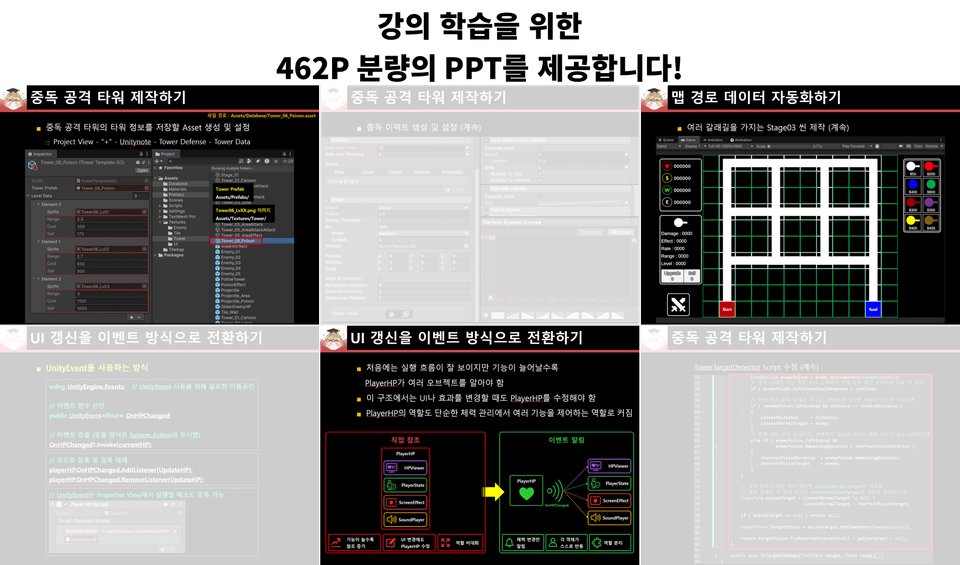
We provide all the resources and the PDF used in the exercises.

We provide all the resources used in the exercises, along with a 462-page course PDF.

Follow along with the examples using the carefully organized PDF, without the hassle of repeatedly playing and pausing the lecture

Learning Content

Part 05. Dividing Tower Roles and Improving the Management Structure

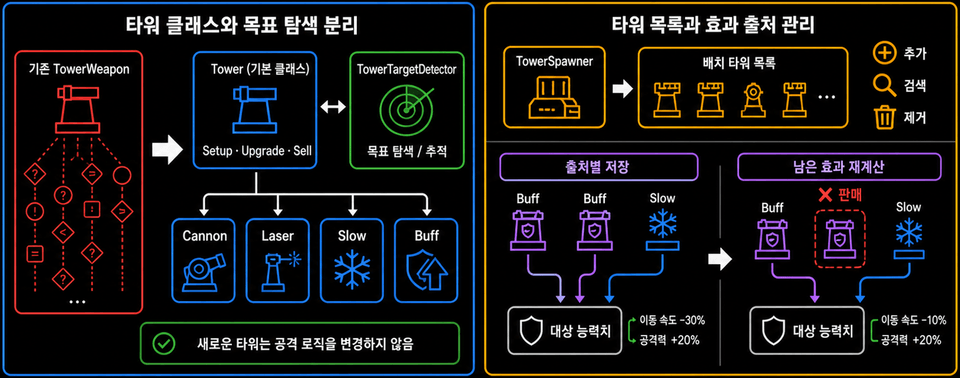
Review the existing code where the functions for each tower type are grouped together, and distinguish between common and individual functions. Manage initialization, upgrades, and selling in the base class, while separating the behavior of cannon, laser, slowing, and buff towers, along with their target-searching functionality.

Next, we improve the structure to directly manage a list of the towers that have been placed. Buff and slow effects are stored by the tower that generated each effect, ensuring that remaining effects are applied correctly even when multiple effects overlap or a tower is sold. We also organize the data access methods and log output.


Part 06. Stabilizing the Game System with Object Pooling and Events

Apply object pooling to projectiles, enemies, and health UI that were repeatedly created and destroyed. Examine precautions during the reuse process, such as the issue of continuing to track enemies returned to the pool, and manage their state according to the objects’ activation and deactivation.

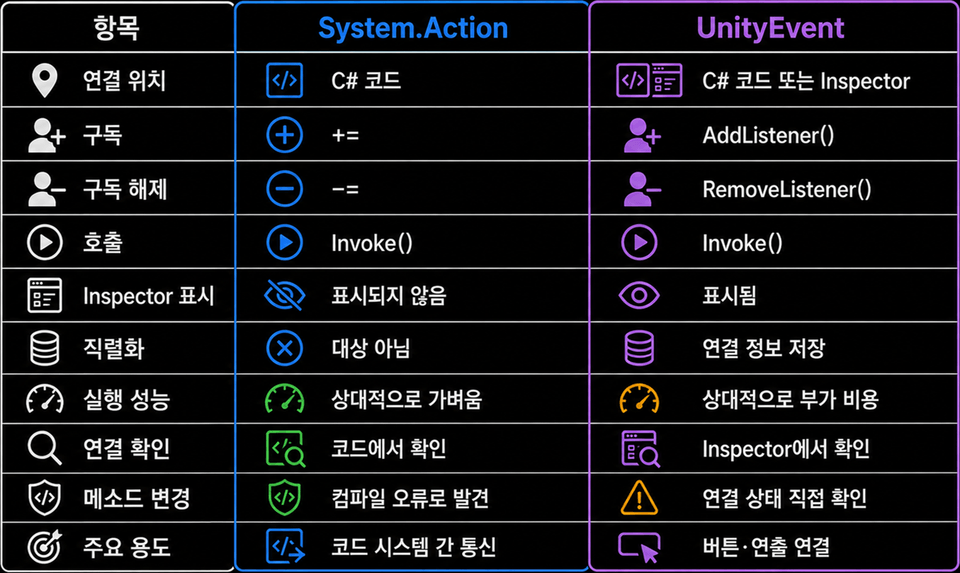
Switch the health, gold, enemy count, and wave UI to update by receiving events whenever their values change. Learn about subscribing and unsubscribing to events, the differences between System.Action and UnityEvent, and prevent duplicate enemy returns and waves from starting more than once. Also improve the configuration process by separating wave data and validating Inspector data.


Part 07. Separating Tower Data and Attack Structures and Adding Area Attacks

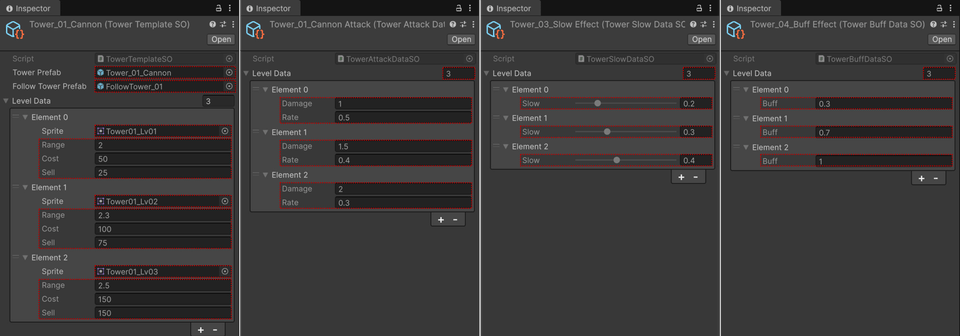
Separate the tower’s common data from type-specific data such as attacks, slows, and buffs into separate ScriptableObjects. Learn how to clearly organize the information required for each feature while transferring the existing tower data to the new structure.

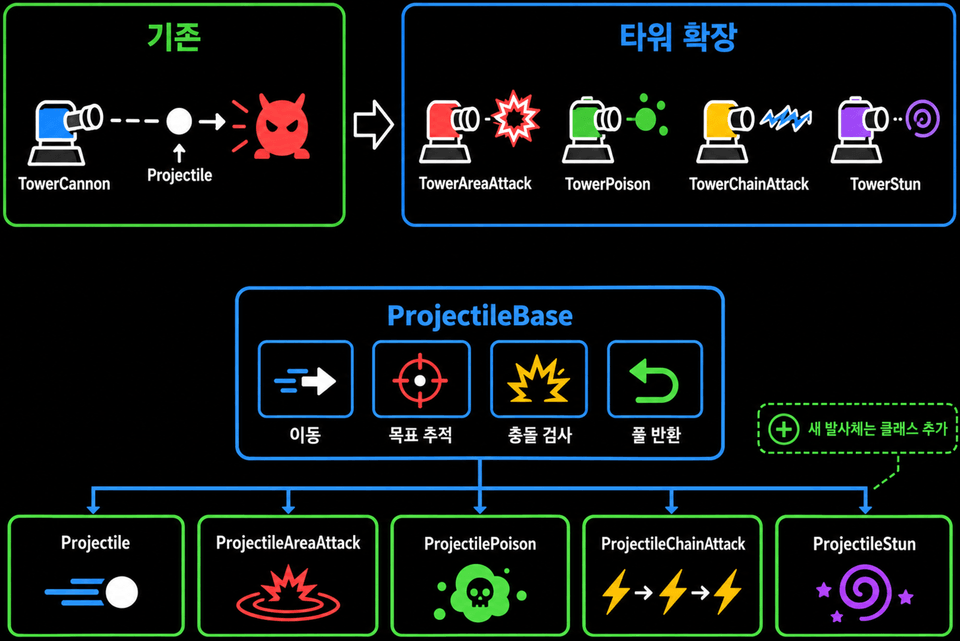
After organizing the shared behavior of attack towers and projectiles, implement an area attack tower that damages multiple enemies within an explosion radius. Connect hit effect pooling, a shared placement preview, and the tower information UI to see how structural improvements can be used to expand actual functionality.


Part 08. Expanding Combat Features with Poison, Chain Attacks, and Stun Towers

Using the tower and projectile structure organized earlier, add towers with different attack characteristics.

The poison tower deals damage over time for a set duration and manages the source of the poison effect, as well as when it is refreshed and ends. The chain attack tower searches for nearby enemies in sequence and continues its attack, while the stun tower stops enemies from moving for a set duration before restoring their state.

Practice distinguishing between the parts that can be commonly reused and those that need to be implemented separately while connecting each tower’s dedicated data, projectiles, effect handling, and UI.


Part 09. Creating an Editor Tool to Automatically Generate Map Path Data

Create stages with multiple starting points and destinations, as well as branching paths, and manage enemy movement paths as separate data.

Implement Path Baker for use in the Unity Editor to analyze map tile information and generate movement paths as ScriptableObject Assets. Connect the generated paths to stages along with wave data, and modify the enemies to use that data for movement.

You can automate the path setup you used to repeat whenever changing maps with a tool, allowing you to experience not only how to implement game features but also how to improve the development process.

Notes Before Enrolling

  • This course was created using Unity version 6000.4.10f1

    Works the same way in all Unity 6 versions. (2026. 09. 26)

  • This course is a follow-up hands-on course that improves the code structure and expands the functionality based on the existing "[Unity 6] Learn to Make a Tower Defense Game by Following Along [Beginner]" course.

  • It is recommended to take this course after understanding the basic flow of the existing project, including tower placement and attacks, enemy movement, health, gold, waves, upgrades, and selling.

  • We will examine the issues in the existing code, make the necessary changes step by step, and then check the execution results.

  • Along with modifying the code, we will also change the prefab’s components, Inspector references, and data Asset settings. Please follow the setup process provided in the textbook as well.

  • Since the structure improved earlier will be used in the next part, it is recommended that you follow the exercises in order. Some features may temporarily stop working while data and references are being moved.

  • Learn within an actual project why common functionality is grouped through refactoring, the criteria for dividing class responsibilities, and what to check when expanding functionality.

Practice environment

  • Operating system and version (OS): Windows

  • Tools used: Unity6, Visual Studio 2022

  • Hands-on project: "[Unity 6] Learn by Following Along: Creating a Tower Defense Game [Beginner]" project

Learning Materials

  • Download the PDF textbook, embedded textbook videos, and resources and proceed with your studies.

  • PDF textbook: You can review the code modification sequence, key concepts, and prefab and Inspector settings step by step.

  • Videos and practice resources in the course materials: You can check the execution results of each feature and use them for practice.

  • C# script files: You can compare them with your code to check for typos or missing parts.

  • Project files for each section: You can review and run the code, object configuration, and data settings for that step.


Recommended for
these people

Who is this course right for?

  • Those who have completed the “[Unity 6] Learn by Following Along: Creating a Tower Defense Game [Beginner]” course and want to take their code structure to the next level.

  • Those who have made a game with Unity but find it increasingly difficult to modify the code as more features are added.

  • Those who want to apply inheritance, events, object pooling, and ScriptableObjects to an actual game.

  • Those who want to implement various attack methods and status effects using the existing structure

  • Those who want to reduce repetitive work through data management and editor tool development

Need to know before starting?

  • Recommended for those familiar with the basic operation of the Unity Editor and C# syntax, and who have experience creating simple games.

  • It would be good if you understand the basic syntax of C#, such as variables, conditional statements, loops, methods, classes, arrays, and Lists.

  • Understanding the enemy spawning and movement, tower attacks, and wave progression flow of an existing tower defense project will help with learning.

  • Inheritance, abstract classes, method overriding, events, and ScriptableObjects are used in the practical exercises. Familiarizing yourself with the relevant concepts in advance will make it easier to understand the structure and flow of the code.

Hello
This is unitynote

Career Verified

14,734

Learners

281

Reviews

143

Answers

4.9

Rating

11

Courses

Key Experience

Current 2022 ~ Professor, Department of Game Software, Hoseo University

Current 2016 ~ Full-time Lecturer, Department of Game Design, Kongju National University

Former 2022 ~ 2024 Unity Certified Instructor

Former 2023 Adjunct Professor, Department of Electrical Engineering, Pohang University of Science and Technology (POSTECH)

Former 2022 Adjunct Professor, Woosong University School of Techno-Media Convergence (Game Multimedia Major)

Former 2019 Adjunct Professor, Department of Computer Science and Engineering, Kongju National University

Former 2018 Adjunct Professor, Department of Photography and Visual Contents, Sangmyung University

Former 2017 Adjunct Professor, Department of Game Media, Kaywon University of Art and Design

Former 2016, 2020–2021 Adjunct Professor, Department of Game Design and Development, Pai Chai University

Former 2016 Namseoul University VRAR Adjunct Professor

Former 2016 Adjunct Professor, Department of Game Animation, Korea University of Media Arts

Former 2015 ~ 2018 Adjunct Professor, School of Information and Communication, Baekseok University

Operator of the "Dr. Ko's Unity Note" YouTube channel https://www.youtube.com/@unitynote. Introduction: I majored in Game Programming and currently teach game development and the Unity engine.

Operating the "Go Baksa's Unity Note" YouTube channel

https://www.youtube.com/@unitynote

Introduction

I specialize in game programming and teach game development and the Unity engine.

Fields of Instruction: Unity Engine (Basics, 2D/3D Game Development, VR/AR), Servers, Artificial Intelligence, Shaders, Introduction to Game Studies, etc.

More

Curriculum

All

58 lectures ∙ (5hr 35min)

Course Materials:

Lecture resources
Published: 
Last updated: 

Reviews

Not enough reviews.
Please write a valuable review that helps everyone!

unitynote's other courses

Check out other courses by the instructor!

Similar courses

Explore other courses in the same field!

Limited time deal ends in 7 days

$27,720.00

30%

$30.80