Learning React.js with TypeScript: From Basics to the Latest Technologies Perfectly
The complete React course where you learn the latest features of React 19 with TypeScript!
From the basics to state management (Context, Redux Toolkit, Zustand), API communication (Fetch, Axios), the latest hooks (use, useActionState, useOptimistic, etc.), and real-world projects, you can learn step-by-step to build React apps that can be applied directly to professional work.
I've never written a course review before, but I highly recommend this lecture for learning React!!!
I had to learn React in a hurry, so I've completed about 30% of the course so far, and I felt it was a flawless lecture.
There isn't a single unnecessary part. I don't think you need to watch any other lectures; you can master the basics of React with just this one.
5.0
OZST
100% enrolled
- Clear and detailed concept explanations
- Explains why each concept emerged
- Provides practical direction for real-world use
- Visualizes concepts for easy understanding
- Creates separate detailed examples for potentially confusing parts
- Deepens understanding through practice sessions based on what was learned in each subsection
- Explains grammar points to watch out for and the reasons why
- Kindly explains using developer tools during practice
- Learns new concepts while refactoring previous code
- Learns overall flow and concepts through final project
**All of this flows naturally and cleanly like water**
The course led me to purchase the React book as well, and I'm enjoying it. Thank you👍
5.0
챙준
100% enrolled
I started on September 12th and completed the course on October 24th.
Since I had content I learned from bootcamp and other courses, I took this course with the purpose of reviewing and reinforcing that knowledge.
As the number of lessons demonstrates, it really covers a tremendous amount of information. I was able to cover so much content from UI design to library utilization, React built-in hooks usage, (global) state management, data fetching, routing, and deployment. In particular, it was great to see examples of efficient hook usage that weren't covered in other courses, allowing me to intuitively learn when to use such hooks.
However, TypeScript content wasn't covered in detail, so I think additional Type learning will be needed separately from taking this course. (e.g. using utility types, etc.)
Thank you for providing such a great course!
What you will gain after the course
You can learn the most up-to-date content as of 2026.
Understanding TypeScript Basic Syntax and Type Systems
React component structure, JSX syntax, and how to use props & state
React + TypeScript State Management Techniques (useState, useReducer)
Core syntax and type safety for list rendering and conditional rendering
TypeScript-based Form Handling and Validation (Controlled/Uncontrolled)
Sucoding's online lectures have also been published as a book!
2025 "Coding Self-Study: React" Published! 🎉
Sucoding's online lectures have been published as a book.😎 Sucoding is also an author who has written numerous books in the front-end field! Watching the online lectures and reading the books together will multiply the synergy!!
React is one of the most popular libraries for building user interfaces, and TypeScript is a powerful extension of JavaScript that enhances the stability and predictability of your code. Using them together allows you to reduce bugs, make code autocompletion and refactoring easier, and create robust designs for large-scale projects.
However, learning React and TypeScript at the same time from the beginning is not easy. It can feel overwhelming to figure out how to apply types to concepts like JSX, Props, and State.
In this course, we will focus on learning only the most commonly used React + TypeScript combinations in practice. We have boldly excluded complex type inference or rarely used advanced features, and instead structured the content to be practice-oriented so that even beginners can quickly become familiar with it.
The key topics covered in this course are as follows:
🧱 Solid foundations from the basics
Reflecting the latest development trends based on React 19 (18+)
Applying TypeScript to React.js Components
Understanding the component tree structure and how to define it
How to type-safely declare Props, State, and Events
Type definition for functional components
Practical patterns such as Children, Optional Props, and Default Props
Learning routing concepts for the latest version of react-router v7
⚙ State Management and Rendering
State definition and type handling using useState and useReducer
Core syntax and type safety for list rendering and conditional rendering
How to use major hooks such as useState, useEffect, useReducer, useRef, and useContext
Type handling for React 19's latest hooks (use, useOptimistic, useActionState)
Applying types to custom hooks and the Context API
🧠 Global State Management
Learning global state management tools commonly used in practice, such as redux-toolkit and zustand
📮 API & Form Handling
Handling Forms based on React + TypeScript (Controlled/Uncontrolled)
How to define response types and handle errors during API integration
🛠 Practice-Oriented Structure
Developing real-world development intuition through various design-based practice examples
I focused on content frequently used in actual development, such as...
Through this course, you can understand the core concepts and syntax of React(19) + TypeScript easily and efficiently, and naturally develop development skills that can be applied immediately in practice. 🚀
It's okay even if you're a complete beginner,
I will teach you everything step-by-step from the basics.
React + TypeScript, don't worry even if it's your first time. We have structured it so that you can learn together step-by-step from the basics.
React is the most popular library for building user interfaces, and TypeScript is a powerful tool that helps you handle React more safely and systematically.
However, when you first encounter these two technologies, these concerns are bound to arise:
"How do I apply types to components?" "What type should I use for useState?"
This course is designed with easy examples and a practice-oriented approach so that even those who are new to both React and TypeScript can start without any pressure.
Sucoding says with confidence.
This course teaches React more easily than any other React course in the world.
🚀 Master React(19) + TypeScript, Easily and Practically
From the latest features of React 19 to state management, form handling, API integration, and real-world projects!
Master core concepts one by one, and I will help you build the skills to naturally apply them to real-world projects.
“React + TypeScript, safer and smarter!” Upgrade your development skills to the next level through this course. 🎯
What makes Sucoding's lectures special
Full reflection of the latest React 19 features
This course was created based on React 19 from the very beginning. (It wasn't filmed with React 18 and then upgraded to 19. It's truly the latest! 🚀)
You will learn the latest features such as the new useOptimistic and useFormStatus, and you will be able to confidently handle React 19 projects.
A core-focused curriculum that can be applied immediately in practice
Learn frequently used React concepts such as JSX, Props, State, and Events along with TypeScript.
From defining component types and handling Hook types to utilizing Generics! You will focus on learning only the essential techniques used in actual field work.
Lecture focused on intuitive, easy examples and hands-on practice
Concepts are explained step-by-step so that even those learning React for the first time can easily understand, and learning follows an example → practice approach.
A practice-oriented course where you learn by coding yourself, helping you apply theory directly to real-world practice.
Clearly understand the differences from JavaScript
Have you only used React with JavaScript? You can clearly compare and understand the differences and advantages of TypeScript.
You will naturally learn how to migrate existing JS code to TypeScript.
Perfectly applying even the latest features of TypeScript
By applying the latest React and TypeScript features, you will build a foundation that can be seamlessly applied to future projects.
We frequently reflect the latest development trends and updates.
Generously revealing practical tips and developer know-how
We provide everything from practical tips unique to working developers not found in textbooks to ways to increase work efficiency.
We suggest not only JavaScript but also the direction for growing as a front-end developer.
Customized feedback for students and meticulous Q&A support
We provide fast and friendly feedback to students' questions.
By pointing out common mistakes or confusing parts, we maximize the learning effectiveness for each individual.
Core curriculum optimized for beginners
Chapter 01 Getting Ready
Learn the necessary environment setup before starting your React journey. We will look at how to install VSCode for each OS and prepare for learning by installing Prettier and extensions.
Chapter 02 Getting Started
In this chapter, we will cover how to start a React application using modern methods. You will configure a Vite-based development environment, which replaces Create React App (CRA), and learn the essential settings required for React development.
Comparison of CRA's limitations and Vite's advantages
Understanding the differences between Webpack and Vite and the trends in the ecosystem
Fast and intuitive React project setup using Vite
Improving code productivity through snippets and user snippets
Cleaning up the initial project structure and understanding the npm run dev execution flow
Additionally, it introduces the concept and characteristics of JSX syntax, which is the most important part of React. By understanding how JSX combines HTML and JavaScript and its specific syntactic features, you will build a foundation for learning components later on.
Chapter 03 Component Basics
In React, a component is the smallest unit of a UI and a core concept. In this chapter, you will learn step-by-step what a component is, how it works, and how it is structured, along with actual code.
What is a component? And why is it important?
Requirements and composition methods for writing functional components
Removing unnecessary DOM using React.Fragment
How to create new components and design folder structures
Understanding the concepts of the root component and component tree structure
Additionally, through hands-on practice, you will develop a sense for component-based design by creating components yourself and placing them in appropriate locations. Through this process, your perspective on components will change, and you will establish a foundation to naturally understand even complex React structures later on.
Chapter 04 Component Data and Props
Now, we will dive into Props, one of the core concepts of React. In this chapter, you will learn how to pass and utilize data between components through various examples and hands-on exercises.
Understanding component relationships in React: Ancestor-Parent-Child structure
How to output primitive and reference type data within JSX
The basic principle of passing values to tag attributes
Various methods and patterns for passing data through props
Destructuring assignment for prop separation and improved readability
How to easily infer and clearly define props types based on TypeScript
Understanding how to pass props using the spread operator (...)
Expanding component reusability using the special prop called children
Comparing the differences in roles between props and children
Through this chapter, you will naturally understand the flow of data between React components and develop the ability to design props while considering both type safety and readability.
Chapter 05 Components and Events
Event handling in React applications is the core of implementing user interaction. In this chapter, you will learn how to handle events in React, from button clicks to event propagation, from a systematic and practical perspective.
Event binding methods using JSX syntax
Event attributes and writing patterns for event handler functions
Various ways to pass parameters to handlers and recommended approaches
The flow of reading props inside a handler and practical examples
Structure of passing handlers as props from a parent component
Structure and usage of the event object (SyntheticEvent)
Differences and uses of target and currentTarget
Event propagation concepts: Understanding bubbling and capturing
How to prevent the default behavior of an event (e.preventDefault())
Finally, by creating a button component yourself and practicing handling various events, you will naturally internalize event handling patterns.
Chapter 06 Component State - useState Hook
React's state management is a core feature that allows components to react and change based on user interactions. This chapter covers a wide range of state management topics, from concepts and usage to practical applications, focusing on useState and useReducer.
Why state is necessary and the basic concept of state values
From the basic usage of the useState hook to its practical application
Object and array state handling precautions and re-rendering behavior
setState update methods and functional updates
The concept of state independence and lifting state up
Separation of state management responsibility through encapsulation
Gradually strengthening state management skills by building a counter app from scratch
useReducer for structuring complex state logic
Transitioning to the reducer pattern and performing practical missions
By the end of this chapter, you will have grown into a React developer capable of reliably managing everything from simple state changes to complex data flows.
Chapter 07 Iterative & Conditional Rendering
Actual user interfaces (UIs) are structured so that screens change conditionally depending on the situation and render multiple data points repeatedly. This chapter focuses on how to implement such UIs in React.
🔹 Conditional Rendering
Various conditional expression methods such as if, switch, ternary operator (? :), and logical operators (&&)
Comparison of when to use each conditional method and their pros and cons
Practical exercises based on real-world scenarios such as traffic lights, login status, and message output
Providing practical tips such as nested conditions, readability, and component separation strategies
🔹 Iterative Rendering
Iterative output of components using map() based on array data
Understanding the importance and scope of the key attribute in list rendering
Combining data selection using filter() and similar methods with conditional rendering
Mastering repetitive patterns through practical tasks such as rendering recipe lists
By the end of this chapter, you will be able to naturally implement complex conditions and repetitions in React, and you will have the skills to design dynamic UIs with excellent readability.
Chapter 08 Styling
In this chapter, you will learn a wide range of various techniques for styling components in React. From simple inline styles to CSS-in-JS, Tailwind, and image styling, you will master all the styling techniques frequently encountered in real-world frontend development through hands-on practice.
🔹 Basics of Styling
How to use inline styles and global CSS
Component-level style encapsulation through CSS Modules
Dynamic class management using the classnames utility
🧩 Mission: Experience and compare various styling methods by implementing a button group UI
🔹 CSS-in-JS — styled-components
styled-components syntax and basic usage methods
Dynamic styling using props
Advanced features such as keyframes and as, and how to use helper functions and mixins
Global style management and a collection of tips
🧩 Mission: Create a traffic light UI with styled-components
🔹 Tailwind CSS — Utility-First Styling
Tailwind's Core Philosophy and Directive System
How to apply conditional classes and practical application strategies
🧩 Mission: Complete the Calculator UI with Tailwind
🧩 Bonus Mission: Challenge yourself with advanced UI by adding practical Tailwind skills!
🔹 Image & Font Styling
Considerations for image rendering and CSS adjustment methods
🧩 Mission: Implement an animated UI where the lamp lights up
Including a summary of how to apply Google Web Fonts.
Through this chapter, you will develop the eye to judge which styling tools are suitable for your project and gain the practical sense to implement beautiful and maintainable UIs.
Chapter 09 Building a Calculator
This chapter is a practice-oriented project where you will directly implement a fully functional calculator application based on what you have learned so far. You will experience everything firsthand, from component design and state management to event handling, type separation, and UI composition.
🛠 Project-Based Learning
An overview of the calculator's operating principles and structure before starting the project
UI design and component structuring
Organizing component roles and responsibilities through the refactoring process
🧩 Clearly separate state and operator types using TypeScript
Directly implementing key features such as numbers, operators, periods, and clear.
Learning the bug handling and debugging workflow frequently encountered in practice
🧪 Utilizing Development Tools
Visualize the flow of state changes through how to install and use React Developer Tools
Improvement in real-time state tracking and component structure analysis skills
By the end of this chapter, you will go beyond simple functional implementation to experience component separation, state design, debugging, and type management all at once, and you will gain confidence in React through the “joy of seeing a feature you built yourself actually work.”
Chapter 10 Handling Forms
In this chapter, we have included practical considerations on how to handle forms in React. Beyond simple input processing, it covers everything from React 19's new features (ref forwarding) and reusing form logic through custom hooks to validation.
🔹 Controlled Components
Hands-on practice with various controlled components including input, checkbox, radio, and textarea
Understanding the flow of state-connected input processing and re-rendering
🧩 Mission: Implementing a Form UI combining various controlled inputs
🔹 Uncontrolled Components
Input value access through ref and DOM-based control methods
Comparison of pros and cons between controlled/uncontrolled approaches and integration strategies
🧩 Mission: Batch processing multiple inputs using the uncontrolled component approach
🔹 React 19 Advanced Form Control
refas a prop: the new pattern (React 19)
Separating complex input processing into custom hooks and increasing reusability
Advanced Custom Hooks: Abstracting internal state and integrating custom validation
🔹 Validation
Basic validation implementation patterns for required values, length, format, etc.
Writing custom validation functions and integrating hooks
🧩 Mission: Completing the Login Form → Comprehensive form practice covering input control + validation + state handling
After completing this chapter, you will move beyond simple input processing and gain the ability to construct complex form flows and manage them with a clean, maintainable structure. This is a decisive opportunity to gain practical experience in input control and master the latest React techniques at a professional level.
Chapter 11 Todo List App
In this chapter, based on the core React concepts learned so far, we will implement a functional Todo application. This is a chapter where you can experience the practical React development workflow from start to finish, including component separation, state management, event handling, list rendering, and editing/deletion.
🛠 Practical Implementation Details
Setting up the basic structure, starting from project setup
Implementing the to-do registration feature via an input form
Displaying the to-do list with list rendering
Adding task completion marking via checkboxes and deletion functionality
🧩 Master state updates and UI control logic through implementing the todo edit function
✅ What you will gain through this practice
Beyond simple API understanding, designing the separation of roles and data flow between multiple components
Implement the structure and flow of a state-driven React app from start to finish on your own.
The experience of personally building a small-scale CRUD app as a mission-like, complete project
By the end of this chapter, you will have your first confident project experience in designing and completing an app by combining various features of React.
Chapter 12 Side Effects and Component Optimization Techniques
In this chapter, we go beyond React components simply "rendering" to cover both side effect management, such as asynchronous tasks, browser events, and external API handling, and optimization strategies to reduce unnecessary rendering.
🔹 Side Effect Management (useEffect, useId, etc.)
Improving accessibility and creating unique identifiers using the useId hook
🧩 Apply useId to a Todo app to gain practical experience with accessibility
Theory + practice on the timing of useEffect's execution, the principles of the dependency array, etc.
🧩 Apply useEffect to the Todo app to implement external data handling and state change reaction processing
Basic concepts of lazy() and Suspense for lazy loading components
UI configuration during loading states and strategies for improving user experience
ErrorBoundary handling methods to protect the app from crashing when errors occur
By the end of this chapter, you will be able to personally implement designs that consider both performance and maintenance even within complex component structures, and you will develop the React app operational sense required for real-world services.
Chapter 13 Context API
Want to handle deep data passing between components cleanly? Context API is the answer. In this chapter, you will learn the core concepts and usage of the Context API as the foundation of global state management, and develop structured app development skills by applying them to real-world projects.
🔹 The Necessity of Global State and Context API Basics
The necessity of global state to solve the props drilling problem
Basic global state design using createContext and useContext
Unnecessary rendering issues and structural improvement methods (memo, context separation)
Efficiently manage complex global states by combining with reducer
✅ Includes practice on patterns for using two or more Contexts together
🧩 Hands-on: UserProfile State Management Project
Analyzing initial UserProfile code → Separating state into context objects
🧩 Manage user preferences such as font size, theme, notification settings, and language settings (i18n.ts) as global state
Utilize useLayoutEffect together to control rendering order and layout responsiveness
✅ Learning highly scalable global state structures through Context API + custom hook design
🧩 Mission: Apply Context API to the Todo App
Introduce global state to the existing Todo app → Improve the state-sharing structure between components
Strengthen practical design skills by configuring multiple components to utilize the same state
Through this chapter, you will move beyond simple component-level state and be able to actually implement global state flows and management strategies that look at the entire app.
Chapter 14 Redux ToolKit
If you have grasped the concept of global state with the Context API, now you will experience a more scalable and maintainable global state management structure with Redux Toolkit (RTK). This chapter focuses on hands-on learning of the core features of Redux Toolkit to help you systematically manage complex states.
🔹 Redux Toolkit Theory + Structuring
The background of Redux Toolkit's emergence and its differences from traditional Redux
Store creation and structuring slices through createSlice
Understanding the flow of state changes, action dispatching, and re-rendering.
✅ State debugging through Redux DevTools integration
Expanding to parameter passing and asynchronous processing logic using thunk
✅ Advanced structure practice for managing slices by separating and merging them
🧩 Hands-on: UserProfile State Management with Redux
Reconstructing UserProfile state based on Redux
🧩 Structure font size, notification settings, and theme status into slice units
Experience a comparison of stronger structural control and maintainability compared to Context API
🧩 Mission: Apply Redux to the Todo App
Transitioning the existing todo management app to Redux Toolkit.
✅ Implement Todo state and add/delete/edit logic in slice units
Strengthening the component-store separation strategy and code management experience in practice
Upon completing this chapter, you will move beyond simple state management and reach a level where you can personally implement "structured global state management on a slice-by-slice basis." This is a practical chapter highly recommended for those who have been curious about how Redux Toolkit is used in real-world professional environments.
Chapter 15 Zustand
Want to create global state quickly without complex configurations? In this chapter, you will learn about Zustand, a lightweight and intuitive global state management library. With a structure that is lighter than Redux and more powerful than Context, it is a state management alternative that is gaining increasing attention in the industry.
🔹 From Zustand Basics to Practice
Concepts and philosophy of Zustand: “Global store with minimal boilerplate”
Basic usage and state definition methods
A structure that allows passing parameters to states and easily creating derived states
✅ persistfeature for persistence storage such as local storage
✅ subscribeWithSelector Re-rendering optimization using
✅ Intuitive immutability management through immer
✅ devtools integration for easy debugging
🧩 Practice: Implementing UserProfile State
Re-implementing the UserProfile state based on Zustand
Experience the differences in code volume, intuitiveness, and scalability compared to Redux/Context
🧩 Mission: Refactoring the Todo App with Zustand
Transition the existing Todo app to a Zustand-based implementation
✅ Directly implementing various ways for components to use global state
Provides the experience of implementing the flow of state change → UI rendering → save/restore with minimal code.
By the end of this chapter, as an expert who has experienced all three state management tools (Context API, Redux Toolkit, and Zustand), you will gain the practical standards and intuition to judge and select the appropriate global state tool for any given situation.
Chapter 16 Data Communication
Now it's time to turn your React app into a "living app." In this chapter, you will learn how to communicate with a real server and directly connect it to the PostBrowser mini-project to complete the practical communication structure of a React app.
🔹 Basics of Data Fetching
Basic concepts and structure of HTTP communication
json-server configuration for a local API server → 🛠 Building a practice-based API environment
API test automation using Thunder Client
📝 db.jsonfile configuration notes provided to complete the practice-based setup
🔹 CRUD practice using fetch
Learn the structure of basic requests (GET, POST, PUT, DELETE)
✅ Reflecting real-world elements such as loading states, error handling, and request cancellation (AbortController)
🧩 Understand the flow of React integration by implementing all practical CRUD operations with fetch
🔹 Advanced Fetching with axios
Summary of the entire CRUD flow, starting from the basic usage of axios
✅ Configuring a common instance via axios.create()
✅ Introduction to practical strategies such as interceptors, error handling, and response structure integration
🧩 Hands-on Project: PostBrowser App
Providing base code → Applying data integration to the React app
Sequential completion from post rendering → implementing paging → adding search functionality
✅ Experience state management, fetching flow, and UI update flow all comprehensively through hands-on practice
Upon completing this chapter, you will possess the ability to directly design and implement practical React applications that communicate with APIs, going beyond simple components. This is the part that builds a solid foundation for expanding into TanStack Query or advanced state management later on.
Chapter 17 Advanced Data Communication
In this chapter, focusing on the form and asynchronous APIs introduced in React 19, you will learn how to optimize data communication from a user experience perspective through feature-specific hands-on practice and a TMDB real-world project.
🔹 Form Handling and Asynchronous Flows in React 19
Smooth UI state transition handling using useTransition
🧩 Experiential learning through hands-on comparison of before and after applying Transition
useActionState, form action, and useFormStatus → Learn new ways of form handling and Server Action flows
🔹 Utilizing the latest UX features
Implementing optimistic UI with useOptimistic
✅ Modern UX design that reflects UI changes immediately even before receiving a response from asynchronous operations
Direct Promise-based data handling and Suspense integration via use()
ErrorBoundary and Suspense combination to configure error + loading response strategies
🧩 Hands-on: TMDB Movie App Development
Movie list rendering → Paging → Expanding to infinite scroll implementation
🧩 Building a high-quality movie app in practice using a combination of Suspense + use() + ErrorBoundary
✅ Experience the full cycle of server communication, including the integration of the signup flow
By the end of this chapter, you will reach a level where you can naturally integrate features that lead the data UX of the React 19 era into real-world apps, going beyond simple fetch or axios calls. This section is highly recommended for those who want to implement user-centered UI responsiveness and real-time app functionality.
Chapter 18 React Router v7
In a React application, the router is the core responsible for page structure, data flow, and the user navigation experience. In this chapter, we will design an SPA structure based on the latest APIs of React Router v7 and, build a complete transition flow encompassing routing, data loading, and error handling.
🔹 Routing Basics and Structuring
Basic Installation and Router Setup
Configuring nested routes, index routes, and layout routes
✅ Learning practical path patterns such as route prefixes, dynamic/optional segments, and splats
UI-centered navigation control using NavLink and Link
🔹 Form & Navigation Behavior
Understanding React Router-based form handling with the <Form> component
Programmatic navigation handling using the navigate() function
✅ Experience the difference between traditional form submission methods and router-based approaches
🔹 Data Fetching + Loading + Error Handling
loader property for designing route-level data fetching flows
✅ loader + suspense, loader + errorElement and other practical structure implementations
Upon completing this chapter, you will gain the frontend design capabilities to independently design and operate the overall SPA structure, from page design to data flow and user experience of a React app.
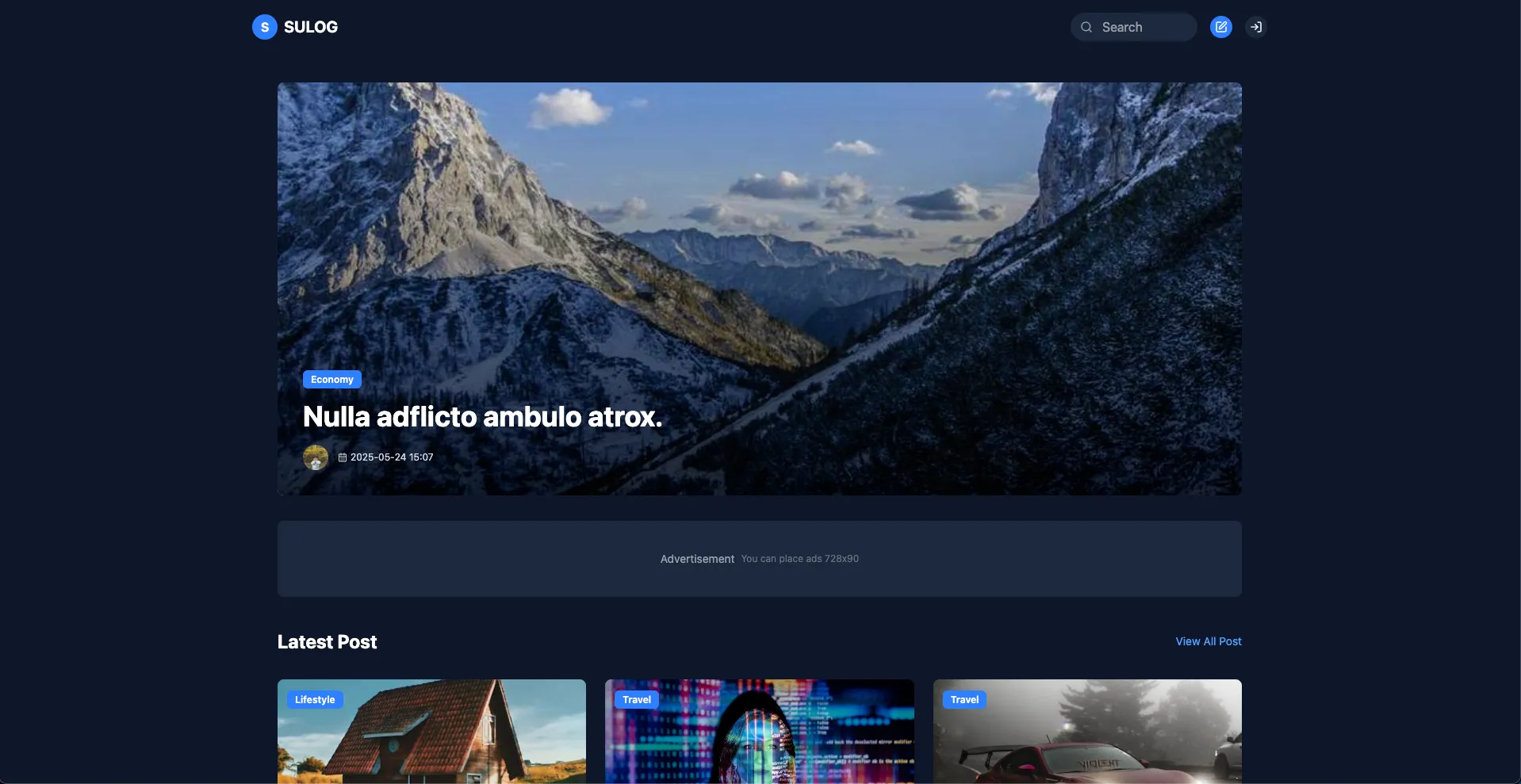
Chapter 19 Final Project - SULOG
This is the final stage of completing a React-based full-stack project that integrates everything learned so far, from component design, state management, data communication, and UX optimization to authentication and deployment. In this chapter, you will directly implement and experience the deployment of a blog-style web application that functions like a real-world service.
🛠 Backend + Authentication Implementation
MongoDB setup and backend API integration
✅ Kakao Login Implementation: From application registration to full OAuth flow configuration
✅ Implementation of custom sign-up/login: Form configuration + server integration + state management
Hands-on practice with token authentication, error handling, and debugging authentication flows
🧩 Full implementation of post features
Post registration → Image attachment preset integration
✅ Complete the full CRUD flow, including edit, delete, and detail view functions.
Comment creation, deletion, and rendering logic → State synchronization and re-rendering processing
✅ Backend modifications are provided together in the lecture notes
🔁 Pagination + List Optimization
Fetch the main post list by page
✅ Strengthen practical skills by designing the page navigation component yourself
Understanding structured paging strategies instead of infinite scroll
🎯 UI Refinement + Error Fixes + Actual Deployment
UI/UX improvements and addressing deficiencies tailored to user flow
✅ Practical deployment practice for both Frontend & Backend via Vercel
Based on real-world services, from domain configuration and image optimization to the final inspection
After completing this final chapter, you will go beyond simple practice and become a “developer who can independently build and operate user authentication-based web services.”
Verify your skills by integrating everything you've learned throughout the course into a single, complete service!
Various hands-on exercises
Optimized hands-on exercises structured to match the level of each chapter
I'll introduce only the exercises with design applied, excluding those without!
Traffic Light (chapter 08)
Lamp (chapter 08)
Calculator (chapter 09)
Login (chapter 10)
To-do List App (chapter 11)
User Settings (chapter 13)
Post Browser(chapter 16)
TMDB(chapter 17)
Final (chapter 19) - GIF unavailable due to capacity issues..T_T
If you include examples without design applied, there are dozens +
All of these high-density examples will support your step-by-step learning
I am confident that it will help you perfectly.
Wait a second!
Did you know that lectures also have a 'vibe' that needs to match yours?
Just as a masterpiece game recognized by everyone might not be fun for me, a lecture is not equally suitable for everyone.
No matter how highly praised a lecture is, it may not be the right fit for you, and conversely, a lecture that seems ordinary to someone else could be the best lecture for you.
That's why at least 10% of all my lectures are available for free. Take a listen for yourself and see if my teaching style resonates with you!
If we are a good match, I will guide you through the fastest shortcut to becoming a front-end developer. Trust me and follow along! 🚀
Frequently Asked Questions
Q. I am a complete beginner who knows absolutely nothing. Will I be okay? A. Yes. It is perfectly fine. This is a customized course designed for those who know nothing to learn. However, you must have a minimum level of knowledge regarding the languages used in the lessons.
Q. Is prior knowledge required?
A. Yes, this course strictly requires prior knowledge of HTML5, CSS3, JavaScript, and TypeScript.
Notes before taking the course
Practice Environment
Operating System and Version (OS): Windows, macOS
Tools used: Visual Studio Code, Chrome
PC Specifications: Minimum specifications capable of web surfing are sufficient.
Learning Materials
We provide learning materials for each lecture to facilitate hands-on practice.
Prerequisite Knowledge and Important Notes
Available for complete non-majors and beginners.
However, prior learning of HTML5/CSS3/JavaScript/TypeScript is required.
Recommended for these people
Who is this course right for?
A frontend beginner learning React for the first time
Developers who are familiar with JavaScript-based React but are new to TypeScript
Those who want to systematically compare state management tools (Context, Redux Toolkit, Zustand)
Developers who want to apply the new features of React 19 to their practical work.
Aspiring job seekers who want to complete a React project for their portfolio
I'm really satisfied because there are mission parts in the middle that allow me to check whether I can solve problems on my own and how well I understand the concepts.
I'm really looking forward to the next lecture. I hope it comes out soon!
Personally, I think with your teaching style, you would also create great data structures/algorithms lectures.
Hello GomCode!
Thank you so much for your Kind words! I feel rewarded knowing that the mission part was helpful. I will continue to prepare content that brings fun and a sense of achievement to your learning. I will also take your valuable feedback about the data structures/algorithms lecture into consideration. I will work hard to prepare the next lecture so it meets your expectations!
I've never written a course review before, but I highly recommend this lecture for learning React!!!
I had to learn React in a hurry, so I've completed about 30% of the course so far, and I felt it was a flawless lecture.
There isn't a single unnecessary part. I don't think you need to watch any other lectures; you can master the basics of React with just this one.
Hello Heeseong Jeon!
I'm so grateful that this is your very first course review... Thank you so much 😊
Knowing that you are finding the course satisfying even while having to learn React in a hurry gives me a lot of strength as the instructor. I put a lot of thought into trimming away unnecessary content and focusing on the essential core concepts, so I'm even more thankful that you recognized that effort.
You mentioned you've completed about 30% so far; the remaining content is also structured to help you build a solid foundation, so please stay with me until the end 💪
As you mentioned, I will make sure this course takes full responsibility for helping you properly master the basics of React.
Thank you once again for your sincere recommendation and support! 🙏
Hello, Ingu-nim! Thank you for your kind words! Your attentive listening gives me more energy. I will continue to strive to be helpful with meticulous and Kind lectures in the future 😊
Hello, Hak-yeol Kim.
Thank you for leaving such a precious review!
When studying with books or internet materials, information is often scattered, making it difficult to grasp the overall flow. I am glad to hear that the lectures are helping you learn more easily. I can feel your passion for learning in your comment about "learning through physical struggle," and I am truly rooting for you.
As you grasp the concepts and flow through the lectures and gain experience through hands-on practice, you will find it easier and easier to understand. I will continue to support your learning journey until the very end. Thank you! 💪











css.png?w=420)






![[PROKIT] Vibe Coding/Frontend Practice Workbook: Building a Timer AppCourse Thumbnail](https://cdn.inflearn.com/public/files/courses/339612/cover/01ke6d974hx4y1esmd9p80w7cx?w=420)



![# [Electron #1] Building a Timer App with Electron + React (With Zustand)Course Thumbnail](https://cdn.inflearn.com/public/files/courses/336817/cover/01jwx9ttbwnetdsbt5qrxgxb3x?w=420)


![[VOD] 6-Week Complete! High-Concentration Vibe Coding for Development Practice (Cursor AI, Figma)Course Thumbnail](https://cdn.inflearn.com/public/files/courses/338156/cover/01k4c77bftwd8ec4k0yakavbrc?w=420)