강의

멘토링

커뮤니티

Business & Marketing

/

etc. (Business & Marketing)

The Ultimate Google Tag Manager Course 2026: Beginner to Advanced

Hi Guys. Welcome to my Ultimate Google Tag Manager Course 2026: Beginner to Advanced! In my course you will learn everything about Google Tag Manager. I have created video lessons on every feature of Google Tag Manager. You will get to see the real practical implementation of how to use every feature of this product.

11 learners are taking this course

Level Beginner

Course period Unlimited

  • Tanmoy Das
실습 중심
실습 중심
자격증
자격증
시험
시험
google
google
metaTag
metaTag
Digital Marketing
Digital Marketing
Google Analytics
Google Analytics
Google Tag Manager
Google Tag Manager
facebook-tag
facebook-tag
time-tag
time-tag
실습 중심
실습 중심
자격증
자격증
시험
시험
google
google
metaTag
metaTag
Digital Marketing
Digital Marketing
Google Analytics
Google Analytics
Google Tag Manager
Google Tag Manager
facebook-tag
facebook-tag
time-tag
time-tag

What you will gain after the course

  • Understand what Google Tag Manager (GTM) is and why it is essential for tracking, analytics, and marketing implementation.

  • Learn the complete GTM interface, including workspace, tags, triggers, variables, versions, and environments.

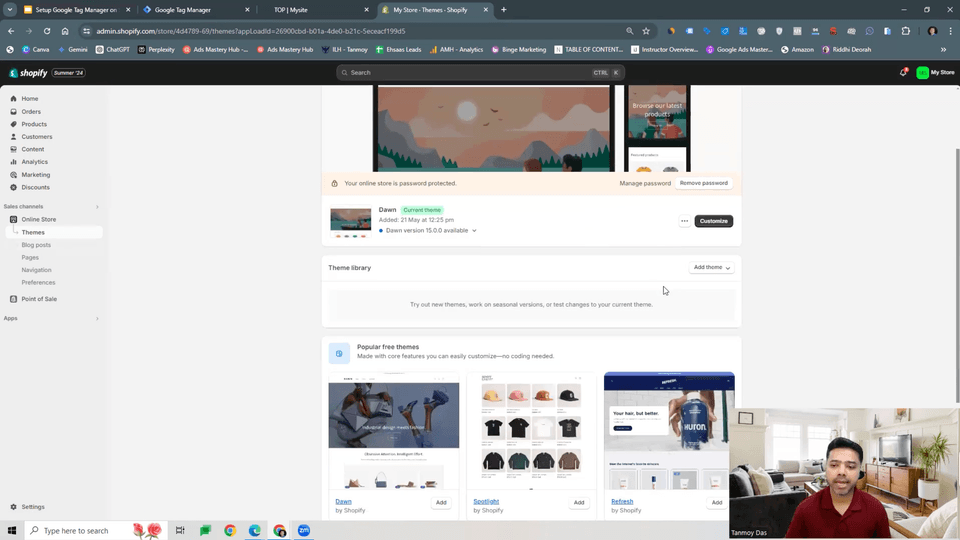
  • Set up GTM on any website (WordPress, Shopify, Wix, custom sites) using step-by-step implementation.

  • Install essential marketing pixels, including Google Analytics 4, Google Ads, Meta Pixel, LinkedIn Insight Tag, and more.

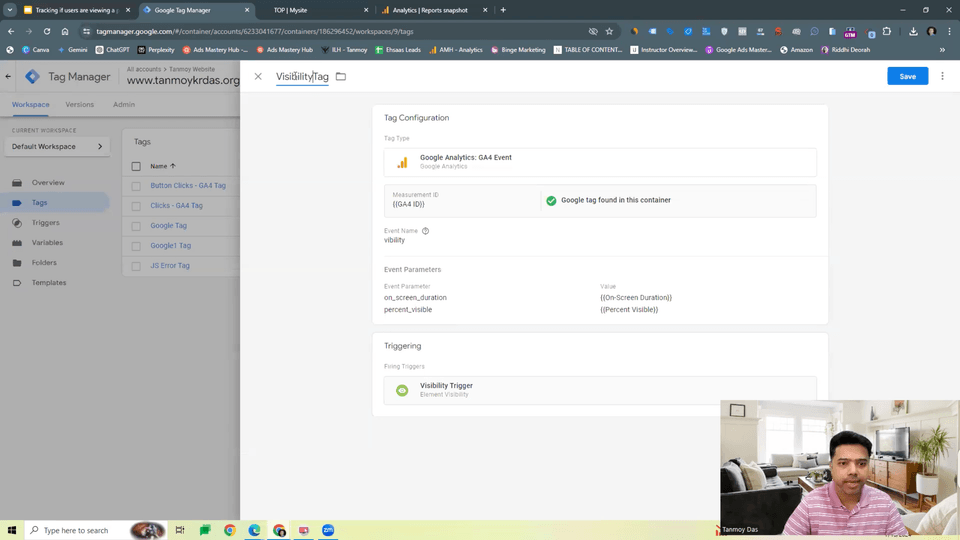
  • Master event tracking for clicks, button interactions, form submissions, link tracking, and scroll depth.

  • Track outbound link clicks to measure user movement from your website to external pages.

  • Set up custom triggers using rules, conditions, regex, and advanced trigger configurations.

  • Understand and use variables — built-in variables, data layer variables, first-party cookie variables, and custom JavaScript variables.

  • Learn how the Data Layer works and how to push custom events, ecommerce data, and dynamic values into GTM.

  • Implement GA4 events (purchase, add_to_cart, sign_up, view_item, etc.) and send them to Google Analytics properly.

  • Set up enhanced ecommerce tracking, including product impressions, product clicks, cart actions, and transactions.

  • Configure conversion tracking for Google Ads, Facebook Ads, LinkedIn Ads, and other platforms using GTM tags.

  • Track form submissions, including AJAX forms, multi-step forms, and forms without thank-you pages.

  • Use preview & debug mode to test tags, validate triggers, and troubleshoot errors before publishing.

  • Publish container versions safely, manage multiple environments, and follow best practices for version control.

  • Learn server-side tagging basics, understanding how server containers work and when to use them.

  • Set up consent mode and configure tags to work with GDPR, cookie consent banners, and privacy requirements.

  • Implement custom HTML tags and work with advanced script implementations.

  • Fix common tracking issues, including duplicate events, incorrect triggers, firing failures, and misconfigured tags.

  • Build a complete tracking plan, test it, and deploy it across real-world scenarios for business, ecommerce, and client projects.

Welcome to my Ultimate Google Tag Manager Course: Beginner to Advanced!

In my course you will learn everything about Google Tag Manager. I have created video lessons on every feature of Google Tag Manager. You will get to see the real practical implementation of how to use every feature of this product.

This is the most detailed course on Google Tag Manager you will ever find on the internet. I have created different sections based on different topics of Google Tag Manager and in each section, I have gone in-depth into explaining the concept of each feature and how to practically implement it in Google Tag Manager.

This course will give you a 100% understanding of Google Tag Manager and after going through this course you will be capable of applying these concepts in building your own online business or handling Google Tag Manager accounts of your clients.

In this course, you’ll learn how to combine Digital Marketing skills with Google Analytics and Google Tag Manager, while mastering advanced tracking using facebook-tag setups and precise event measurement with time-tag configurations.

📚What You'll Learn – Course Highlights

① Master the Fundamentals of Google Tag Manager

  • What GTM is and Why it's essential

  • How containers, tags, triggers, and variables work

  • How to set up your GTM account the right way

② Install GTM on Any Website

  • Step-by-step installation for Wix, WordPress, Shopify, and Squarespace

  • How to inject GTM on custom-coded websites

③ Connect GTM with GA4 and Advertising Platforms

  • Complete GA4 setup + sending your first events

  • Google Ads conversion tracking

  • Meta Pixel installation and event setup

  • How to unify your analytics and marketing tags in one place

④ Track Essential User

  • Click tracking (buttons, outbound links, CTAs)

  • Scroll and engagement tracking

  • Time-on-site and other interaction behaviors

  • Page-specific triggers and custom events

  • Building meaningful conversion events for your business

⑤ Debug, Test, and Fix Common Tracking Issues

  • Using GTM Preview Mode effectively

  • Validating events with GA4 DebugView

  • Fixing duplicated or missing events

  • Troubleshooting the most frequent GTM errors


⑥ Learn the Most Useful Advanced GTM Skills

  • Understanding and using the Data Layer

  • Pulling dynamic values into GTM

  • Creating custom HTML&JavaScript tags

  • Exporting, importing, and reusing GTM containers

💁Recommended For

🤔

Professionals Who Need To Use Google Tag Manager For Their Clients.

🧐

Business Owners Who Are Tracking Their Marketing Efforts.

🤩

Anyone Who Wants To Learn About Google Tag Manager.


💡After Taking This Course

  • Setup Google Tag Manager In Different CMS And e-Commerce Platforms

  • Deploy Facebook, Google Ads Remarketing, LinkedIn And Other Third-Party Tracking Pixels With Google Tag Manager.

  • Send Values To Custom Dimensions And Events In Google Analytics 4.

  • Import And Export Tags From One Google Tag Manager Account To Another.

  • Achieve Google Analytics 4 Event Tracking With Parameters.

  • Learn How To Use Data Layer To Track Certain Actions.

  • Learn HowTo Deploy Various Tags And Track Them In Google Analytics 4 (GA4).


🧑‍💻This covers GTM from Absolute Beginner to Advanced!


End-to-End GTM Mastery for 2025

Fully updated GTM training covering the latest interface, consent mode, tag templates, server-side tagging basics, and modern tracking methods – all explained for marketers, not developers

Real-World Tracking Implementation Across Any Platform

Hands-on installation and setup for WordPress, Shopify, Wix Squarespace, and custom-coded websites – plus complete GA4, Google Ads, Meta Pixel, and LinkedIn tacking integrations

Essential & Advanced Event Tracking Made Simple

Learn how to track everything that matters: clicks, scrolls, form submissions, outbound links, video engagement, ecommerce events, Data Layer pushes, dynamic values, and custom events used in real client projects

Practical, Client-Style Workflows & Troubleshooting Skills

Build tracking systems the way agencies do: tag planning, naming conventions, documentation, debugging, fixing duplicate events, validating conversions, and deploying production-ready GTM setups.

💬10 FAQs

1️⃣ Do I need prior experience with Google Tag Manager to take this course?

No. The course is designed for complete beginners and takes you step-by-step from basic to advanced tracking setups.

2️⃣ Will I learn how to set up GA4 using Google Tag Manager?

Yes! You’ll learn how to install GA4, configure events, track conversions, and implement enhanced measurement using GTM.

3️⃣ Does the course include tracking for Google Ads, Meta (Facebook) Ads, and LinkedIn Ads?

Absolutely. You’ll master using GTM to deploy the Google Ads Conversion Tag, Meta Pixel, LinkedIn Insight Tag, and other major marketing pixels.

4️⃣ Will I learn how to use the Data Layer?

Yes. The course covers Data Layer basics, custom dataLayer pushes, enhanced ecommerce, and advanced event tracking techniques.

5️⃣ Can I take this course if I don’t have my own website?

Yes. Demo websites and simulated environments are provided so you can practice GTM setups even without your own website.

6️⃣ Does the course include form tracking and button click tracking?

Yes. You’ll learn to track form submissions, click events, scroll depth, outbound links, CTA button clicks, and video engagement.

7️⃣ Will I learn how to use GTM’s Preview & Debug Mode?

Absolutely. You’ll master debugging, troubleshooting, validating tag firing, and solving common GTM issues before publishing.

8️⃣ Does the course cover server-side tagging?

Yes. You’ll get an introduction to server-side tagging, its benefits, and how to set up basic server-side configurations.

9️⃣ Is this course useful for freelancers, agencies, and PPC specialists?

Definitely. GTM is a must-have skill for performance marketers, analysts, freelancers, and agencies working with multiple clients.

🔟 Do I get lifetime access and updates?

Yes! Once enrolled, you receive lifetime access to all lessons, updates, and newly added GTM features as they roll out.

💡When you complete this course

This course provides a certification of completion in a format suitable for resumes and portfolios.

By completing the course, you can receive this, which can serve as official proof of your learning accomplishments.

💡Learn Smart with Language Options for Audio and Subtitles

You can switch both audio and subtitles according to your learning style. Select your preferred language.

Recommended for
these people

Who is this course right for?

  • Digital marketers who want to track campaigns accurately and understand user behavior across websites.

  • Google Analytics users who want to move beyond basic tracking and set up advanced events and conversions.

  • PPC specialists who need reliable conversion tracking for Google Ads, Meta Ads, LinkedIn Ads, and other platforms.

  • SEO professionals who want deeper insights into user interactions like scrolls, clicks, outbound links, and form submissions.

  • Business owners and entrepreneurs wanting complete visibility into what users do on their website.

  • Web developers and designers who want to implement scripts, pixels, and tracking without hardcoding everything.

  • E-commerce store owners using Shopify, WooCommerce, or custom websites who need enhanced ecommerce tracking.

  • Freelancers and agency professionals who want to offer GTM setup, analytics tracking, and data layer implementation as a high-paying service.

  • Marketing students and beginners looking to gain a valuable technical skill that dramatically boosts employability.

  • Anyone frustrated with incorrect tracking, missing conversions, or relying too heavily on developers for analytics setups.

Need to know before starting?

  • No prior experience with Google Tag Manager is required — the course starts from the basics.

  • Basic computer skills, such as browsing websites, using spreadsheets, and handling files.

  • A laptop or desktop computer with a stable internet connection to follow the practical lessons.

  • A website or landing page access (optional, but useful for hands-on practice).

  • A Google account to set up Google Tag Manager and Google Analytics.

  • Basic understanding of digital marketing or analytics (helpful but not mandatory).

  • Willingness to test, experiment, and troubleshoot, as GTM requires practical implementation.

  • Optional: Access to Google Analytics 4 if you want to practice GA4 event and conversion tracking.

  • Optional: Access to advertising platforms like Google Ads, Facebook Ads, or LinkedIn Ads for conversion setup.

  • A learning mindset, since GTM can be technical, but the course explains everything step-by-step.

Hello
This is

235

Learners

3

Reviews

5.0

Rating

29

Courses

Tanmoy Kr. Das is an IIM MBA alumnus and a seasoned digital marketing professional with over 18 years of experience. An ex-Google employee, he is widely known for his expertise in digital marketing, artificial intelligence, and online business creation.

As an acclaimed educator and corporate trainer, Tanmoy has empowered over 200,000 students and professionals across the globe. His teaching spans multiple domains — from Google Ads, Meta Ads, and SEO to AI tools like ChatGPT, Gemini, Copilot, and Midjourney, as well as strategies to build and monetize online businesses.

Celebrated for his ability to simplify complex concepts into actionable insights, Tanmoy continues to inspire learners and entrepreneurs to leverage technology for sustainable growth and success in the digital era.


Tanmoy Kr. Das는 IIM MBA 출신의 디지털 마케팅 전문가로, 18년 이상의 풍부한 경력을 보유하고 있습니다. 전 구글 직원으로 그는 업계 내에서 디지털 마케팅, 인공지능 (AI), 온라인 비즈니스 구축 분야의 탁월한 전문성을 인정받고 있습니다.

교육자이자 기업 트레이너로, Tanmoy는 지금까지 전 세계 20만 명 이상의 수강생들과 전문가들에게 실질적인 성장을 이끌어왔습니다.

그의 강의는 Google Ads, Meta Ads, SEO부터 ChatGPT, Gemini, Copilot, Midjourney와 같은 AI 도구 활용, 그리고 온라인 비즈니스 구축 및 수익화 전략에 이르기까지 폭 넓은 영역을 아우릅니다.


복잡한 개념을 누구나 이해할 수 있도록 실용적인 인사이트로 풀어내는 능력으로 유명한 Tanmoy는, 디지털 시대에 기술을 활용해 지속 가능한 성장을 이루고자 하는 학습자와 창업가들에게 꾸준히 영감을 주고 있습니다.

Curriculum

All

39 lectures ∙ (2hr 31min)

Published: 
Last updated: 

Reviews

Not enough reviews.
Please write a valuable review that helps everyone!

$47.30

Tanmoy Das's other courses

Check out other courses by the instructor!

Similar courses

Explore other courses in the same field!