inflearn logo

Mastering Excel Task Automation with Python

This is a practice-oriented course designed to increase work efficiency by automating repetitive Excel tasks with Python. You will learn how to automate the entire workflow—from opening files to data processing, inspection, consolidation, and saving—and will also be provided with practical automation code using pywin32.

4 learners are taking this course

Level Beginner

Course period Unlimited

Python
Python
Excel
Excel
automation
automation
pywin32
pywin32
data-processing
data-processing
Python
Python
Excel
Excel
automation
automation
pywin32
pywin32
data-processing
data-processing

What you will gain after the course

  • Automated Excel File Processing and Data Manipulation Using Python and pywin32

  • Building practical automation processes such as condition-based data inspection and merging multiple files

  • Write a reusable automation function that works even in DRM environments


Daily repetitive Excel tasks
and organization—now, finish it all with Python!

Leveraging Python and pywin32,
this is a practical, hands-on course designed to automate repetitive Excel tasks
and maximize your work efficiency.


Is your finish time getting later and later,
and are you still stuck holding onto Excel files even on weekends?

From data collection and inspection to report writing,
experience the magical transformation where tasks that used to take hours
are completed in just seconds.

Learn practical automation code that works flawlessly even in DRM environments
and
completely transform the way you work.

Break free from repetitive Excel tasks
and drastically reduce your work hours.
Seize the opportunity to become a practical automation expert now.


Mastering the core syntax for automating repetitive Excel tasks with Python and pywin32


Now, instead of tedious manual work, transform into an expert who completes reports in just seconds.


By the end of this course, you will


You can automate Excel tasks using Python.

You can directly handle repetitive Excel tasks using Python and pywin32-based automation.

From opening files to copying/pasting data, organizing, and saving,
everything can be performed automatically without manual work.


You can read multiple Excel files and perform data-processing efficiently.

You can create a data-processing flow that reads data from multiple Excel files,
extracts only the necessary information, and organizes it.
You can automate data collection and organization tasks frequently used in practical work.


You can learn practical Excel control methods using pywin32

Beyond simply using libraries, you can understand the automation method of directly controlling Excel through pywin32
and learn to a level where you can apply it to
actual work.


You can reduce repetitive tasks and increase work efficiency.

Through Python-based Excel automation,
you can reduce repetitive task time
and create an environment where you can focus on more important work.


✔️

Put an end to repetitive Excel tasks once and for all with Python!

Master Excel Automation
with Python and pywin32

You will learn how to automate repetitive Excel tasks using Python and the pywin32 library with a focus on practical application. You can master specific code to efficiently automate the entire process, from opening files to data processing, inspection, aggregation, and saving.

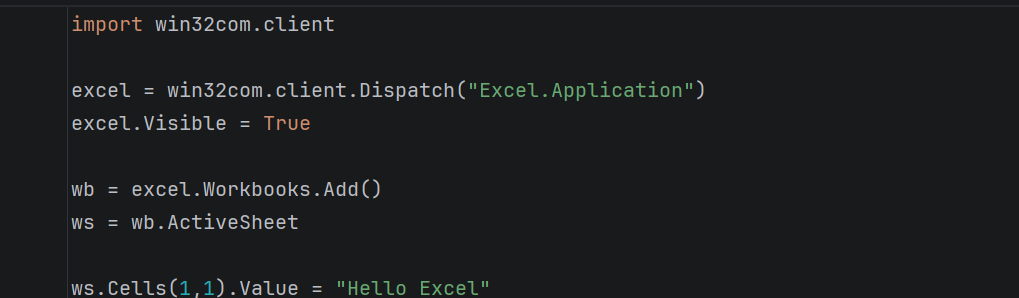
Example of Excel automation code using pywin32

Building Practical Excel Automation Workflows

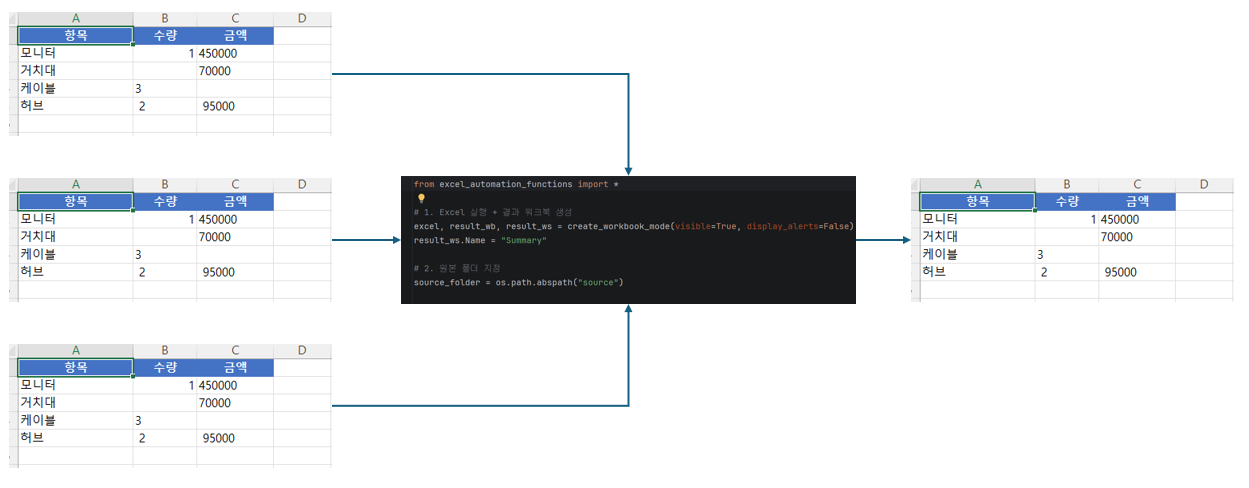
Experience solutions that are immediately applicable to real-world work environments by writing reusable automation functions that work even in DRM environments. Maximize work efficiency by directly practicing the process of processing multiple Excel files simultaneously and aggregating data in an instant.

Building Practical Excel Automation Workflows

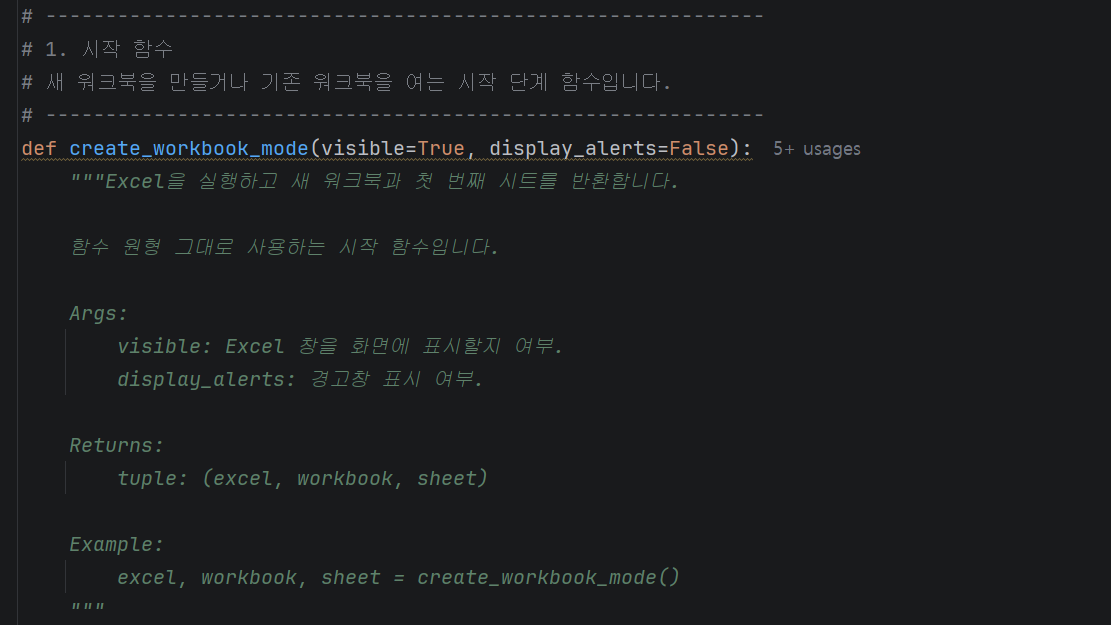
Ready-to-use automation codes and functions

The course provides a systematic curriculum starting from Python basics to Excel control using pywin32 and practical real-world projects. By structuring and functionalizing automation code, you can reduce repetitive tasks and achieve practical results that dramatically improve work productivity.

Automation codes and functions for immediate use


📚

Escape Repetitive Tasks with Python


Section 1

Python Basics: Essential Syntax for Excel Automation

This introduces the overall concept of Excel automation and how to utilize Python and pywin32. It analyzes the inefficiency of repetitive Excel tasks and covers ways to improve work productivity through automation. With a practical approach, you will learn essential Python syntax and build automation workflows.


Section 2

Getting Started with Excel Automation: Controlling Excel Using pywin32

You will learn how to directly control Excel files using the Python library pywin32. You will build a foundation for automation by mastering basic Excel manipulation functions, such as opening Excel files, selecting sheets, and reading and writing cell values.


Section 3

Implementing Practical Excel Automation Functions

This section focuses on Excel automation features frequently used in real-world business environments. You will practice writing code to automate complex tasks such as data processing, conditional inspection, merging multiple files, formatting, and report generation. You will also learn how to write reusable functions that work even in DRM-protected environments.


Section 4

Practical Project and Automation Completion

Based on what you have learned so far, you will carry out a real-world business automation project. Through practical scenarios such as data collection, processing, and automatic report generation, you will develop the ability to structure automation code and apply functions. You will become an automation expert by learning how to expand and modify the examples provided in the lecture to fit your own work environment.

We can solve the concerns of people like this!


📌

Office workers who spend a lot of time on repetitive Excel tasks


Are you repeating the same tasks every day—opening similar Excel files,
copying, organizing, and saving them?

I recommend this to those who want to reduce repetitive tasks with Python
and spend their time on more important work.

📌

Professionals who want to automate data organization and report generation


It is suitable for those who want to efficiently handle tasks
such as organizing and inspecting data
according to set rules, and
creating them in report formats.

📌

Beginners who have learned Python but feel overwhelmed by task automation


If you'd like, I can continue and unify the other sections in the same style to match the overall tone of the Inflearn introduction page.

Notes before taking the course


Practice Environment

  • Windows operating system is required.

  • Microsoft Excel 2016 or a later version must be installed.

  • The practice sessions will be conducted in a Python development environment, with explanations based on the use of PyCharm Community Edition.

Prerequisites and Important Notes

  • It will be easier to take this course if you are familiar with basic Python syntax.

  • Basic proficiency in Excel will help you understand the practice content.

  • This course is focused more on practice than theory.


Learning Materials

  • We provide the Python code examples used in the lecture.

  • We provide the Excel example files and sample data required for the practice sessions.

  • We provide lecture slide PDFs that summarize the core content.


Recommended for
these people

Who is this course right for?

  • Office workers working overtime due to repetitive Excel tasks

  • A beginner developer who wants to apply Python to practical work

  • Practitioners looking to automate data organization and report writing tasks

Need to know before starting?

  • Basic Excel experience (level of cell entry and understanding formulas)

  • It is better if you have experience installing and running Python, but beginners can also take the course.

  • Understanding repetitive Excel tasks in business operations

Hello
This is fasthome

Curriculum

All

27 lectures ∙ (6hr 40min)

Course Materials:

Lecture resources
Published: 
Last updated: 

Reviews

Not enough reviews.
Please write a valuable review that helps everyone!

Similar courses

Explore other courses in the same field!

Limited time deal

$36.30

38%

$59.40