
inflearn logo

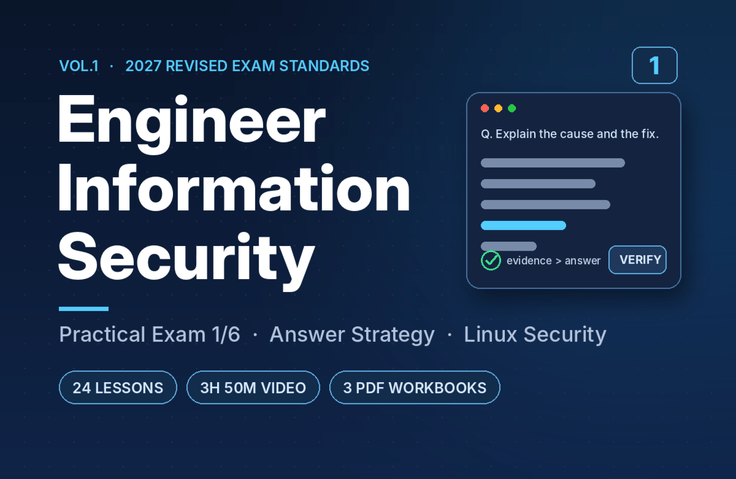
Information Security Engineer Practical Exam 1 – Answer Strategy and Linux Security

This is Part 1 of a six-part course based on the revised 2027 practical exam content outline for the Information Security Engineer certification. Across 24 lessons totaling 3 hours and 50 minutes, you’ll practice “reading the task verb → finding supporting evidence → writing your answer” with whiteboard videos and AI narration: 6 lessons on answer-writing strategies and 18 on Linux accounts, permissions, and security settings. The course also includes a 73-page integrated e-book tailored to the exam scope, exam-style question sheets, and PDF answer keys and explanations.

1 learners are taking this course

Level Basic

Course period Unlimited

Linux
Linux
Engineer information security
security training
security training
Linux
Linux
Engineer information security
security training
security training

What you will gain after the course

  • You can structure short-answer, written-response, and practical answers by identifying the question’s command verbs and reviewing the materials provided.

  • Can read account status and authentication policies from passwd, shadow, and PAM settings and explain any issues.

  • You can assess file permissions, umask, SUID/SGID, ACLs, sudo, and SSH settings from a least-privilege perspective and provide remediation commands as answers.

  • Can correlate Linux logs, audit records, patches, and malware artifacts to provide evidence in suspected compromise cases.

  • I can organize backup and recovery verification, inspection results, and reinspection records in a practical answer format.

Information Security Engineer Practical Exam 1 – Answering Strategies and Linux Security

Practice identifying what the question asks, finding supporting evidence, and writing your answer, plus 18 lessons on Linux accounts, permissions, and security settings.

Knowing the terminology alone is not enough to score well on the Information Security Engineer practical exam. You need to understand what the question is asking, find supporting evidence in command output and configuration files, and write it in a way the grader can verify. This course is the first in a six-part series aligned with the revised 2027 exam standards, combining 6 lectures on answer-writing strategies with 18 lectures on Linux security.

Study through 24 lectures, about 3 hours and 50 minutes of video. The course works through Linux topics frequently tested in practical exams—passwd and shadow, PAM, file permissions and umask, SUID, SGID, ACLs, sudo and SSH, services and scheduled tasks, logs, audit, patches, traces of malware, backups, and suspected security breach scenarios—using commands and configuration evidence.

Series Structure (6 Parts)

  • Part 1: Answer Strategies and Linux Security (Lessons 001–024, 24 lessons) — This course

  • Part 2: Windows and Network Security (Lectures 025–054, 30 lectures)

  • Part 3: Security Controls and Service Security (Lessons 055–086, 32 lessons)

  • Part 4: Web, APIs, Cryptography, and Authentication (Lessons 087–114, 28 lessons)

  • Part 5: Cloud, Logs, and Incident Response (Lectures 115–138, 24 lectures)

  • Part 6 Risk Assessment, Emerging Technologies, and Practice Questions (Lessons 139–160, 22 lessons)

Each part can be taken independently, and taking them in numerical order completes the full 160-lecture course.

Features of This Course

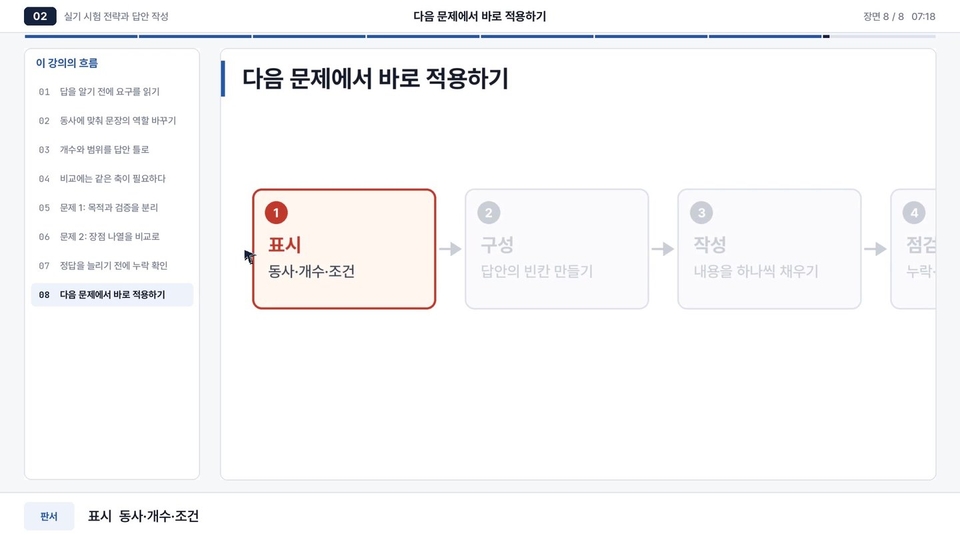
  • Four-step answer-writing process: In Lessons 1–6, learn to mark the action verb in each question, structure the answer with blanks, fill in the content, and then check for omissions. Apply this process to the original practice problems throughout the Linux course.

  • Aligned with the 2027 revised exam criteria: Linux accounts, permissions, configuration, logs, and incident response are covered across 18 lessons. Each lesson proceeds through concept explanations, interpreting command output, and solving original practice questions.

  • Three study materials included: The course fee includes a 73-page comprehensive e-book tailored to this course, a 13-page exam-style workbook, and 12 pages of answers and explanations.

Lesson 002 screen | Applying the four-step answer-writing process—from identifying command verbs to reviewing—directly to the next question

Recommended for

  • For those who have passed the written exam and want to learn how to write answers before starting to study for the practical exam.

  • Those who want to solve Linux account, permissions, and log problems using commands and configuration evidence.

  • Those who want to read log, command, and configuration examples and try solving short-answer, essay-style, and practical problems themselves.

  • Those who want to study the areas separately, starting with the sections they need.

What You’ll Learn in the Course

In the answer strategy section, we cover how to interpret question prompts and supporting materials, use precise terminology in short-answer responses, turn practical knowledge into exam answers, and find evidence in log and configuration questions. A comprehensive assessment then helps create an individual review plan.

In Linux security, the course covers system architecture and where to start an inspection; passwd, shadow, and PAM; file permissions, umask, special permissions, and ACLs; sudo, SSH, environment variables, and service checks; log correlation, audit, patches, and signs of malware; and backup and recovery verification, along with comprehensive cases involving suspected breaches. It concludes with inspection results and follow-up inspection records.

Learning Objectives

  • Read the question’s action verbs and the materials provided, then structure short-answer, essay, and practical responses.

  • Read account status and authentication policies in passwd, shadow, and PAM configurations, and explain the issues.

  • Assess file permissions, umask, SUID/SGID, ACLs, sudo, and SSH settings from the perspective of least privilege, and write remediation commands as answers.

  • Correlate Linux logs, audit records, patches, and malware traces to provide evidence in suspected intrusion cases.

What You Should Know Before Taking the Course

Learning will be easier if you are familiar with the basic operating system and networking concepts covered in the written exam for the Information Security Engineer certification. If terms such as IP addresses and ports, processes, files and directories, users, and permissions are unfamiliar, please review the relevant fundamentals as well. This is not an introductory course that explains the entire written exam syllabus from the beginning.

Materials provided with the course

1. Integrated e-book PDF - 73 pages
A reference textbook containing two volumes: Fundamentals of Security Principles and Practical Exam Interpretation, and Linux Accounts, Permissions, and Security Settings. Use it to review concepts you haven’t fully understood and continue reading related material.

2. Exam-Style Study Notes Worksheet - 13 pages
These self-produced short-answer, essay, and practical exercises are based on past exam formats. They cover a basic practical skills assessment and Linux topics.

3. Learning Notes: Answers and Explanations - Page 12
After solving the problems, check the answers and explanations, then review any concepts or settings you misunderstood.

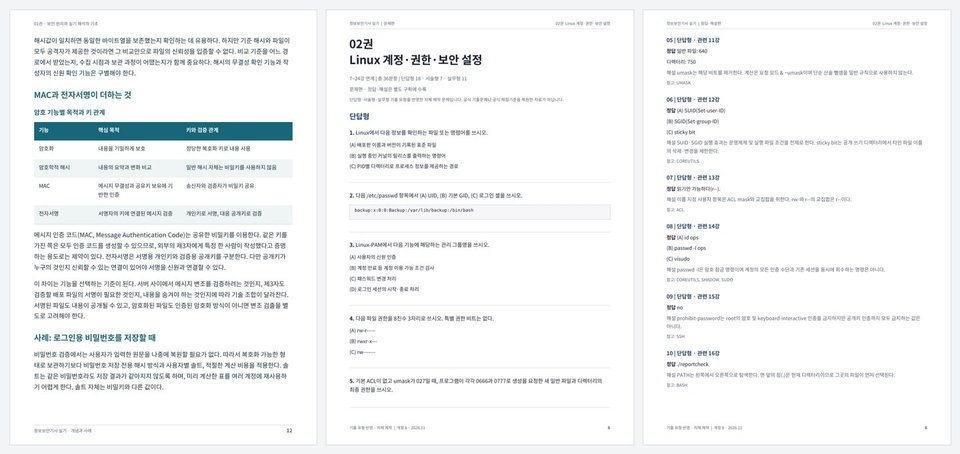
Examples of provided materials | Integrated e-book (concepts and case studies), study notes worksheet, answers and explanations

Please study in the order of the lecture videos. The textbook and worksheets are separate reference materials organized by topic, so their examples, question numbers, and sequence may differ from those in the videos. You can download the e-book in Lecture 1, the worksheet in Lecture 2, and the answers and explanations in Lecture 3.

How the Lecture Is Conducted

Concepts and examples are explained using on-screen notes and AI voice narration. Review the meaning of commands, settings, and logs, then write your own answers and review the related questions and explanations.

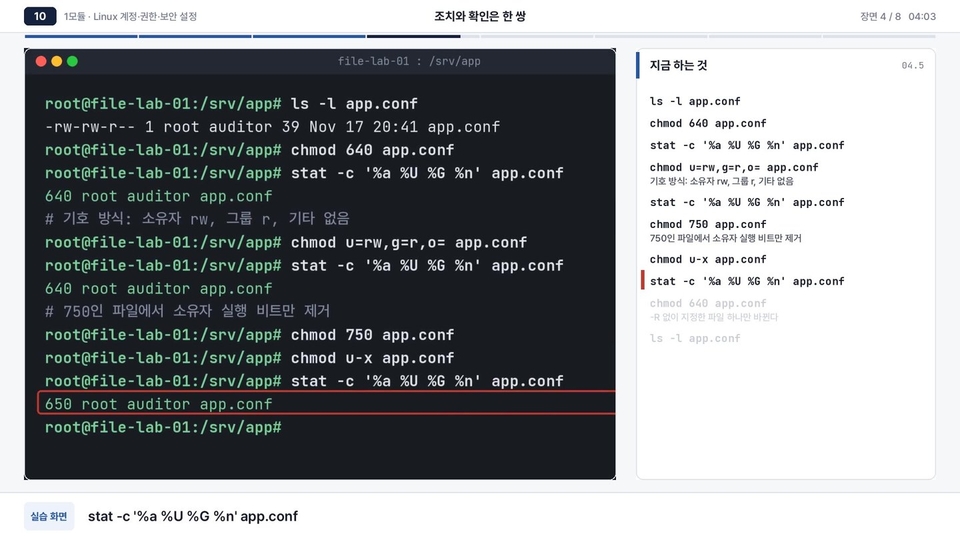
Lecture 010 screen | A practice screen showing changing permissions with chmod and checking the result with stat, with the command sequence on the right.

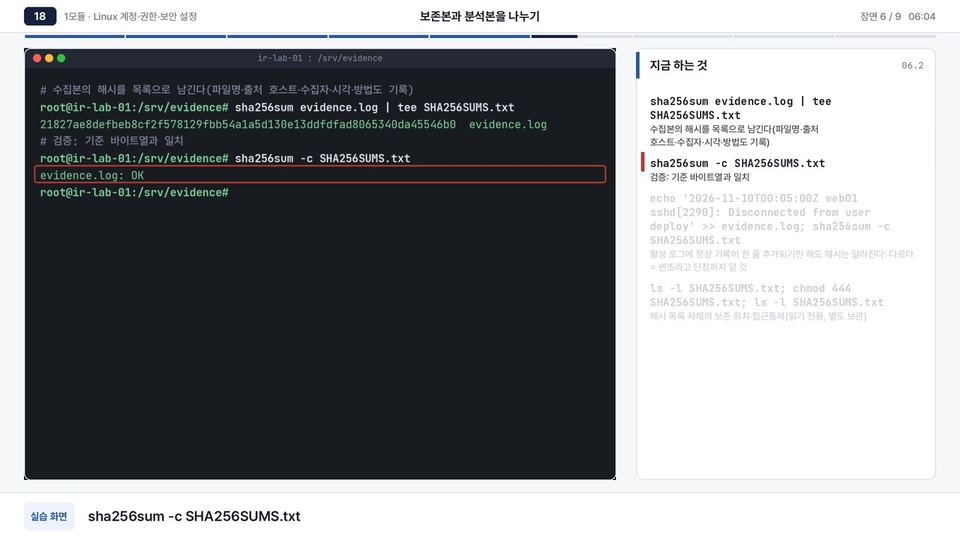
Lesson 018 screen | Recording the hash of collected logs to establish grounds for preserving evidence

Learning Sections and Video Duration

The 24 lessons are divided into 7 sections. The times below are the total video durations; please add extra time for solving problems and review.

01. Practical Exam Study Guide and Answer-Writing Strategies

Lessons 001–006 | 6 lessons | Video 00:50:52

Review the practical exam scope and the recommended order for using the lectures. Learn how to interpret command verbs and reference materials to structure short-answer and essay responses. Based on the recommended approach to log and configuration problems and an assessment of the full scope, you’ll also create a personalized review plan.

02. Linux Accounts, Permissions, and Security Settings

Lessons 007–024 | 18 lessons | Video 02:58:47

Starting with Linux architecture, accounts, and PAM, this course covers security settings for file permissions, ACLs, sudo, SSH, environment variables, services, and scheduled tasks. It also teaches you to read logs, audit records, patches, and signs of suspected malware, then follow the process through to inspection results and reinspection records for backups, recovery, and suspected security breaches.

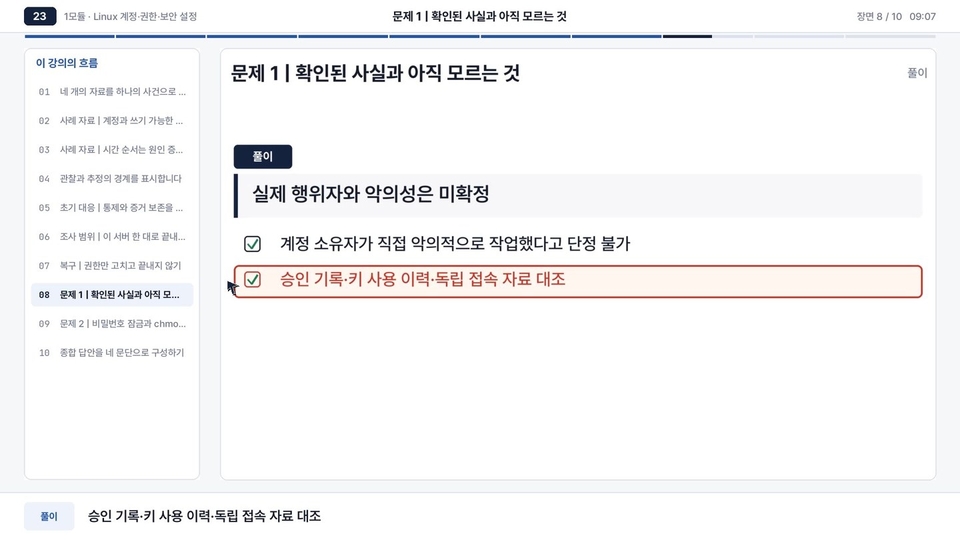
Lecture 023 screen | Organizing an answer in a comprehensive suspected-intrusion case by separating confirmed facts from what is still unknown.

Sample Two-Week Study Schedule

  • Week 1 · Study guide and answer writing + Linux accounts and permissions · Lessons 001–013 · About 2 hours and 5 minutes

  • Week 2 · sudo·SSH·services + logs·patches·security incident cases · Lectures 014~024 · about 1 hour 45 minutes

About the Instructor

I am a practicing information security professional with certifications as an Information Security Engineer, CPPG, and ISO/IEC 27001 Provisional Auditor. My work has included web and infrastructure penetration testing (vulnerability assessments), ISMS-P certification, and personal information protection. I designed the curriculum and questions around how commands, configurations, and logs used in practice should be expressed in exam answers.

Frequently Asked Questions

Q. What order should I study in?
A. Watch the videos, check the e-book for topics that need further explanation, then solve the related practice problems. Review the answers and explanations, and go back over anything you got wrong.

Q. Can I take just Part 1?
A. Each part covers a separate topic, so you can take only the parts you need. Since Part 1 is the only one that covers answer-writing strategies, we recommend that even those starting with another part also watch Lessons 1–6.

Q. Can I take the course even if I lack basic knowledge?
A. Some content assumes familiarity with basic operating system and networking terms. Please review any foundational concepts you need and adjust your learning pace accordingly.

Recommended for
these people

Who is this course right for?

  • Those who have passed the written exam and are beginning to study for the practical exam, and want to start by learning how to write answers.

  • For those who want to troubleshoot Linux account, permission, and log issues using commands and configuration settings as evidence.

  • For those who want to study log, command, and configuration examples and try solving short-answer, written-response, and practical problems themselves.

  • For those who want to study topic by topic, starting with what they need.

Need to know before starting?

  • It will be easier if you understand the basic terms for the Information Security Engineer written exam (IP, ports, operating systems, and basic security concepts).

  • Experience using basic Linux commands is recommended. This is not an introductory course that covers the entire scope from the beginning.

Hello
This is rmsxodxod1289

Career Verified

129

Learners

9

Reviews

3

Answers

1.9

Rating

9

Courses

I am a practitioner who started with penetration testing and builds information security management systems.

I handle annual security assessments of infrastructure, web, and applications for automotive manufacturers and energy companies.

I assessed them layer by layer and handled the same client’s ISMS-P certification through three rounds: initial, follow-up, and renewal.

I responded by independently carrying out the technical safeguards component.

Currently, as the information security officer in a one-person team, I am preparing for initial certification while establishing AI security governance.

I am designing a system. Since this is an area where standards are still taking shape, starting with defining the scope of controls

It’s a role where you have to build the framework from the ground up.

I hold certifications as an Information Security Engineer, CPPG, and ISO/IEC 27001 Auditor Trainee.

More

Curriculum

All

24 lectures ∙ (3hr 49min)

Course Materials:

Lecture resources
Published: 
Last updated: 

Reviews

Not enough reviews.
Please write a valuable review that helps everyone!

rmsxodxod1289's other courses

Check out other courses by the instructor!

Similar courses

Explore other courses in the same field!

Limited time deal

$30,800.00

30%

$34.10