


inflearn logo

Claude Code for Non-Developers: Cutting Back on Explanations Again

A writing course for non-developers who find themselves repeating the same explanations every time they open a new chat in Claude Code. Save decisions in a rules file (CLAUDE.md), and delegate tasks to chats divided up like departments. It also covers a review chat that only makes judgments and a log of lessons learned. Included are rules and records of failures from running two YouTube channels with 16 chats after work, along with three templates for revising your work.

3 learners are taking this course

Level Basic

Course period Unlimited

Business Productivity


AI Agent
AI Agent
claude
claude
No-code
No-code
AI
AI
Business Productivity

AI Agent
AI Agent
claude
claude
No-code
No-code
AI
AI

What you will gain after the course

  • Why New Chats Forget What Was Decided Earlier, and How to Write a Shared Rules File That All Chats Can Read

  • Criteria for deciding whether to divide work among department chats—and when doing so actually creates more work

  • How to Screen Work Before Sending It Out with an Evaluation-Only Review Chat, a Fact-Checking Sheet, and an AI Tell Checklist

  • How to log mistakes in a lessons-learned ledger and failure log, then turn them into rules when they recur.

  • Rules and a review request to reduce the risk of Windows paths in commands being changed to other characters, real names being exposed through Korean names in paths, or conversation history folders overlapping.

When you use Claude Code for solo work over a long period, you end up explaining the same things over and over. The tone we settled on last time is missing from today’s writing, and whenever I open a new chat, I have to start by explaining what I don’t like all over again.

I was doing the same thing. Even after dividing chats into departments and giving each department its own rule file, I was still repeating the same explanations in new chats. What was missing was a single line telling them to read the existing materials first, and Chapter 1 opens with that story.

I’m an office worker who doesn’t know how to code. After work, I ran two YouTube channels and got a blog ready using sixteen Claude chats. In September, I opened and used several chats in one folder, and on October 10, I divided the folders up like a company. This course is a written account of the rules I set and the failures I encountered over those two months.

What This Covers

Repeating the same explanations doesn’t decrease just by phrasing them better, so this lesson covers where to store the decisions you’ve made.

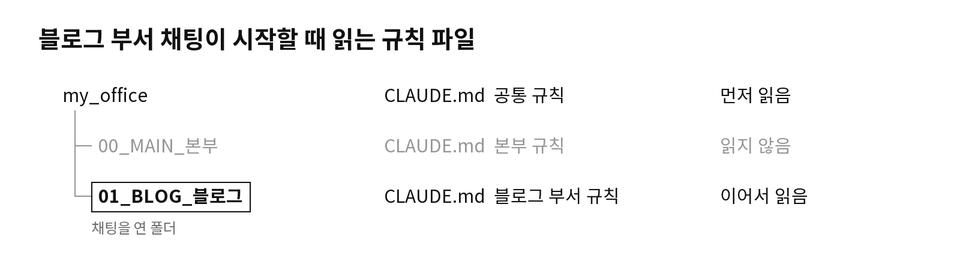
The top-level folder holds shared rules that every chat reads, while department folders hold rules specific to that work. Each chat is assigned one task. A separate review chat checks the work and makes judgments without creating anything. Messages between departments go through a single headquarters chat, reducing what reaches the person to one line—'Should I escalate this?'—and only the essential information. Experiences and lessons are collected in one lessons ledger, which every chat must read before starting work.

As you follow the course, Korean-language text files for shared rules, department rules, review chat rules, and a lessons-learned log will be created on your PC.

What I've experienced

If all you need is a rule template, you can ask Claude and get something similar. This course focuses more on where this approach held up in practice—and where it fell apart.

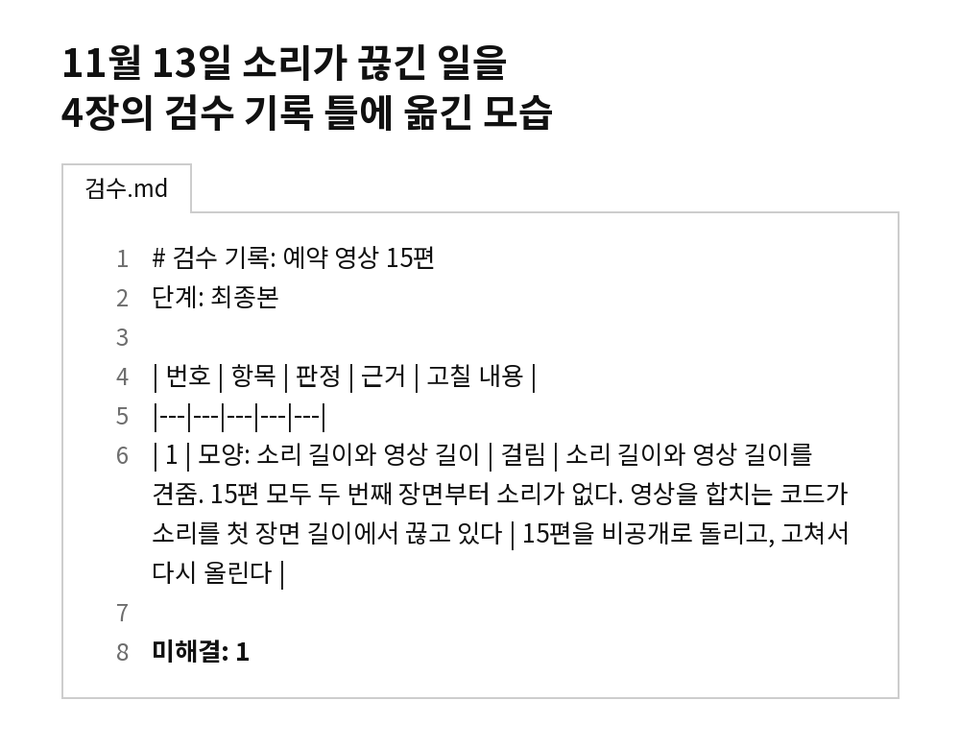
The chat that caught the audio cutting out in the scheduled video wasn’t the one that created it, but the review chat that only evaluates it. I explain why I keep a separate review-only chat in Chapter 4.

Splitting things up wasn’t always better. We put a department on hold because it was hard to manage with too many layers of verification (Chapter 3), and we also hit usage limits after launching several agents at once (Chapter 9). After seeing a Windows path in a command get changed into different characters three times, we covered that issue together with the problem of Korean usernames appearing in paths in a single Chapter 8.

Structure

There are nine chapters and three templates you can use right away. They’re preceded by “Introduction” and followed by “Conclusion.”

  1. Why New Chats Forget What Was Decided Before

  2. Writing Shared Rules for All Chats

  3. How to Decide Whether to Split Departments—and When Not To

  4. Review-Only Chat

  5. Fact-Checking Checklist

  6. Checklist for Signs of AI-Generated Text

  7. A Ledger for Building on What We've Learned

  8. When Paths Break in Windows

  9. Failure Log

Appendix 1 contains the general rules, Appendix 2 is the rules file for the review chat, and Appendix 3 is a blank template for the lessons-learned ledger. Just fill in the bracketed fields with your own details, and you can use them right away. You can also adapt them to suit your work. The only thing you may not do is copy the lecture text and templates as-is and post or distribute them elsewhere. Chapter 1 and Appendix 1 are available as previews.

Each chapter is short enough to read in one sitting after work. On the day you read Chapter 1, your only hands-on task is to create a folder, open a chat in it, and jot down one explanation you’ve found yourself repeating lately. That one line will become your first rule in Chapter 2. I haven’t included any screenshots because screens change often, and screenshots can easily show paths containing your username.

Things to Know in Advance

You’ll need a paid Claude plan, a Windows PC, and the Claude desktop app. The Code tab in the desktop app is available with a Pro, Max, Ultra, Team, or Enterprise subscription. On the free plan, you’ll see a prompt to upgrade to a paid plan. Your administrator may have disabled this feature for company accounts (Team or Enterprise). Installation and basic usage aren’t covered.

This does not cover how to make money, nor does it promise that this approach will improve your output or generate income. This course aims to reduce the fatigue of repeating the same explanations and prevent incorrect work from going out unchanged. A rules file is only guidance that Claude tries to read and follow, not an enforcement mechanism, so it may sometimes be overlooked. That’s why it also recommends keeping a separate review chat that doesn’t create anything.

I wrote the course materials with Claude, using my own work logs as the foundation. I took the dates, numbers, and messages sent in chats directly from the logs without changing them. Because I work anonymously, I don’t disclose my name or work history, and I removed people’s names, channel names, and on-screen text that could reveal which channels they were. I followed Claude’s official documentation and Microsoft’s guidance for feature descriptions, and only included things not covered in the documentation if I had tested them myself on my PC. Screens and features may change, so if the main text differs from the documentation, follow the documentation.

Frequently Asked Questions

Q. Can I follow along even if I don’t know anything about coding?

A. There’s no need to memorize commands or write code. The rules file is written in Korean, and you can ask Claude to create folders or write to files using natural language. However, in the Code tab, Claude works directly with the folders and files on your PC. When a confirmation window appears, it’s up to you to read it and click.

Q. Do I need to split the chat into as many as sixteen chats?

A. No. I’ve split them up and then combined them again several times, including twice when I merged three chats into one. Chapter 3 explains how to decide whether to split them up, along with my experience combining them. To get started, all you need is the one-page set of general rules in Appendix 1.

Q. Can I just use the claude.ai Chat tab?

A. This course is based on opening a chat in the Code tab for each department folder. If you only use the Chat tab, Chapter 2 briefly covers how to add shared rules to your project instructions. However, you’ll need to paste them in and update them separately for each project, and the free plan lets you create only five projects, so it’s difficult to replicate department operations exactly.

Q. Does it work on Mac?

A. This was written with Windows PCs in mind, and I haven’t checked it on other operating systems. Using rules files and dividing things by department is largely independent of the operating system. The path issue in Chapter 8 is specific to Windows.

Recommended for
these people

Who is this course right for?

  • People who can’t code but use a paid Claude plan to consistently run solo projects, like a blog or channel, after work.

  • Someone who has to explain their tone and rules from scratch every time they start a new chat.

  • For those using the Claude desktop app on a Windows PC (Chapter 8 is especially useful if your username contains Korean characters)

Need to know before starting?

  • This assumes you’ve installed the Claude desktop app and tried chatting in it (installation and basic usage are not covered).

  • Able to create folders and rename files in Windows Explorer.

Hello
This is gojeuneok

I’m a non-developer who can’t code. After work, I handle content projects on my own by splitting multiple Claude chats into departments and assigning them tasks like setting rules, reviewing, and fact-checking. As the chats get longer, they forget what we agreed on earlier and the results become inconsistent. I’ve run into this problem several times, so I’m compiling the rules and failure logs that have helped reduce it.

Curriculum

All

13 lectures ∙ (9min)

Published: 
Last updated: 

Reviews

Not enough reviews.
Please write a valuable review that helps everyone!

Similar courses

Explore other courses in the same field!

Limited time deal ends in 1 days

$4,950.00

70%

$13.20