iOS app distribution, now, just one Enter and you're done!
gitminam
$38.50
Basic / fastlane
5.0
(8)
Learn how to automatically distribute iOS apps to TestFlight and the App Store using Fastlane.

Basic
fastlane

Understand Git's internal structure and core principles, and learn essential practical concepts such as Reset, Revert, Merge, Rebase, conflict resolution, and Reflog. For those who have used Git for a long time but lack confidence, this provides a solid foundation and the confidence to handle any unexpected situation with ease.
18 learners are taking this course
Level Intermediate
Course period Unlimited
You can understand Git's data storage methods and clearly grasp its internal operating principles.
You can learn how to undo changes using Reset and Revert.
You can understand the definition and internal structure of branches.
You can understand the types of merges and their operating principles.
By learning the principles and usage of Rebase, you can maintain a clean commit history.
You can learn about the causes of conflicts and how to resolve them.
You can understand the types of branch management strategies and GitFlow, a representative method.
By learning how to use Reflog, you can easily restore commits that were accidentally deleted.
Even after using Git for a long time, do you still find yourself searching for answers whenever a problem occurs?
Many people have no trouble using Git on a daily basis, but lose confidence when conflicts arise or when they need to undo a wrong commit. No matter how long you have used Git or how many commands you know, it is difficult to utilize Git with confidence if you do not properly understand its internal structure.
This course focuses on how Git stores and manages data, explaining Git's internal workings to build a solid foundation. It is a course where you will systematically learn core Git concepts essential for real-world work, including Reset, Revert, Merge, Rebase, conflict resolution, GitFlow, and Reflog.
Git is easy once you understand the core concepts. Master Git with this course.
💡In this course, we will cover the following topics.
Exploring Git Internal Structure
Understand how Git stores and manages data, and learn the core principles and internal workings of Git.
Undoing Changes
Learn the differences between Reset and Revert and their proper usage to understand how to undo changes according to the situation.
Merge and Rebase
Understand the principles and differences between the two methods of merging branches, and learn how to apply them appropriately in practice.
Handling Conflicts
Understand the causes of conflicts and learn how to resolve conflicts that occur during Merge and Rebase.
Managing Branches
Understand why branch strategies are necessary and learn GitFlow, while mastering branch management methods suitable for collaboration.
Restoring Lost Commits
Learn how to restore accidentally deleted commits using Reflog.
A principle-centered lecture that builds real fundamental skills
Rather than simply learning how to use commands, we explain the underlying principles of how Git works internally. By understanding these principles, you will build a solid foundation that allows you to solve problems on your own in any unexpected situation.
Proven content incorporating extensive references
We have summarized core concepts easily and accurately based on various references, including over 20 Git-related books, lectures by Git creator Linus Torvalds, materials from Scott Chacon (co-author of "Pro Git"), the official Git manual, and Stack Overflow.
Intuitive understanding through visual materials
The internal structure of Git and the operating principles of various Git commands, which can feel abstract and complex, are represented using graph-based visual aids so that you can understand them easily and intuitively by seeing them.

Those who have used Git for a long time but are still confused and lack confidence
By understanding the internal principles and core concepts of Git, you can build a solid foundation and use Git confidently in any situation.

Those who panic when a conflict occurs
By understanding the principles of why conflicts happen, you will be able to resolve any conflict situation calmly.

Those who are afraid of features like Reset, Rebase, and Reflog
You can learn the features you hesitated to use for fear of making mistakes, from their principles to systematic practice, and use them with confidence.
💡Who this course is for
Those who mechanically use only commit, push, and pull every day, and feel intimidated whenever unexpected situations like conflicts arise
Those who want to deeply understand the internal workings of Git but feel overwhelmed about where to start
Those who do not clearly understand the difference between Merge and Rebase and only use Merge because it is familiar
Those who want to learn how to safely undo incorrect changes or restore lost commits
Those who have used Git for a long time but still find professional branch collaboration strategies to be ambiguous
Those who always use Git cautiously for fear of accidentally losing code or messing up the team project's history
Look at the items below and check if you can confidently answer "Yes" right now.
The more "No" answers you have, the more this course will be able to help you.
I understand how Git stores and manages data. (Yes / No)
I understand how commit hashes (SHA-1) are generated and what role they play. (Yes / No)
I can explain the difference between Reset and Revert and when to use each. (Yes / No)
I understand what a branch is and how it is implemented internally. (Yes / No)
I can explain the types of Merge and how they work. (Yes / No)
I can explain the principles and practical applications of Rebase. (Yes / No)
I can explain the differences between Merge and Rebase and the situations in which each should be used. (Yes / No)
I am aware of the precautions to take when using Rebase. (Yes / No)
I can explain the causes of conflicts and how to resolve them. (Yes / No)
I can explain the concept of GitFlow and the role of each branch. (Yes / No)
I can restore accidentally deleted commits using Reflog. (Yes / No)
Based on the principles of Git, you can determine solutions on your own even in unexpected problem situations. (Yes / No)
You can grow into the developer who handles Git best in your organization.
During my 15 years of developing at various companies and working with many developers, I found that surprisingly few deeply understood and utilized the internal principles of Git. Even when I was working at a large corporation, people naturally sought me out whenever important decisions were needed, such as Git-related issues or branch management strategies. This course helps you properly understand the principles of Git so that you can use it confidently in your organization and grow into a trusted developer.
Become a developer who truly understands and uses Git
You will no longer rely solely on searching and will be able to use Git with confidence. Instead of simply memorizing commands, you will understand how Git works and be able to apply it appropriately to any situation.
No matter what problem arises, you will be able to solve it yourself without panic.
Your fear of Git mistakes will disappear. You will be able to recover incorrect commits, deleted branches, and tangled histories on your own using Reset, Revert, Reflog, and more.
Grow into a developer trusted in collaboration.
By utilizing Merge and Rebase appropriately for each situation, confidently resolving conflicts, and maintaining systematic branch management and clean commit histories, you will become a developer trusted by your colleagues.
Git will no longer be a hurdle in development, but a productivity tool.
You will spend less time resolving Git issues and be able to develop more efficiently and stably by utilizing Git.
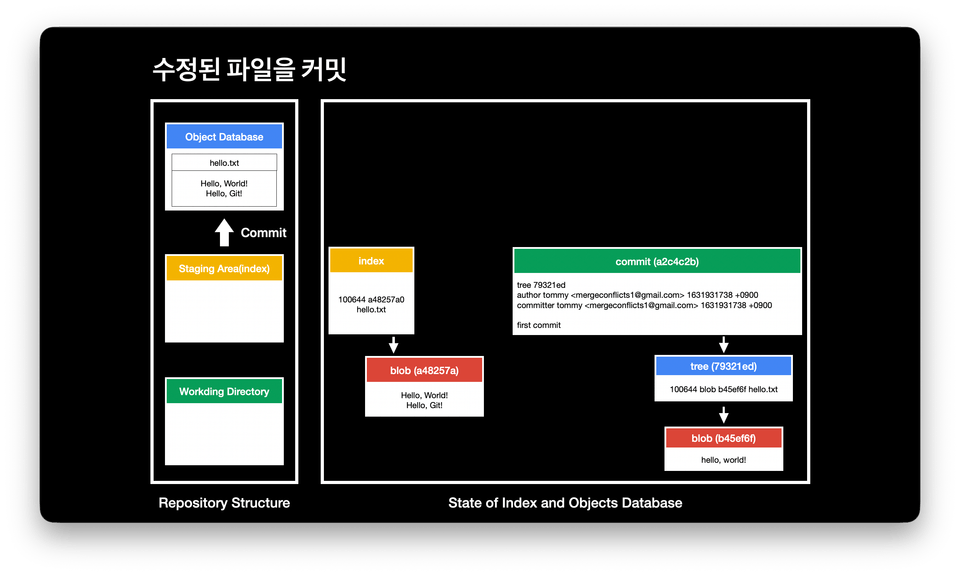
Exploring Git Internal Architecture
Delta Model and Snapshot Model
Repository Structure and Commit History
The four objects of Git
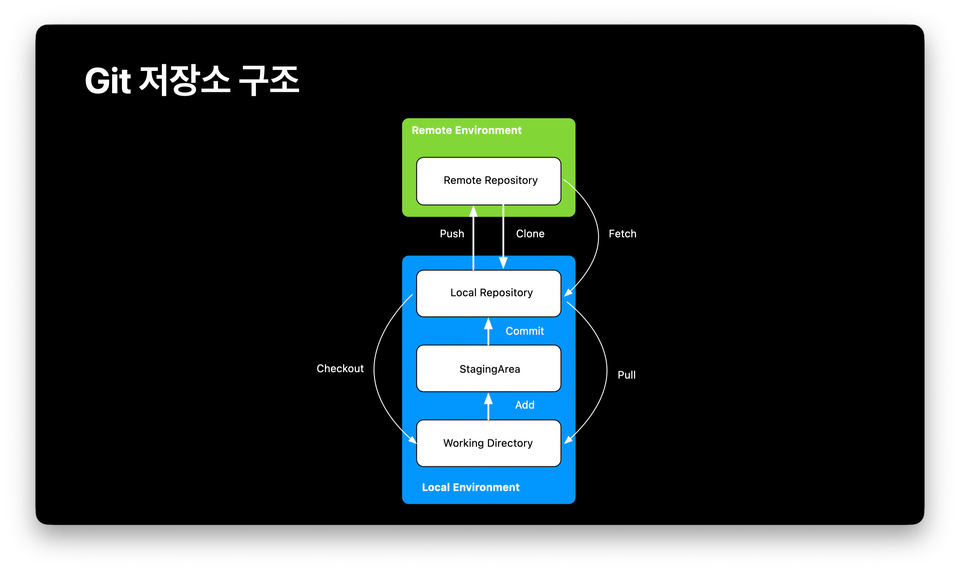
Reverting Changes
Git repository structure
How to use commands for undoing changes
When to use each command
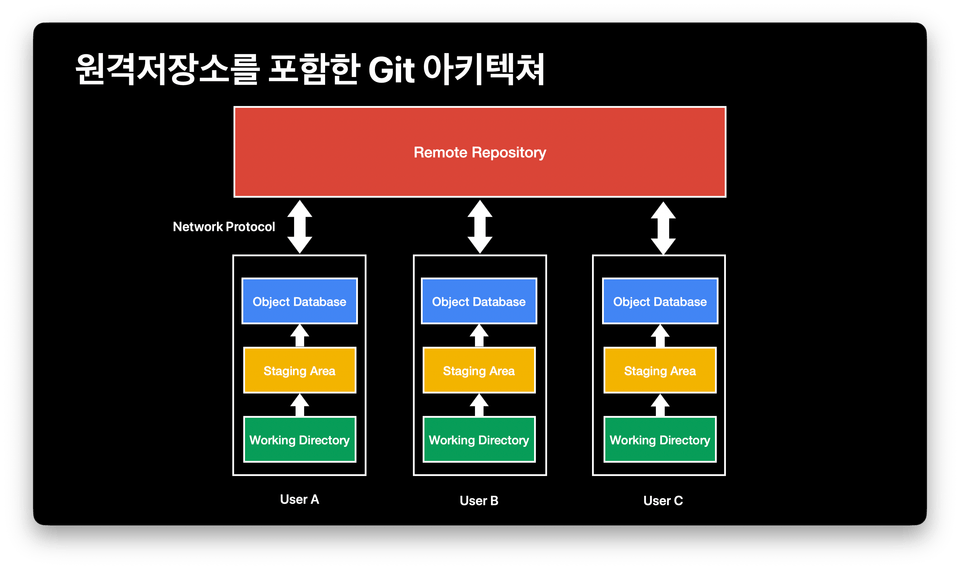
Merging Branches - Merge
Definition of a Branch
The role of HEAD
Types and behaviors of merging
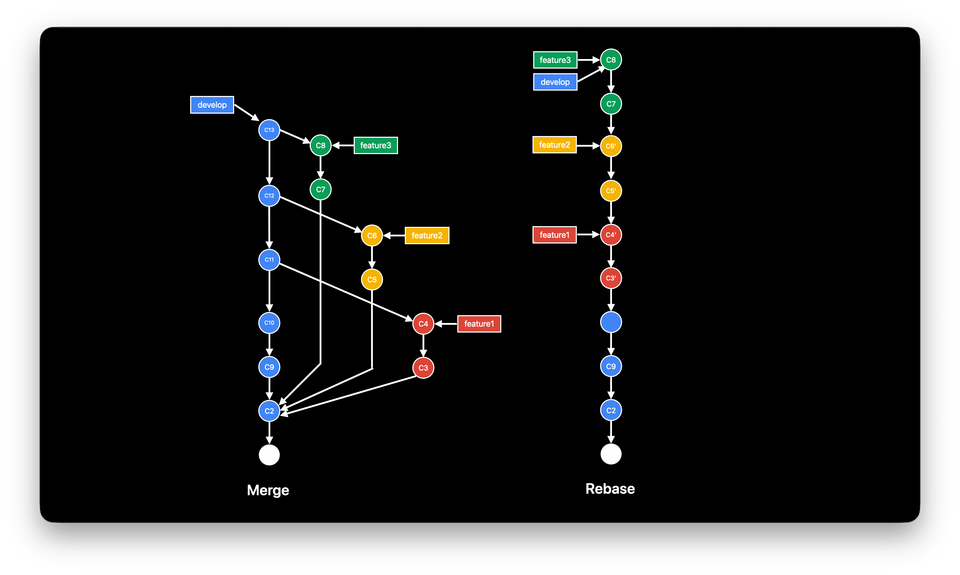
Merging Branches - Rebase
What is a commit hash and how is it generated?
What is rebase and how is it used?
What is interactive rebase, and how is it used?
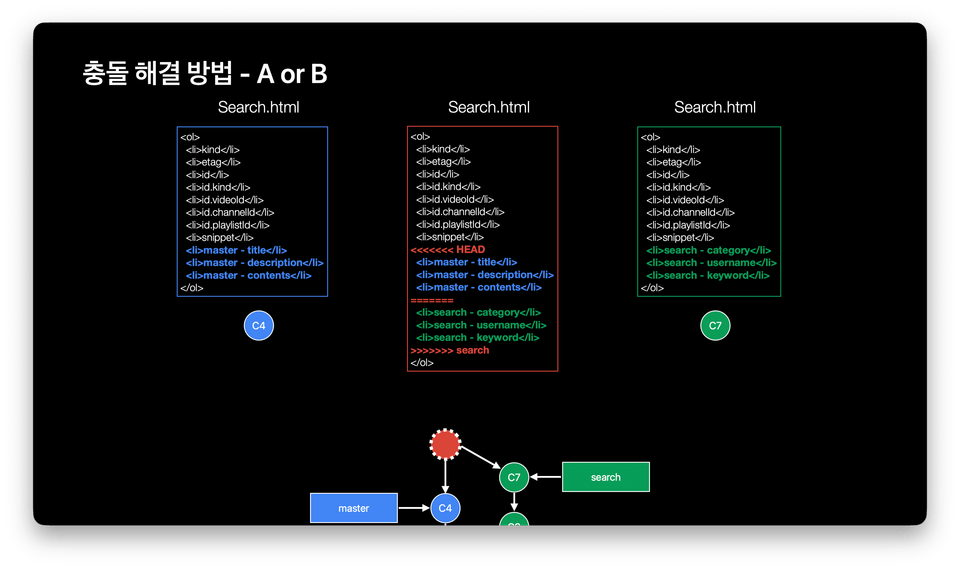
Handling Conflicts
Why conflicts occur
How to resolve conflicts
Practice on how to resolve conflicts when they occur during merge or rebase
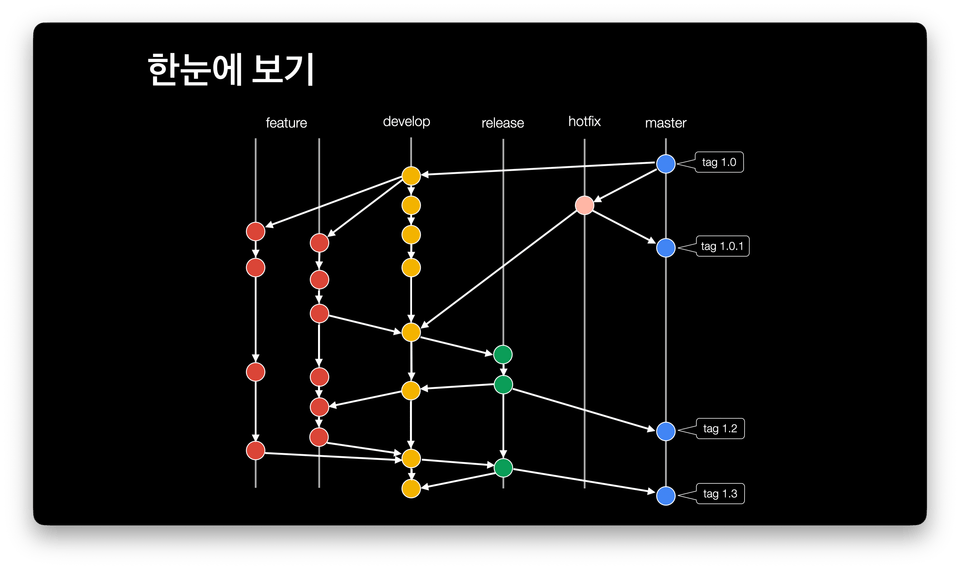
Managing Branches
Types of branch strategies
GitFlow
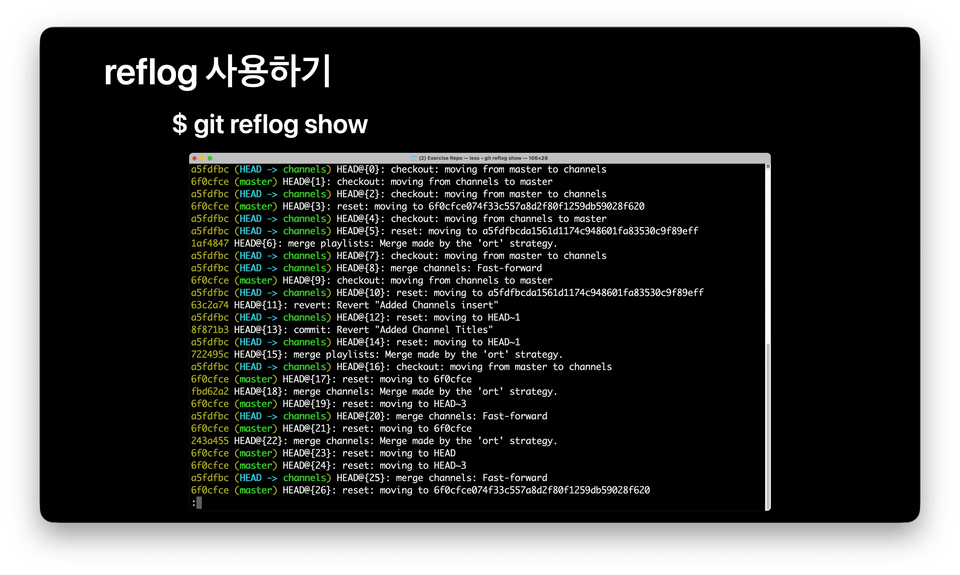
Restoring Lost Commits
What is Reflog?
Restoring accidentally lost commits using Reflog
Major Git Teaching Experience
Samsung Electronics
Eastsoft KDT
Development Experience
Kakao Mobility iOS App Developer (2018-2024, Kakao Taxi/Kakao T App Development)
Entrepreneurship and over 10 years of practical experience
Publication
Lectures
💡The journey from app developer to Git instructor
I first learned about Git in 2015. I have used it steadily since then, but in 2019, I felt a desire to understand Git more deeply. At that time, I had been using Git for 4 to 5 years, but I only knew the commands frequently used in practice and did not properly understand Git's overall structure and principles. While there were usually no issues, I repeatedly found myself unable to confidently resolve unexpected problems when they arose. Feeling embarrassed by these recurring situations, I decided to learn Git properly.
After deciding to study Git, I looked through various books, but I couldn't find the one I was looking for. The book I wanted was not one that simply explained commands, but one that explained the core concepts of Git in a simple and concise way.
Thinking that there might be others with the same needs as mine, I decided to write such a book myself. To explain the core concepts of Git easily, I consulted various resources. These included Linus Torvalds' 2007 Google Tech Talk introducing Git, lectures and books by Scott Chacon—co-founder of GitHub and co-author of 『Pro Git』—more than 20 Git books and lecture slides, manuals included in the Git development code, and Stack Overflow. Whenever I encountered difficult parts, I researched them thoroughly until I fully understood them, and contemplated how to convey that information easily.
As a result of these efforts, I published a book titled "Tommy's Git with SourceTree." Following that, I collaborated with Hackers HRD to produce an online Git course. Through these experiences, I developed a vision to help people use Git more easily, and after leaving my job, I created a Git course on Udemy. Currently, I am active as a professional Git instructor.
All hands-on exercises are conducted in a VSCode/Mac terminal environment. You can follow along using the default terminal on macOS with Git installed.
Windows or VSCode users can also participate in the practice sessions.
On Windows, you can follow along using Git Bash or WSL, and VSCode users can do the same using the built-in terminal.
I will provide it via a Notion link!
Experience using git add, git commit, git push, and git pull in a CLI environment
This is intended for developers who have experience using Git rather than beginners.
Who is this course right for?
Those who are using Git but want to properly understand how it works.
Those who want to use Merge and Rebase with confidence depending on the situation
Those who want to understand why conflicts occur and develop the skills to resolve them personally.
Developers who want to utilize Git more deeply by understanding its internal structure
Those who want to learn how to restore accidentally deleted commits
Need to know before starting?
Experience using git add, git commit, git push, and git pull in a CLI environment
This is intended for developers who have experience using Git rather than beginners.

Career Verified
268
Learners
24
Reviews
2
Answers
4.9
Rating
3
Courses
Teaching Experience
Samsung Electronics (Fast Campus Instructor)
ESTsoft KDT course, etc.
Development Experience: Kakao Mobility - Kakao Taxi, Kakao T iOS App Developer (2018-2024), over 10 years of practical app development experience. Publications: Tommy's Git with Sourcetree. Lectures: Udemy (Git
Professional Experience
Kakao Mobility - Kakao Taxi, Kakao T iOS App Developer (2018-2024)
Over 10 years of practical experience in app development
Publication
Lectures
Operations
All
70 lectures ∙ (3hr 34min)
Course Materials:
4. Delta Model
07:06
5. Snapshot model
06:30
13. What is a Reset?
05:15
16. What is Revert?
04:00
Check out other courses by the instructor!
Explore other courses in the same field!
25% off for new members
$41.60
25%
$61.60