inflearn logo

FreeRTOS Programming 2 - Learn RTOS Design and Debugging Through 40 Real-World Failures

Has your RTOS code ever stopped unexpectedly, leaving you unsure where to start? We deliberately recreate 40 real-world failures on an STM32 board, then walk you through the entire process of finding and fixing their causes using evidence such as on-screen numbers, the debugger, and logs.

1 learners are taking this course

Level Intermediate

Course period Unlimited

C
C
FreeRTOS
FreeRTOS
stm32
stm32
rtos
rtos
lvgl
lvgl
C
C
FreeRTOS
FreeRTOS
stm32
stm32
rtos
rtos
lvgl
lvgl

What you will gain after the course

  • Assess task partitioning, priorities, and periodic waits (vTaskDelay and vTaskDelayUntil) based on symptoms and numbers.

  • Safely connect interrupts to the RTOS while respecting ISR priorities and FromISR API constraints.

  • Choose queues, notifications, event groups, and mutexes based on data flow, and avoid deadlocks and priority inversion.

  • Correctly Handling Buffer Ownership and Completion Timing in Asynchronous DMA and UART Processing

  • Gathering evidence of failures with the stack, heap, logs, and watchdogs to prevent recurrence

  • Directly trace the cause using the CubeIDE debugger (breakpoints, call stack, Live Expressions)

What You’ll Gain from This Course

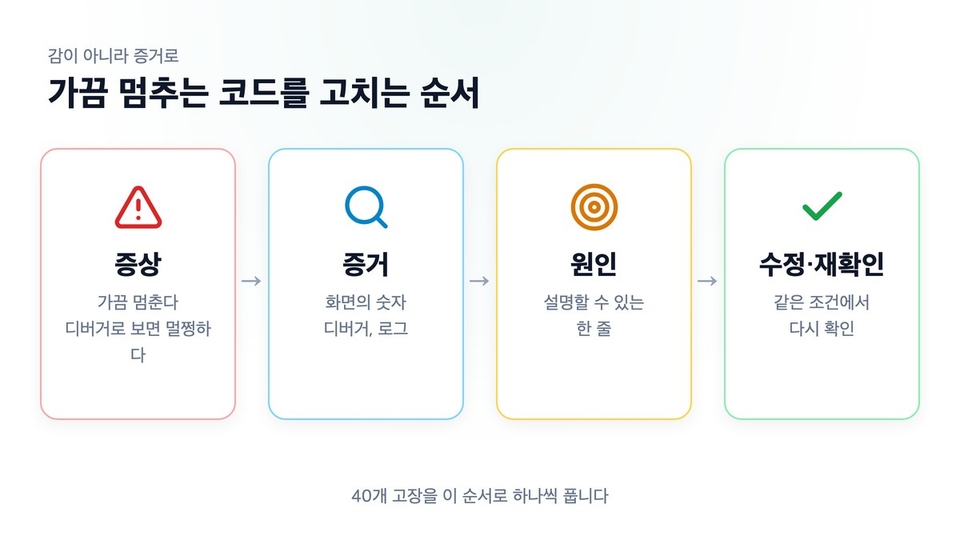
The ability to diagnose and fix RTOS code that occasionally freezes using evidence, not guesswork. You’ll learn to narrow down the cause using the numbers on the screen, the debugger, and logs, then verify the fix under the same conditions.

The hands-on code is a FreeRTOS project written in C. It runs on an STM32 board (STM32F429I-DISC1), and results are verified by the numbers displayed on an LCD screen rendered with LVGL. This isn’t a course on learning RTOS from scratch; it’s about dealing with code that works but occasionally hangs.

One-line summary

We trace and fix, one by one, 40 real-world failures deliberately reproduced on an STM32 board, following the evidence. From task design, interrupts and DMA, queues and synchronization, to memory diagnostics and robustness. 40 chapters, approximately 14 hours and 30 minutes.

About How This Course Was Made

This course was created using an AI-based production process. The narration uses voice synthesis trained on the instructor’s own voice, and AI tools were also used to create the scripts and graphics. The instructor personally handled the planning and content review, and all screenshots of hands-on results were captured from tests run on actual STM32 boards in STM32CubeIDE.

"It occasionally freezes. It looks fine in the debugger."

RTOS failures usually show up like this. If it stopped every time, it would be easy. But failures that happen once every few hours, only when buttons are pressed in a particular sequence, or disappear when you add logging are impossible to spot, no matter how many times you reread the code.

So many developers increase the delay, change priorities, or make waits infinite. The symptoms disappear for a while, but fixes you can’t explain will cause problems elsewhere.

The goal of this course is to make fixes whose causes you can explain with evidence.

Questions that actually come up in embedded systems interviews

"What is priority inversion?" "Why do you have to use FromISR APIs inside an ISR?" "How can you tell if the stack has overflowed?" "Why does the system remain frozen even though there’s a watchdog?"

Answers memorized from a book fall apart after just one follow-up question. In this course, you’ll trigger these failures on a board, verify their causes with numbers, and then fix them. You’ll be able to say in an interview, "I reproduced it, and this is what happened."

Every chapter follows the same sequence

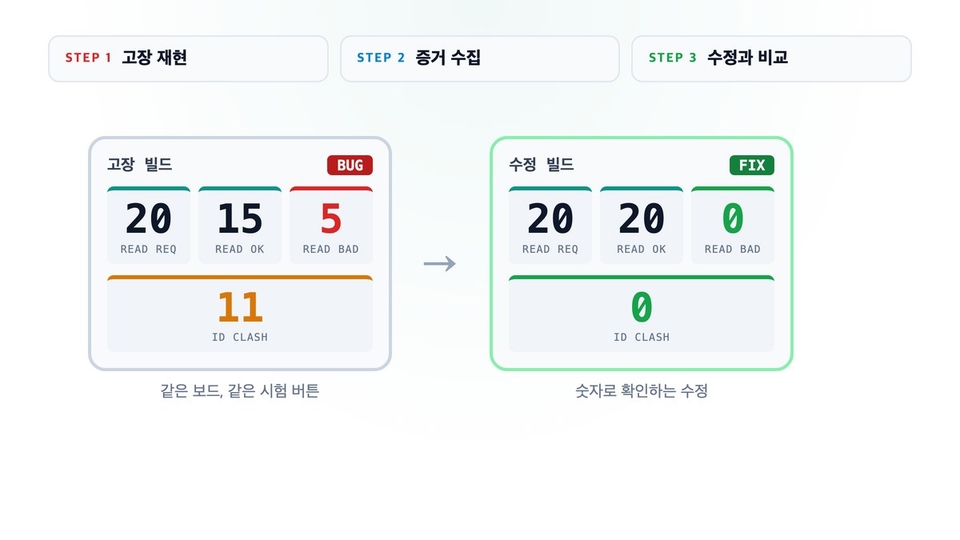
Each chapter covers a real-world failure you might encounter in practice. You’ll run the faulty build and the fixed build in sequence on the same board, then compare their results numerically.

STEP 1

Reproduce the Failure

Display the symptom on screen using the faulty build.

STEP 2

Gather evidence

Narrow down the cause using LCD values, the debugger, and logs.

STEP 3

Compare with the fix

Compare it side by side with the fixed build.

What you’ll learn

Tasks, Interrupts, and Data Flow

01 Project structure, boot sequence, and interrupts before initialization

02 The boundary between GUI tasks and worker tasks

03 Priorities, periodic waits, and software timers

04 Passing Data with Queues, Notifications, and Event Groups

05 ISR priorities, FromISR APIs, and DMA·UART completion timing

Synchronization, Diagnostics, and Robustness

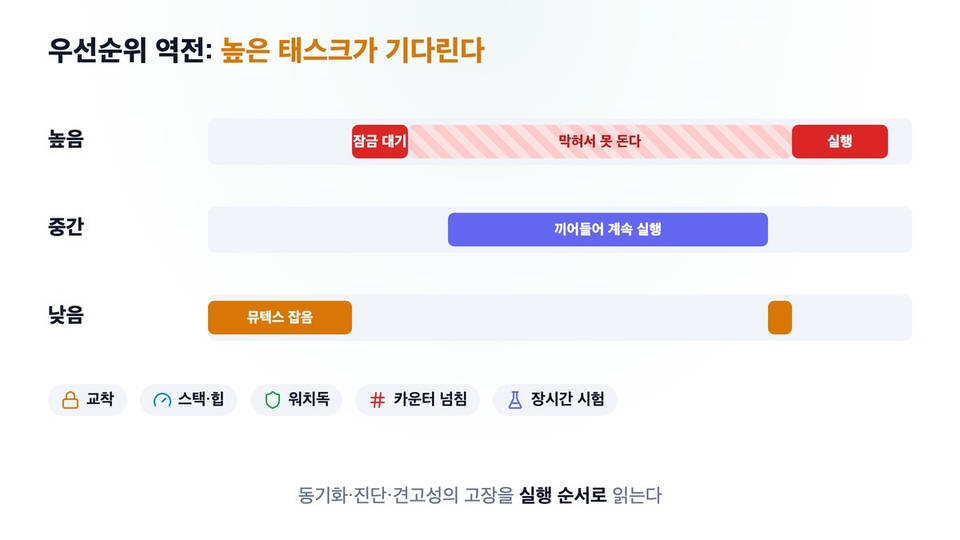
06 Mutexes, Priority Inversion, Lock Ordering, and Deadlock

07 Stack/Heap Measurement and How Logging Changes Timing

08 Sensor Failure, Retries, Infinite Waits, Watchdog

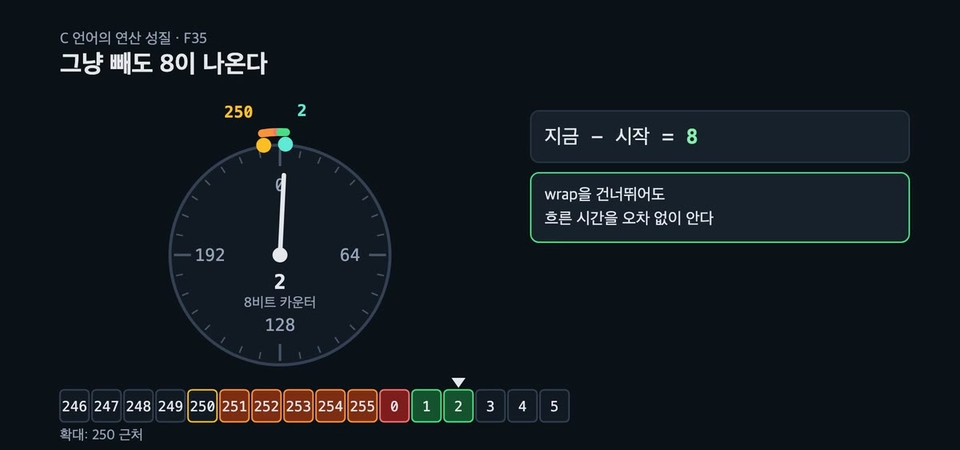
09 Counter Overflow in Long-Duration Logging

10 Pass criteria for PC tests and long-duration tests

What makes this course unique

40 Chapters, One Board, and One Screen

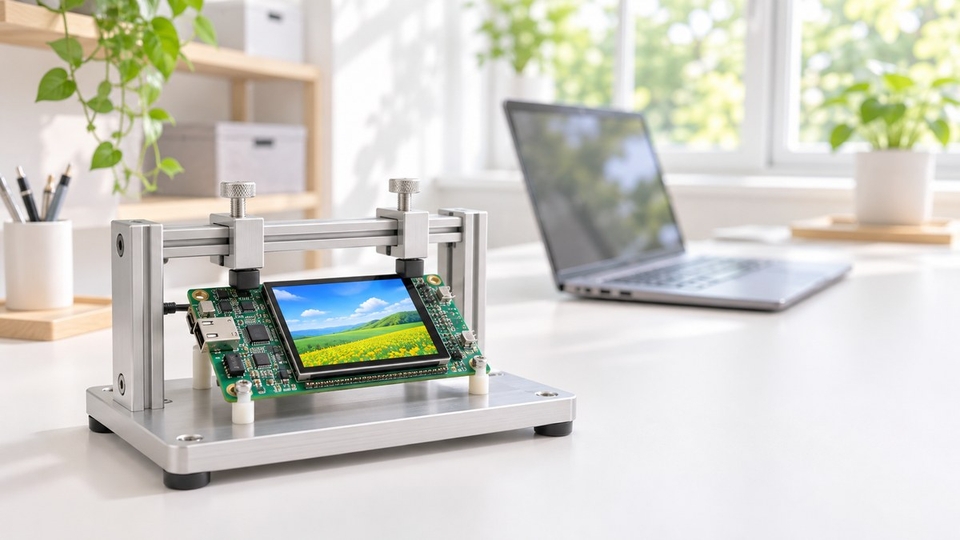
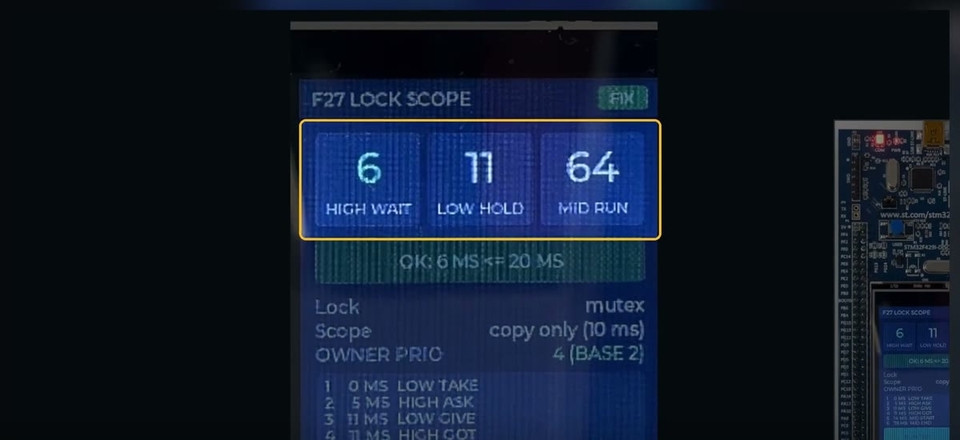
Every failure is reproduced on the STM32F429I-DISC1 using a single LVGL screen. The same numbers appear every time you run it, so you can compare the results before and after the fix side by side.

Real source code and debugger screen

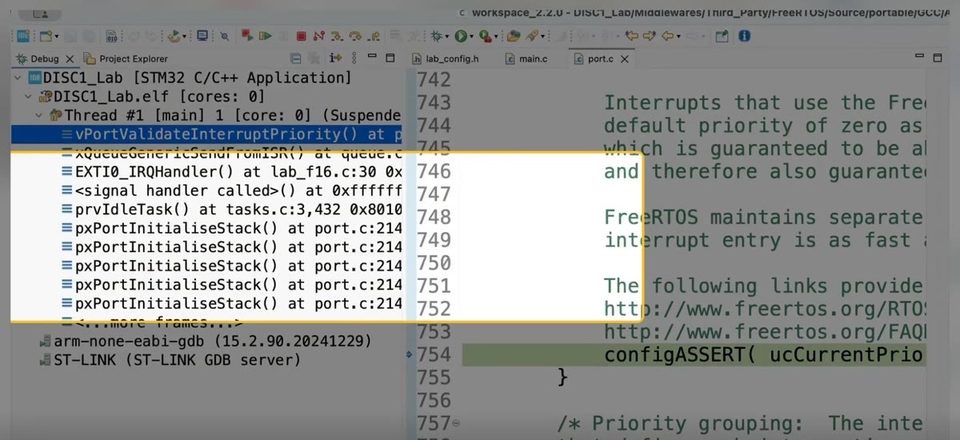
Trace the cause directly using STM32CubeIDE’s actual source, breakpoints, call stack, and Live Expressions.

The faulty build and the fixed build

Compare the two builds side by side.

Grounded in the original documentation

Registers, using the original RM0090 and PM0214 documents.

Practice problems for each chapter

Compare it with other solutions.

Actual lecture screen

Compare the numbers on the board display before and after the failure

Use the CubeIDE debugger to pinpoint the line causing the issue

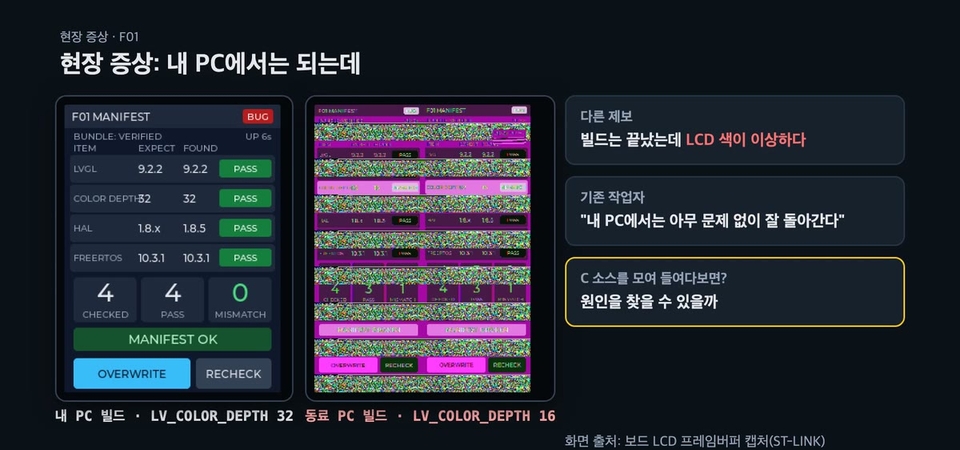
Lesson 1 · The same source code, but only the build on a colleague’s PC renders the screen incorrectly

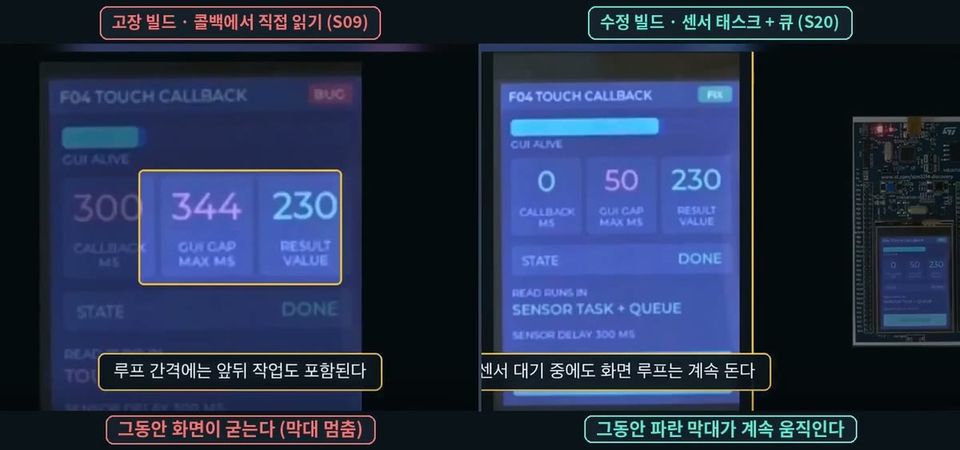
Lesson 5 · Compare the faulty and fixed builds side by side on the same board

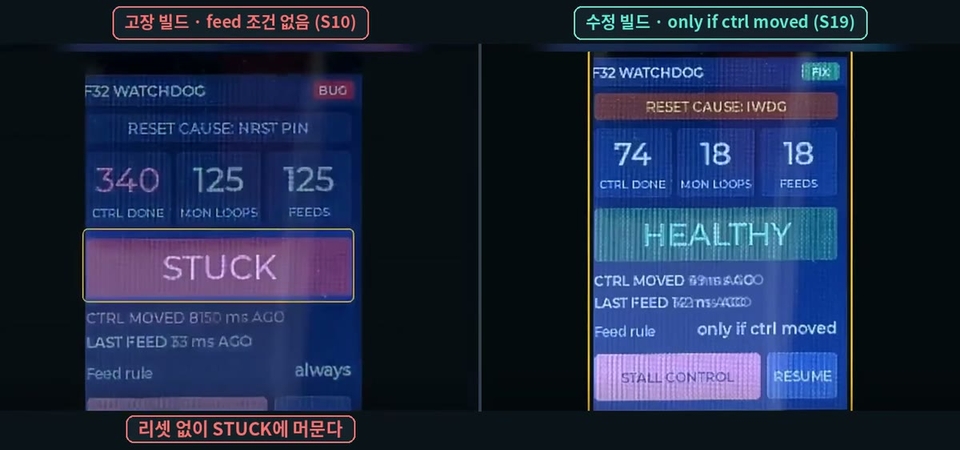
Lesson 37 · A failure that stays frozen without resetting, even with a watchdog

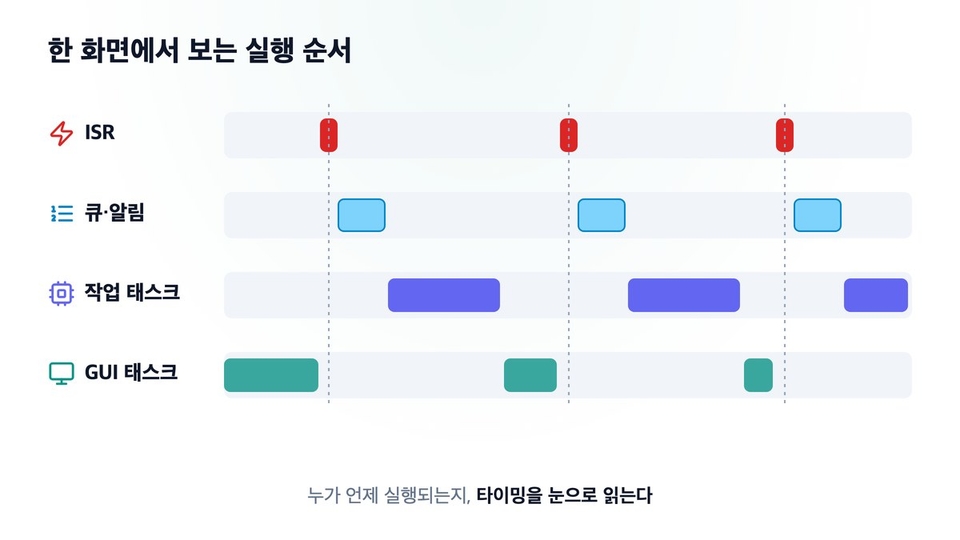
Lesson 30 · A timing diagram drawn from values measured on the board

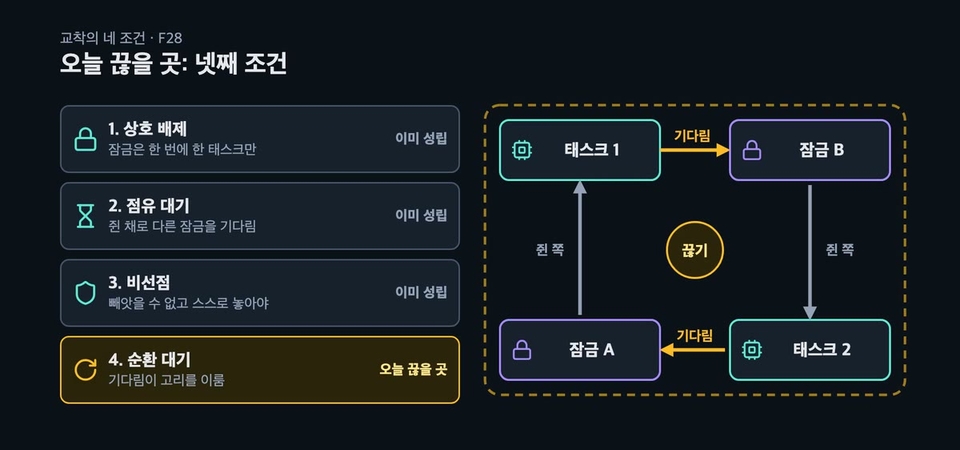
Lesson 16 · The four conditions for deadlock and how to break the cycle

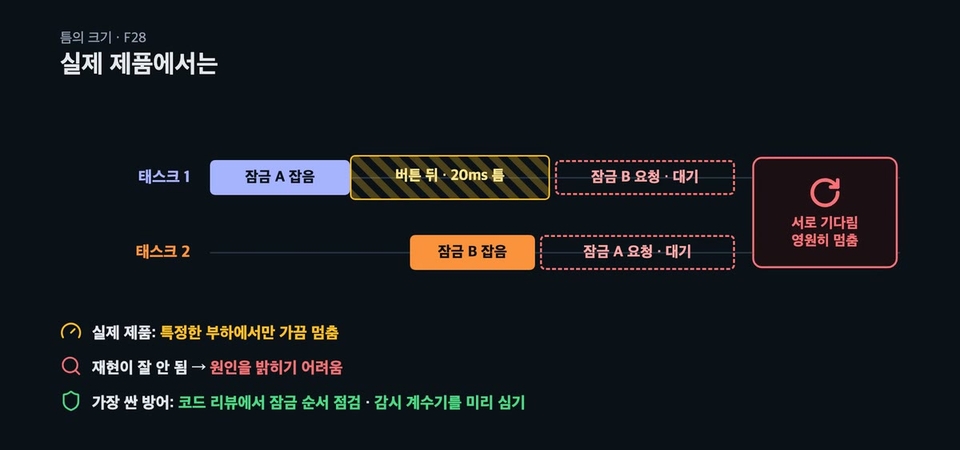
Lesson 16 · How deadlocks show up in real products

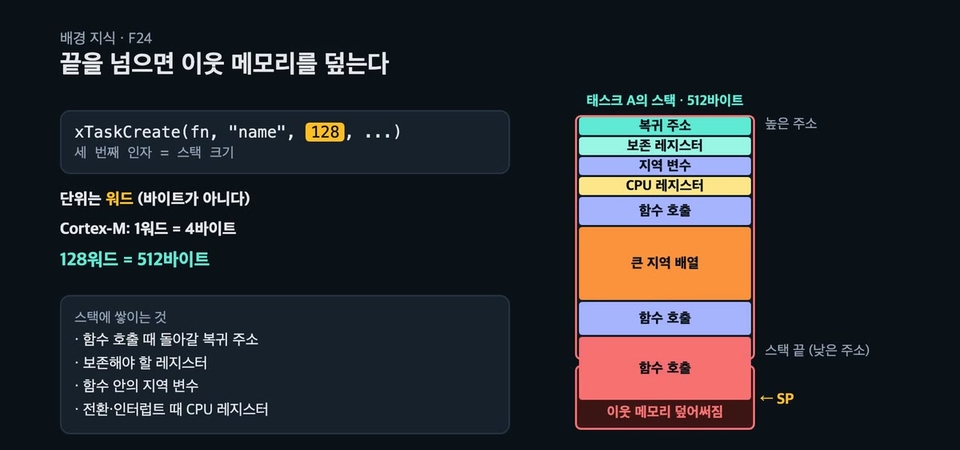
Lesson 29 · Going past the end of the stack overwrites neighboring memory

Lesson 38 · Subtraction still works even when the counter overflows

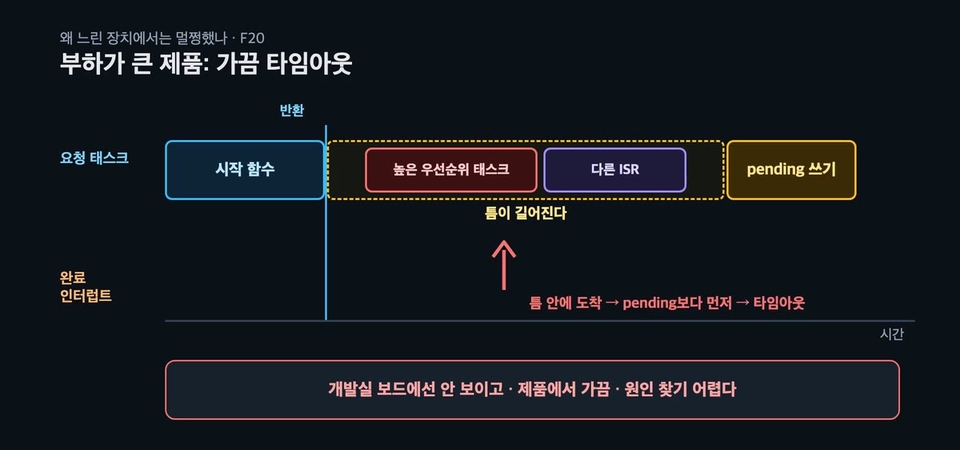
Lesson 26 · The timeout that only occasionally occurs in high-load products

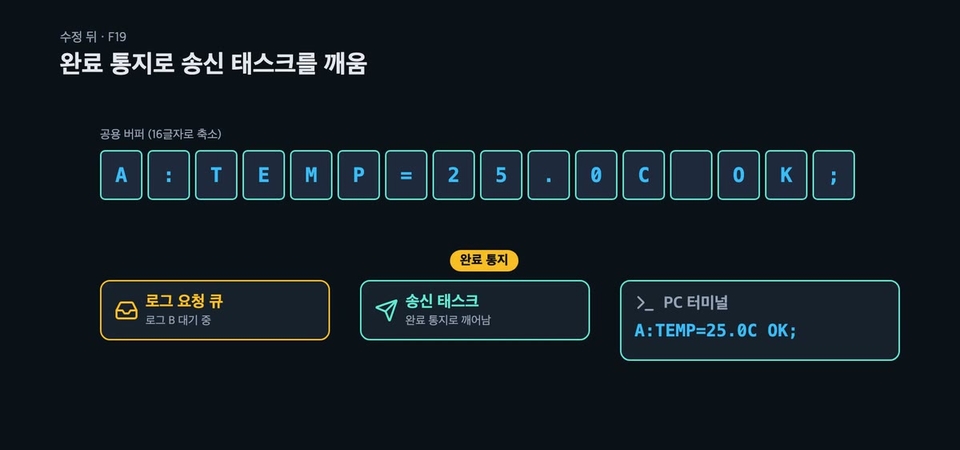
Lesson 25 · A structure that wakes the sending task with a completion notification

18 years of hands-on teaching experience

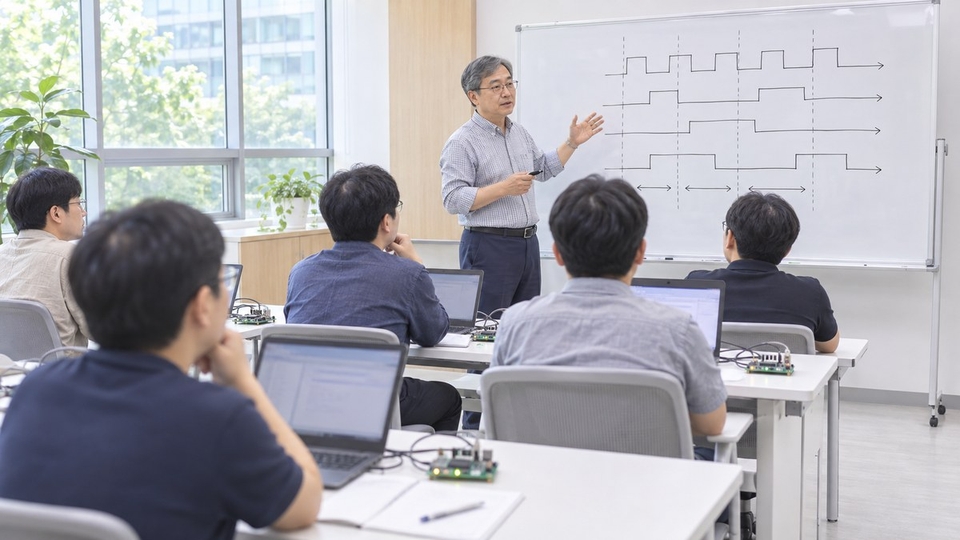
Since 2008, I’ve taught developers at companies and institutions including Samsung Electronics, LG Electronics, SK hynix, and Hyundai Mobis. This course reworks the types of RTOS failures I’ve encountered in the field so that anyone can reproduce them on a single board.

If you’ve used FreeRTOS, it’s time to start troubleshooting

This course is for those who can create tasks and queues but feel lost about where to start when things occasionally freeze. If you learned the APIs in Part 1 (FreeRTOS Programming), Part 2 covers how those APIs fail in real-world situations.

If you're preparing for a career in embedded development, learn the APIs in Part 1, then see how they fail in real-world work in Part 2. Across 40 chapters and about 14 hours and 30 minutes, we've gathered the issues that working developers encounter one by one over several years.

Lab Environment

Board and Tools

  • STM32F429I-DISC1 (with built-in LCD)

  • STM32CubeIDE 2.2.0

  • STM32CubeMX (Lesson 2), PuTTY (serial log lesson)

  • C language, FreeRTOS, LVGL

If you don't have a board

  • The video includes execution and debugger screens for every section.

  • You can watch and follow along with the causes and fixes as they’re explained.

Related technologies: FreeRTOS · rtos · stm32 · C · lvgl

Frequently Asked Questions

Q. Can I take this without listening to Part 1?

If you’ve ever used tasks, queues, and semaphores with FreeRTOS, you can jump right in. Each chapter begins with a brief review of the background you’ll need. If you’re new to FreeRTOS, I recommend taking Part 1 first.

Q. Can I take this course before getting a job?

If you’ve ever used tasks and queues with FreeRTOS, that’s enough. In fact, it’s even more beneficial to take this course before getting a job. You’ll reproduce and fix on a board common interview topics such as priority inversion, ISR handling, stack overflow, and deadlock.

Q. Do I need to have the board?

No. We show both the execution results and the debugger screen in the videos. If you want to reproduce it yourself, you’ll need an STM32F429I-DISC1 board.

Q. Is the narration AI-generated?

Yes. It’s synthesized speech trained on the instructor’s own voice. The instructor personally planned and reviewed the script and hands-on material, and the on-screen demonstrations show results from running them on an actual board.

Recommended for
these people

Who is this course right for?

  • A developer who has tried FreeRTOS but can’t figure out why it occasionally hangs.

  • An RTOS user whose code works but who can’t explain why it has to be written that way.

  • A developer who got stuck while using interrupts, DMA, and an RTOS together

  • Those who want to explain priority inversion, deadlocks, and atomicity with evidence.

  • A student who has completed FreeRTOS Programming (Part 1) and is ready to move on to hands-on practice.

Need to know before starting?

  • C Language Pointers and Structures

  • Experience using basic FreeRTOS APIs (tasks, queues, and semaphores)

  • Basic Use of STM32CubeIDE

Hello
This is guileschool

Career Verified

3,594

Learners

263

Reviews

281

Answers

4.7

Rating

7

Courses

I majored in electronic engineering at Inha University and worked as an embedded software developer.

I have been teaching in-person courses for 18 years since 2008. I taught developers at companies and institutions including Samsung Electronics, LG Electronics, SK hynix, Hyundai Mobis, LIG D&A, and Seoul National University, and compiled that experience into course materials.

『RTOS』(2008), 『Linux Shell』(2018), 『FreeRTOS』(2019), 『Cortex-M』(2022), 『Bootloader-Based Embedded Systems』(2023)

YouTube Giles School (https://www.youtube.com/@guileschool): Embedded Systems and Development Courses

I have also been researching Mac automation for 15 years. I teach ways to reduce repetitive tasks using Keyboard Maestro and AppleScript, and I develop and sell Greenlight, an automation plugin for Final Cut Pro. I publish the tools I create on GitHub (https://github.com/guileschool).

Captain Macbot on YouTube (https://www.youtube.com/@captainmacbot): How to use AI and automation on a Mac

Please send course requests and other inquiries to guileschool@gmail.com.

More

Curriculum

All

43 lectures ∙ (14hr 42min)

Course Materials:

Lecture resources
Published: 
Last updated: 

Reviews

Not enough reviews.
Please write a valuable review that helps everyone!

guileschool's other courses

Check out other courses by the instructor!

Similar courses

Explore other courses in the same field!

Limited time deal

$127.60

49%

$254.10