inflearn logo

Learning Practical C/C++ Builds with CMake and VSCode

Have you ever felt stuck using a copied-and-pasted CMakeLists.txt without knowing why it works? Edit and build it yourself in VS Code, and make everything from target design to packaging, cross-compilation, and remote debugging your own.

18 learners are taking this course

Level Basic

Course period Unlimited

C
C
C++
C++
Linux
Linux
VSCode
VSCode
cmake
cmake
C
C
C++
C++
Linux
Linux
VSCode
VSCode
cmake
cmake

What you will gain after the course

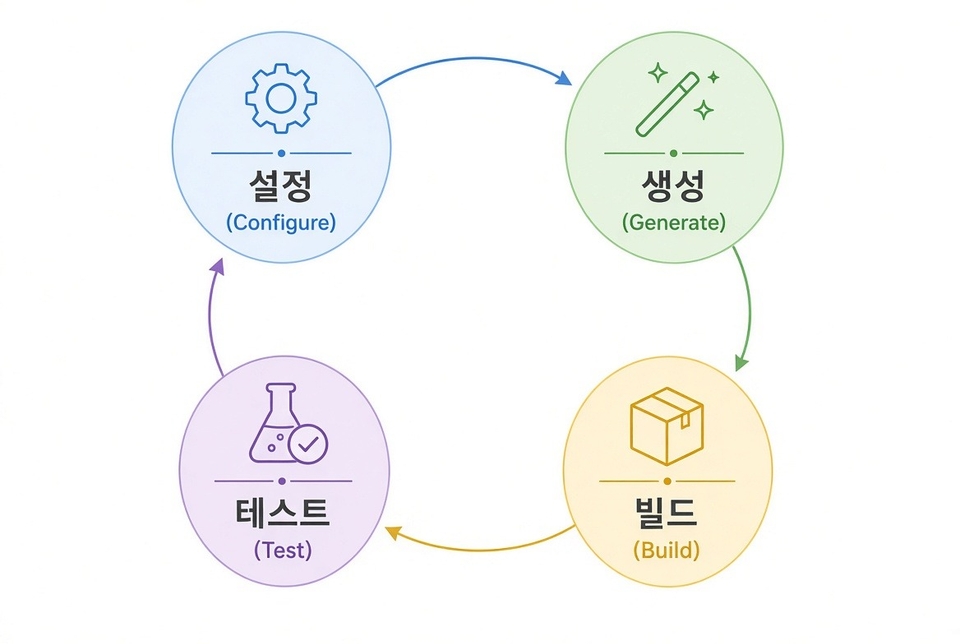
  • A CMake Build Workflow That Distinguishes Configure, Generate, and Build, and Troubleshoots Version and Policy Issues

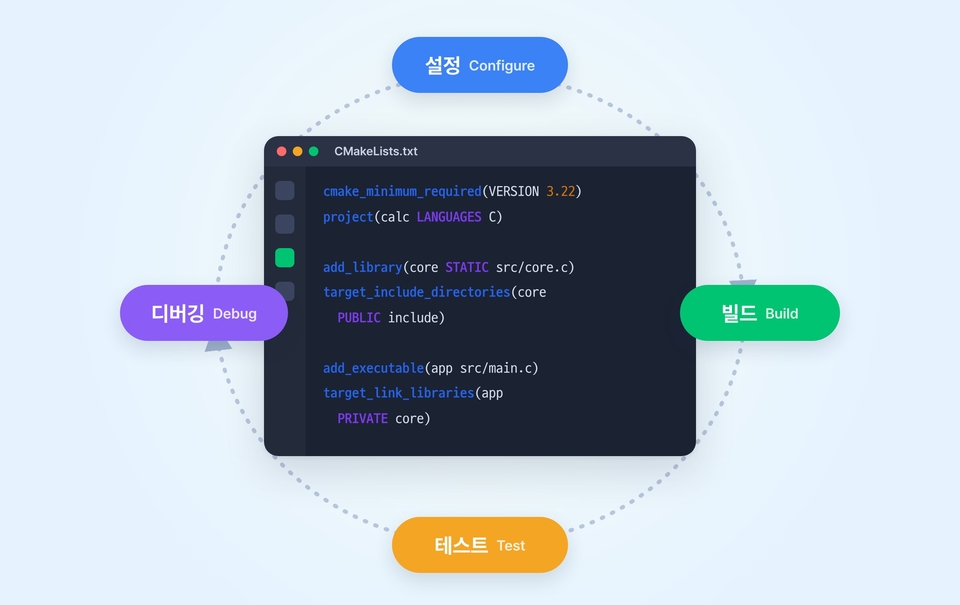
  • A development loop in VSCode (CMake Tools, clangd), from configuration through build, testing, and debugging

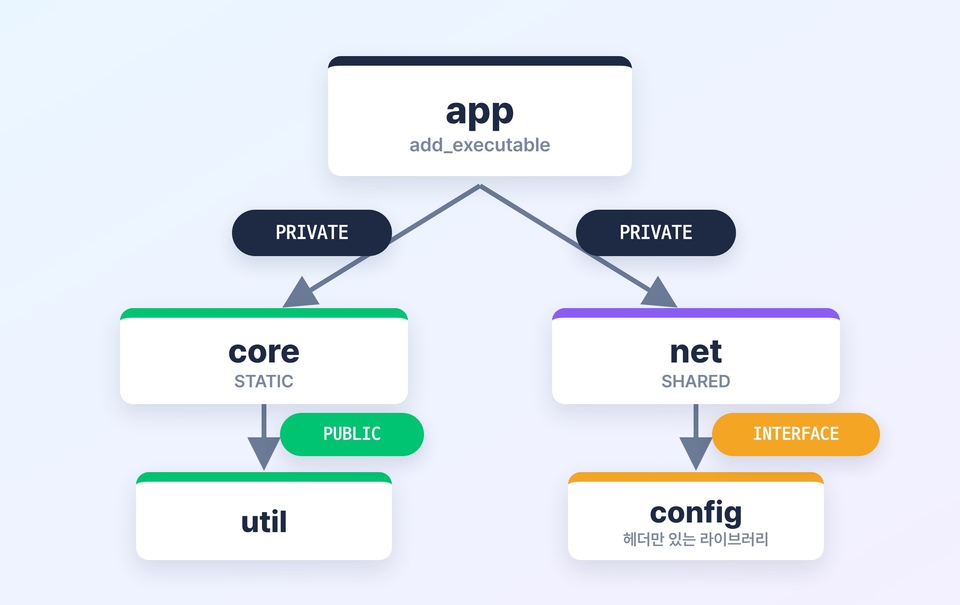
  • Target-Centric Design Distinguishing PUBLIC / PRIVATE / INTERFACE and Multi-Module Configuration

  • Control build configurations with option, cache, configure_file, Generator Expression, and presets

  • Dependency management, testing, and package distribution using find_package, FetchContent, CTest, and CPack

  • Cross-compilation and remote debugging in VSCode using toolchain files and a sysroot

What you'll gain after completing the course

A C/C++ development loop in VSCode where configuration, building, testing, and debugging all come together. Instead of memorizing where the buttons are, you’ll be able to read configuration files and actual logs and fix issues yourself.

In a nutshell

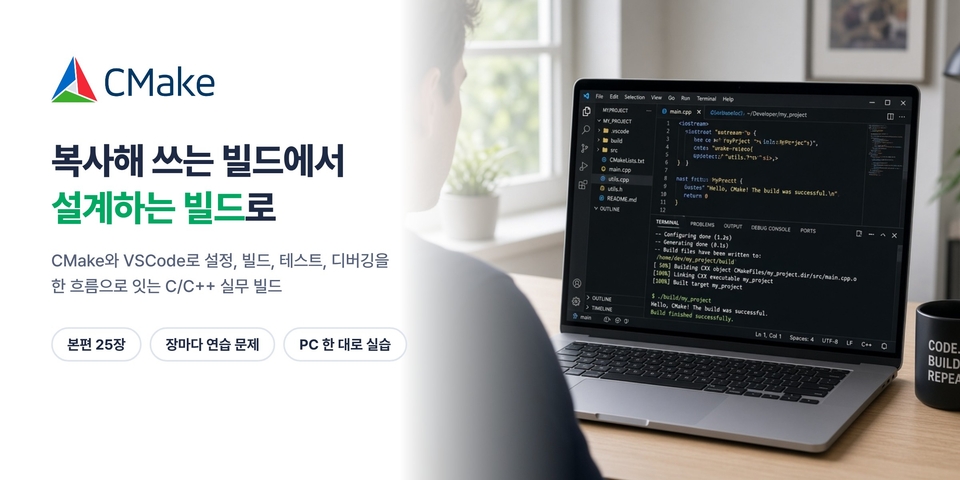
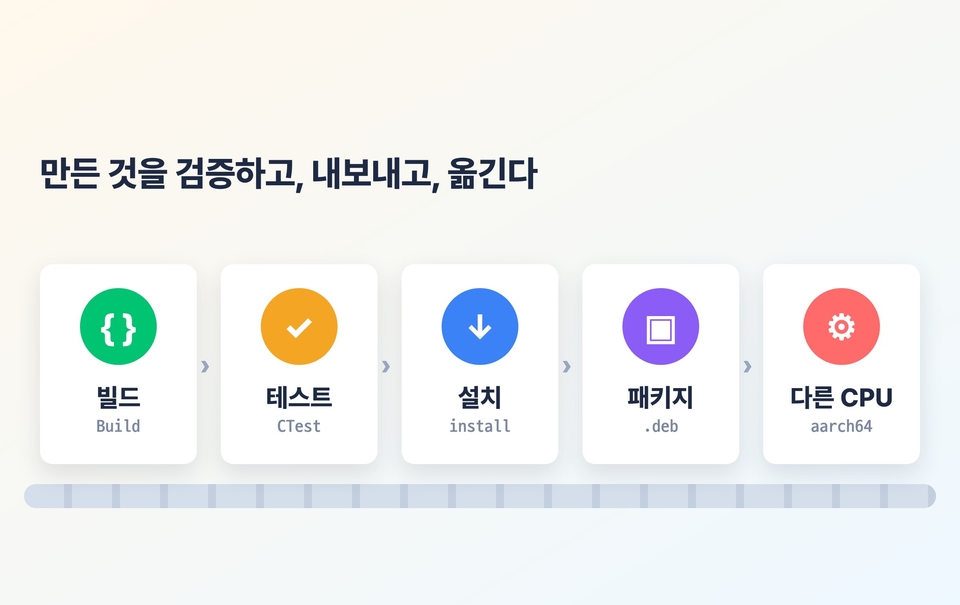
Build a configure · build · test · debug loop on a single PC, then progress through target-centered design, testing, and package deployment to cross-compilation and remote debugging. The main course has 25 chapters and runs for about 5 hours. Each chapter includes exercises.

About How This Course Was Created

This course was created using an AI-based production process. The narration uses synthetic speech trained on the instructor’s own voice, and AI tools were also used to create the scripts and graphics. The instructor, who has nearly 20 years of experience in embedded systems and corporate training, handled the planning and content review personally. All exercise results are screenshots verified by running them in a real VSCode environment on a PC and a physical Raspberry Pi board.

Course Overview

STEP 1

Complete the development loop

A single workflow from setup to debugging

Chapters 01–04

STEP 2

Target Design and Deployment

Libraries, build control, testing, and packaging

Chapters 05–19 · 24–25

STEP 3

Cross-Compilation and Remote Development

Toolchain files, QEMU, gdbserver

Chapters 20–23 · Choose your board

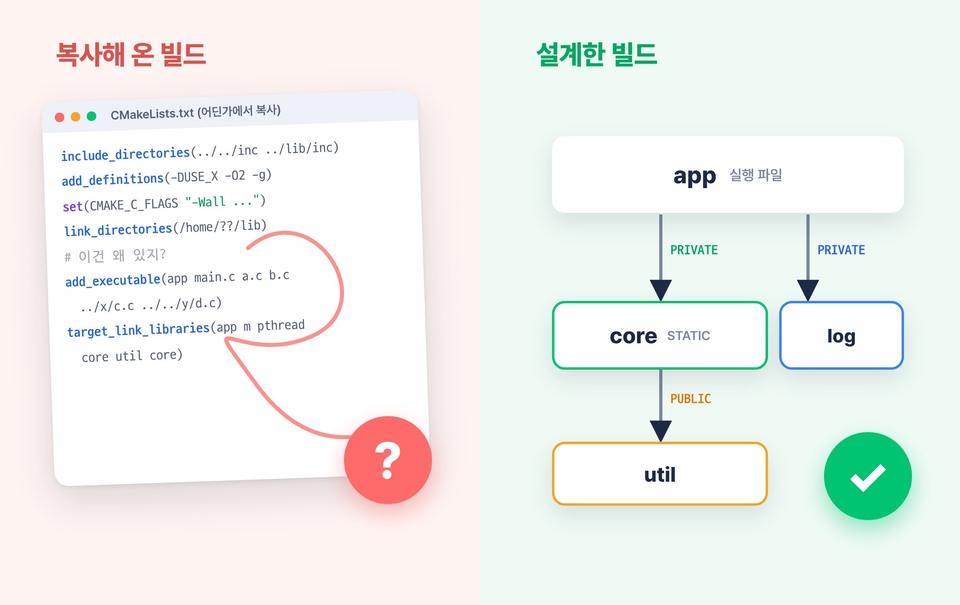
"It falls apart when you copy and use it"

A copied CMakeLists.txt falls apart the moment you add another library, the build options diverge, or you start cross-compiling. The build works, but you don’t know why; when it doesn’t, you don’t know what to fix.

The goal of this course is a robust build designed with an understanding of the underlying principles.

Why CMake Now

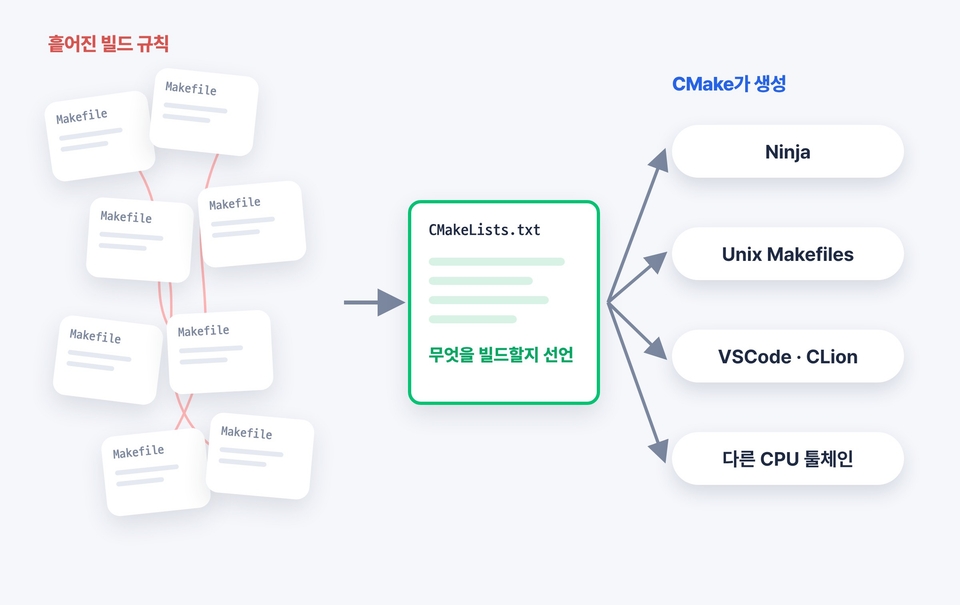
The problem isn’t Make, but scattered build rules. As a project grows, compiler options get copied all over the place, and Makefiles in each directory call one another and become tangled.

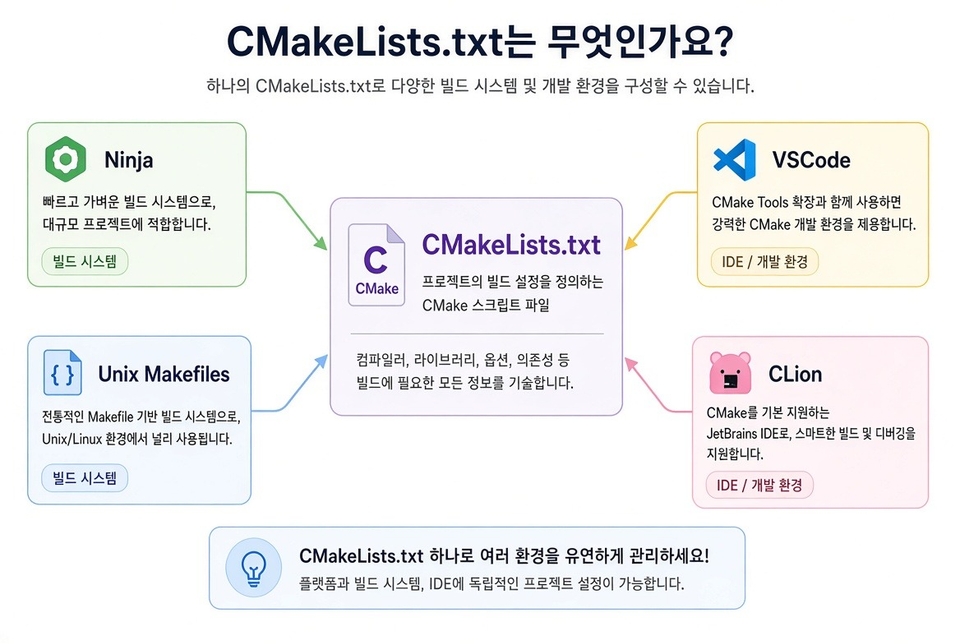
CMake lets you declare what to build, and generates build files suited to your build tool and toolchain. Large C/C++ open-source projects like LLVM, Qt, and OpenCV, as well as IDEs like VSCode and CLion, all understand projects this way.

What you'll learn

Target-Centric Design and Build Control

01 Configure / Generate / Build, cache, Ninja, CMake 4.x compatibility

02 VSCode development loop: CMake Tools, clangd, breakpoints, and Watch

03 Static and shared libraries and PUBLIC / PRIVATE / INTERFACE

04 add_subdirectory for multi-module projects and symbol visibility

05 option, configuration header, Generator Expressions, functions, and presets

Testing, Packaging, and Cross-Compilation

06 Generate code and headers during the build with Custom Commands

07 Installation, find_package, FetchContent

08 Testing with CTest and GoogleTest, and .deb packaging with CPack

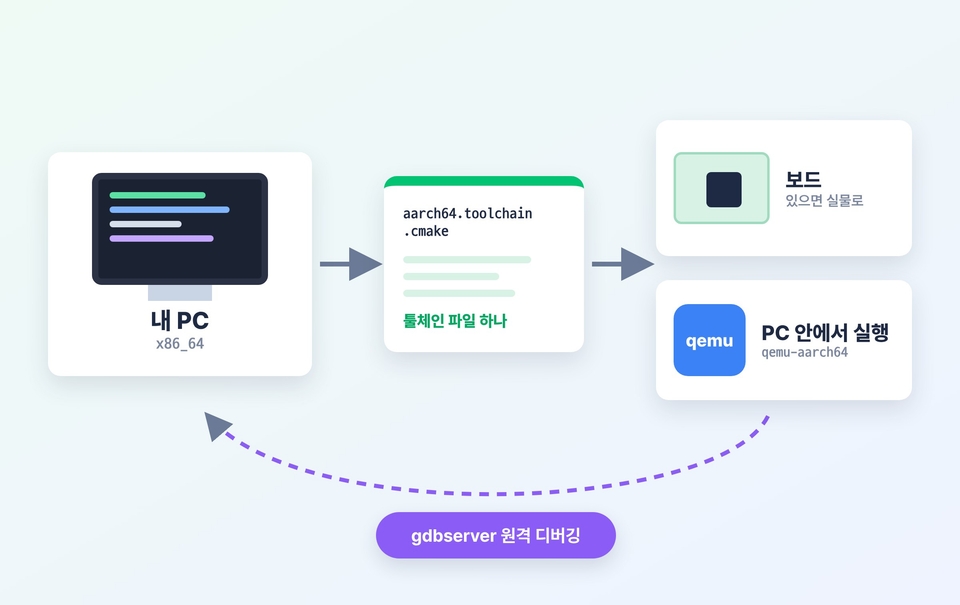
09 Cross-compiling with toolchain files and sysroots, and running with qemu

10 Comprehensive hands-on practice covering Remote SSH development, gdbserver debugging, and release

What Makes This Course Unique

Read the logs, not the buttons

We read configuration files alongside actual Configure / Build logs, so you can follow the same workflow even when tool versions change.

From PC to a Different CPU, the Board Is Optional

Covers toolchain files, sysroots, QEMU, and remote debugging with gdbserver. Even without a board, you can follow along to the end using QEMU on your PC.

Breaking It on Purpose

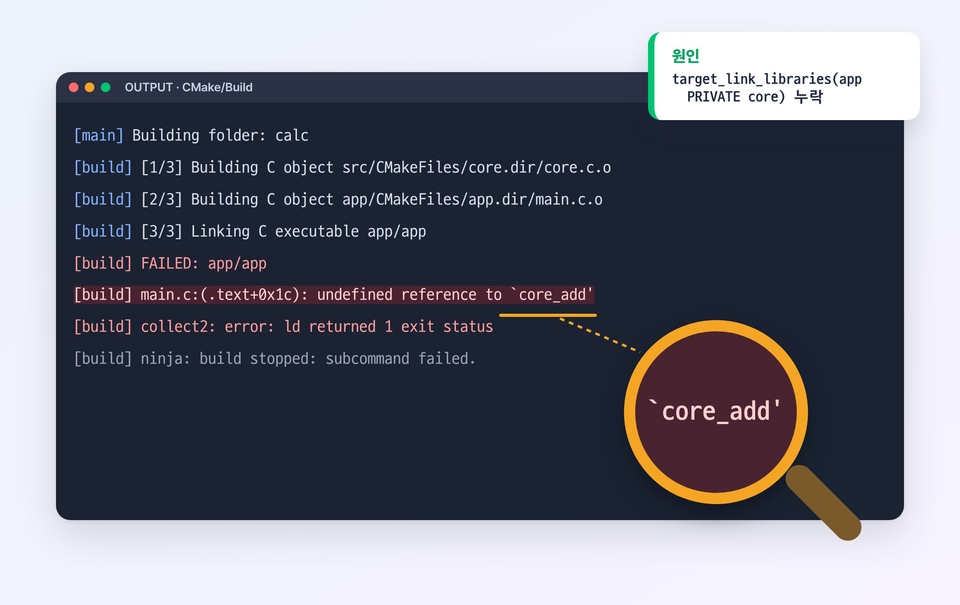
Exclude the configuration and find the cause of the error.

Verify with the build artifacts

You also verify the generated files, binaries, and symbols.

Practice problems in every chapter

Solve them yourself, then check your answers with the solutions.

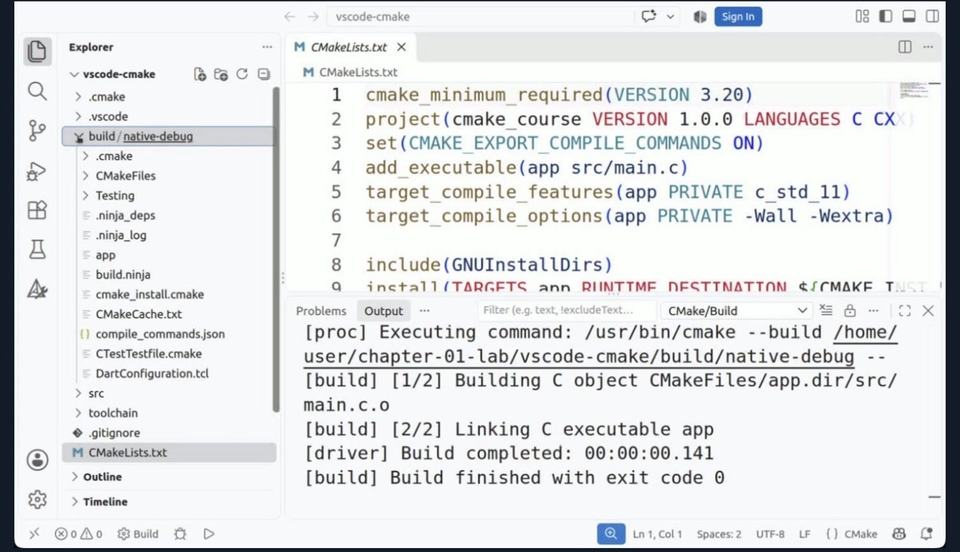
Actual course screen

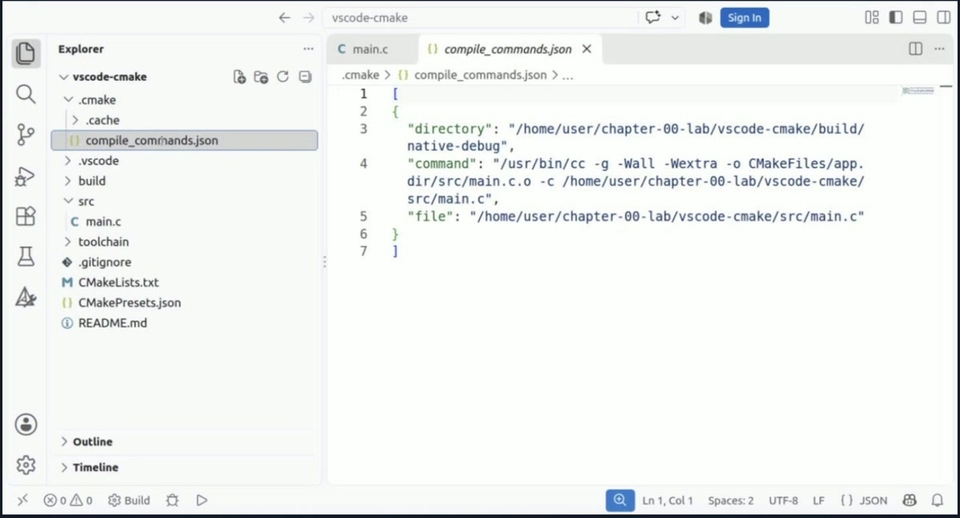
Read the CMake build process right in the VSCode output window

We also check the compile_commands.json that clangd reads

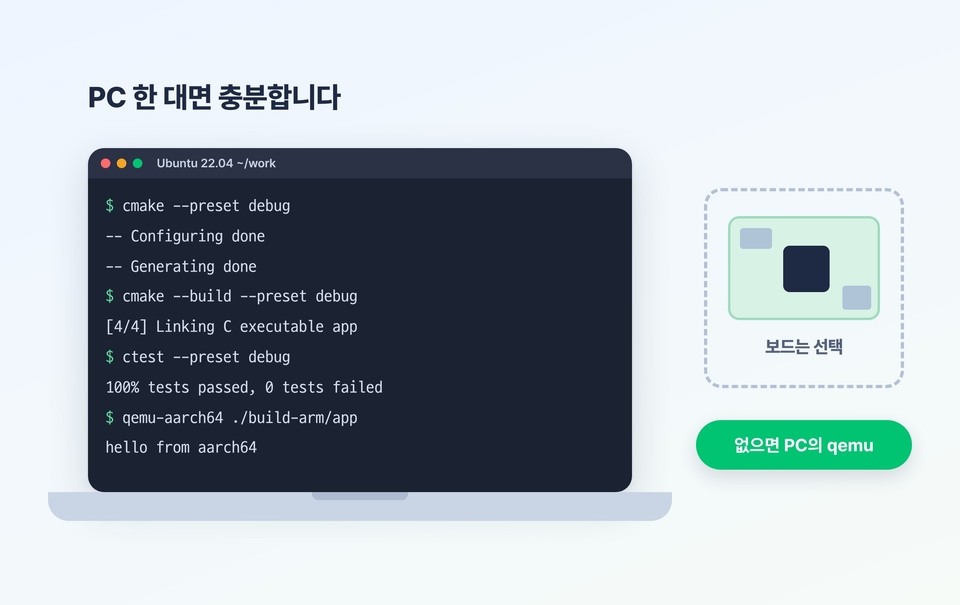
Get started with just one PC—no board needed

You don’t need to prepare any equipment in advance. All hands-on exercises are done on a single Ubuntu PC. For the cross-compilation and remote chapters, you can follow along from start to finish using qemu on your PC (Chapters 20–22). In Chapter 23, we deploy the same project to a physical Raspberry Pi 3B+ board and try remote debugging. Even if you don’t have a board, you can still follow along by watching Chapter 23.

18 years of hands-on teaching experience

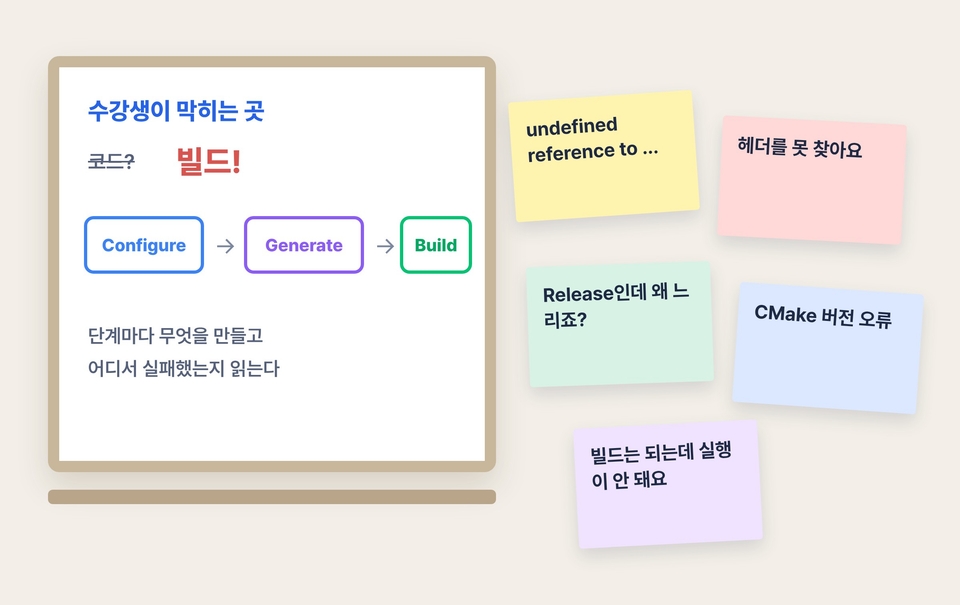
Since 2008, I have taught developers at companies and institutions such as Samsung Electronics, LG Electronics, SK hynix, and Hyundai Mobis. Surprisingly, the point where students most often get stuck in practice isn’t the code, but the build process. This course is structured to help you overcome those stumbling blocks step by step.

Developers leveling up from Makefile to CMake

This course is for those who can read CMakeLists.txt but feel unsure about designing one themselves, and those who lose time to build problems every time.

For developers who have been losing time to build issues

Toward reading and fixing configuration files and logs yourself

Any C/C++ project, regardless of field

It applies directly to software for servers, desktops, libraries, and devices.

Practice Environment

Basic course

  • Ubuntu 22.04 LTS

  • CMake 3.22, Ninja (including compatibility scenarios with CMake 4.x)

  • gcc 11 (build-essential), gdb

  • VSCode + CMake Tools, clangd

Cross-Compilation and Remote Chapters (20–23)

  • aarch64-linux-gnu-gcc, qemu-user

  • gdbserver, gdb-multiarch, Remote - SSH

  • A Raspberry Pi 3B+ or later is optional (use qemu if you don’t have one).

What this course does not cover

  • Windows, MSVC, Visual Studio generators, macOS Xcode: The hands-on exercises use Linux as the baseline. The principles are the same.

  • Package managers like Conan and vcpkg: The principles are covered using FetchContent and find_package.

  • CI (e.g., GitHub Actions), CDash, and coverage reports: Testing is covered through CTest and GoogleTest.

  • Yocto·Buildroot, flashing and debugging MCU firmware: These are specialized topics, so they are not covered.

  • C++20 modules and new CMake 4.x features: The hands-on exercises use CMake 3.22. Only 4.x compatibility issues are covered in Chapter 03.

Frequently Asked Questions

Q. Is it difficult to take the course without a Raspberry Pi?

No. You can do all the exercises with a single PC. Cross-compilation and remote development (Chapters 20–22) use qemu on your PC. Chapter 23 demonstrates the same process on a physical Raspberry Pi 3B+ board, so if you have one, you can follow along.

Q. Can I follow along on Mac or Windows?

CMake syntax and build workflows are independent of the operating system. The hands-on exercises use Ubuntu 22.04, so a VM or WSL2 is recommended. Visual Studio and Xcode generators are not covered.

Q. Is this suitable for C++ projects or server and desktop development?

Yes. This is a practical general-purpose CMake course, not one limited to a specific field. The examples are primarily in C, but the course includes a chapter on mixing C and C++, and its guidance on target design, testing, installation and packaging, and presets applies directly to C++ projects.

Recommended for
these people

Who is this course right for?

  • A developer looking to migrate a Makefile-based C/C++ project to CMake

  • A CMake beginner who copies and uses CMakeLists.txt without understanding how it works.

  • Developers who want to use VS Code as a C/C++ development environment with build and debugging support integrated.

  • A developer who wants to learn the entire workflow, from library setup to testing and package deployment.

  • Intermediate CMake users looking to learn cross-compilation, ABI management, and remote debugging

Need to know before starting?

  • Basic C or C++ syntax

  • Basic Linux Terminal Commands

Hello
This is guileschool

Career Verified

3,581

Learners

262

Reviews

281

Answers

4.7

Rating

6

Courses

I majored in electronic engineering at Inha University and worked as an embedded software developer.

I have been teaching in-person courses for 18 years since 2008. I taught developers at companies and institutions including Samsung Electronics, LG Electronics, SK hynix, Hyundai Mobis, LIG D&A, and Seoul National University, and compiled that experience into course materials.

『RTOS』(2008), 『Linux Shell』(2018), 『FreeRTOS』(2019), 『Cortex-M』(2022), 『Bootloader-Based Embedded Systems』(2023)

YouTube Giles School (https://www.youtube.com/@guileschool): Embedded Systems and Development Courses

I have also been researching Mac automation for 15 years. I teach ways to reduce repetitive tasks using Keyboard Maestro and AppleScript, and I develop and sell Greenlight, an automation plugin for Final Cut Pro. I publish the tools I create on GitHub (https://github.com/guileschool).

Captain Macbot on YouTube (https://www.youtube.com/@captainmacbot): How to use AI and automation on a Mac

Please send course requests and other inquiries to guileschool@gmail.com.

More

Curriculum

All

29 lectures ∙ (5hr 16min)

Course Materials:

Lecture resources
Published: 
Last updated: 

Reviews

Not enough reviews.
Please write a valuable review that helps everyone!

guileschool's other courses

Check out other courses by the instructor!

Similar courses

Explore other courses in the same field!

Limited time deal

$49,500.00

50%

$77.00