
강의

멘토링

커뮤니티

Design

/

3D Modeling

Open Software 2.5D CNC Makercam Lecture

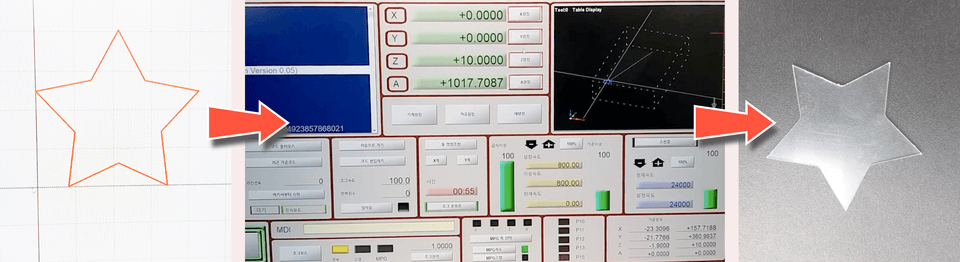
※ Various products can be manufactured using free 2.5D CNC machining-related CAM software (Makercam).

(3.7) 3 reviews

17 learners

Level Basic

Course period Unlimited

  • gremaza
CAD
CAD
CNC
CNC
CAD
CAD
CNC
CNC

What you will gain after the course

  • CNC, CAM, CAD, CNC engraving machine, woodworking, product processing,

★ The CAM software usage instructions for lectures have been revised and supplemented. This is only available offline.

Students, please leave your nickname, contact information, and email address to the instructor's email address (freesnut@naver.com). We will email you the materials you need for the class.

First, download and install Adobe Flash Player 30, then run it and open it from the file, then browse to find the makercam.swf file.

Recommended for
these people

Who is this course right for?

  • Product developers who want to turn their ideas into products by processing them with a CNC machine

  • Learners who want to make products using wood or acrylic, etc.

  • Students, job seekers, and self-employed people preparing to start a business who want to learn CNC engraving

Need to know before starting?

  • Internet

  • 2D Design

  • Illustrator, Inkscape

  • CAD, machine processing knowledge, KS system

  • Computer (HW, SW) basic knowledge

Hello
This is

152

Learners

10

Reviews

2

Answers

3.1

Rating

3

Courses

Currently operating Gremja Workshop and serving as a Section Manager in the Production and Development Department of a jewelry components manufacturing and sales company. Majored in Mechanical Design and Automation Programming with experience working in machinery-related firms. Proficient in 2D & 3D mechanical design (utilizing AutoCAD, Inventor, CATIA, Rhino, and SolidWorks). Holds certifications including Engineer General Machinery, Industrial Engineer Jig & Fixture Design, and Craftsman Electricity. Experienced in CAM software (Mastercam, PowerMill, VisualCAM, CamBam, MakerCAM), CNC equipment (MACH3, DSP controllers), 3D modeling (Blender, Rhino), and prototyping using 3D printing. Skilled in manufacturing various products using CNC engravers, laser markers, and UV printers.

(Using CAM) Prototype production using CNC equipment (MACH3, DSP controllers), 3D modeling (Blender, Rhino), and 3D printing; manufacturing various products using CNC engravers, laser markers, and UV printers.

그레마자공작소_창동_명함.jpg

Curriculum

All

14 lectures ∙ (4hr 38min)

Published: 
Last updated: 

Reviews

All

3 reviews

3.7

3 reviews

  • knh376481536님의 프로필 이미지
    knh376481536

    Reviews 1

    Average Rating 5.0

    5

    100% enrolled

    I feel a little bit

    • dobinha7351님의 프로필 이미지
      dobinha7351

      Reviews 1

      Average Rating 5.0

      5

      100% enrolled

      Thank you for the great lecture and helping beginners adapt well~~

      • gremaza
        Instructor

        Thank you for the good course review! ^^ I hope the course content will help you achieve your goals, and as I posted in the news, if you have any questions or need any materials, I will do my best to answer them. Please contact me at any time via my email (freesnut@naver.com).

    • jongsunyu7279님의 프로필 이미지
      jongsunyu7279

      Reviews 3

      Average Rating 3.3

      1

      100% enrolled

      ㅠㅠ

      • gremaza
        Instructor

        Are you not satisfied with the results of the lecture? MakerCam is a very good free cam software and I also use it when I need it. If you have any questions, please leave a message on the bulletin board. I also accept emails ^^

    $38.50

    gremaza's other courses

    Check out other courses by the instructor!