GSAP Guide for Web Animation Part.03
kindtiger
The flower of web animation, scroll animation! Learn about ScrollTrigger, which allows you to use GSAP more powerfully.
Basic
scrolltrigger, gsap, Interactive Web
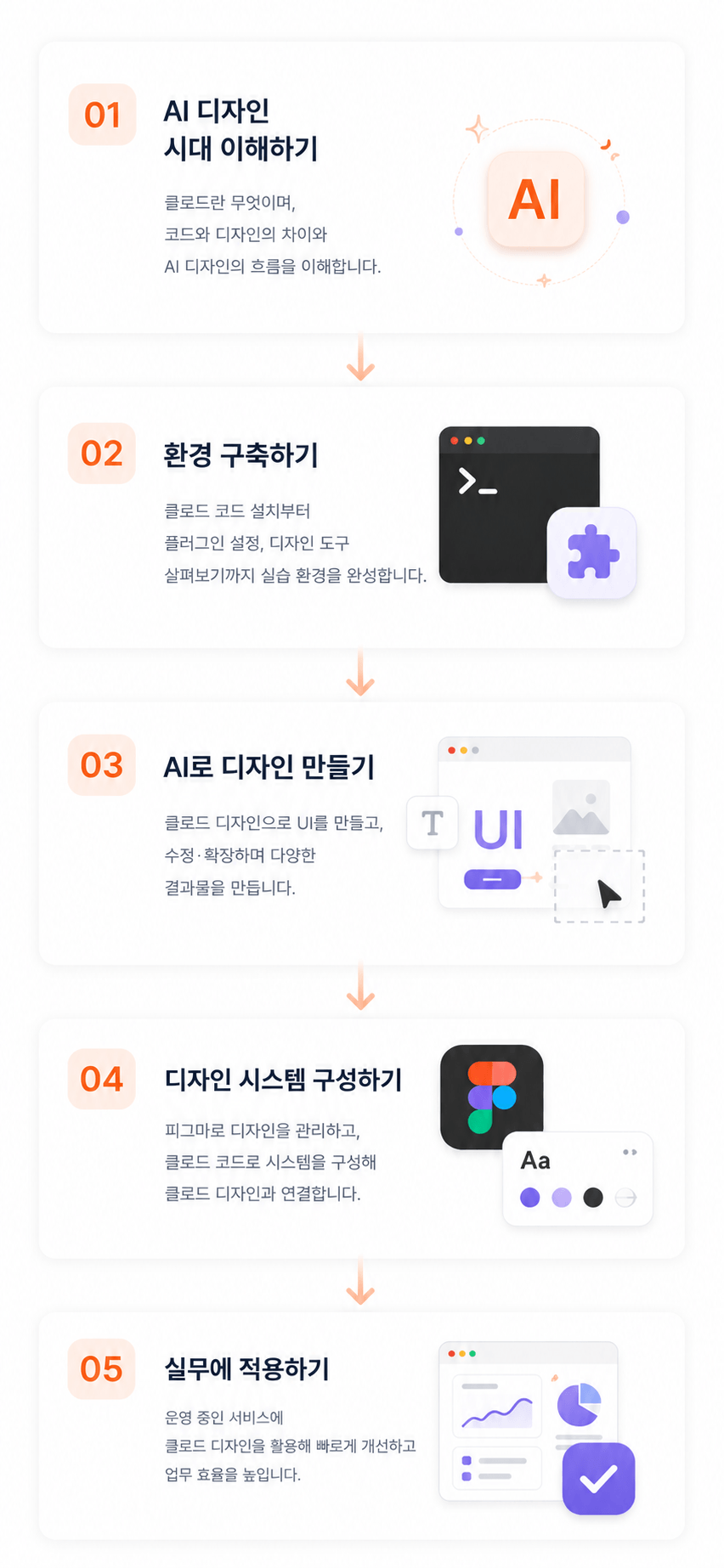
Even if you are not a major or a designer, you will learn how to directly create and modify web UIs, proposals, and design systems using Claude Design and Figma. To ensure immediate application in practice, the course proceeds step-by-step with a focus on hands-on practice—covering everything from the differences between Claude Code and Claude Design to installation, plugin utilization, component-based UI production, design modification, and methods for applying them to live services. This lecture is designed to help developers, planners, and marketers who found design tools difficult to experience rapid result-making through AI and component-based workflows.
308 learners
Level Beginner
Course period Unlimited
Reviews from Early Learners
5.0
동해바다
Since this Claude design course came out so early, I was going to ignore it thinking there wouldn't be much to it, but I bought and watched it anyway once I saw it was Beom-sam's lecture. I believe Beom-sam's lectures are rare and valuable because there aren't many people who can perform both design and web development at such a high level. I look forward to the next lecture.
5.0
전성진
This is a useful lecture for everyone from beginners to professionals. It can be applied to real-world work immediately without any issues, and I think it will also improve work efficiency. Thank you.
5.0
황찬욱
The diction is good, and the content is great too.
Learn how to directly create and modify web/app UI using Claude Design and Figma, even if you are not a designer.
Hands-on experience in quickly creating proposals, landing pages, and interactive web screens with AI.
Understanding workflows to increase design productivity using Claude Code and plugins
Experience an AI-based collaboration method where developers, planners, and marketers can directly create design outputs.
Learn how to quickly create and improve UI drafts for an active service using Claude Design.
Non-majors
Solo entrepreneurs
Designers
Using Claude Design and Figma, you will be able to directly create and edit web UIs, proposals, landing pages, and interactive screens,
while naturally learning design system structures and professional workflows.
Furthermore, even if you have no design experience,
How to quickly visualize the screens you want
How to request designs from AI
How to efficiently manage services currently in operation
You will experience these through practice-oriented learning.
Apply the design system using Claude Design and manage consistent design deliverables.
Automatically generate a design system using Figma and Claude Design, then apply it to Claude Design.
Learn how to use AI to create professional proposals quickly and efficiently.
From content structure planning to slide design, data visualization, and presentation material composition, you will master the proposal creation process that can be applied immediately in practice.
slide design
Learn how to plan and design detail pages that capture users' attention.
Experience the entire process of creating detail pages that can be used in actual marketing, from product analysis and section composition to visual design.
detail page design
Create an immersive web portfolio using scroll animations and interactions.
Learn how to create design drafts using AI and apply the latest web technologies to complete a differentiated portfolio.
portfolio web design
Create a next-generation web portfolio featuring 3D objects and interactions using Three.js and AI tools.
You can implement your own unique portfolio through 3D model utilization, animation composition, and user experience design.
portfolio web design
I have been conducting various practical projects and education centered on web design, front-end development, and design systems, and I have often seen many people easily give up or feel difficulty when faced with the field of design.
And recently, with the emergence of Claude-based design workflows,
I have come to feel that the very way these problems are solved is changing completely.
We have now entered an era where even those who did not major in design
can create and edit screens and quickly visualize ideas together with AI.
Quickly turning service ideas into screens
Some people are creating proposals themselves,
Some are reducing the time spent on repetitive design tasks,
Some are now able to validate their results even faster.
Therefore, this lecture is not just about teaching you how to use AI tools,
This lecture was created to help anyone in the AI era express their ideas directly and
quickly turn them into tangible results.
In particular, it is structured around theory and practice so that even those without design experience
can start without burden,
Through this course, I hope more people will stop viewing design as just a difficult professional field,
I hope you can experience the process of bringing your own ideas to life!
Operating System and Version (OS): Windows, macOS
Tools used: Claude account (Paid), Figma account (Paid)
Figma Slides
It is okay even if you don't have any design knowledge.
It is structured so that even beginners who are new to Figma and Claude Design can follow along.
If you are interested in web/app services and UI, you will enjoy the course even more.
Basic computer literacy and the ability to use the internet are sufficient.
Claude and some AI tools require a paid plan.
Practice sessions can be conducted in both Mac and Windows environments.
Who is this course right for?
Developers, planners, and marketers who are not designers but need to create web/app screens or proposals themselves
Working professionals who feel frustrated because they need to request a designer or an external contractor for even a single design modification
Frontend developers who want to improve development and design collaboration efficiency using Figma and design systems
Startup practitioners and solo entrepreneurs who need to quickly create UI drafts, landing pages, and proposals.
Current and aspiring designers who want to increase design productivity using AI
PMs and service planners who want to directly improve or test the UI of the services they are operating.
Non-majors and beginners who haven't been able to start because design tools felt too difficult.
Developers and creators who want to connect Claude Code and Claude Design to their practical workflows.
Need to know before starting?
You can learn even if you are new to AI.
You can learn even if you don't know anything about design.
You can learn even if you don't know Figma.
We use Claude's paid model in class (Pro or higher)
Career Verified
4,903
Learners
284
Reviews
317
Answers
4.9
Rating
6
Courses
Hello, I'm Beom-ssaem, an instructor who enjoys creating lectures on design and development 🙂 For online/offline lecture inquiries, please contact me at seonbeom2@gmail.com 🙇♂
All
27 lectures ∙ (4hr 8min)
Course Materials:
All
27 reviews
4.7
27 reviews
Reviews 2
∙
Average Rating 5.0
Edited
Reviews 5
∙
Average Rating 5.0
Reviews 2
∙
Average Rating 5.0
Reviews 19
∙
Average Rating 4.9
5
Since this Claude design course came out so early, I was going to ignore it thinking there wouldn't be much to it, but I bought and watched it anyway once I saw it was Beom-sam's lecture. I believe Beom-sam's lectures are rare and valuable because there aren't many people who can perform both design and web development at such a high level. I look forward to the next lecture.
Reviews 5
∙
Average Rating 3.6
Check out other courses by the instructor!
Explore other courses in the same field!