inflearn logo

Claude Design: Easy to Learn Even for Non-Majors

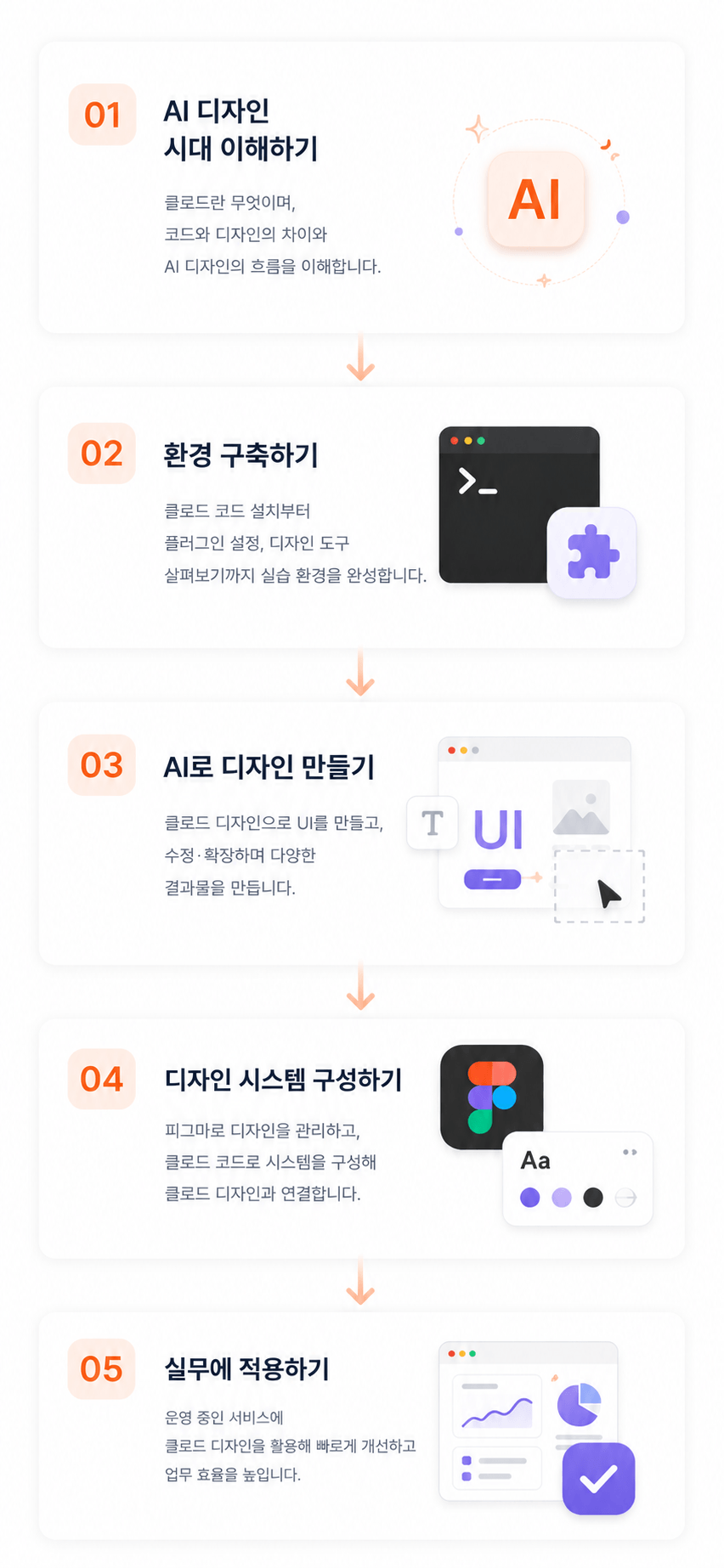
Even if you are not a major or a designer, you will learn how to directly create and modify web UIs, proposals, and design systems using Claude Design and Figma. To ensure immediate application in practice, the course proceeds step-by-step with a focus on hands-on practice—covering everything from the differences between Claude Code and Claude Design to installation, plugin utilization, component-based UI production, design modification, and methods for applying them to live services. This lecture is designed to help developers, planners, and marketers who found design tools difficult to experience rapid result-making through AI and component-based workflows.

2 learners are taking this course

Level Beginner

Course period Unlimited

Figma
Figma
terminal
terminal
figma-plugin
figma-plugin
AI Agent
AI Agent
claude
claude
Figma
Figma
terminal
terminal
figma-plugin
figma-plugin
AI Agent
AI Agent
claude
claude

What you will gain after the course

  • Learn how to directly create and modify web/app UI using Claude Design and Figma, even if you are not a designer.

  • Hands-on experience in quickly creating proposals, landing pages, and interactive web screens with AI.

  • Understanding workflows to increase design productivity using Claude Code and plugins

  • Experience an AI-based collaboration method where developers, planners, and marketers can directly create design outputs.

  • Learn how to quickly create and improve UI drafts for an active service using Claude Design.


Recommended for these people

Non-majors


Solo entrepreneurs


Designers


After the course, you will not only learn how to use AI tools, but you will also understand a new way of working regarding
"how to quickly create and manage designs."

You will be able to directly create and edit web UIs, proposals, landing pages, and interactive screens using Claude Design and Figma,
while naturally learning design system structures and practical workflows.

Furthermore, even if you have no prior design experience,

  • How to quickly visualize the screens you want

  • How to request designs from AI

  • How to efficiently manage services currently in operation


You will experience these through hands-on, practice-oriented learning.


Understanding the course content at a glance


Features of this course

You will learn how to produce and manage efficient designs by using Claude Design and Claude Code together.


Applying a design system to Claude Design

Apply design systems using Claude Design and manage consistent design deliverables.


Automatic generation of design systems using Claude code

Automatically generate a design system using Figma and Claude Design, then apply it to Claude Design.

What you will learn

Proposal Design

Learn how to use AI to create professional proposals quickly and efficiently.
From content structure planning to slide design, data visualization, and presentation material composition, you will master a proposal creation process that can be applied immediately in practice.

slide design

Detail Page Design

Learn how to plan and design detail pages that capture the user's attention.
Experience the entire detail page production process, from product analysis and section composition to visual design, which can be directly applied to actual marketing.


detail page design

Interactive Web Portfolio

Create an immersive web portfolio using scroll animations and interactions.
Learn how to create design drafts using AI and apply the latest web technologies to complete a differentiated portfolio.

portfolio web design

3D Web Portfolio

Create a next-generation web portfolio featuring 3D objects and interactions using Three.js and AI tools.
You can implement your own unique portfolio through 3D model utilization, animation composition, and user experience design.

portfolio web design

The person who created this course


I have been conducting various practical projects and education sessions centered on web design, front-end development, and design systems, and I have often seen many people easily give up or feel difficulty when faced with the field of design.

And with the recent emergence of Claude-based design workflows,
I have come to feel that the very way these problems are solved is changing completely.

We have now entered an era where even those who did not major in design can
create and edit screens and quickly visualize ideas together with AI.

  • Quickly turning service ideas into screens and

  • Some people are creating proposals themselves,

  • some can reduce the time spent on repetitive design tasks,

  • And some have become able to validate their results even faster.

Therefore, this lecture is not simply about teaching how to use AI tools,

This lecture was created to help anyone in the AI era express their ideas directly and
quickly turn them into results.


In particular, it is structured around theory and practice so that even those without design experience can
start without feeling burdened,

Through this course, I hope more people will stop viewing design as just a difficult, professional field and instead,

I hope you can experience the process of bringing your own ideas to life!

Notes before taking the course

Practice Environment

  • Operating System and Version (OS): Windows, macOS

  • Tools used: Claude account (Paid), Figma account (Paid)


Learning Materials

  • Figma Slides


Prerequisites and Important Notes

  • It's okay if you don't have any design knowledge.

  • It is designed so that even beginners who are new to Figma and Claude Design can follow along.

  • If you are interested in web/app services and UI, you will find this course even more enjoyable.

  • Basic computer skills and the ability to use the internet are sufficient.

  • Claude and some AI tools require a paid plan.

  • The practice sessions can be conducted in both Mac and Windows environments.

Recommended for
these people

Who is this course right for?

  • Developers, planners, and marketers who are not designers but need to create web/app screens or proposals themselves

  • Working professionals who feel frustrated because they need to request a designer or an external contractor for even a single design modification

  • Frontend developers who want to improve development and design collaboration efficiency using Figma and design systems

  • Startup practitioners and solo entrepreneurs who need to quickly create UI drafts, landing pages, and proposals.

  • Current and aspiring designers who want to increase design productivity using AI

  • PMs and service planners who want to directly improve or test the UI of the services they are operating.

  • Non-majors and beginners who haven't been able to start because design tools felt too difficult.

  • Developers and creators who want to connect Claude Code and Claude Design to their practical workflows.

Need to know before starting?

  • You can learn even if you are new to AI.

  • You can learn even if you don't know anything about design.

  • You can learn even if you don't know Figma.

  • We use Claude's paid model in class (Pro or higher)

Hello
This is kindtiger

Career Verified

4,564

Learners

251

Reviews

309

Answers

4.9

Rating

6

Courses


Hello, I'm Beom-ssaem, an instructor who enjoys creating lectures on design and development 🙂 For online/offline lecture inquiries, please contact me at seonbeom2@gmail.com 🙇‍♂


More

Curriculum

All

24 lectures ∙ (3hr 42min)

Published: 
Last updated: 

Reviews

Not enough reviews.
Please write a valuable review that helps everyone!

kindtiger's other courses

Check out other courses by the instructor!

Similar courses

Explore other courses in the same field!

Limited time deal

$19.80

48%

$38.50