inflearn logo

Beginning Kubernates-Based MSA (with Spring Boot) - Part 1

Covers the topics you need to know to work on projects using Kubernetes.

71 learners are taking this course

Level Basic

Course period Unlimited

Kubernetes
Kubernetes
CI/CD
CI/CD
JWT
JWT
Kafka
Kafka
MSA
MSA
Kubernetes
Kubernetes
CI/CD
CI/CD
JWT
JWT
Kafka
Kafka
MSA
MSA

What you will gain after the course

  • CI/CD Automation Using GitOps

  • How to Operate Multiple Microservices on Kubernetes

  • Circuit Breaker and API Gateway

  • How to Install and Use Kubernetes Directly on AWS EC2

  • How to manage configuration values through AWS Secrets Manager/Parameter Store

Essential Knowledge for Implementing MSA with Kubernetes - PART 1

So you can try Microservice Architecture even on your own

  • Let’s install and run Kubernetes on Docker Desktop.

  • Let's also build a CI/CD pipeline to automate everything.

  • Let’s also communicate between microservices through Kafka.

  • Handle JWT authentication with Redis

  • Let's manage configuration information with AWS Secrets Manager.

  • Let’s install and use K3s directly on AWS EC2.


Beginning Kubernates-Based MSA (with Spring Boot) - PART 2

Recommended for those who:

Developers who want to build their own MSA

Developers who want to experience the process step by step firsthand, rather than just learning about theoretical MSA.

Job seekers who need a standout portfolio

Job seekers or employment-preparation candidates who want to build distinctive development experience and a portfolio.

Kubernetes beginners

Developers who want to get started with Kubernetes but don’t know how.

After completing the course,

  • Improved understanding of the development process when using Kubernetes

  • Implementing a safer service state using circuit breakers and other mechanisms


  • Implement MSA using existing code in other environments, such as AWS EC2.

  • Develop the ability to think through the design of the entire system before having AI complete it.


What you will learn in PART 1

Topic (1) CI/CD Pipeline

GitOps - 'Git as the Single Source of Truth']

Control operations and deployments centered around Git

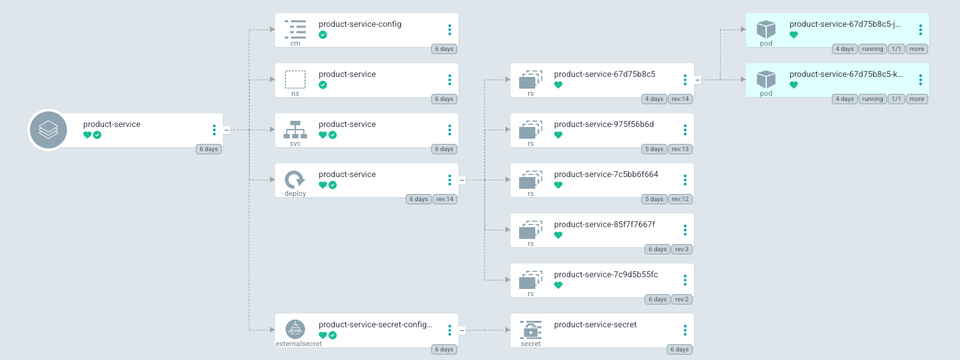
Complete the automation in Kubernetes using ArgoCD.

Automating container image tag/version management

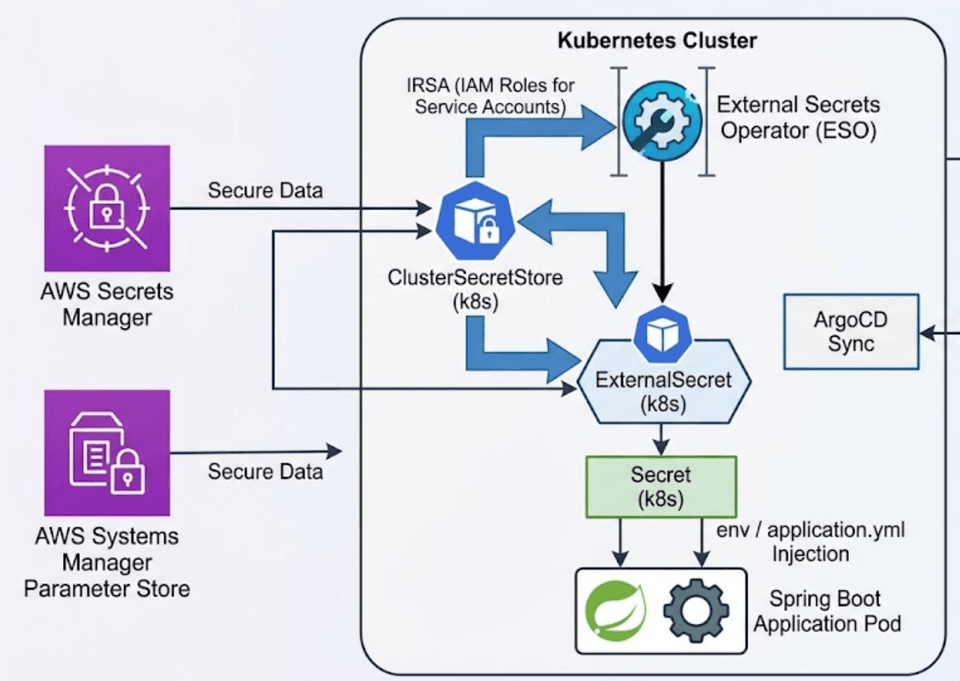
Section (2) Secrets and ESO

Every development project requires configuration, and configuration values must be managed securely.

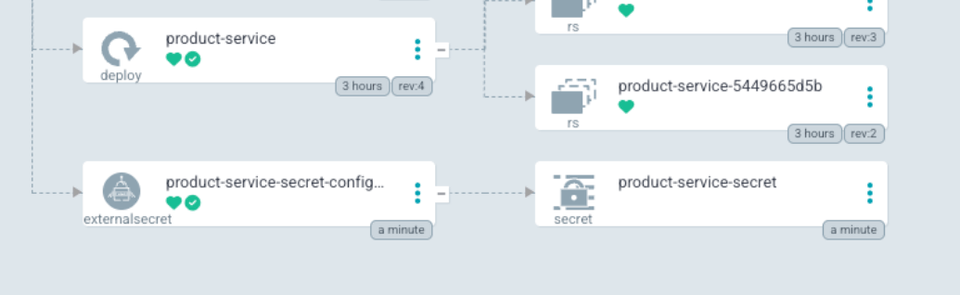
Kubernetes Secrets, External Secrets, ClusterSecretStore

How to Use AWS Secrets Manager and Systems Manager

How to safely manage and deploy configuration values in any environment without modifying the code

Introducing Stakater Reloader — Automatically apply changed configuration values without downtime

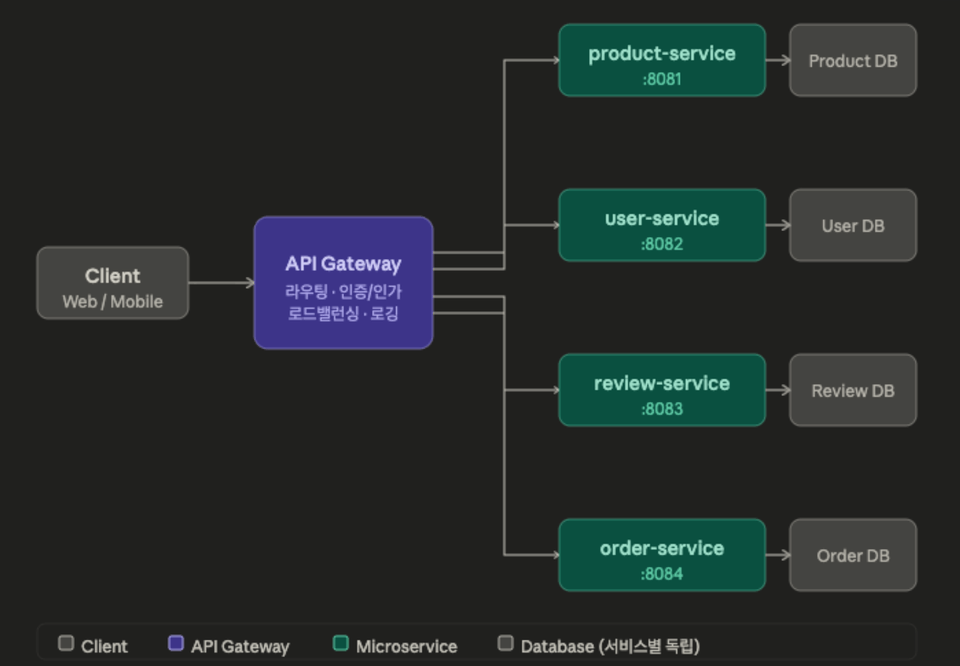
Section (3) API Gateway & Circuit Breaker

Unify multiple microservices through API Gateway routing.

Block services that continue to experience failures - Circuit Breaker Configuration

Understanding the Differences in Authentication Methods Between Monolithic Architecture and MSA

External calls through Traefik, a Kubernetes Ingress Controller


Section (3) Kubernetes on AWS EC2

Can an MSA developed in a local environment be used in another environment?

Install EC2 on AWS (t3.medium)

Let’s install K3s and deploy the microservices we’ve written so far.


Q. What is the practice environment?

Operating system: This course was created on a Mac, but the exercises can also be completed on Windows.

Since Kubernetes runs on Docker Desktop, an environment with at least 16GB of memory is recommended.


Q. Can I take the course without knowing Java or Spring Boot?

The reason experience with Java or Spring Boot is required is to understand the explanations in the course.

Although there is not much code for actual development, knowledge of web programming is essential.

Notes Before Taking the Course

Practice environment

  • Operating System and Version (OS): macOS

  • Tools: VSCode (or another IDE), JDK21, and an AWS account are required.

  • PC specifications: A machine with 16GB or more of RAM capable of running Docker Desktop

Recommended for
these people

Who is this course right for?

  • A developer who wants to get started with Kubernetes

  • A developer looking to learn about approaches to MSA

  • A development team that wants to implement an MSA by bringing together independent services

Need to know before starting?

  • Spring Boot

  • Web

Hello
This is zk202308a5410

Career Verified

2,450

Learners

185

Reviews

294

Answers

4.8

Rating

7

Courses

Gumonggage Coding Team is a community established in 2015 for people working in development-related fields to gather.

The lectures are currently being conducted by Manager Cookie, who is the operator of the Guman-gage Coding Group.

I began my career in development in 2000 and have experience working across venture companies, SMEs, large corporations, and as a freelancer.

Since the 2010s, I have been primarily focusing on corporate training and consulting.

Naver Cafe

I have development experience with corporations, large enterprises, and as a freelancer. Since the 2010s, my primary focus has been on corporate training and consulting. Naver Cafe

Major Publications

Spring Web Project Learned Through Code

Learning Spring Boot Through Code

Learning React through Code

Implementation of RESTful API Server

Spring 6 Legacy Project

Java Web Development Workbook

React Native in Action (Translation)

Development/Lecturing

Worked at Samsung SDS Development Team

Worked at SK Customer Happiness Co., Ltd.

Corporate lectures for companies including KT, SK, POSDATA, Kyobo Life, Shinsegae, Asiana, National Health Insurance Service, and more.

More
Published: 
Last updated: 

Reviews

Not enough reviews.
Please write a valuable review that helps everyone!

zk202308a5410's other courses

Check out other courses by the instructor!

Similar courses

Explore other courses in the same field!

Limited time deal

$11,880.00

70%

$30.80