(To be reopened as a new course) Building Your Own AWS Cloud Network - Basics
We will build a simple cloud network using AWS's basic core network services, understand the structure of the architecture and the flow of traffic, and develop the ability and confidence to implement an actual network.
Describes technologies and related services for implementing AWS cloud networks.
Understand network and traffic flow through architecture diagrams
Build your own real cloud network
AWS's main network services Get used to it by trying it out yourself!
📖 Course Introduction
What can I learn?
Learn the basics of using AWS's major network services and how to understand and configure the AWS cloud network .
How was the lecture created?
When working with the AWS cloud in the field, many people typically first consider EC2 for servers, S3 for storage, and RDS for databases when building AWS-based architectures . They also give considerable thought to how to apply emerging technologies like Docker, Containers, and Kubernetes, which are gaining popularity these days.
Of course, these are critical services for the architecture to function, but they don't operate independently. As with all IT infrastructure, all AWS services are ultimately connected through a network , and traffic flows and communicates through this network to ensure the architecture's true operation. In fact, a significant number of system errors and failures are often attributed to network-related services.
To this end, we've prepared a workshop lecture that will teach you how to build a simple cloud network using AWS's basic core network services, understand the architecture structure and traffic flow, and implement an actual network yourself.
What can you expect?
You can develop the ability to understand the structure and traffic flow of AWS architecture and implement an actual AWS network yourself .
📖Course Features
What are the features?
The overall curriculum focuses on how to utilize AWS's network services at a fundamental level .
Rather than explaining concepts or theories, the lecture is structured around hands-on practice of configuring and using AWS network services .
We'll proceed slowly and easily so that even those unfamiliar with AWS network services can follow along.
You can quickly set up a basic practice environment using the CloudFormation template code provided, allowing you to easily review only the key contents of a specific chapter.
Please note that since this is a hands-on workshop lecture , we do not provide in-depth explanations of knowledge or theory for individual services.
Who is this course for?
Amazon Web Services (AWS) Just started AWS beginner
AWS network configuration and If you are interested in related services, For those unfamiliar with
AWS's main network services How to actually use it Anyone who wants to learn
📖Learning Content
1. Understanding VPC Networks
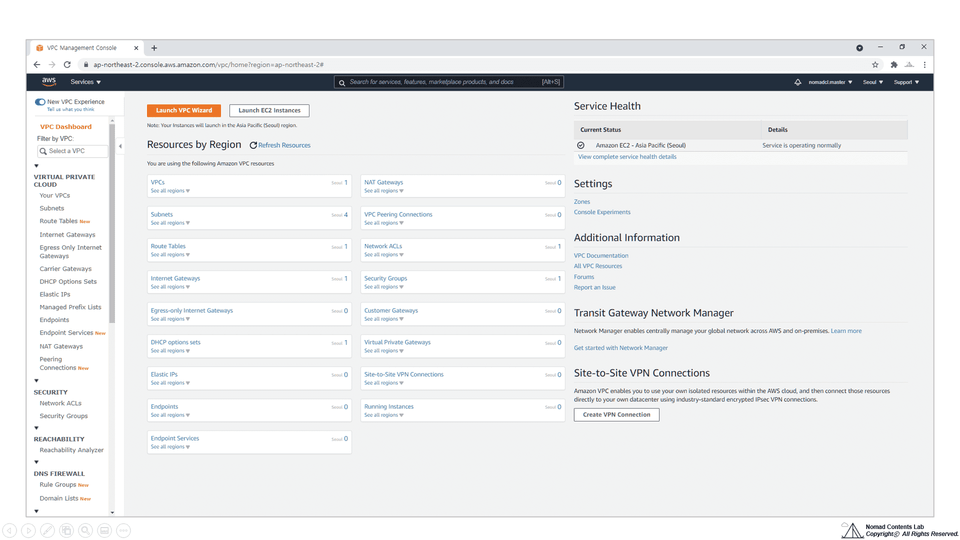
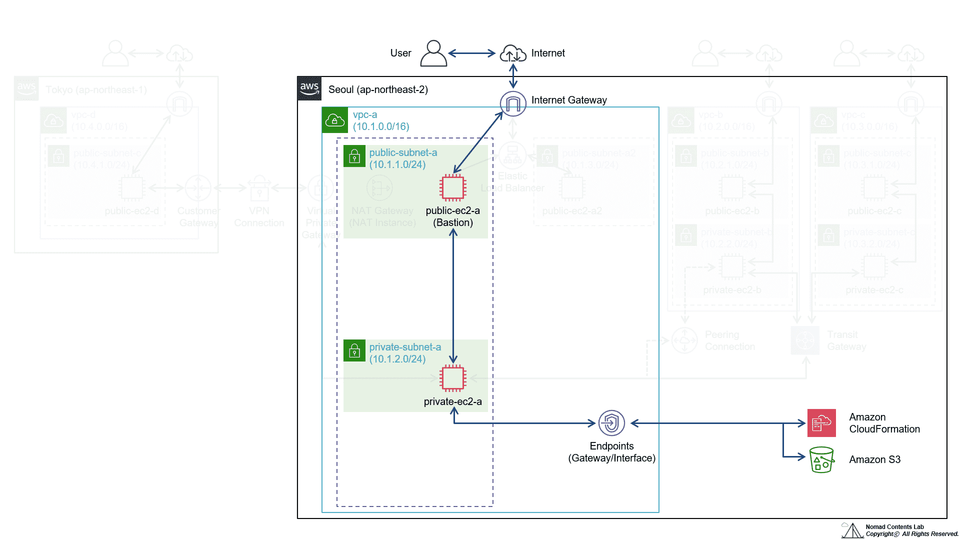
Let's take a look at the Default VPC and briefly understand the key elements that make up AWS's VPC: VPC, Subnet, Internet Gateway, Route table, Security group, and Network ACL.
2. Simple Public Network Configuration
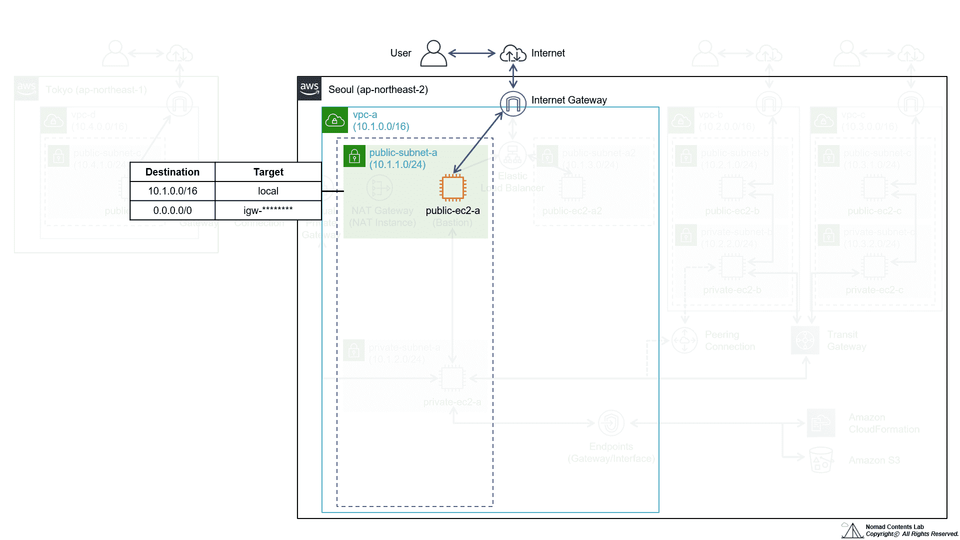
We will configure the core elements of VPC, such as Subnet, Internet Gateway, and Route table, and create an EC2 instance within the VPC network to create a simple public network that can communicate directly with the outside world.
3. Control network communication through security groups and network ACLs
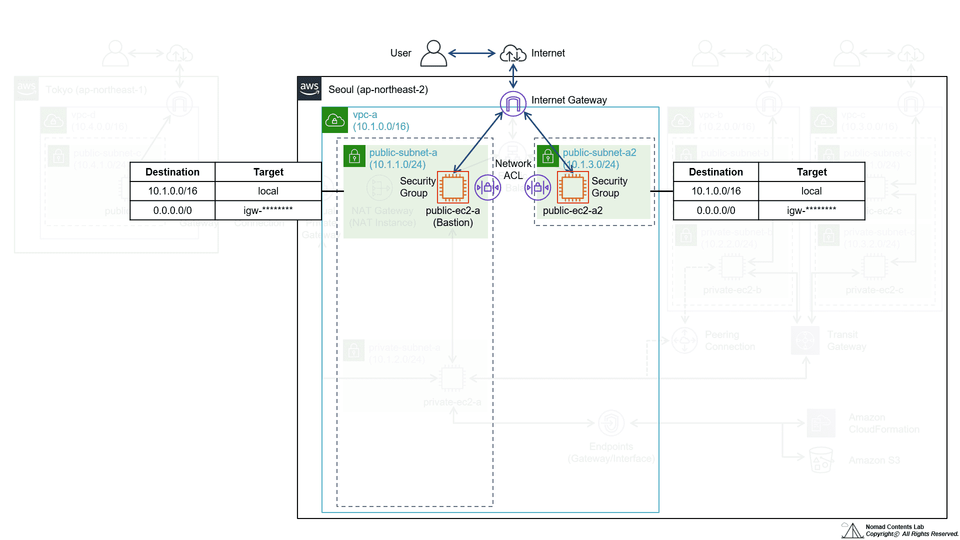
Learn how to control network traffic by configuring security groups and network ACLs, which are key elements of VPC, and setting rules.
4. Configuring external communication for private networks
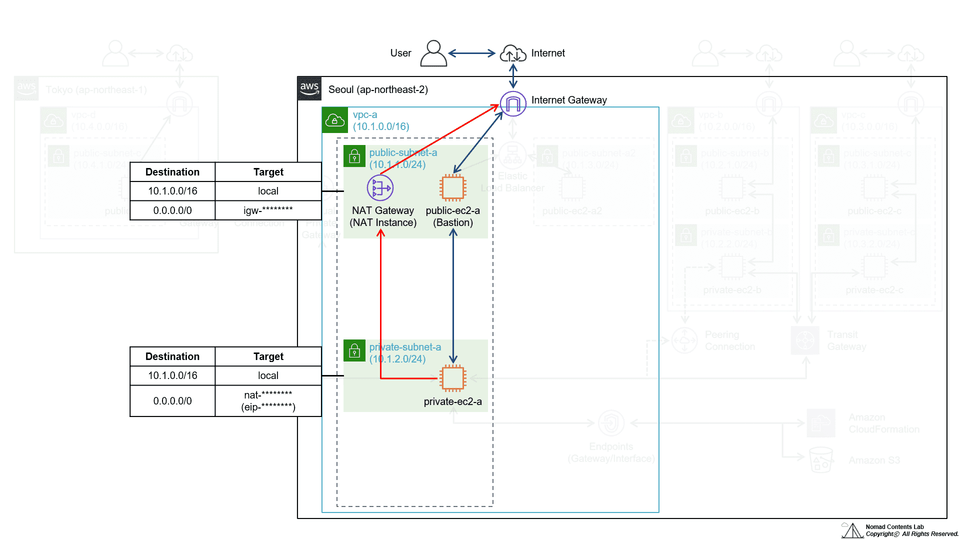
Create a private network with limited direct communication with the outside world, and configure an environment in which EC2 instances located in the private network can communicate with the outside world.
5. Accessing and Managing AWS Services Through VPC Endpoints
Configure a network that allows EC2 instances located in a private subnet to access and use AWS services outside of the VPC using VPC Endpoints (Gateway Endpoints, Interface Endpoints).
6. Configuring a redundant network using Elastic Load Balancer
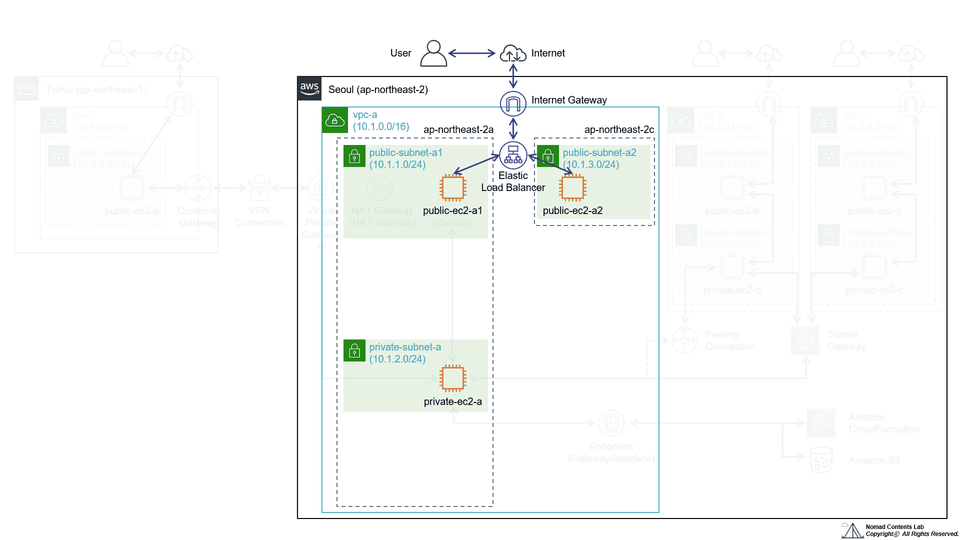
We use Elastic Load Balancer (Application Load Balancer, Network Load Balancer) to redundantly manage the network and implement path-based routing that distributes traffic coming into the Load Balancer to specific targets according to specific conditions.
7. Connecting VPC networks through VPC Peering
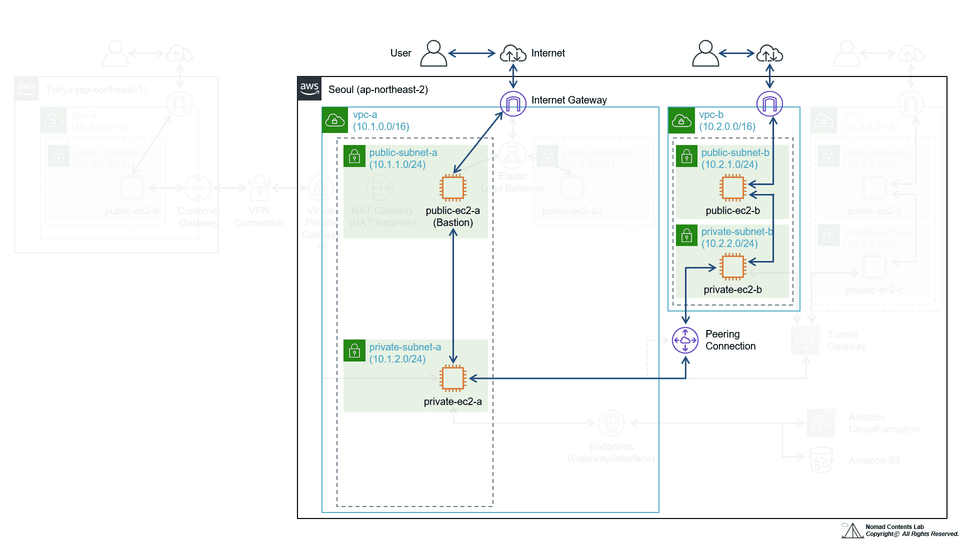
Use VPC Peering to connect two different VPCs within the same account and region and expand the network to enable communication.
8. Connecting VPC networks through Transit Gateway
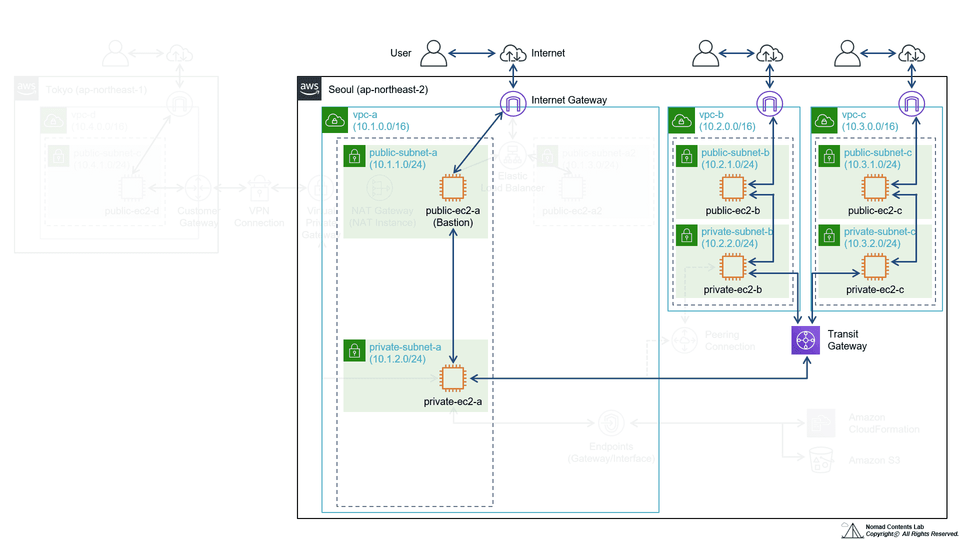
Use a transit gateway to connect three different VPCs within the same account and region and configure an expanded network that can communicate.
9. Build a Site-to-Site VPN with OpenSwan
Build a more extended network by connecting your virtual external network to the AWS network using OpenSwan and Site-to-Site VPN services.
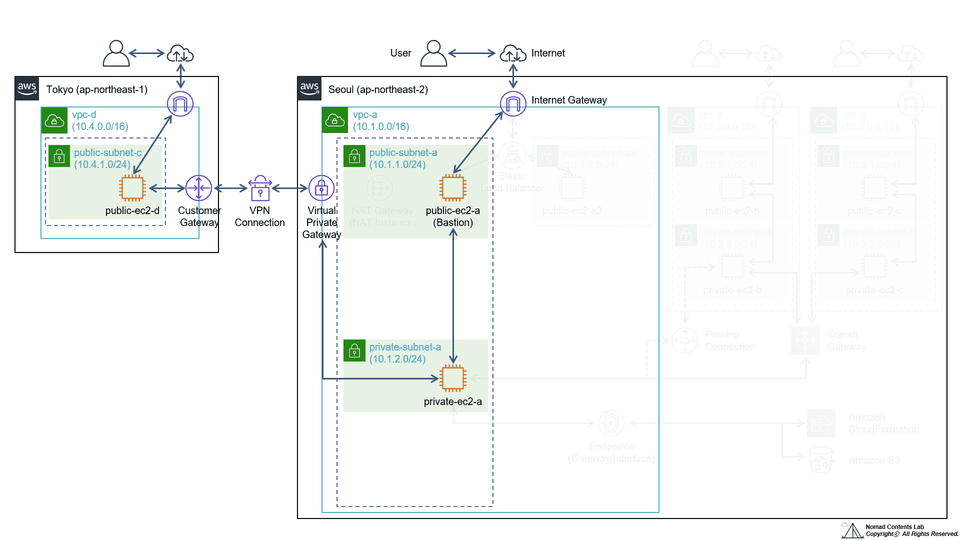
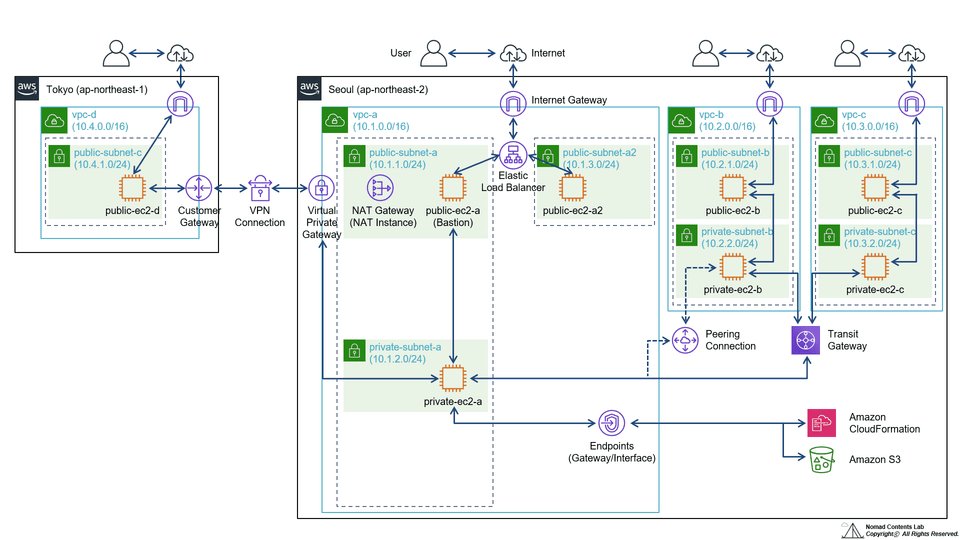
📣 By the end of this chapter, you will be able to build an architecture like this!
Of course, it is difficult to implement specific web services or functions in this state, but by using various services and related software packages in this architecture, it is possible to implement a complete web service.
💬Q&A
Q. How much do I need to know about the AWS Cloud?
It's sufficient to have a basic understanding of the services covered in this course: EC2, VPC, ELB, VPC Peering, Transit Gateway, and Site-to-Site VPN. (For example, a VPC is a logically isolated virtual private network. An Elastic Load Balancer distributes network traffic.)
Q. What level of content is covered in the lectures?
This course's difficulty level ranges from basic to fundamental, and you'll learn the fundamental concepts and usage methods of AWS's major network-related services.
Q. Do I also need knowledge of networking or Linux?
Even if you have no prior knowledge or experience with networks or Linux, you should still be able to follow the overall exercises without much difficulty. (Of course, since this course covers networks, a basic understanding of both is helpful.)
Q. How much does it cost to practice using a personal account?
If you create a new AWS account for this course, you can complete the training for just a few thousand won. As you know, AWS charges for all services based on the time used. However, creating a new account allows you to save on training costs by taking advantage of the free tier, which allows you to use key services, including EC2 instances, for one year. (※ Services used in this course are not eligible for the free tier: NAT Gateway, Network Load Balancer, Transit Gateway, VPN.)
✒️Knowledge sharer
Noamd Contents Lab has been working in various IT-related fields for a long time and has been creating content to share the experience and knowledge we have gained with many people. :)
Recommended for these people
Who is this course right for?
For those new to AWS
For those who are interested in or unfamiliar with AWS network configuration and related services
For those who want to learn how to use AWS's main network services in practice
Need to know before starting?
You will need to understand the concepts of major AWS services (EC2, VPC, ELB, VPC Peering, Transit Gateway, Site-to-Site VPN), but since this is a lecture that concretizes the concepts through practice, it is okay to understand only the basic concepts.
Hello This is
2,622
Learners
252
Reviews
129
Answers
4.8
Rating
2
Courses
Noamd Contents Lab creates and shares content based on the experience and knowledge gained from performing IT-related tasks across various fields for a long time. :)








![[Deep-Up_ONE] Understanding Corporate IT Systems in One GoCourse Thumbnail](https://cdn.inflearn.com/public/files/courses/341417/cover/ai/2/bfab075d-63e3-4b79-a37b-000e4e1d1549.png?f=avif&w=420)


