

inflearn logo

AI Basics Before Delegating Work to AI — From Choosing Tasks to Delegate to Hands-On Agent Workflow Design

For office workers unsure what to delegate to AI and how to instruct it, we provide practical guidelines based on experience with 16 scheduled tasks.

5 learners are taking this course

Level Beginner

Course period Unlimited

AI
AI
ChatGPT
ChatGPT
Business Productivity
AI Agent
AI Agent
claude
claude
AI
AI
ChatGPT
ChatGPT
Business Productivity
AI Agent
AI Agent
claude
claude

What you will gain after the course

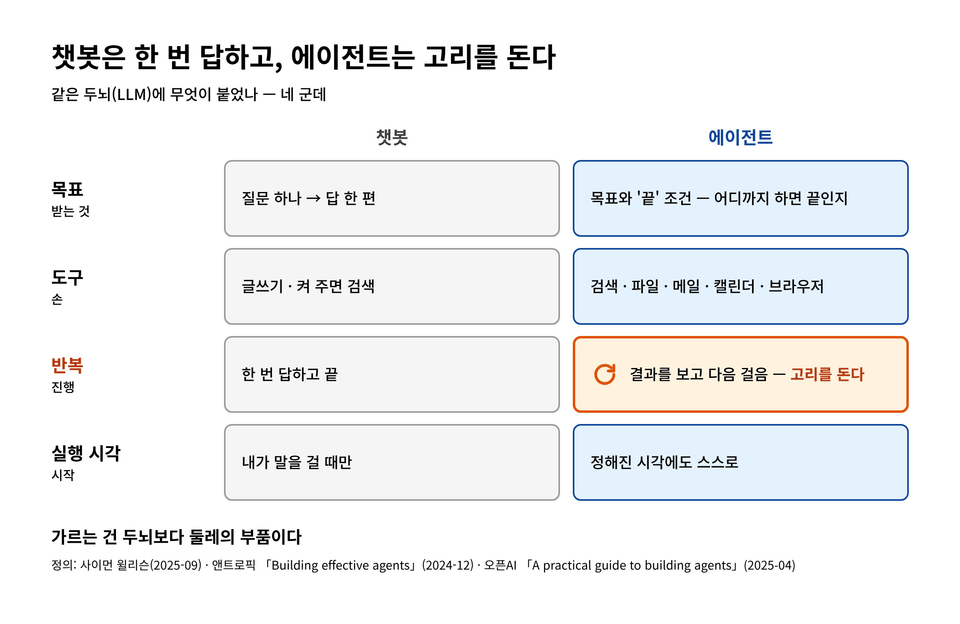
  • The Difference Between Answering AI and Working AI (Agents) — What Can You Delegate?

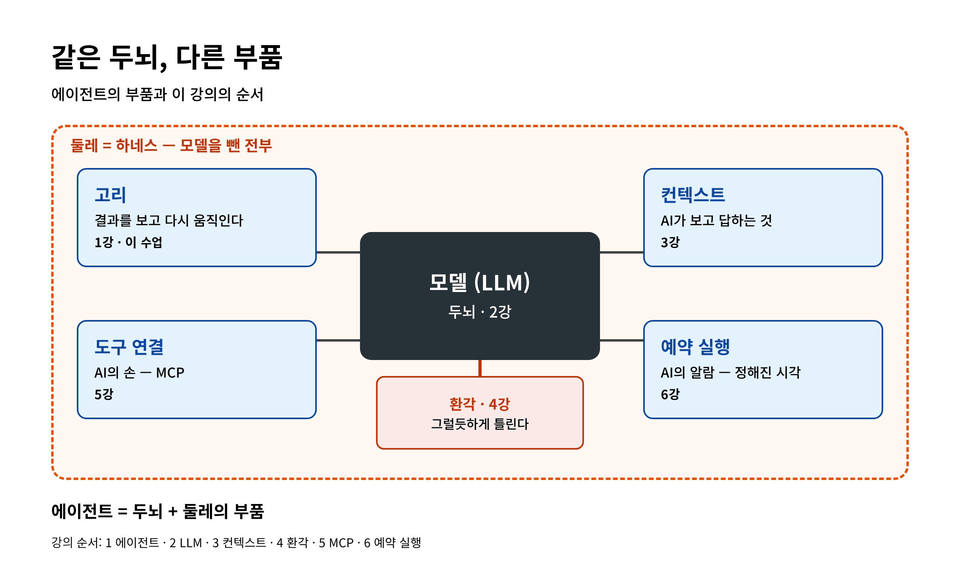
  • LLM · Context · Hallucinations · Tokens — Why AI Gets Things Plausibly Wrong and Where to Prevent It

  • MCP · Scheduled Execution · RAG · Memory — How AI interacts with my files and apps, acts autonomously, and remembers

  • How to Use Prompts as Work Instructions · Choosing the Right Model for the Task · Deciding Whether to Distribute the Work Among Multiple AIs

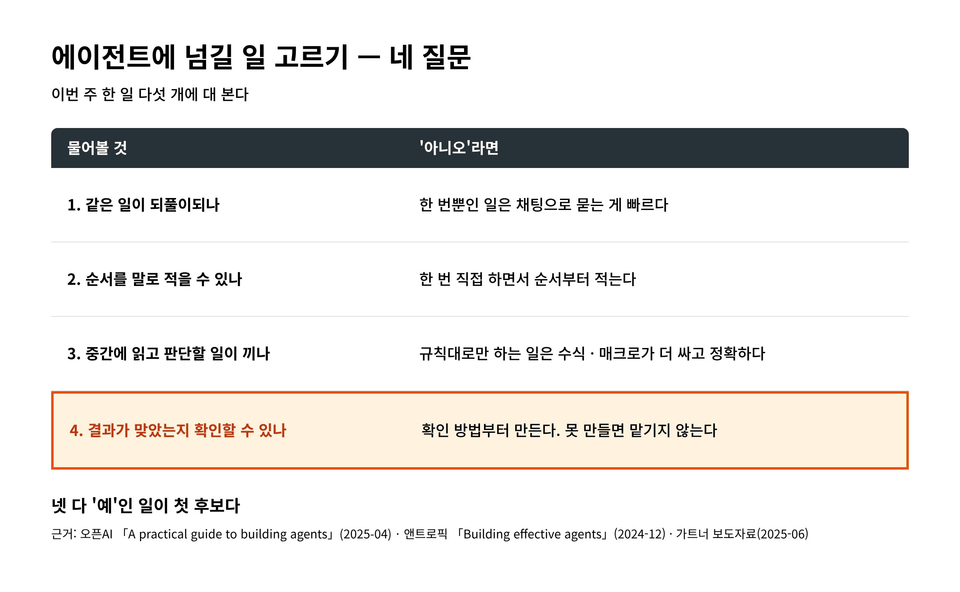
  • Practical exercise outcome — one “Task Delegation Card” created by screening five tasks from the past week using four questions

If you’ve been told, “Try automating some of our team’s work with AI,”


If you open the AI interface first, you’re unlikely to have less work even a month later. That’s because you’re opening the tool before deciding what to delegate.


This course covers what comes before that. You’ll understand 12 principles—without any development knowledge—explaining why AI gives irrelevant answers, why it doesn’t act on its own, and why it makes plausible-sounding mistakes. In the final exercise, you’ll turn one task from your work that you can delegate to AI into a single card.


▣ Figure 1


Recommended for:


• Office workers who have been told, “Automate it with AI.”

• Those who run team operations using Excel and email

• Those who have tried Claude or Copilot but don’t know what to delegate to them


Features of this course


1. Not how to use the tools, but “what to delegate and how far” — Button locations change whenever the tools change, but the criteria for choosing what to delegate remain the same. We cover criteria that apply to Claude, Copilot, and ChatGPT alike.


2. Case studies from AI workflows that actually run — We explain the principles through experiences operating 16 AI scheduled tasks that run automatically at set times, along with publicly available research materials.


3. A checklist for every lesson, with a finished product at the end — Lessons 1–12 include a checklist to try right after each lesson, and after completing the hands-on exercises in Lessons 13–15, you’ll have a “Task Delegation Card” in hand.


4. A Course Made of Text and Images — Instead of videos, it consists of text and 91 illustrations and photos, making it easy to find and read only the parts you need and review them again.


▣ Figure 2


What You'll Learn


Lesson 0 · Getting Started — What you’ll have at the end of this course


Part 1 · 12 AI Fundamentals (Lessons 1–12)


• Lesson 1: Agents — AI that answers and AI that works

• Lesson 2: LLM — How AI Generates Sentences

• Lesson 3 Context — What does AI see when it answers?

• Lesson 4: Hallucinations — Why AI Gets Things Wrong Convincingly

• Lesson 5: MCP — How AI Accesses My Files and Apps

• Lesson 6: Scheduled Execution — Why Doesn’t AI Act on Its Own?

• Lesson 7: Prompts — Why the task you requested produces unexpected results

• Lesson 8: Tokens — The Units AI Uses to Count Text

• Lesson 9: RAG — How AI Finds and Reads My Documents

• Lesson 10: Memory — The memories that remain even after you delete the chat

• Lesson 11: Multi-Agent Systems — Where Things Slip Through When Tasks Are Divided

• Lesson 12: Choosing Models — Which Model to Use for Which Task


▣ Figure 3


Part 2 · Practice: Choosing Tasks to Delegate (Lessons 13–15)


• Lesson 13: Write down five things you did over the past week

• Lesson 14: Identifying Tasks to Delegate with Four Questions — Including Actual AI Responses

• Lesson 15: Creating a Delegation Task Card


▣ Figure 4


Part 3 · The Next Step (Lesson 16) — What to create after the card


What You’ll Have in Hand After Listening to It All


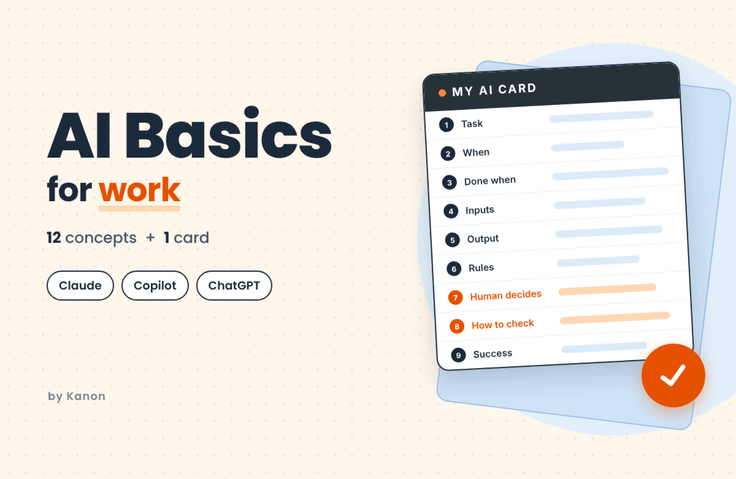
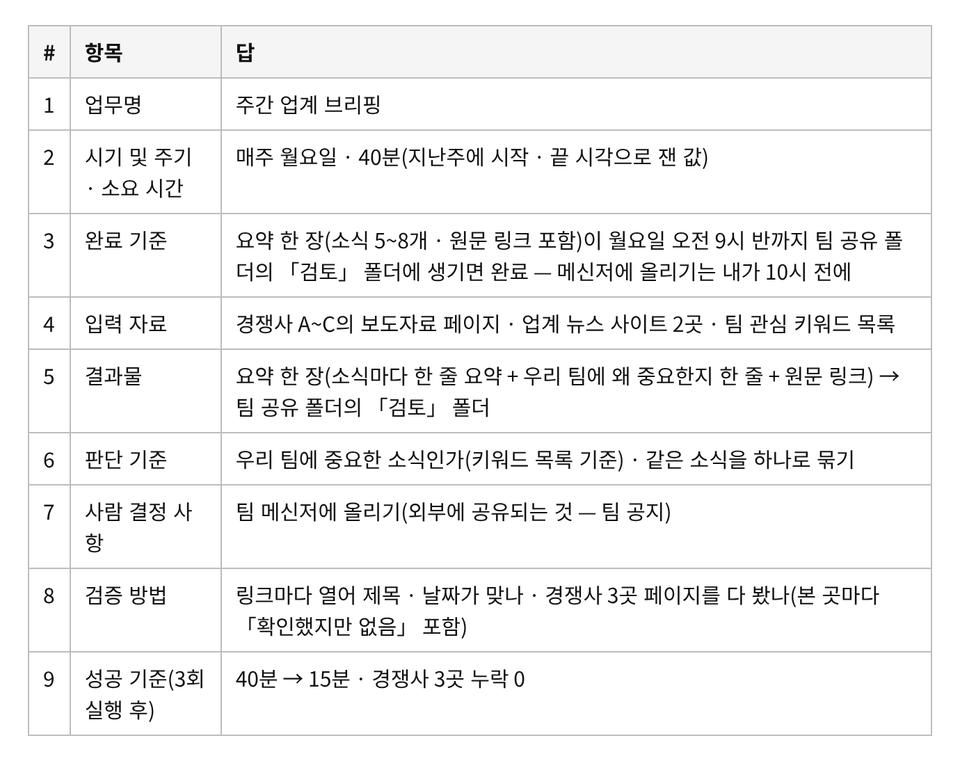
A single “Delegation Card” filled out with the task name, completion criteria, input materials, deliverables, decision criteria, matters requiring human decisions, verification method, and success criteria. With this card, it is clear what to delegate to AI and how far to delegate it. Below is an example card from Lesson 15.


▣ Figure 5


Frequently Asked Questions


Q. Do we learn how to use tools like Claude Code?


No. Rather than installation or screen操作, we cover the judgment that comes first—what to delegate and where AI gets things wrong. These are principles you can apply even when the tools change.


Q. Is it okay if we can only use Copilot at the company?


Yes. The hands-on exercises aren’t tied to any specific tool, and Lesson 15 separately explains how to apply the cards to in-house chatbots, conversational AI, Claude Cowork, and Copilot Cowork.


Q. I’ve barely used AI. Can I follow along?


Yes. Terms are explained in full when they first appear, and the principles are illustrated through examples and diagrams. You can read Lessons 1–12 starting with whichever ones interest you, while the hands-on exercises in Lessons 13–15 should be completed in order.


Notes Before Taking the Course


• Prerequisites: No programming knowledge is required.

• Practice environment: If you have ChatGPT, Claude, or Copilot, you can try the exercises in practice. If not, you can complete them with just paper and a pen.

• Learning materials: We provide an Excel template (.xlsx) for the practice in Lesson 13. It can be opened in Excel or Google Sheets.

• Duration: Each lesson is approximately 15 minutes, and the hands-on exercises in Lessons 13–15 take a total of 40–60 minutes.

• Note: This course consists of text and illustrations without videos. It does not cover tool installation or on-screen操作. The features and pricing of AI tools are current as of October 2026 and may change.


About the Knowledge Sharer


Kanon — Operations at a multinational company. By delegating work to AI, I personally build and run operational systems that prevent “quietly wrong automation.” I publish a series of articles on using AI for work on Naver Blog and Brunch.

Recommended for
these people

Who is this course right for?

  • Office worker who was told above, “Automate it with AI.”

  • Someone who runs team operations through Excel and email

  • Someone who has opened Claude · ChatGPT · Copilot but doesn’t know what to have them do

Need to know before starting?

  • No development knowledge is required.

  • If you have ChatGPT, Claude, or Copilot, try running the exercise in practice (if not, you can complete it on paper).

Hello
This is kanon

Career Verified

Hello, I'm Kanon.

As a non-developer office worker, I hope to help others use AI and improve their productivity.

Reviews

Not enough reviews.
Please write a valuable review that helps everyone!

Similar courses

Explore other courses in the same field!

Free