inflearn logo

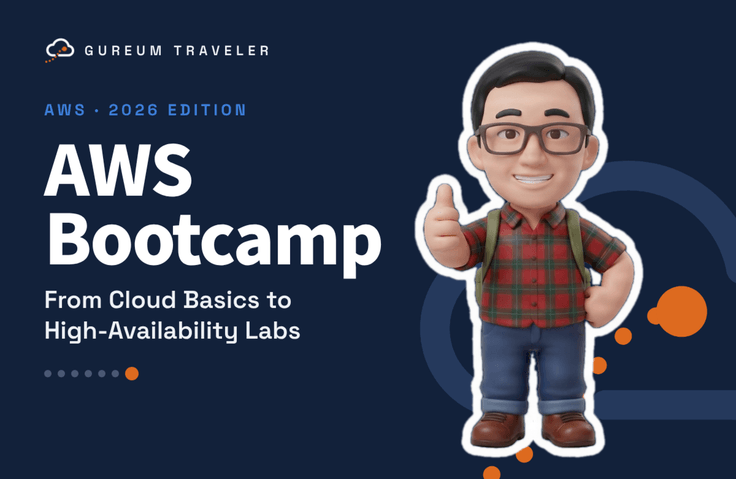
[2026 Revised] AWS Bootcamp - From Cloud Fundamentals to High Availability Hands-On Labs

When you’re just getting started with AWS, hundreds of service names and unfamiliar infrastructure terms can make it hard to know where to begin. This hands-on bootcamp starts with creating an account and culminates in building a highly available WordPress site that keeps running even if one Availability Zone goes down. An instructor with more than 25 years of experience designing cloud infrastructure for the financial industry will guide you through the same steps and standards used in real-world projects.

1 learners are taking this course

Level Basic

Course period 12 months

AI
AI
AWS
AWS
aws-ec2
aws-ec2
aws-s3
aws-s3
aws-rds
aws-rds
AI
AI
AWS
AWS
aws-ec2
aws-ec2
aws-s3
aws-s3
aws-rds
aws-rds

What you will gain after the course

  • Set up a secure AWS account yourself with root MFA, budget alerts, and IAM Identity Center to prevent billing and security incidents.

  • Design and build a VPC network with subnets, routing tables, security groups, NACLs, VPC endpoints, and NAT gateways.

  • Build a web tier that automatically replaces failed servers using EC2, AMI, ALB, and Auto Scaling.

  • Configure storage and databases with S3, EFS, and RDS Multi-AZ, then verify backups and failover.

  • Apply HTTPS, a CDN, and a web application firewall to your domain using Route 53, ACM, CloudFront, and WAF.

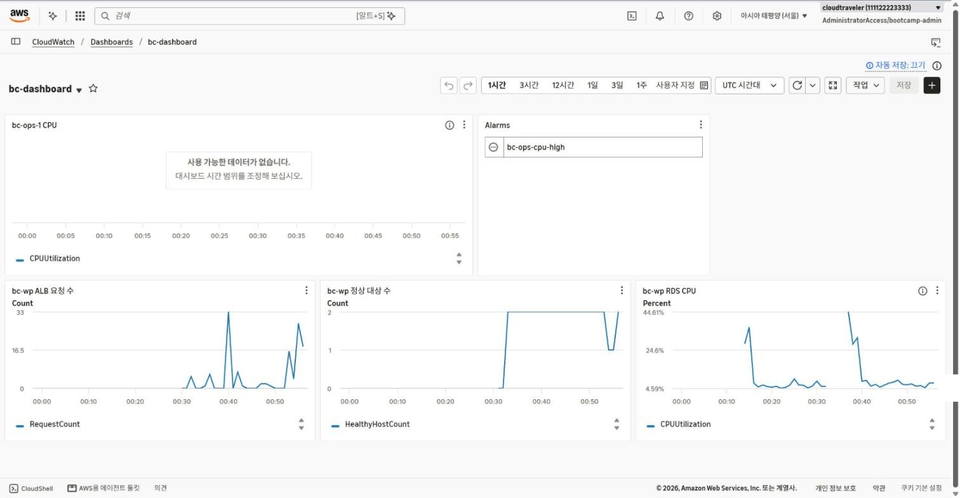
  • Build monitoring, auditing, threat detection, and backup systems with CloudWatch, CloudTrail, GuardDuty, and AWS Backup.

  • Deploy infrastructure as code with CloudFormation and Terraform, and run serverless workloads and containers with Lambda and ECS Fargate.

  • Get hands-on experience with the end-to-end process of migrating servers and databases to AWS using AWS MGN and DMS.

  • Complete a highly available WordPress setup spanning two Availability Zones, then manually stop the server and database to verify that the service remains available.

# A Hands-On AWS Bootcamp: From Creating an Account to Highly Available WordPress

When you first log in to the AWS Console, hundreds of service names appear all at once.
"Why do I need to create a VPC?", "Why is the NAT Gateway so expensive?", "What happens if a server goes down?"

This course answers those questions with hands-on exercises, not just words.
First, you’ll set up your account and cost safeguards, then build up your network, servers, database, CDN, and security layer by layer.
Finally, you’ll complete a WordPress site that keeps running even if you manually stop its servers and database.


Course Features

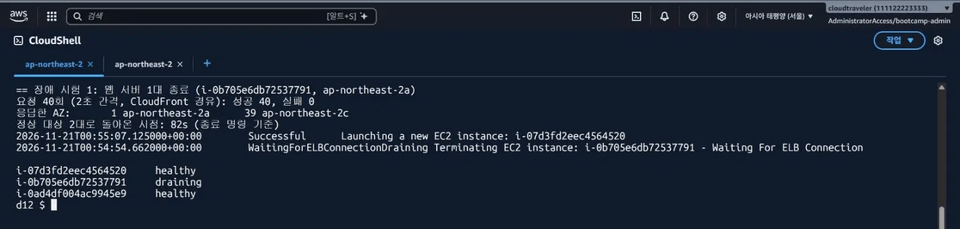
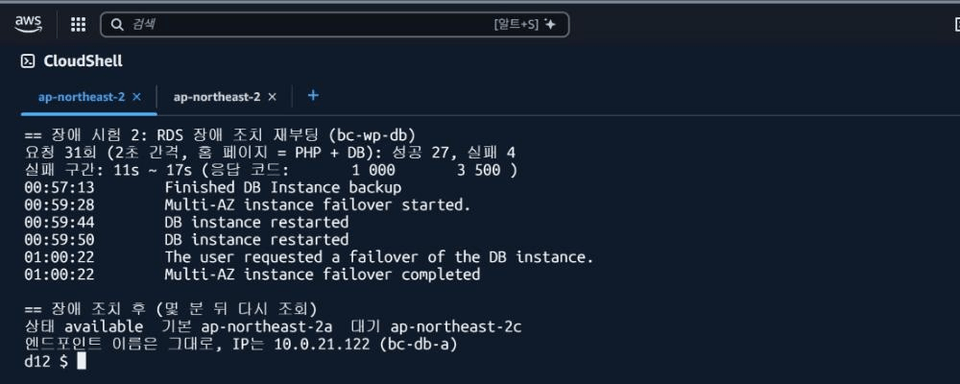
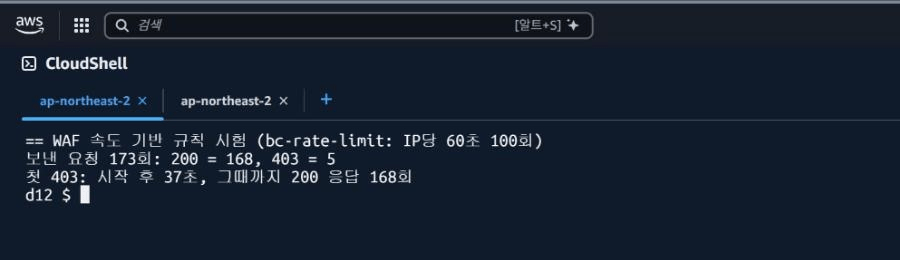
1. Newly filmed in the console in November 2026 All hands-on exercises were re-recorded in the AWS console in November 2026. The course reflects recent changes, such as regional NAT gateways, public IPv4 charges, mandatory root MFA, Amazon Linux 2023, and default S3 security settings. 2. 41 hands-on exercises that build on one another In the final capstone, you reuse the VPC created in Section 03, the certificate issued in Section 08, and the backup plan created in Section 09. The exercises aren’t isolated—they come together as a single service. 3. Explanations backed by measured numbers Instead of saying "It’s quick to set up" or "There’s a brief interruption," we show you the values we measured ourselves. - RDS Multi-AZ creation: about 15 minutes - Forcefully shutting down one web server: 0 failed requests; automatic recovery after 82 seconds - RDS failover: about 6 seconds of downtime; the endpoint name stays the same - WAF rate limiting: with a limit of 100 requests, 168 requests actually got through before traffic was blocked 4. Cost safeguards come first In the first section, you’ll start by setting up root MFA and budget alerts. Before each exercise, we provide an estimated cost based on the Seoul Region, and every exercise ends with a walkthrough of deleting the resources.

What You'll Learn

  1. Set up a secure AWS account yourself using root MFA, budget alerts, and IAM Identity Center to prevent unexpected charges and security incidents.

  2. Design and build a VPC network with subnets, route tables, security groups, NACLs, VPC endpoints, and NAT gateways.

  3. Build a web tier with EC2, AMIs, ALB, and Auto Scaling that automatically replaces servers if they fail.

  4. Set up storage and databases with S3, EFS, and RDS Multi-AZ, then verify backups and failover.

  5. Use Route 53, ACM, CloudFront, and WAF to enable HTTPS, CDN, and web firewall protection for your domain.

  6. Set up monitoring, auditing, threat detection, and backups with CloudWatch, CloudTrail, GuardDuty, and AWS Backup.

  7. Deploy infrastructure as code with CloudFormation and Terraform, and run serverless workloads and containers with Lambda and ECS Fargate.

  8. Practice migrating servers and databases to AWS from start to finish using AWS MGN and DMS.

  9. Build a highly available WordPress deployment across two Availability Zones, then stop the server and database yourself to verify that the service stays up.

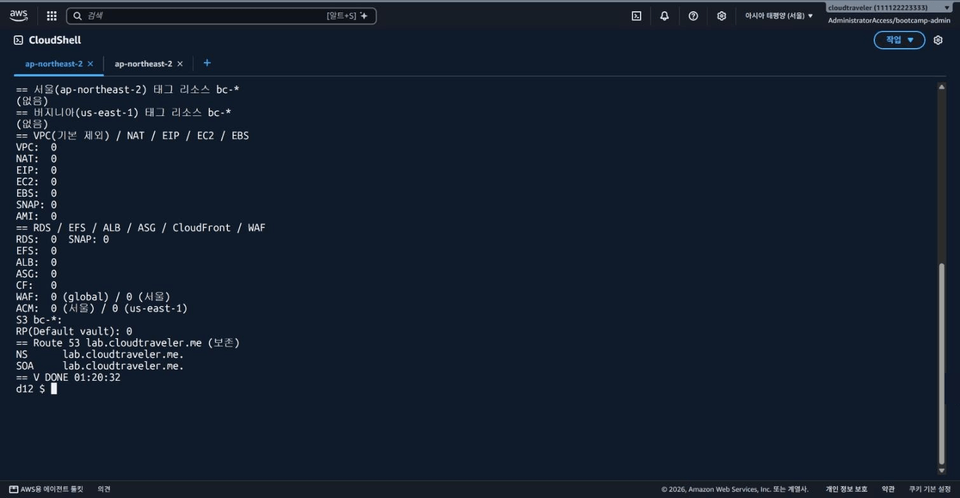
  10. Learn to clean up completed lab resources in dependency order so you don’t incur unnecessary charges.


💡Capstone: Break It Yourself to Test High Availability in WordPress

In the final section, we put everything we’ve learned so far together.

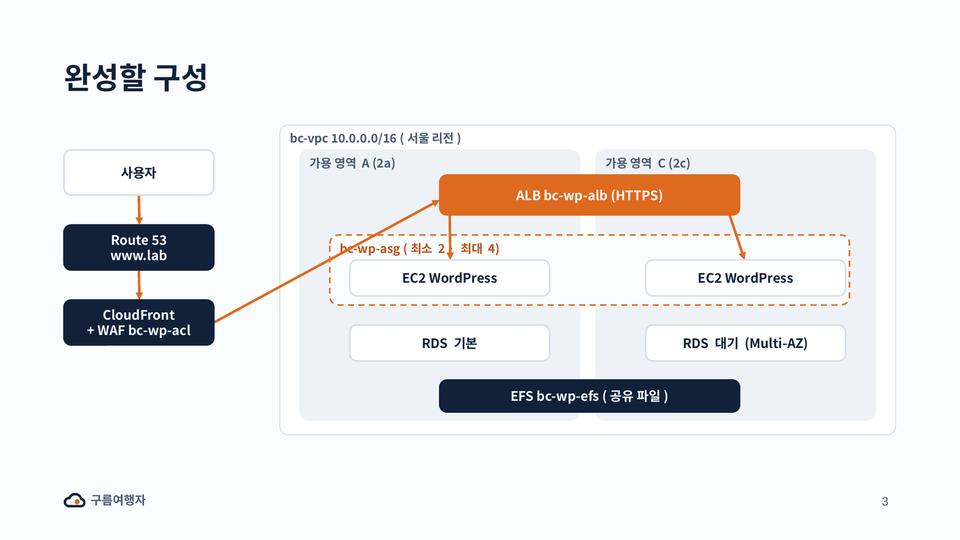
- Requests flow through Route 53 → CloudFront + WAF → ALB → EC2 instances in two Availability Zones (Auto Scaling)
- Use RDS Multi-AZ for database redundancy and EFS to share uploaded files
- Lock down the ALB to accept requests only through CloudFront, blocking paths that bypass WAF

Once everything is set up, we force-terminate the web server and trigger a database failover to see it reboot.

Notes Before Taking the Course

Practice Environment

  • Operating system and version (OS): All operating systems are supported, including Windows, macOS, and Linux.


  • PC specifications: A basic PC with internet access

Learning Materials

  • Formats of the provided learning materials: PDF, cloud links, text, etc.

  • Length and size: Learning materials are provided for each section.

Prerequisites and Important Notes

- No prior knowledge of cloud computing or AWS is required.
- You’ll need a card that supports international payments and a mobile phone for MFA.

Frequently Asked Questions

Q. Are there costs for the hands-on exercises?
Most exercises can be completed using the free tier or at very low cost.
However, NAT gateways, load balancers, RDS Multi-AZ, WAF, and migration exercises incur hourly charges.
We provide estimated costs and cleanup instructions for each exercise, so we recommend completing the cleanup on the same day you do the exercise.

Q. Does this prepare me for certification exams?
This is not a test-prep course. In the final lesson, we connect the CLF-C02 and SAA-C03 exam topics
to the hands-on exercises in this course. You’ll build configurations that frequently appear on the exams.

Q. What if the console interface changes?
The AWS console changes frequently. To help you follow along even if the screens look different, we explain the meaning of menu names and settings, and
provide step-by-step instructions in the student guide (PDF).

Recommended for
these people

Who is this course right for?

  • IT beginners, non-majors, and students who are new to cloud computing and AWS

  • Infrastructure, network, and security engineers looking to expand their on-premises server and network experience into the cloud

  • A beginner developer who wants to reliably deploy a web service they built themselves on AWS

  • Those who want to build a hands-on foundation before taking the AWS Cloud Practitioner or Solutions Architect Associate exam

  • For anyone looking to build good AWS habits that help control costs and maintain security, such as setting budget alerts, managing permissions, and cleaning up resources.

Need to know before starting?

  • No prior knowledge of the cloud or AWS is required. You just need to be able to work with files and folders and use a web browser.

Hello
This is gureum

Career Verified

225

Learners

39

Reviews

14

Answers

4.5

Rating

4

Courses

The name Gureumyeohaengja reflects a commitment to share “how to cross complex clouds without getting lost.” From exam candidates preparing for certifications to professionals considering a cloud migration, I bring together only the methods that have proven effective in real-world settings.

Drawing on more than 25 years of hands-on experience in IT, I aim to share practical knowledge that goes beyond theory and can be applied directly in the field. I started out as a network and data center engineer, and today I lead cloud-based infrastructure consulting and service development on a global scale. With the know-how of an expert who has successfully delivered numerous large-scale projects, I’m passionate about helping you understand complex IT technologies and apply them immediately in your work.

Cloud Consulting: Supporting and consulting on global services based on AWS, Azure, NAVER Cloud Platform, and Alibaba Cloud.

AWS: Solutions Architect, Network Specialist

NAVER Cloud: NCP Expert (2023/05 & 2023/10 Nclouder)

Network & Security: Aviatrix ACE Engineer, Fortinet Certified Solution Specialist Public Cloud Security, Cisco Certified Specialist - Data Center

Professional: CISSP, PMP

More

Curriculum

All

55 lectures ∙ (5hr 52min)

Course Materials:

Lecture resources
Published: 
Last updated: 

Reviews

Not enough reviews.
Please write a valuable review that helps everyone!

gureum's other courses

Check out other courses by the instructor!

Similar courses

Explore other courses in the same field!

Limited time deal

$26.40

68%

$84.70