inflearn logo

Naver Cloud Platform (NCP) Practical Architecture and Operations Bootcamp

Even when following the console, it can be difficult to identify the causes of outages and establish operational standards. Drawing on hands-on implementation and operations experience, we guide you from design through deployment and troubleshooting.

1 learners are taking this course

Level Basic

Course period Unlimited

AI
AI
Naver Cloud
Naver Cloud
vpc
vpc
AI
AI
Naver Cloud
Naver Cloud
vpc
vpc

What you will gain after the course

  • Design and implement an NCP network architecture that meets requirements, based on VPC, subnet, routing, and security configurations.

  • Integrate compute, storage, and database services to deploy services and perform basic operational checks.

  • Diagnose and resolve issues arising from network, permissions, and resource settings, step by step.

  • Explain the rationale behind architectural choices and operational considerations through practical scenarios.


"From clicking through the console to building real-world architectures,

A hands-on Naver Cloud Platform (NCP) boot camp, from start to finish"


Knowing cloud concepts alone isn’t enough to manage real-world infrastructure. This hands-on course walks you through building, verifying, and documenting key services on Naver Cloud Platform (NCP), widely used in South Korea’s public, financial, and enterprise environments.

In the Essential section, you’ll build a web service from scratch, starting with a VPC and going all the way through to the database. In the Intermediate section, you’ll expand your practical skills across six tracks: DevOps, Kubernetes, AI, Security, Big Data, and Media. All hands-on exercises are based on a VPC environment and the new console.

Course Features

📌 A step-by-step guide based on the new console. To make sure you can follow along without getting lost when the interface changes, we provide step-by-step instructions and hands-on videos based on the current NCP new console interface.

📌 Build a complete web service from start to finish. Follow the full process—from creating a VPC and servers to setting up a load balancer and DNS, Auto Scaling, NAS, and Cloud DB—to complete an entire architecture rather than learning individual features in isolation.

📌 Covers everything from the basics to the next steps. Practice deployment automation using Terraform and SourcePipeline, NKS (Kubernetes), CLOVA AI services, security, big data, and media services by track.

📌 A cleanup process to help keep costs down. Each exercise includes the steps for deleting resources. The DevOps track also provides IaC source code for installing and deleting resources through code.

📌 We wrap up with checkpoints. Each lab follows this sequence: goal and configuration overview → hands-on practice → checkpoint summary, so you can review what you built and why before moving on.

Recommended for those who:

  • Cloud beginners and junior developers: Those who want to deploy and run their own services or applications in a real cloud environment.

  • Infrastructure, network, and systems engineers: Those who want to quickly learn the architecture and console of Naver Cloud Platform based on their on-premises and other cloud experience.

  • Solution Architects, Presales Professionals, and PMs: Those who want to design NCP architectures tailored to customer environments, prepare technical proposals, and demonstrate their hands-on skills.

💡Certification candidates (NCA, NCP, etc.): Those who want to improve their learning efficiency by understanding how real services are configured, going beyond simple memorization.

After completing the course, you’ll be able to

  • You can design VPCs, subnets, and ACGs, create and scale servers, and deploy web services yourself.

  • You can build a setup that responds to traffic changes using a load balancer, DNS, and Auto Scaling.

  • You can build stateful services by connecting NAS shared storage to Cloud DB for MySQL.

  • You can automate infrastructure provisioning and application deployment with Terraform and SourcePipeline.

  • You can deploy container applications to an NKS cluster and integrate AI, security, big data, and media services into your service architecture.

  • When a connection error occurs, you can determine whether to check the network, security, or resources first.

What you'll learn.

① Essential · VPC and Server Creation and Scaling
Design a VPC and subnets, then create servers. You’ll also practice creating a server image and quickly scaling up servers with the same configuration.

② Essential · Load Balancer, DNS, and Auto Scaling
Connect a load balancer to a domain to create a service address. Configure Auto Scaling so that servers automatically scale up and down based on Cloud Insight monitoring metrics.

③ Essential · NAS and Cloud DB for MySQL
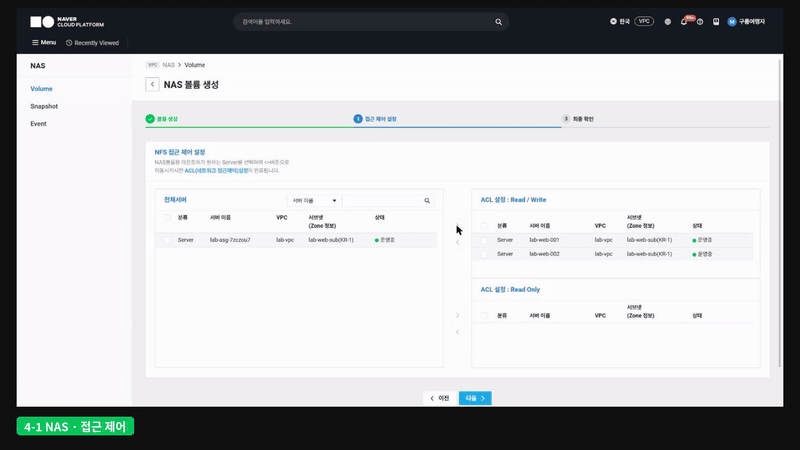
Mount NAS shared storage for multiple servers, create a Cloud DB for MySQL, and connect it to the application.

④ Intermediate · DevOps
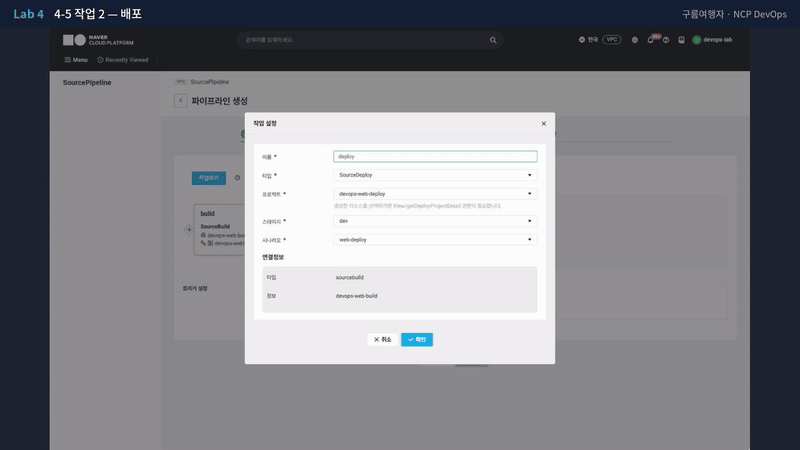
Use Terraform to define infrastructure as code, and automate everything from build to deployment with SourceCommit, SourceBuild, SourceDeploy, and SourcePipeline.

⑤ Intermediate · Kubernetes
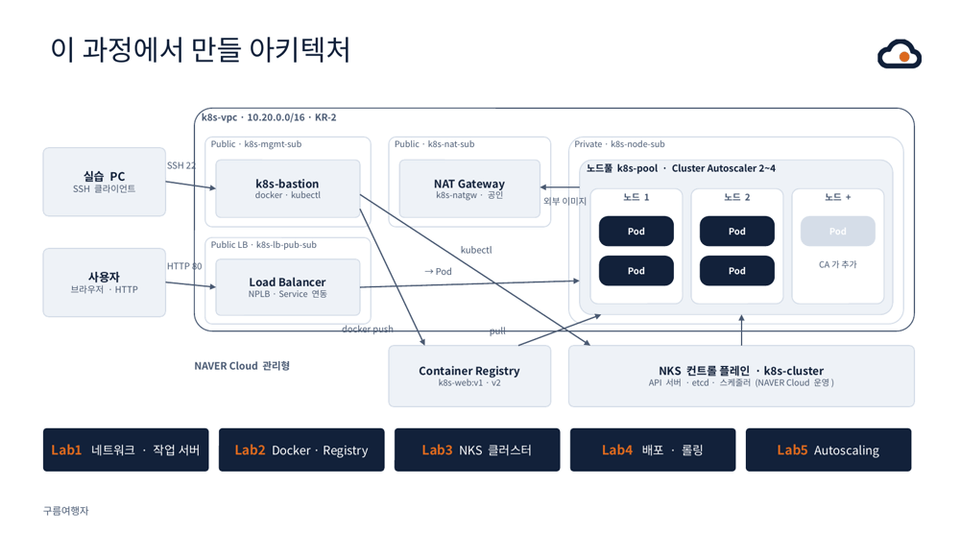
Deploy and operate containerized applications using NKS clusters and Container Registry.

⑥ Intermediate · AI / Security / Big Data / Media
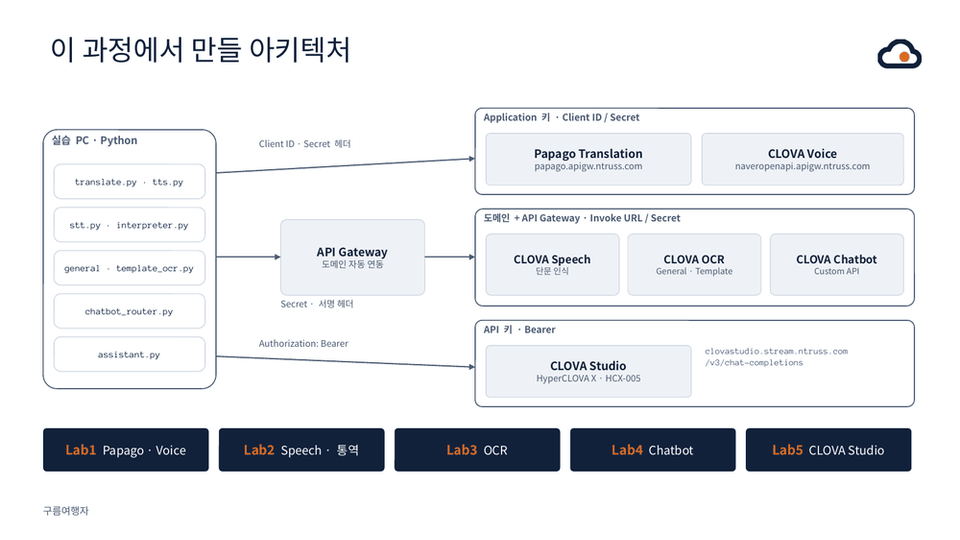
Practice with AI services like CLOVA Studio, OCR, and Speech; security services like KMS and Secret Manager; big data analytics services; and media services like VOD Station.

The person who created this course

  • Cloud presales and architecture consulting: Design and propose enterprise and financial cloud architectures based on AWS, Azure, and Naver Cloud.

  • Certifications: Naver Cloud Associate, Professional, and Expert; AWS Solutions Architect – Professional; CISSP; PMP

  • Book: *PMP Boot Camp* (PMBOK 7th Edition)

💡While designing NCP infrastructure alongside customers, I often heard them say, "I know my way around the console, but I’ve never deployed a service all the way through." This course was designed to bridge that gap by having you build a working setup from start to finish.

Things to Know Before Enrolling

Practice Environment

  • Operating systems: Both Windows and macOS are supported. The exercises are conducted in the NCP console in a web browser.

  • Tools used:

    • NCP account (payment method must be registered), Chrome browser

    • SSH client (Windows Terminal, PuTTY, etc.)

    • In the Intermediate track, you will also install CLI tools such as Terraform and kubectl. [Check] Version notation

  • Billing notice: Charges may apply to practice resources based on NCP rates. We recommend cleaning them up promptly by following the deletion steps provided at the end of each lab.

  • PC requirements: Since the hands-on exercises are mainly console-based, no special hardware specifications are required.

Learning Materials

  • Course Materials (PDF)

  • Lab-specific Procedure Guide

  • Hands-on source code by track

Prerequisites and Notes

  • It will be easier if you’re familiar with basic Linux commands (connecting, editing files, and installing packages) and networking fundamentals such as IP addresses and ports.

  • Essential is suitable even for beginners. Intermediate assumes an understanding of the Essential material.

  • The NCP console may change with updates. If there are major changes, we’ll update the course and materials.

  • Questions can be submitted via Inflearn’s Q&A board.

  • The copyright for the lecture videos and study materials belongs to the knowledge sharer, and unauthorized distribution is prohibited.

Recommended for
these people

Who is this course right for?

  • Junior developers and cloud beginners looking to build and deploy services directly on NCP and strengthen their operations skills.

  • Infrastructure and systems engineers looking to build on their experience with other cloud platforms or on-premises environments and develop practical NCP skills.

  • Solution architects, presales professionals, and PMs looking to build the skills to design NCP architectures that meet customer requirements and develop technical proposals.

Need to know before starting?

  • Understanding of basic networking concepts (IP, subnets, firewalls, etc.)

  • Experience using basic commands in Linux or Windows server environments

  • Basic knowledge of web application or service architecture

Hello
This is gureum

223

Learners

39

Reviews

14

Answers

4.5

Rating

3

Courses

The name Gureumyeohaengja reflects a commitment to share “how to cross complex clouds without getting lost.” From exam candidates preparing for certifications to professionals considering a cloud migration, I bring together only the methods that have proven effective in real-world settings.

Drawing on more than 25 years of hands-on experience in IT, I aim to share practical knowledge that goes beyond theory and can be applied directly in the field. I started out as a network and data center engineer, and today I lead cloud-based infrastructure consulting and service development on a global scale. With the know-how of an expert who has successfully delivered numerous large-scale projects, I’m passionate about helping you understand complex IT technologies and apply them immediately in your work.

Cloud Consulting: Supporting and consulting on global services based on AWS, Azure, NAVER Cloud Platform, and Alibaba Cloud.

AWS: Solutions Architect, Network Specialist

NAVER Cloud: NCP Expert (2023/05 & 2023/10 Nclouder)

Network & Security: Aviatrix ACE Engineer, Fortinet Certified Solution Specialist Public Cloud Security, Cisco Certified Specialist - Data Center

Professional: CISSP, PMP

More

Curriculum

All

49 lectures ∙ (4hr 7min)

Course Materials:

Lecture resources
Published: 
Last updated: 

Reviews

Not enough reviews.
Please write a valuable review that helps everyone!

Similar courses

Explore other courses in the same field!

Limited time deal

$26.40

68%

$84.70