2026! A Practical Guide to Redis for Backend Developers: From Basics to Real-World Patterns
Many backend developers use Redis, but in reality, they often use it merely as a simple cache server. There are many cases where developers know the Redis data types but don't know how to apply them in practice, lack experience implementing real-world patterns like distributed locks or rate limiting, or fail to understand Redis from a backend architecture perspective. I also had the experience of pondering how to utilize Redis in a high-traffic environment while developing actual services. This is because knowing simple commands is entirely different from solving service problems with Redis. This course starts with the basic concepts and data structures of Redis and progresses through learning by implementing core patterns used in actual backend services step-by-step. In particular, you will learn how to solve the following practical problems using Redis: Caching (Cache-Aside) strategies to reduce server load, Distributed Sessions (Session Store) to share login states, Distributed Locks to solve concurrency issues, Rate Limiting to prevent API overload, and Real-time Ranking Systems (Leaderboards) for large-scale users. All hands-on exercises are conducted in a real API server environment based on Python FastAPI. Rather than just learning simple CLI commands, you will understand how Redis is used in backend systems by implementing it yourself. Through this course, you will be able to utilize Redis not just as a simple cache, but as a core tool for designing backend architecture.
210 learners
Level Beginner
Course period Unlimited
News
4 articles
Hello, students! 😊
"Section 7. [Appendix] Bonus Track" has a new lesson added! 🎉
(New Lesson) [Special Types]Redis GEO: High-Speed Location Search
It covers Redis GEO, the core of location-based services such as delivery apps and nearby searches.
Learn how to implement a "Find Near Me" feature using only Redis, without the need for a separate spatial database.
What you will learn:
Redis GEO Concepts and Features
Geohash principles and Redis internal structure
Hands-on practice with core GEO commands and usage, including GEOADD, GEODIST, and GEOSEARCH
Redis GEO use cases, limitations, and recommended real-world architecture
Currently, you can take this course in 'Section 7. [Appendix] Bonus Track'.
If other special type lectures such as Bitmap, HyperLogLog, and Bloom Filter are added in the future, I plan to create a separate section called 'Special Data Types'.
Thank you.
Hello, students! 😊
I recently posted a notice regarding 'Precautions when testing in a public IP environment'.
That content was a guide on IP binding and password settings when creating a Redis container, specifically for cases where the test environment is a computer accessible from the outside (such as a public IP).
However, even in a public IP environment,
127.0.0.1if you have restricted the IP to this, you do not necessarily need to set a password.If you set a password, you will need to authenticate continuously throughout the subsequent practice sessions, which may cause inconvenience to the learning flow.
If you have set a password, we recommend deleting the existing container if possible and recreating it (by specifying only the IP) as shown below.
docker rm -f my-redis docker run -d --name my-redis -p 127.0.0.1:6379:6379 redisWe apologize for any inconvenience caused to your learning experience.
Below is a guide on where a password is required for each lecture practice if you continue to use one.
21. Redis Stack: A Taste of JSON Storage and High-Speed Search (FullText Search)
You must enter a password when loading Redis into Redis Insight.
24. Transactions and Scripting: Lua Script and Redis Functions
Specifying a password in the Redis Functions load command
# If a password is set for Redis docker exec -i my-redis redis-cli -a <password> -x FUNCTION LOAD REPLACE < coupon_logic.lua
The entirety of Section 5. [Pattern] Implementing Practical Backend Application Patterns (with FastAPI)
Specify the account (default) and password in all code that creates a Redis connection pool in FastAPI.
@asynccontextmanager async def lifespan(app: FastAPI): app.state.redis = redis.from_url("redis://localhost:6379/0", decode_responses=True) # If a password is set for Redis # app.state.redis = redis.from_url("redis://default:<password>@localhost:6379/0", decode_responses=True) print("✅ Redis connection successful!") yield await app.state.redis.aclose() print("❌ Redis connection closed!")
Hello, students! 😊
I have added a new lesson to "Section 6. [Ops] Redis Operations and Incident Response".
(New Lesson) Building Real-world Monitoring: Prometheus + Grafana Integration Practice
Monitoring Redis status through CLI commands like INFO and SLOWLOG has limitations in practice because it only allows you to view the current state in text format on the console.
Therefore, I have included a hands-on process where you will directly build a monitoring environment using the Prometheus (Collection + Time-series DB) + Grafana (Visualization) combination, which is the near-standard for building monitoring systems in actual field work, and then generate random traffic to Redis to check and interpret various metrics on a visualization dashboard.
The hands-on process is structured to be easy to follow, and since this is a combination of open-source tools frequently used in the field, I hope you find it helpful and apply it to your actual work.
Thank you.
Hello, students! 😊
If your test environment is a computer accessible from the outside (such as a public IP), please refer to the following information to run Redis safely.
Basic execution command.docker run --name my-redis -p 6379:6379 -d redisThe above setting is a dangerous configuration where Redis can be exposed to the external internet in a public IP environment.
👉In this case, please make sure to run it as follows. (Recommended)⭐⭐⭐
docker run -d --name my-redis -p 127.0.0.1:6379:6379 redis127.0.0.1→ Block external access (Most important)
👉 If you want to further enhance security, you can set a password as shown below. (Optional)
docker run -d --name my-redis -p 127.0.0.1:6379:6379 redis redis-server --requirepass "password"requirepass→ Prevents unauthorized access (password setup)requirepassis not a mandatory setting, and you may omit it in a test environment.However, you can set it if you want to further enhance security, in which case you must use the password for all subsequent Redis CLI and code practices.
⚠ How to connect after setting a password
If you used the
requirepassoption, you must execute the following command after connecting to the Redis CLI.127.0.0.1:6379> AUTH password(Added on 2026.03.19)
Hello, students 😊
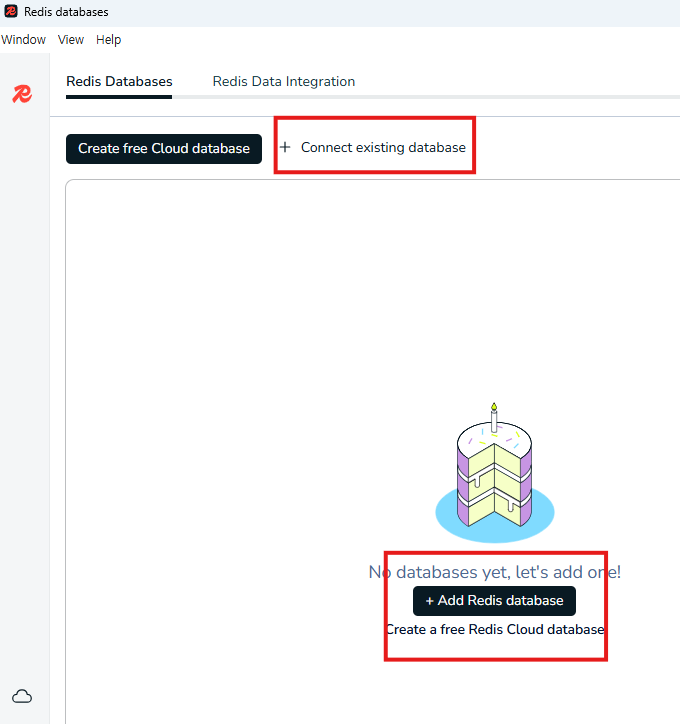
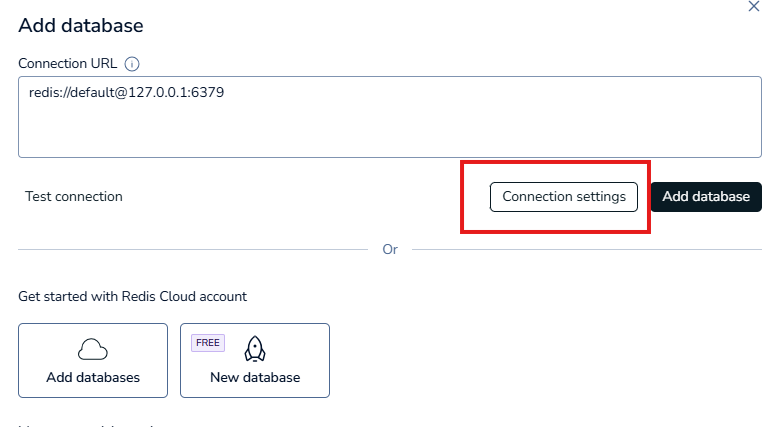
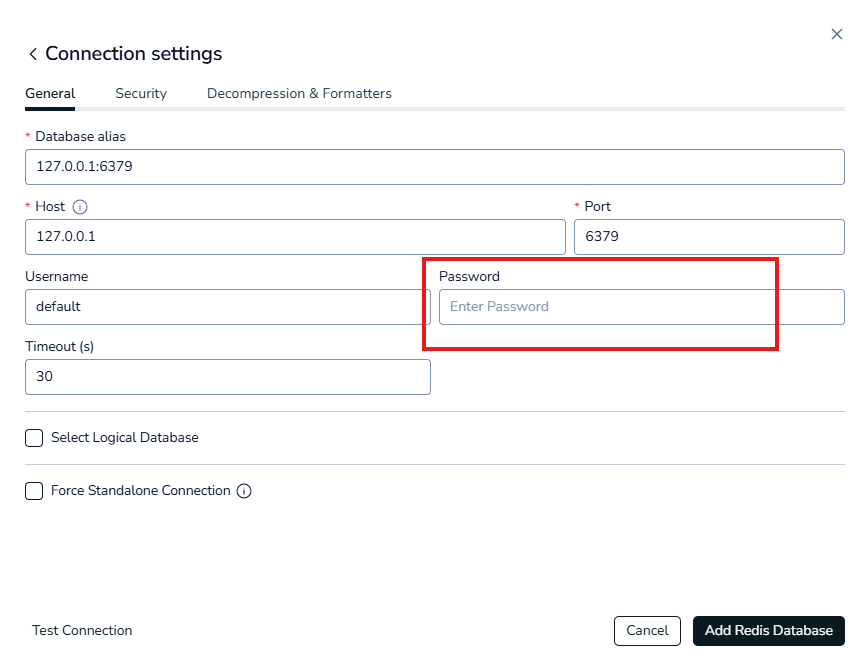
If you have set a password for Redis and created the container as guided above, you must enter the configured password when using Redis Insight to establish a connection.
Redis Insight is covered in
'Section 4. [Advanced] Redis In-depth and Latest Trends'
'Redis Stack: A Taste of JSON Storage and High-Speed Search (FullText Search)'.(Configuration Path) Connect existing database (or Add Redis database) -> Connection settings