


We would like to inform you of changes to the YouTube comment collection section.
When collecting YouTube comments, the following logic is currently used.
1. Get the total number of comments on YouTube
2. Scroll down the comments until the maximum number of comments (500) is reached → Stop when the total number of comments matches.
The total number of comments that are initially retrieved only brings the number of replies.
There was a problem with the number of comments collected below only counting general comments.
There are two ways to approach it:
1. How to get all replies and count them as numbers
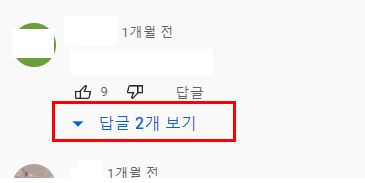
At this time, you can collect reply information by clicking the "View Replies" button one by one.
In this case, you will have to click one by one and wait for the results, which will take a long time, making it difficult to collect a large amount of data.
It's going to take more time.
2. Scroll down the comments and stop when there is no difference from the existing number of comments.
As you scroll down, keep comparing the number of comments with the number you organized earlier.
If the number of comments does not increase even after scrolling down, it is considered complete. This process is stopped.
There are pros and cons to both methods, but I think the second method is cleaner.
Let me guide you through this process.
I will upload the code data to the relevant lecture material post (Section 5, Collecting YouTube comments 2).