


The Trend is Kubernetes (Beginner to Intermediate Edition)
[Update 2025.04] Enhance your Kubernetes skills cost-effectively with theory and practice. Through this course, you too can easily jump on the bandwagon.
8,150 learners
Level Basic
Course period Unlimited

・
Edited
If you think your VM is slow when installing Kubernetes on Windows, check this out.
Hello. This is Ilpro.
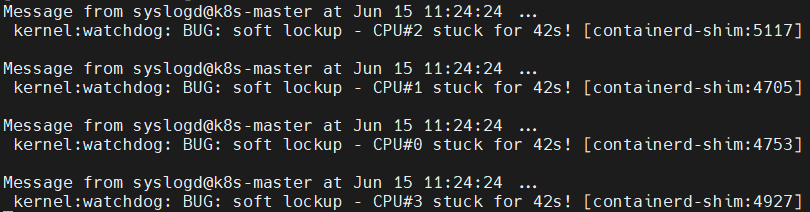
If you have seen the message below after installing Kubernetes with Virtualbox or if you feel that the VM is very slow, check if Hyper-V is currently being used. In conclusion, [Enable Netid VT-x/AMD-V] must be enabled for the CPU to be faster.
[Problem situation]
Bug: soft lockup - CPU#2 stuck for 32s! The VM slows down and I can't connect to it.
[Check status]
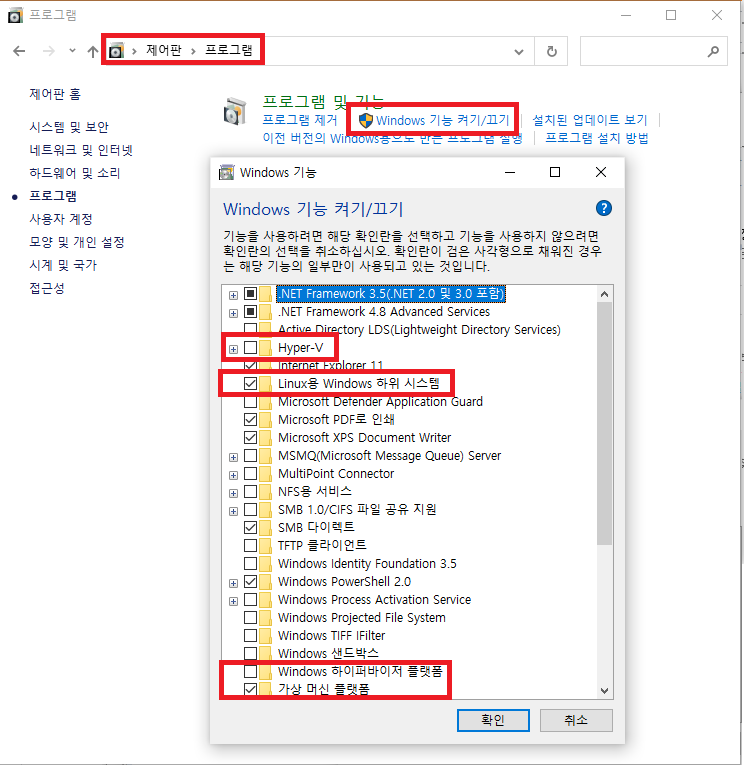
I unchecked Hyper-V with the contents below, but it is not actually reflected, so you may be using Hyper-V.
[How to disable Hyper-V]
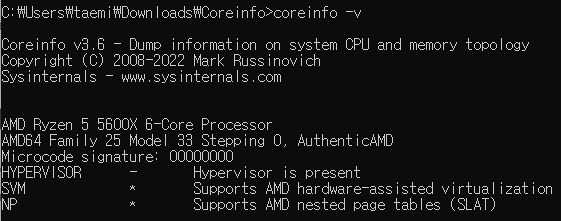
If you want to clearly check the virtualization usage status in Windows, download coreinfo from the link below and run it.
- Download: https://learn.microsoft.com/en-us/sysinternals/downloads/coreinfo
coreinfo -vI am currently using AMD Ryzen and HYPERVISOR is not being used because it is checked.
And since SVM and NP are checked, [Native VT-x/AMD-V] can be activated normally.
If this is not checked, try the following:
1) Type "PowerShell" in the Windows search bar.
2) Right click on “Windows PowerShell”
3) Select "Run as administrator"
4) Enter the command below
Disable-WindowsOptionalFeature -Online -FeatureName Microsoft-Hyper-V-All bcdedit /set hypervisorlaunchtype off
Also, make sure that all the virtualization-related extended features in Virtualbox are checked. In particular, [Enable Native VT-x/ADM-V] must be checked.
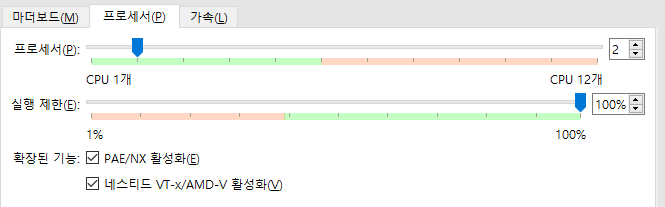
(The feature check setting is now reflected in the Vagrantfile script.)
You can go into the actual VM (k8s-master) and check again whether it is reflected.
(The result must be a number greater than or equal to 1)
egrep -c '(vmx|svm)' /proc/cpuinfo
*The contents will be updated through the link below.