HTML+CSS+JS Portfolio Practical Publishing (Season 1)
Through various practical examples of HTML+CSS+JQUERY publishing for beginners and intermediate levels, you will learn the basics of publishing for intermediate publishing skills. In particular, through various practical examples, you will gain confidence in publishing by experiencing sufficient explanations and practical work. This is a publishing class that provides a sufficient amount of study time of over 41 hours. (It is more effective if you study CSS intermediate theory on the Coding Works YouTube publishing channel.)


When studying publishing, be sure to have a ‘dual monitor environment’.
Hello. This is Coding Works.
I know some of you are already doing this, but I am sending you some news because there is one thing that is most important and must be done first to improve your publishing skills.
When studying publishing, be sure to have a ' dual monitor environment '.
It's not that it's a bit inconvenient for those who don't have a 'dual monitor environment' to study.
In order to focus on publishing studies and study efficiently, I personally think that it is very important to have a 'dual monitor environment'.
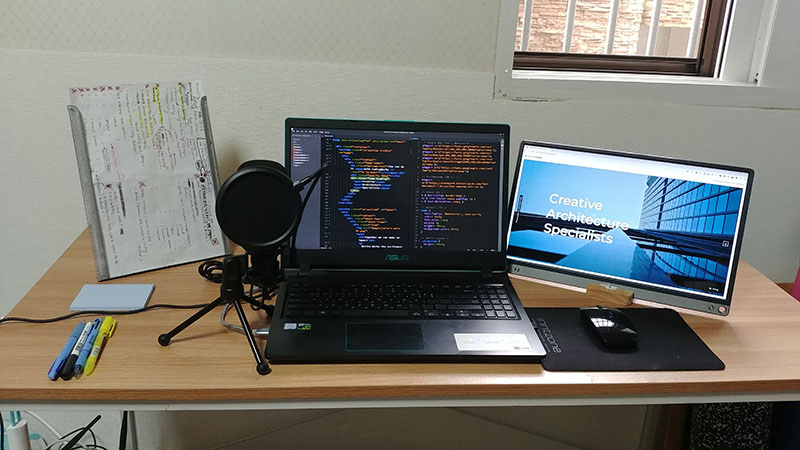
When working, you can study by looking at the text editor on your laptop or desktop and the browser screen on your dual monitor.
When studying, you can study by looking at the text editor on your laptop or desktop and the Inflearn video screen on your dual monitor.
There is absolutely no need to buy expensive or branded products for dual monitors. Small and medium-sized companies' products are also very good.
If you go to a shopping mall, you can find a 22-inch 80,000 won monitor that has a 1920 FHD screen, so you can work and study without any problems by having a 'dual monitor environment'. There is no need to be obsessed with brand products, so small and medium-sized companies' products are also good. Just check if it is a 1920 FHD resolution . ' Dual monitors' are actually too big for 24 inches, and 22 inches are the most suitable.
If you want to set up a 'dual monitor setup' with a portable monitor like the one in the photo, it's a bit expensive. It'll cost you around 200,000 won.
Portable monitors are great because they are powered by your laptop, so you can use them in a cafe or anywhere.
In conclusion, if you want to improve your publishing skills through efficient learning, you should first have a 'dual monitor environment'. ^^