[2026 Examination Standards] Perfect Guide for the Web Design & Development Technician Practical Exam
This is a specialized practical exam lecture optimized for the Web Design & Development Craftsman (formerly Web Design Craftsman) practical exam, strictly adhering to the exam standards effective from January 1, 2025, to December 31, 2027. Coding Works' Web Design & Development Craftsman practical exam lectures, covering HTML+CSS+JQUERY publishing, are different. It includes fully produced instructional videos for all exam types (Types A, B, C, D, E, and F) for the 2026 Web Design & Development Craftsman exam.
745 learners
Level Beginner
Course period Unlimited


Additional updated video of web design technician practical exam layout production
Hello. This is Coding Works.
The video of the web design technician practical exam layout production has been additionally updated.
The added video is a video of creating a layout with a background color. Creating a layout with a background color is easier than using the existing method of using a border. You can download the completed file of the layout module created with a background color from the module creation completed file download data room.
List of additional videos
- Fixed horizontal layout (A1~A4) - Creating HTML+CSS structure using background color
- 100% horizontal wireframe (B1~B4) - Create HTML+CSS structure using background color
- Vertical 2-column wireframe (C1-C4) - Creating HTML+CSS structure using background color
When creating layout wireframes with borders, you must use box-sizing: border-box. However, box-sizing: border-box may seem unfamiliar to those who are not familiar with it.
So if you use it as a background color to create your layout wireframes, you don't need to worry about box-sizing: border-box because you're not using a border.
There are advantages to both creating it as a border and creating it as a background color.
I hope that students will experience both and create in a way that suits them.
From my perspective, I would recommend...
If you don't find it difficult to create a layout with borders, I recommend creating a layout with borders. If you find it difficult to create a layout with borders, I recommend creating a layout with background colors.
When creating a layout with a background color, the background color is for the purpose of setting the layout anyway and will be deleted when adding content inside, so there is no need to worry too much about the color.
The only thing that's needed is a color difference that's enough to be distinguishable.
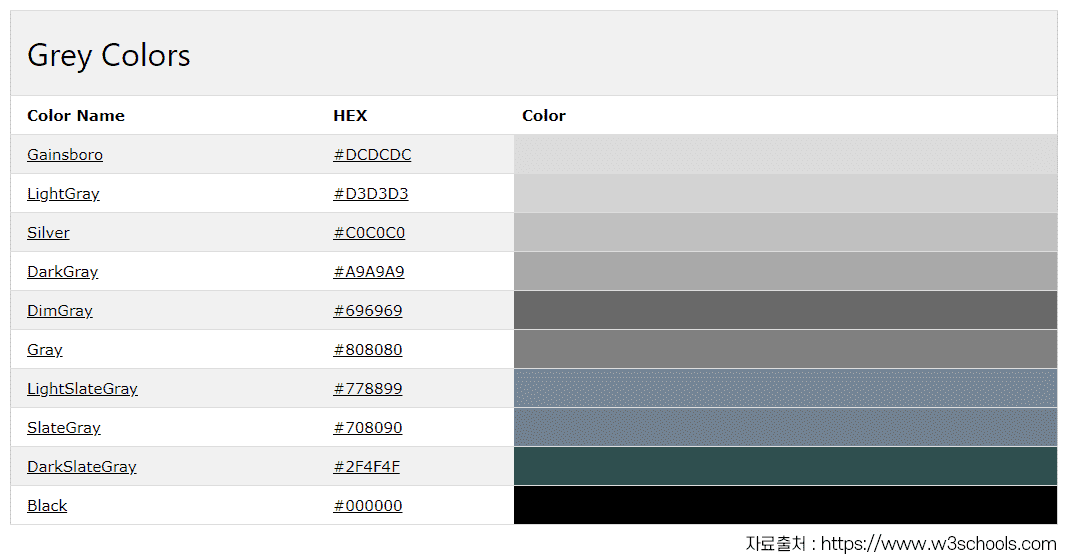
※ Please refer to the attached gray color image to create a layout with a background color.