Shorts with explosive views with CapCut
promentor
This course covers everything from editing and producing various short-form videos like YouTube Shorts, TikTok, and Reels using CapCut to monetization!
입문
Youtube Creator, CapCut
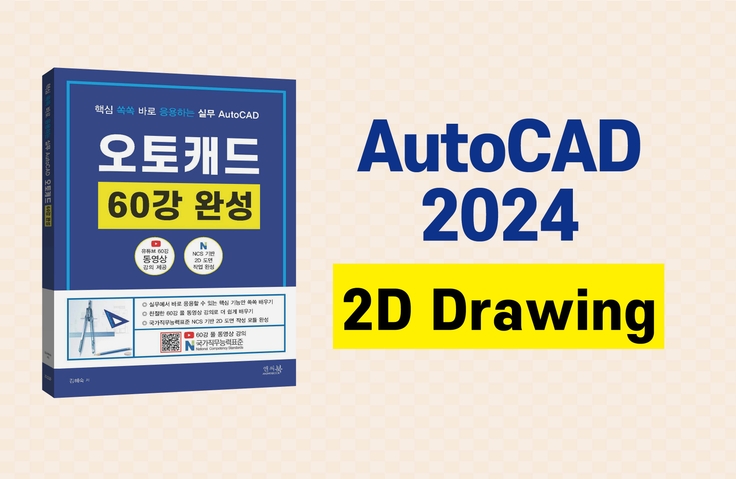
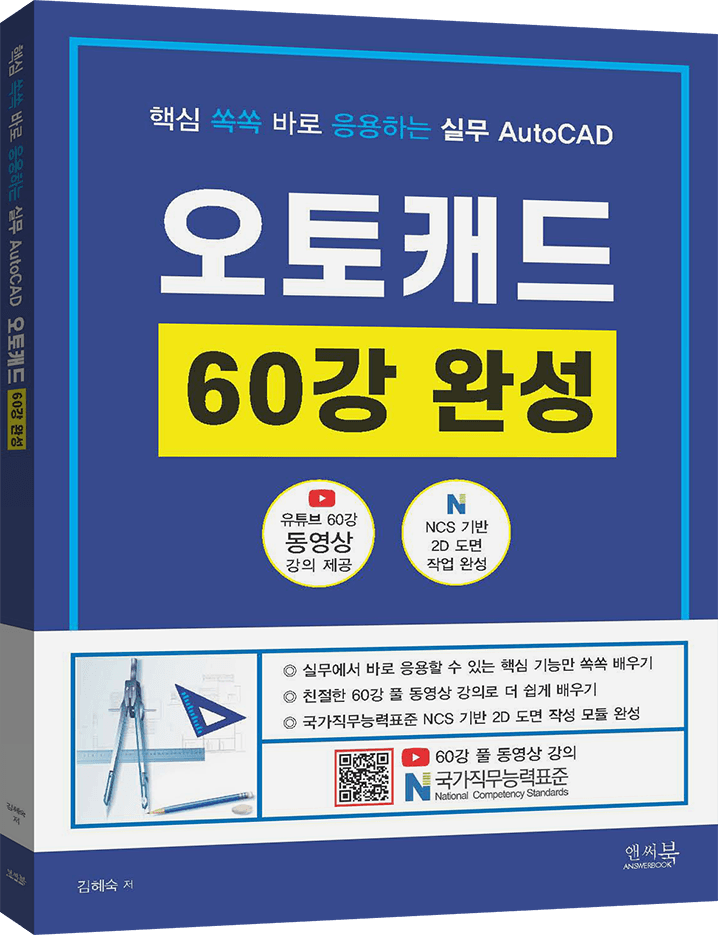
This is a practical AutoCAD course that allows you to quickly learn the core functions of NCS-based AutoCAD 2D drawing and practical applications in the workplace from the author of "AutoCAD 60 Lessons Completed."


Reviews from Early Learners
5.0
권오현
It was a very satisfying education that allowed me to recall from my head what I had learned in school.
5.0
똘똘이스머프
I listened to your valuable lecture well. Happy New Year and stay healthy always.
5.0
프로멘토
It was good that it explained each command step by step in an easy-to-follow manner, and that I could learn the practical aspects of drawing with practice drawings. It was also good that it explained the entire contents of the book when I first started.
NCS-based AutoCAD 2D drawing
Key features that can be applied immediately in practice
You can fully understand 2D drawing work.
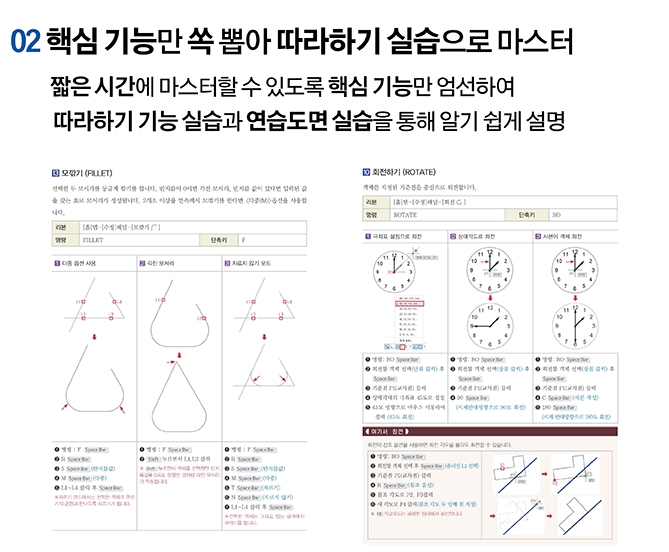
Learn only the core functions so you can master 2D commands in a short period of time.
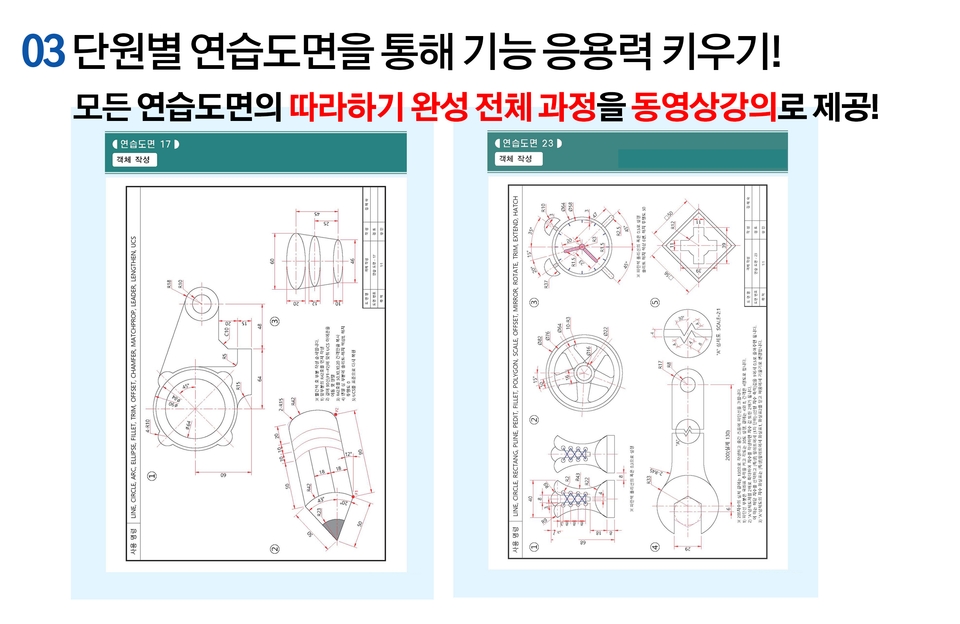
You will practice the 2D functions by following them directly and create 24 practice drawings.
Learn how to print drawings and know-how in the Shapes and Layout tabs.
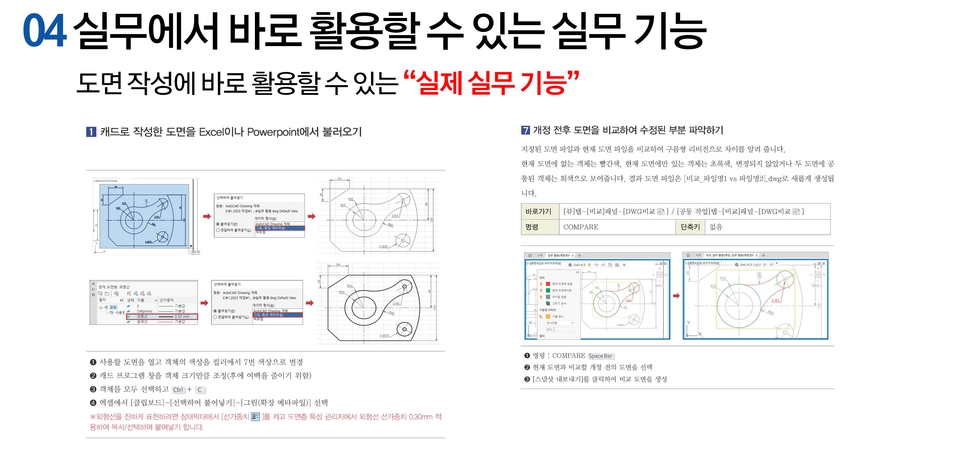
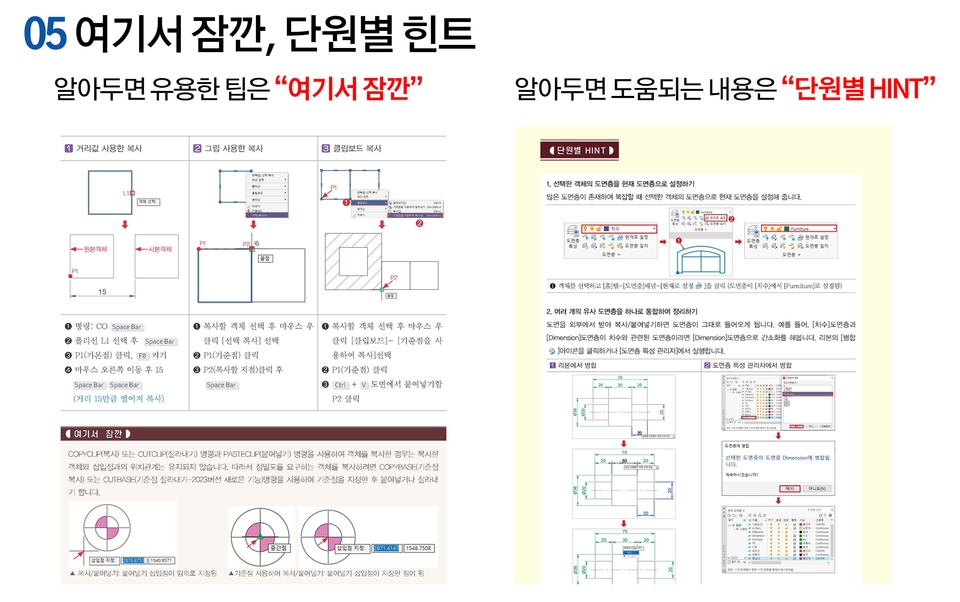
Learn features and tips that can be used immediately in the field.
Book Source Files: All the practice files and practice drawing files needed for the lecture are available for free download .
The book "AutoCAD 60 Lessons Complete (Answerbook, written by Hye-sook Kim)" is not absolutely necessary.
Those who only need 2D drawing work
Those who only need the core functions required for 2D drawing work
Those preparing for NCS-based 2D education
Educators preparing for the NCS competency unit 2D drawing work learning module training
Those who want to learn practical skills
Those who want to learn only the functions that are essential for practical use rather than all of AutoCAD's functions
Learn AutoCAD features
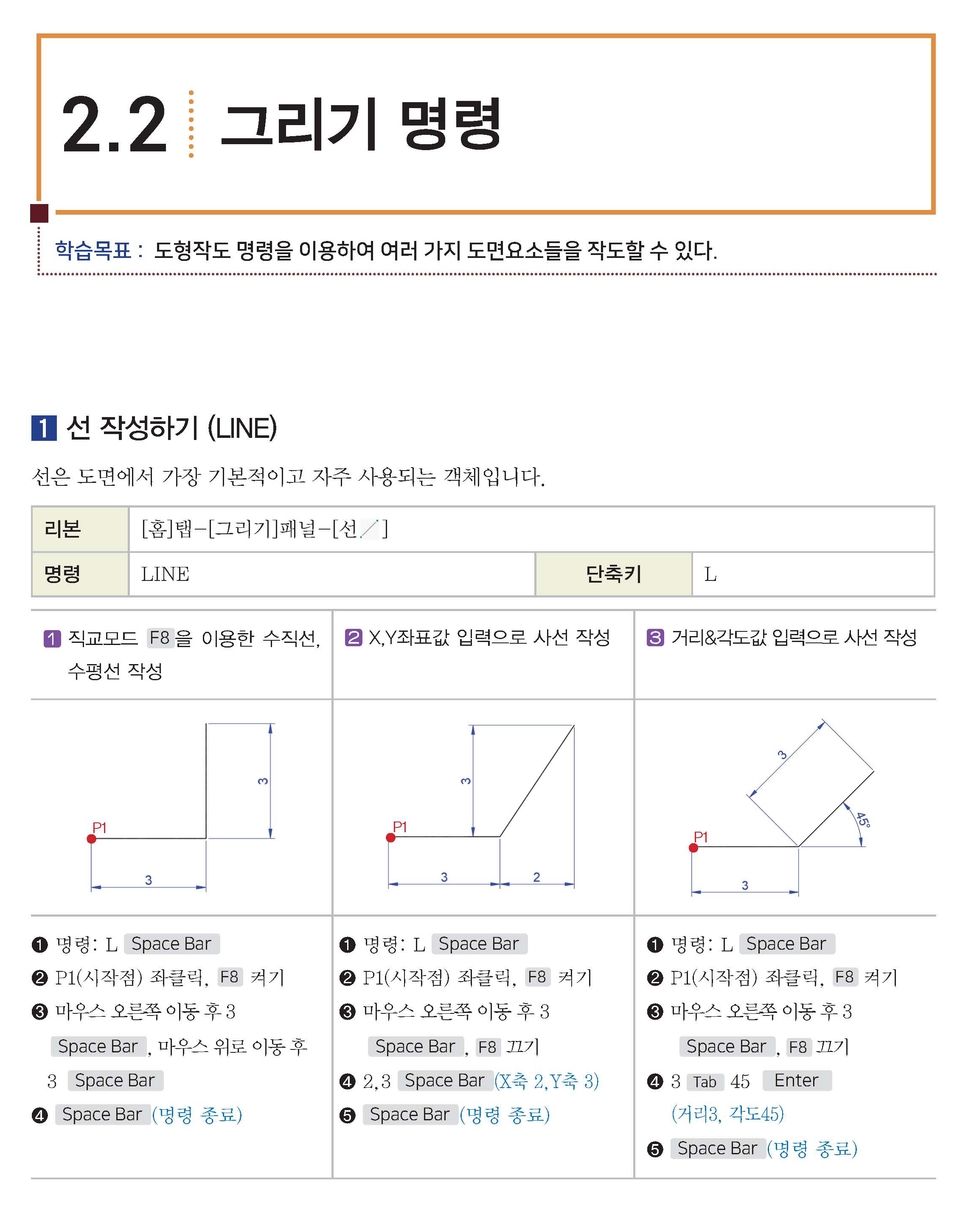
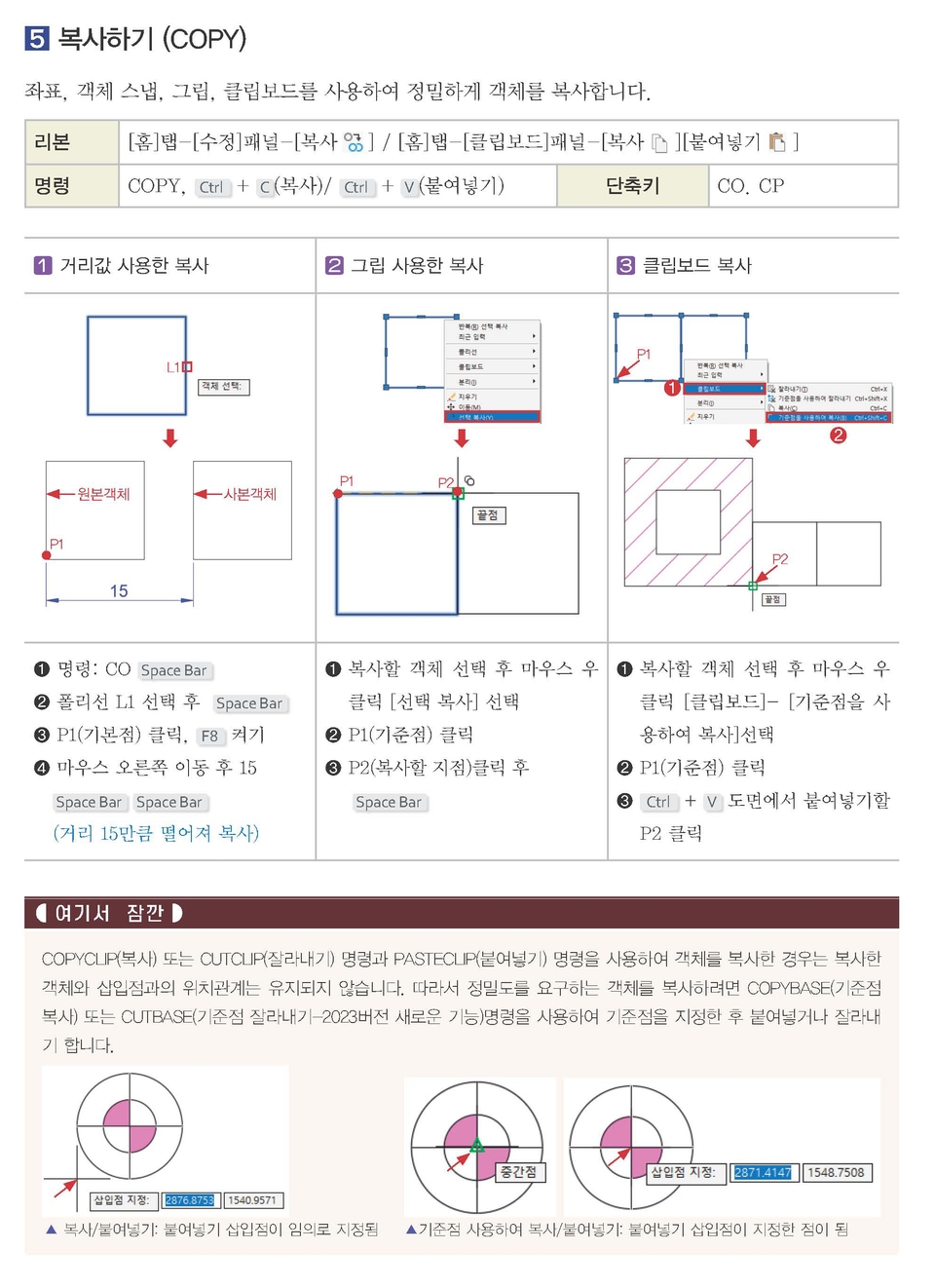
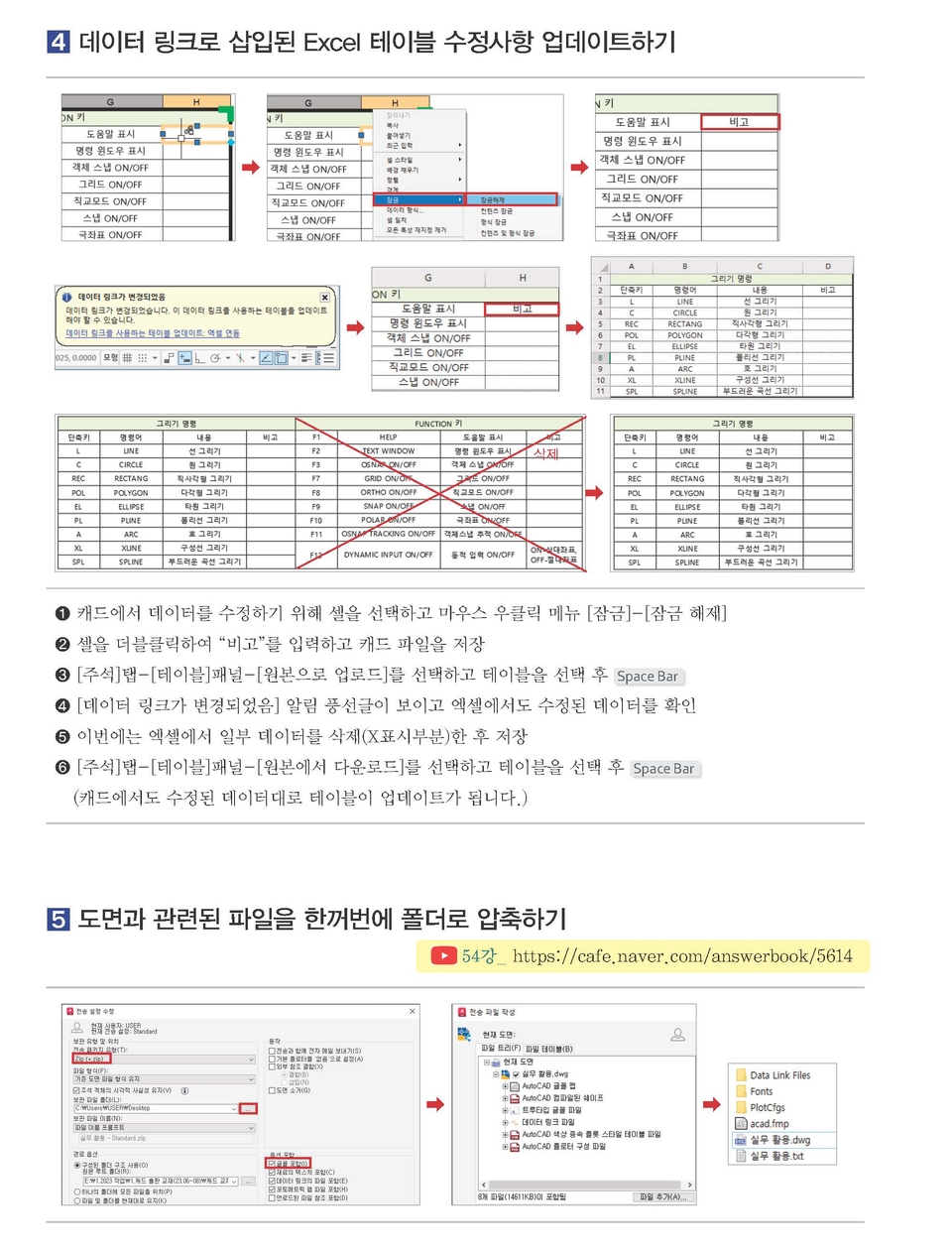
We explain AutoCAD drawing creation (drawing/editing/text, dimensions, leaders, field creation/block creation and editing, etc.) and drawing printing, and practical functions one by one so that you can follow along step by step.
All commands are explained in detail by first displaying each page on the screen, such as commands, functions, and practice drawings, as shown in the following screen, and then the practical training process is explained in detail.


Drawing 24 practice drawings
At the end of each unit , you will learn step-by-step how to create 24 practice drawings using the commands you have learned.


Learn practical AutoCAD features that can be used immediately in the field and are based on the author's extensive practical experience.


Learn all the drawing/editing/drawing output/practical functions based on 2D drawing creation based on NCS competency units.

We carefully select only the core functions necessary for drawing work and explain them step by step so that you can understand them by following them yourself.

You will learn the entire process of creating 24 practice drawings like the one above step by step so that you can apply what you have learned in each unit.

Learn practical features and the author's know-how that can be applied immediately in the field.

Instructor: Kim Hye-sook
I am the author of <AutoCAD 60-Lecture Complete Guide: Applying the Core Knowledge Immediately (Answerbook)> .
Currently, he is being used as an external lecturer at the Gyeonggi Human Resources Development Center of the Korea Chamber of Commerce and Industry.
I have worked as a professional instructor at various educational institutions and companies, and I have included all of my experiences in this book.
Q Do I need the book <AutoCAD 60 Lectures Complete (Answerbook)> to watch the lectures?
This lecture is based on the book "AutoCAD 60-Lecture Complete: Applying Core Practical Knowledge (Answerbook, written by Hyesook Kim)". Therefore, watching it alongside the book will be helpful. However, it's not strictly necessary.
The contents of the book are previewed in the video, so if you need it, you can purchase it from the online bookstore below.
Q I only need AutoCAD 2D.
This course isn't a burdensome, all-inclusive introduction to AutoCAD. It boldly excludes 3D features, focusing instead on the core functions essential for 2D drawing.
Q. Does the company also need the AutoCAD features?
This course not only reflects the NCS-based 2D drawing learning module, but also contains various practical functions and tips that can be immediately applied in the field.
Q. Does the company also need the AutoCAD features?
It contains various practical functions that can be used immediately in practice.
AutoCAD Tools: AutoCAD 2024 (English version)
The format of the learning materials provided (60 video practice files, practice drawing AutoCAD files, and source code, etc.)
This video lecture and learning materials were created based on the contents of the book <AutoCAD 60 Lectures Complete (Answerbook, written by Hye-sook Kim)>. All materials provided in this video content are protected by copyright and therefore cannot be copied, distributed, or used for secondary purposes.
Who is this course right for?
If you want to quickly learn AutoCAD 2D functions and practical skills
Instructor preparing NCS-based AutoCAD 2D drawing course
2,458
Learners
105
Reviews
2
Answers
4.6
Rating
1
Course
Promentor's real coaching lecture that anyone can follow!
ProMentor is a group name composed of the top 1% active industry experts in each field with over 7 years of experience.
Experts affiliated with Pro-Mentor must satisfy all of the following conditions.
- Those with 7 or more years of practical experience in their respective fields and who are currently active as working professionals
(Those who have stopped working in the field and only provide lectures are excluded from Pro-Mentor membership)
- Those who have published at least one physical book in their field of expertise through an official publishing house
(Excludes publications with low public credibility, such as self-publishing, POD publishing, or e-book-only publishing)

All
61 lectures ∙ (15hr 22min)
Course Materials:
All
3 reviews
5.0
3 reviews
Reviews 3
∙
Average Rating 5.0
5
It was a very satisfying education that allowed me to recall from my head what I had learned in school.
Thank you~~
Thank you for your good lecture review~~~ Thank you for your good lecture review. Please send your personal information (name, address, contact information) to the email in the format below to receive the book. After confirmation, We will send you the book "AutoCAD 60 Lectures Complete (by Hye-sook Kim. Answer Book)". - Course review by the person who participated: - Name: - Address: - Contact information: Email address to send to answerbook@naver.com
Thank you for your good review. Please send your personal information (name, address, contact information) to the email in the format below to receive the book. After confirmation, We will send you "Short-form video editing and production revenue generation with Capcut". - Course review Course name: - Name: - Address: - Contact information: Email address to send to answerbook@naver.com
Reviews 1
∙
Average Rating 5.0
5
It was good that it explained each command step by step in an easy-to-follow manner, and that I could learn the practical aspects of drawing with practice drawings. It was also good that it explained the entire contents of the book when I first started.
Thank you~~
Thank you for your good lecture review~~~ Thank you for your good lecture review. Please send your personal information (name, address, contact information) to the email in the format below to receive the book. After confirmation, We will send you the book "AutoCAD 60 Lectures Complete (by Hye-sook Kim. Answer Book)". - Course review by the person who participated: - Name: - Address: - Contact information: Email address to send to answerbook@naver.com
Reviews 868
∙
Average Rating 5.0
5
I listened to your valuable lecture well. Happy New Year and stay healthy always.
Thank you~~
Thank you for your good lecture review~~~ Thank you for your good lecture review. Please send your personal information (name, address, contact information) to the email in the format below to receive the book. After confirmation, We will send you the book "AutoCAD 60 Lectures Complete (by Hye-sook Kim. Answer Book)". - Course review by the person who participated: - Name: - Address: - Contact information: Email address to send to answerbook@naver.com
Check out other courses by the instructor!
Explore other courses in the same field!