


Learn to Create Your Own Animated Emoticons with Animate (feat. a Creator with 20 Million Views)
You can learn the core usage of Adobe Animate from a KakaoTalk emoticon artist who produced an official collaboration music video with pop star JVKE and a K-pop idol, and achieved 20 million views on YouTube for their animation.
841 learners
Level Beginner
Course period Unlimited


Version 21.07 News
Hello students, this is Grinemo.
Here's the June update news.
Animate has been updated to version 21.07.
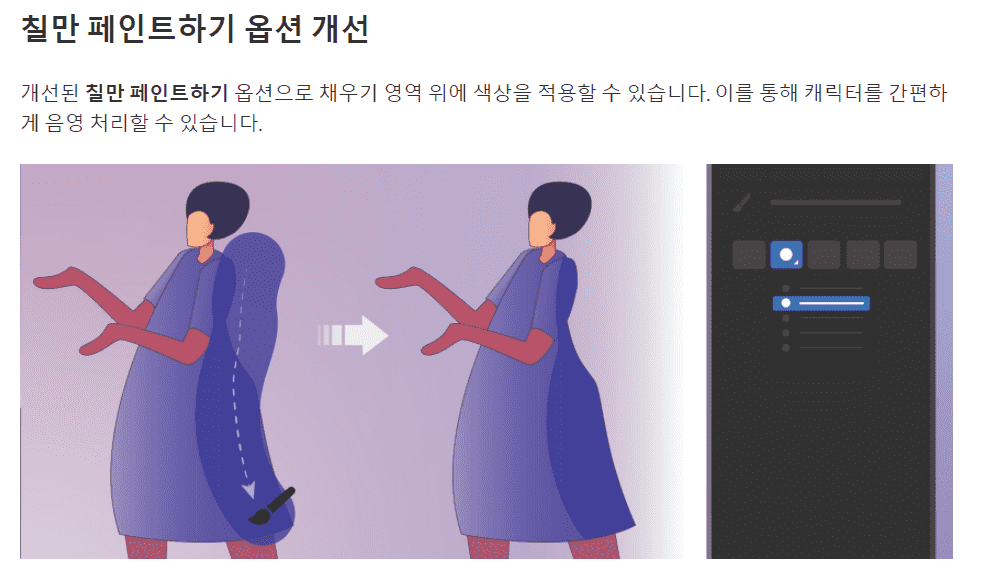
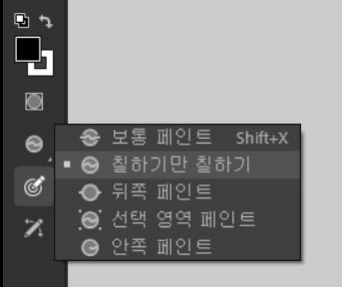
Added " Paint Only " option to Brush Mode.
Now, when you select this option , you can paint a different color directly on the painted surface.
As I mentioned in class, I usually work on shading with the line tool, so I don't use the brush mode very often.
Some functions are usefully used by registering shortcut keys.
This newly added option is convenient because it allows you to draw inside a surface that has been painted with a different color while maintaining the brush texture.
However , the shortcut list is in English, so please search in English and apply the shortcut key .
(I searched in English just in case, and it came up. The first post said it wasn't in the shortcut list.
Please note that the content sent by email is the original post before revision.)

- Paint Fills only
I think it would be a very useful feature if we could use a shortcut key.
That's all.