


Learn to Create Your Own Animated Emoticons with Animate (feat. a Creator with 20 Million Views)
You can learn the core usage of Adobe Animate from a KakaoTalk emoticon artist who produced an official collaboration music video with pop star JVKE and a K-pop idol, and achieved 20 million views on YouTube for their animation.
841 learners
Level Beginner
Course period Unlimited


Animate 21.06 version update contents
💬Animate has been updated to version 21.06.
📄Another feature was added in the graphic symbol loop option in the previous version 21.03.
This allows you to specify a specific section for the loop (repetition) of a graphic symbol .
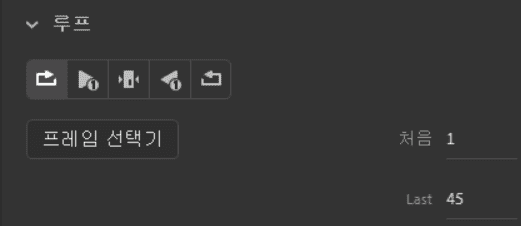
📄You can now specify the First and Last frames in the Loop options of the Graphic Symbol Properties panel.
If you write the numbers of the beginning and end frames, the graphic symbol will continue to repeat with the frames you wrote.
📄In the past, you had to add one more keyframe to change the frame number.
Of course, it wasn't that inconvenient to add keyframes.
It's a bit more comfortable since it was a bit cumbersome in the twinned section.
💬That was it for Grienemo.
Thank you.🙋♂️