


Learn to Create Your Own Animated Emoticons with Animate (feat. a Creator with 20 Million Views)
You can learn the core usage of Adobe Animate from a KakaoTalk emoticon artist who produced an official collaboration music video with pop star JVKE and a K-pop idol, and achieved 20 million views on YouTube for their animation.
841 learners
Level Beginner
Course period Unlimited


If the pressure function is enabled but the pressure is not applied.
Hello, this is Grinemo.🙋🏻♂️
Even after installing (re-installing) the Animate app or updating to a new version and activating the pressure feature, there are times when the pressure does not work.
In that case, uninstall and reinstall the tablet driver.
After running Animate, the top menu,
In Edit > Preferences > Edit Preferences > Drawing tab, change the option for "Tablet Input" at the bottom to "WinTab".
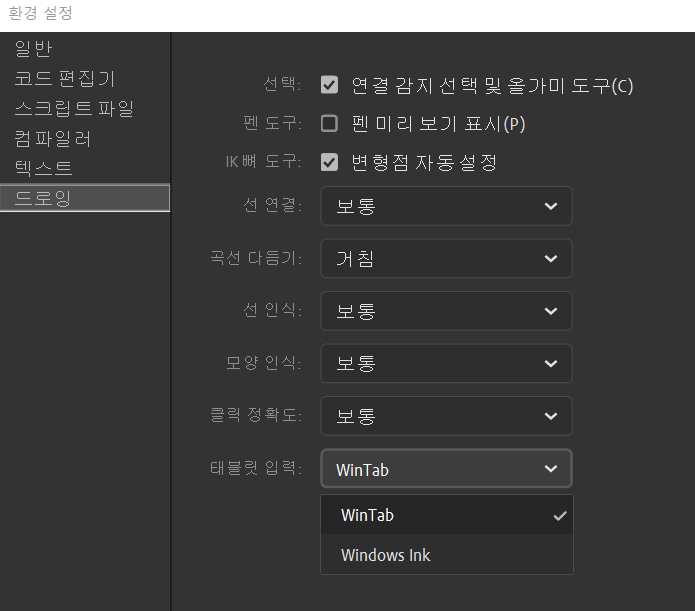
However, when using Wintab with dual monitors, the tablet pen mapping is extended to monitor 2 when running Animate.
When drawing, you will feel more and more sliding.
Like when you increase the DPI of your mouse.
In that case, selecting Window Ink again will make the mapping work normally.
conclusion
: If pressure sensitivity does not work when using one monitor, select 'WinTab' to resolve the issue.
: When using dual monitors (2 monitors), when you select WinTab, the tablet mapping will extend to Monitor 2.
That is, the range of perception increases, so it slides faster and more.
:Dual monitor users can choose to use Windows Ink.
Thank you. 🙂