


Google Analytics (GA4+GTM) for Practitioners (2026 Update)
This is a detailed and practical course for Google Analytics beginners. Rather than just covering fragmented features, you can learn the actual analysis process using GA4 through scenario-based analysis. It is continuously being updated to reflect the latest GA4 changes!
1,287 learners
Level Basic
Course period Unlimited


・
Edited
[Important] GA4 'thresholding' is (almost) gone. (Updated on 2/12/24)
Google has removed Google signals data from GA4 reporting IDs (effective February 12th)
It's a bit tricky to explain, but what I'm saying is that the orange triangle next to the GA4 report name will no longer appear when you click on it and it will say "Benchmark applied."
What 'reference point applied' meant was that some data was not visible.
The issue of data from yesterday's live advertisement not being visible in the traffic source/medium report (because it is small) or data not matching other reports was resolved with the message 'Baseline applied'.
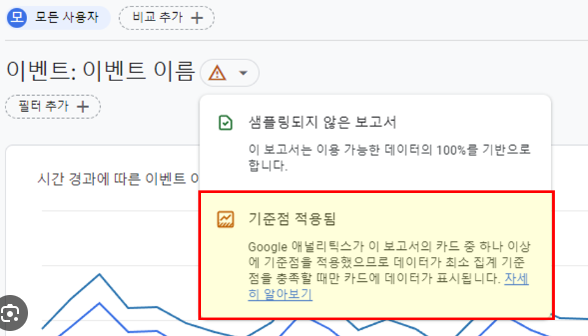
This is (almost) gone in GA4. As of February 12, the “threshold applied” message from Google signals is (almost) gone. However, you will still see this message in reports that still use demographic dimensions (such as age).
The most frequently asked question in the GA4 beginner KakaoTalk room
'I can't see the data' and 'The data doesn't seem to match', but I think this issue will be resolved to some extent.
In my lecture, I also explained how to fix the 'reference point applied' problem, but I think you can ignore this part for now.