강의

멘토링

커뮤니티

BEST
Programming

/

Devops & Infra

Getting started with Linux performance analysis

This lecture will teach you the basic commands required for performance analysis of Linux servers, how to use the tcpdump command to solve network problems, and troubleshooting methods based on cases. Through this lecture, you will be able to solve various performance problems that occur on Linux servers.

(5.0) 43 reviews

513 learners

Level Basic

Course period Unlimited

  • alden
Linux
Linux
Linux
Linux

Reviews from Early Learners

Reviews from Early Learners

5.0

5.0

Timothy Kim

100% enrolled

I registered for the course and finished it right away. Since it was the Linux commands I normally use, I easily skipped over the part about understanding the commands, and it would have been better if there had been explanations of the options that are frequently used in practice (I think there were only some) I liked that the actual failure case analysis content was able to establish the methodology once again Thank you for the great lecture!

5.0

song.sh

42% enrolled

The content is really great~!!!!

5.0

rysgood

32% enrolled

This is a good lecture.

What you will gain after the course

  • Commands for Linux Performance Analysis

  • Key concepts that make up Linux from a performance perspective

  • Process, Results Interpretation, and Troubleshooting for Linux Performance Analysis

Difficult and complex Linux performance analysis?
We will explain it in an easy-to-understand way with commands and examples.

In “Getting Started with Linux Performance Analysis”

How can I analyze Linux performance?

  • ✅ Learn the basics for analyzing performance and network issues on Linux servers.
  • ✅ Develop problem-solving skills by focusing on various performance and network issues that actually occurred on Linux servers.

This article covers Linux performance analysis, which is essential for those who develop servers or develop and operate services in a Linux environment.

It is especially helpful for these people:

Systems engineer or cloud engineer with operational ownership of Linux servers

Backend/server engineer who develops and operates services in a Linux environment

Engineers struggling with persistent performance and network issues on their Linux servers

The process of Linux performance analysis is vast and complex. Therefore, even when performance or network-related issues arise on a Linux server, it can be difficult to determine the best course of action.
We have designed this lecture to help those who have experienced these difficulties find a direction to solve their problems .


The most frequently occurring issues in practice
Let's take a closer look.

01

Six Basic Commands for Performance Analysis

02

Network troubleshooting tool tcpdump

03

Real-world performance analysis and troubleshooting examples

Key commands for performance analysis

Learn the essential knowledge you need to know for Linux performance analysis in an easy-to-understand way based on actual commands used for performance analysis.
  • Learn what Load Average is, why it's important, and how to interpret it using the uptime command.
  • We will examine OOME and Syn Flooding among kernel messages using the dmesg command and learn how they affect performance.
  • Let's examine system memory usage using the free command. Learn why the output is divided into "free" and "available" and what swap means.
  • Let's take a look at the system's disk usage using the df command.
  • Learn how to analyze your system's CPU usage and the status of processes using the top command.
  • Learn how to interpret your system's network connection information and the status of sockets using the netstat command.

Network Problem Analysis tcpdump Command

Learn about the tcpdump command to analyze and troubleshoot network problems.
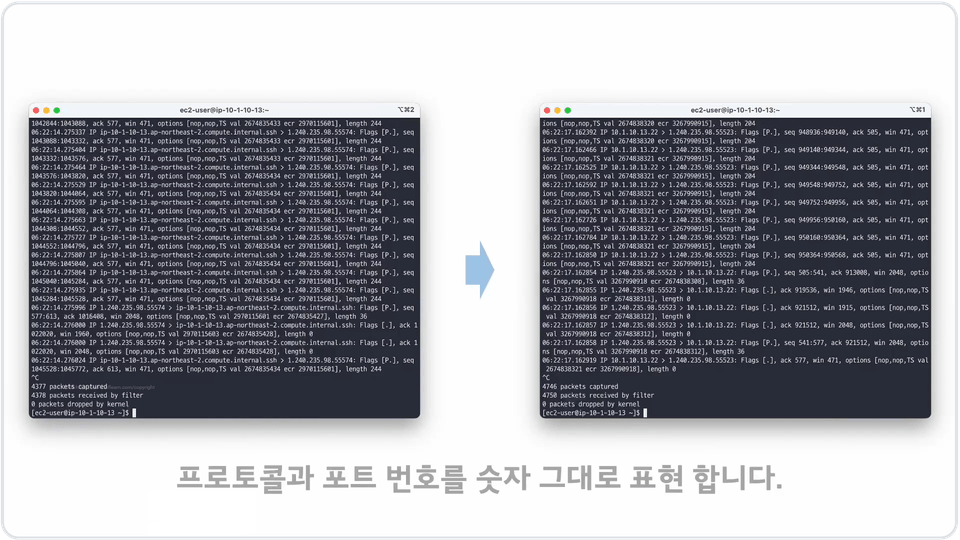
  • Let's see what tcpdump can tell us.
  • Learn how to generate packet dumps.
  • Let's look at how to analyze packet dumps using WireShark.

Real-world performance analysis and troubleshooting examples

We'll explore how to identify and resolve issues through real-world performance analysis and troubleshooting examples.
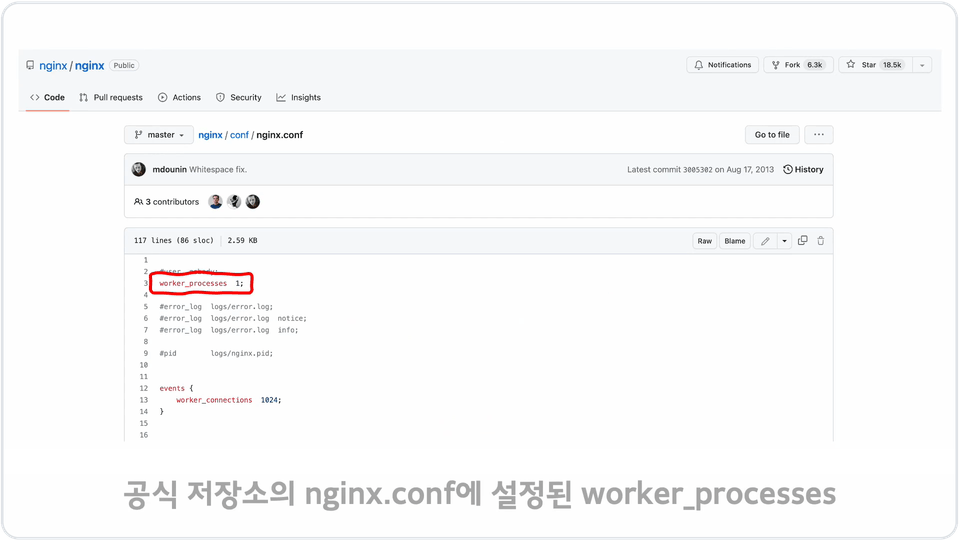
  • Here are five real-world performance examples.
  • Learn how to track and address performance issues in Linux, based on analysis and resolution of actual problems that occurred.
  • You can take your foundational knowledge for solving problems in practice to the next level.

I will share my Linux performance analysis know-how gained from my work experience.

I wrote the book, " Linux Kernel Stories for DevOps and SE ."
I currently work as an SRE at Carrot Market, sharing my diverse knowledge through Brunch and Tistory . I hope this course will help you take a step closer to Linux performance analysis. 🙂


Q&A 💬

Q. Can I take the course even if I don't know anything about Linux?

This course does not cover the basics of Linux installation and operation. It is primarily designed for those who have experience developing and operating services in a Linux environment or operating Linux servers.

Q. How much Linux operating experience is required?

You must be able to remotely access a Linux server, be familiar with basic commands for operation, and have experience installing packages or applications for service operation.

Q. Is there anything I need to prepare before attending the lecture?

It would be good to have at least one Linux server that you can connect to so that you can enter the commands covered in the lecture and view the output results.

💾 Please check before taking the class

  • If it's a Linux server, any environment is fine, including physical servers and AWC EC2.
  • We provide PDF study materials.
  • Basic operational experience with Linux servers is required for learning.

Recommended for
these people

Who is this course right for?

  • Anyone who operates a server in a Linux environment

  • Those who develop and operate services in a Linux environment

Need to know before starting?

  • Basic Linux usage (SSH connection method, basic commands)

Hello
This is

1,724

Learners

119

Reviews

62

Answers

4.9

Rating

3

Courses

Having worked at Naver Cloud, Kakao, and Weverse Company, I am currently working as an SRE at Karrot to ensure stable service operations.

I have authored two books: Linux Kernel Story and ElasticSearch Operation Know-how from the Basics..

Curriculum

All

19 lectures ∙ (3hr 9min)

Course Materials:

Lecture resources
Published: 
Last updated: 

Reviews

All

43 reviews

5.0

43 reviews

  • ongsiming님의 프로필 이미지
    ongsiming

    Reviews 1

    Average Rating 5.0

    5

    100% enrolled

    I registered for the course and finished it right away. Since it was the Linux commands I normally use, I easily skipped over the part about understanding the commands, and it would have been better if there had been explanations of the options that are frequently used in practice (I think there were only some) I liked that the actual failure case analysis content was able to establish the methodology once again Thank you for the great lecture!

    • hjyun83님의 프로필 이미지
      hjyun83

      Reviews 2

      Average Rating 5.0

      5

      100% enrolled

      • kenshin91368784님의 프로필 이미지
        kenshin91368784

        Reviews 1

        Average Rating 5.0

        5

        37% enrolled

        • kayoungkim1224님의 프로필 이미지
          kayoungkim1224

          Reviews 4

          Average Rating 5.0

          5

          100% enrolled

          • kaeunlee4824님의 프로필 이미지
            kaeunlee4824

            Reviews 7

            Average Rating 5.0

            5

            63% enrolled

            $26.40

            alden's other courses

            Check out other courses by the instructor!

            Similar courses

            Explore other courses in the same field!