
![[Absolute Beginner] Learn Android Kotlin by building 8 appsCourse Thumbnail](https://cdn.inflearn.com/public/courses/327096/cover/fa1cbc3c-c0e8-4a3d-9f2a-1150b67f6457/327096-eng.png?w=420)
[Absolute Beginner] Learn Android Kotlin by building 8 apps
bokchi
We will create 8 Android apps using Kotlin syntax. Beyond 8 practical exercises, you'll learn Android with diverse theoretical explanations.
Beginner
Android, Kotlin, Firebase
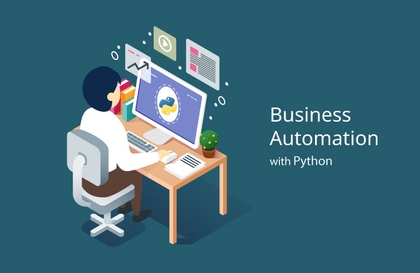
If you have learned Python for business automation, let's use Python for actual work! This is a good business automation lecture for those who want to manipulate Excel using Python.

Automation of tasks using Python
Automation of tasks using Python and Excel
The most important thing for non-development workers
Take advantage of our work automation skills!
While conducting several offline basic Python classes with non-developers,
I wanted to learn Python and apply it to my work, but I didn't know how to apply it.
I often see people who haven't been able to utilize Python.
In this course, you will learn business automation skills that allow you to manipulate Excel and perform automatic calculations using Python.
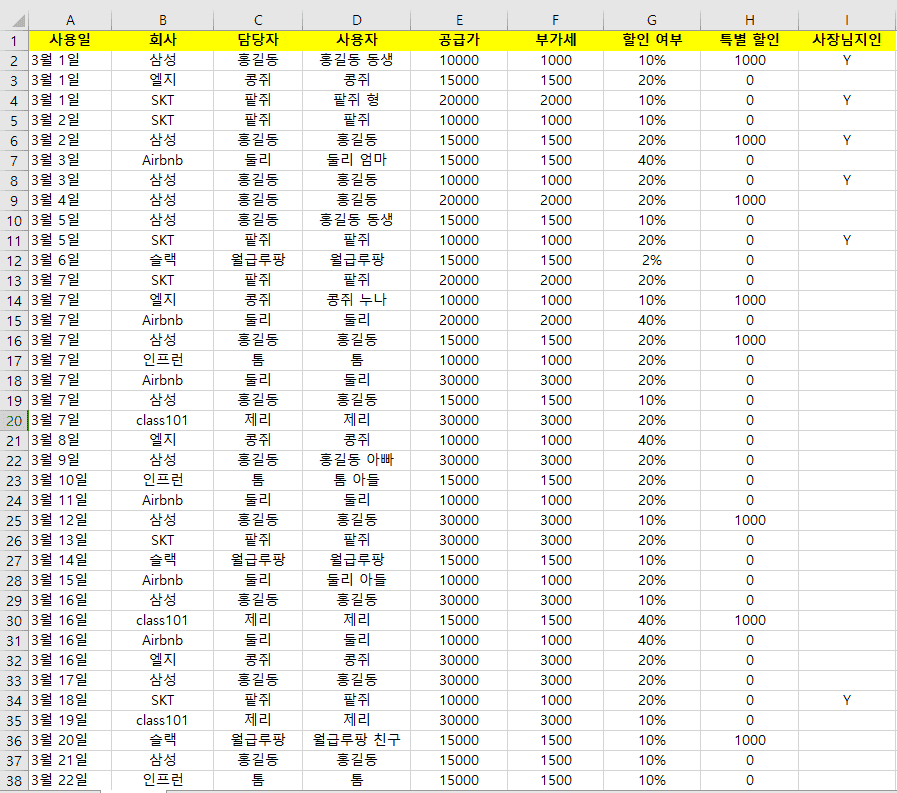
An Excel file like the one above
1. Create a quotation by classifying it by company.
2 Send me an email telling me how much it cost
3 The boss's acquaintance gave me a 50% discount
4. Tell us who used the quote
Let's say you have a mission.
In this case, if you input the number of rows to be organized in the Excel file using Python code and run it,
An Excel file of the quotation and email content are automatically generated for each company.
Who is this course right for?
People who want to manipulate Excel with Python at once
People who want to apply Python they have learned to business automation
Need to know before starting?
Python Grammar
6,148
Learners
394
Reviews
1,387
Answers
4.8
Rating
12
Courses
2015년 스타트업 창업을 계기로 다양한 개발 프로젝트를 진행하였습니다.
현재는 평범한 직장인 개발자입니다
All
13 lectures ∙ (1hr 30min)
8. Save as text file
09:08
10. Creating a GUI
06:17
All
15 reviews
4.5
15 reviews
Reviews 2
∙
Average Rating 4.0
5
I was interested in business automation, so I studied Python to make it easier to handle difficult parts in Excel. I was frustrated because I only knew Python grammar and couldn't apply it to my work. I took the course because I wanted to save the data I read in in the format I wanted and automate the work by programming it. After taking this course, I learned the overall flow. Now I plan to create my own 'daily sales report'. Thank you for the great course.
Hello, Akmanjak. I also made this lecture because someone who does similar work at work asked me to make a program. I'm glad that it was helpful. I will try to make a better lecture. Thank you :)
Reviews 10
∙
Average Rating 5.0
Reviews 3
∙
Average Rating 3.7
5
There was a manual input task that had to be done for several days, but I didn't have the confidence to transfer and write everything, so I found this lecture that was on sale, and I listened to the lecture diligently over the weekend and applied it to complete the necessary coding. I would like to thank you for creating a lecture that was perfect for me, and I am leaving an honest review. 1. No basic explanation at all - Although it is stated that basic Python grammar is required as a prerequisite, there was almost no mention of grammar, so I had to search the Internet here and there. In particular, the explanation of openpyxl and how it works was lacking, so I looked it up a lot. There are various libraries such as xlsxwriter in addition to openpyxl. 2. The tone of voice and the lecture style are not neat - Even if the tone of voice is like that, the lecture is so unorganized that I have to organize it myself in the middle and repeat and pause it to listen. Usually, other people use PPTs instead of coding programs to explain the current process, write methods, etc., but this lecture didn't have that, so it was difficult. 3. Poor ending - There is a 20-minute lecture in the middle, but it took longer than other lectures because an error occurred and it was fixed. But I can't believe it even after seeing the solution. You took what was there at the beginning and solved it with a loop?? I still don't get it. In the last lecture, if you made it with GUI, you should have shown a demonstration once, but this process was omitted, and someone even asked a question saying that they made it following the lecture and it was detected as a virus... And if you had given an answer, you should have given an additional lecture for other students later, or there should have been a mention in the <Lecture Introduction> section, but there isn't. ㄷㄷ -------------------------------------------------------------------------------------------------------------- Despite the above shortcomings, this lecture is the easiest course for beginners like me to approach among the methods of organizing Excel data using Python, and if you have patience and fully understand it, you can automate the work you really have to do in the office, so I give it full marks.
Reviews 1
∙
Average Rating 4.0
4
It would be good to assume that you know Python to some extent, but it might be hard for those who don't know anything to understand ㅜㅜ I know a little bit too ㅋㅋㅋ I'm just busy following the code ㅜ
Hello, Min-kyung If you are not familiar with Python, it might have been a little difficult ㅠㅠ Thank you for taking the class~
Reviews 1
∙
Average Rating 5.0
5
I've been hearing a lot about Python from developers around me for a few years now, but when I actually tried to approach it, it was used in so many different ways, and the tools and libraries used were so diverse that it felt vague. I really like it when you pick out the necessary parts and give lectures on topics.
Thank you, Kim Jung-Hun, for your review :) I think these words are the strength that helps me prepare for the lectures diligently. Have a nice day!!
Check out other courses by the instructor!
Explore other courses in the same field!