

모바일 네비게이션 퍼블리싱 ㅡ모바일트리거,GNB 보이기 감추기 부분 다시 수정하여 질문드립니다!
251
7 asked
<!doctype html>
<html lang="ko">
<head>
	<meta charset="UTF-8">
	<meta name="viewport" content="width=device-width, initial-scale=1">
	<title>DesignWokrs Agency</title>
	<script src="./js/jquery-2.1.4.js"></script>
	<!-- page scroll Effects js&css -->

	<script src="./js/velocity/velocity.min.js"></script>
	<script src="./js/velocity/velocity.ui.min.js"></script>
	<script src="/js/velocity/main.js"></script>
	<link rel="stylesheet" href="./js/velocity/velocity.css">
	<!-- custom js&css -->

	 <!-- 순서가 중요함 pc버전인 스타일 css가 먼저우선시 되야함 -->
	<link rel="stylesheet" href="./style.css">
	<!-- 모바일 부분만 반응 css -->
	<link rel="stylesheet" href="./responsive.css">

</head>
											<!-- 애니메이션 속성들  -->
<!-- hijacking: on/off - animation: none/scaleDown/rotate/gallery/catch/opacity/fixed/parallax -->

<body data-hijacking="on" data-animation="rotate">

    <div class="container">
		<section class="cd-section visible">
			<div>
				<div class="content">
				<img src="./images/temp-section-01.jpg">
				</div>
			</div>
			</section>

	<section class="cd-section">
		<div>
			<div class="content">
				<img src="./images/temp-section-02.jpg">
			</div>
		</div>
	</section>

	<section class="cd-section">
		<div>
			<div class="content">
				<img src="./images/temp-section-03.jpg">
			</div>
		</div>
	</section>

	<section class="cd-section">
		<div>
			<div class="content">
				<img src="./images/temp-section-04.jpg">
			</div>
		</div>
	</section>

	<section class="cd-section">
		<div>
			<div class="content">
				<img src="./images/temp-section-05.jpg">
			</div>
		</div>
	</section>

	<section class="cd-section">
		<div>
			<div class="content">
				<img src="./images/temp-section-06.jpg">
			</div>
		</div>
	</section>

	<section class="cd-section">
		<div>
			<div class="content">
				<img src="./images/temp-section-07.jpg">
			</div>
		</div>
	</section>

	<header>
		<div class="gnb-inner">
		<div class="logo">
			<a href="#none"><img src="images/logo.png"></a>
		</div>
		<!-- 네비게이션 부분 -->
		<div class="gnb">
			<div class="menu">
			<a href="#none">Home</a>
			<a href="#none">About</a>
			<a href="#none">Project</a>
			<a href="#none">Plan & History</a>
			<a href="#none">Awards</a>
			<a href="#none">Location</a>
			<a href="#none">Contact</a>
			</div>
			<div class="slogan">We design places, not projects.</div>
		  </div>
		  <!-- 햄버거 버튼 -->
		  <div class="trigger">
			<span></span>
			<span></span>
			<span></span>
		  </div>
		</div>
	</header>
 </div>

	<nav>
		<ul class="cd-vertical-nav">
			<li><a href="#0" class="cd-prev inactive">Next</a></li>
			<li><a href="#0" class="cd-next">Prev</a></li>
		</ul>
	</nav> <!-- .cd-vertical-nav -->
</body>
</html>
/* 모바일전용 */
/*pc min:최소너비 */
/* 모바일 기준 최대넓이 768을 넘지 못한다 */
@media (max-width: 768px) {
/* Entire Layout(전체적인 레이아웃) */
.cd-section {
height: auto;
}
.cd-section > div {
height: auto;
}
.content {
position: static;
width: 100%;
height: 100%;
left: 20px;
bottom: 20px;
};
/* Header */
.menu {
display: block;
}
.slogan {
display: none;
}
.gnb {
background-color: #fff;
position: fixed;
top: 0;
right: 0;
width: 250px;
height: 100vh;
/* 왼쪽,위아래,퍼짐정도 */
box-shadow: -5px 0 10px rgba(0, 0, 0, 0.1);
}
.menu {
line-height: 40px;
/* 메뉴를 전체적으로 내림 */
margin-top: 60px;
}
.menu a {
text-align: right;
display: block;
padding-right: 20px;
color: #000;
font-size: 20px;
};
/* Trigger */
.trigger{
display: block;
border: 1px solid #000;
width: 24px;
height: 14px;
position: absolute;
right: 20px;
top: 20px;
cursor: pointer;
};
};/* pc버전 */
/* Google Web Font : Montserrat */
@import url('https://fonts.googleapis.com/css?family=Montserrat:200,300,400,500&display=swap');
@import url('https://fonts.googleapis.com/css?family=Manrope:300,400,500,600&display=swap');
@import url('https://fonts.googleapis.com/css2?family=Source+Sans+Pro:wght@200;300;400;600;700;900&display=swap');
@import url('https://fonts.googleapis.com/css2?family=Overpass&display=swap');
/* FontAwesome CDN 4.7 */
@import url('https://stackpath.bootstrapcdn.com/font-awesome/4.7.0/css/font-awesome.min.css');
/* Reset CSS */
* {box-sizing: border-box;}
ul { list-style: none;}
a {text-decoration: none;}
/* Default CSS */
body{
font-family: 'Montserrat', sans-serif;
color: #222;
font-size: 15px;
margin: 0;
height: 100vh;
background-color: #fff;
}
/* Entire Layout(전체적인 레이아웃) */
.cd-section {
height: 100vh;
}
.cd-section > div {
height: 100%;
position: relative;
}
.content {
background-color: #ddd;
position: absolute;
/* 연산함수 calc를 이용하여 섹션내에 삐저나오지 않고 들어오게함 */
width: calc(100% - 40px);
height: calc(100% - 80px);
left: 20px;
bottom: 20px;
/* 넘치는 부분 끊기 */
overflow: hidden;
}
/* Header */
header {
position: fixed;
top:0;
left: 0;
width: 100%;
}
.gnb-inner {
/* bd+tab =보더 생성 */
/* border: 1px solid #000; */
width: calc(100% - 40px);
margin: auto;
height: 60px;
/* 높이값만큼 주면 중앙 정렬 */
line-height: 60px;
}
.logo {
float: left;
}
.gnb {
float: right;
}
.menu {
display: block;
}
.menu a{
}
.gnb a {}
.slogan {
font-size: 16px;
font-style: italic;
}
.trigger {
display: none;
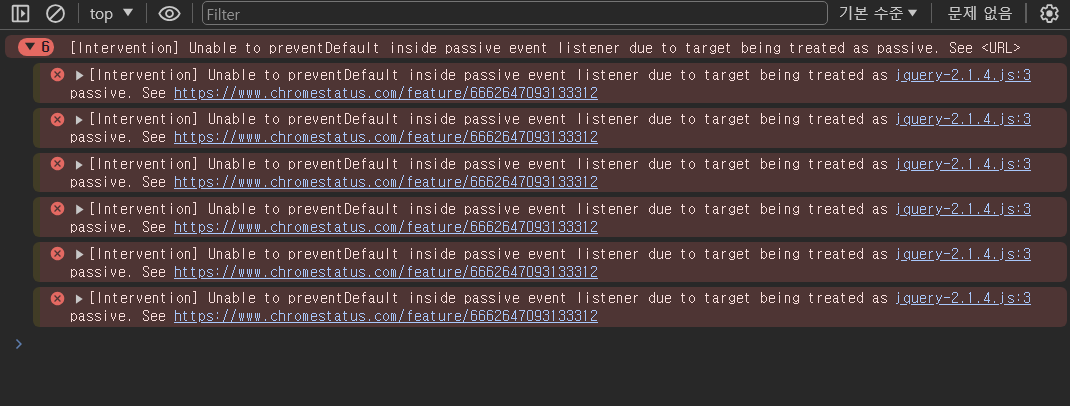
}
아까 질문드렸던 수강생입니다 추가하여 업로드 하였습니다
Answer 2
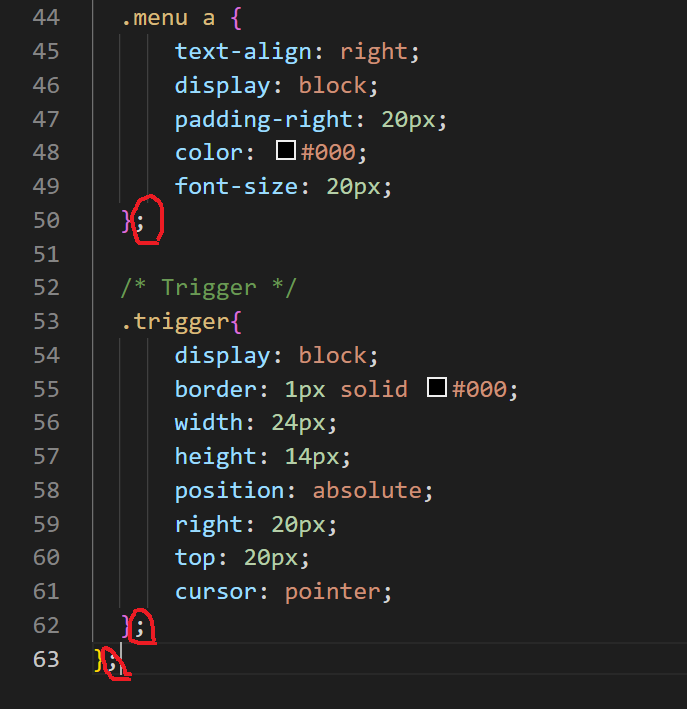
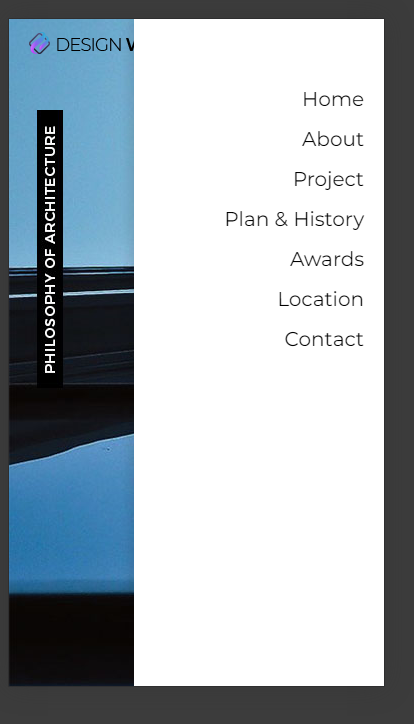 위 코드 적용시 이렇게 임시 보더 박스가 표시 되지 않습니다 ㅠㅠ
full reload 질문
1
245
3
섹션4에 있는 4번째 강의 질문(스크롤링)
1
207
2
안녕하세요. 질문있어서 조심스레 글을 올려봅니다.
1
240
1
브라켓 라이브 실행시 실행오류때문에 진도가안나갑니다..ㅠㅠ
1
388
3
css full reload 문제가 발생하여 질문드립니다!
1
390
3
파일 내 index.html에 대한 오류
1
303
1
모바일 네비게이션 퍼블리싱 - 모바일트리거, GNB 보이기 감추기 부분 해결되지 않아 재 질문 드립니다ㅠㅠ
1
248
1
모바일 네비게이션 퍼블리싱 - 모바일트리거, GNB 보이기 감추기 질문입니다
0
253
2
모바일 네비게이션 퍼블리싱 ㅡ모바일트리거,GNB 보이기 감추기 부분 질문드립니다.
1
293
3
크로스브라우징-크롬
1
345
2
섹션 17 하드코딩으로 이미지맵 만들기 부분 연습파일이 없어요..
0
304
1
line-hieght를 em 단위로 쓰는 것에 대하여 질문 드립니다
1
255
1
슬릭 슬라이더 dots 보이게 하는 방법 질문 드립니다
1
328
1
이거 h2 가 안나오고 스크롤도 안되는데 왜이래요?
1
298
1
모바일 버전에서 메뉴 클릭 후 그 위치로 이동할 때 상단 영역
1
577
2
PC에서 모바일화면으로 전환되면 GNB 메뉴가 OPEN되어있는 상태 (소스)4
2
263
1
PC에서 모바일화면으로 전환되면 GNB 메뉴가 OPEN되어있는 상태 (소스)3
2
359
1
PC에서 모바일화면으로 전환되면 GNB 메뉴가 OPEN되어있는 상태 (소스 js)2
2
314
1
PC에서 모바일화면으로 전환되면 GNB 메뉴가 OPEN되어있는 상태
2
487
1
포지션 속성 중복과 관련해서
1
259
1
section about에 관련.. 궁금해요
1
289
1
섹션3 모바일네이게이션 퍼블리싱 모바일트리거 관련
1
242
2
개발자도구
2
585
6
트리거메뉴 제이쿼리
3
484
2