inflearn logo
Challenge
Ended

The Core of Excel Practice! Must-Know Functions Complete Mastery Challenge Season 2

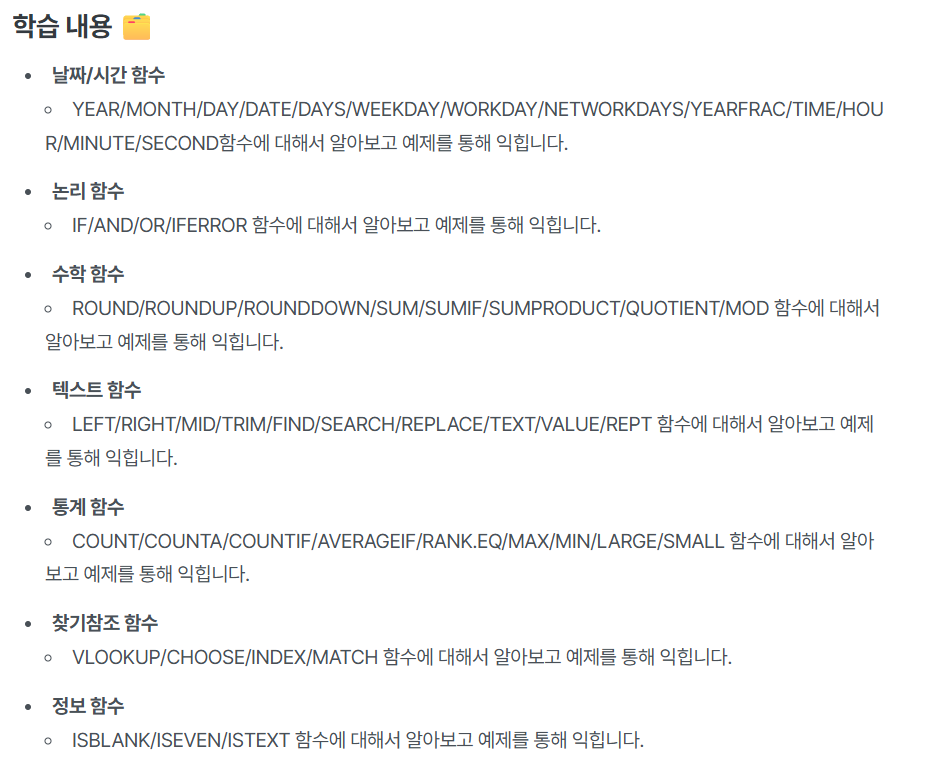
🙋‍♀️ Have you ever thought this? "Functions! I understand when I hear about them, but I can't think of them when I actually try to use them..." "Wouldn't it be great if they just came to mind at the right moment?" Excel functions are the most powerful tool for improving work efficiency. But it's true that they can feel unfamiliar and complicated. That's why we've prepared this! 📌 Course Introduction We've carefully selected only the essential functions needed for practical Excel work and explain them easily with examples. ✔ Basic essential functions like IF / VLOOKUP / SUMIF / COUNT / RANK.EQ ✔ Financial functions like FV / PMT, statistical functions like AVERAGEIF / COUNTIFS ✔ Example-focused structure that you can use immediately in practical work It's not just about throwing function explanations at you and calling it done— we've structured it so you can follow along directly while looking at example files. Don't worry if you're an Excel beginner! We'll teach you slowly and step by step.

158명이 수강한

강의로 진행되는 챌린지!

Excel
MS-Office
functions

28개 수업 학습

5회 미션 수행

라이브 2 회

성취의 증표, 수료증을 발급해요.

무제한 복습, 내 것으로 만들어요.

질문하고 즉시 답을 얻어요.

추가 자료를 통해 학습을 이어나가요.

dmsgml1030님과 함께해요!

Career Verified

480

Learners

55

Reviews

1

Answers

4.9

Rating

20

Courses


I am teaching office certification courses to help students preparing for employment with their self-development.

And I teach practical Excel classes for office workers to help them improve their job competencies

CEO of Eunhee-ssam Class

■ Professional Qualifications

Vocational Training Teacher Level 2 (General Administration & Office Work) Ministry of Employment and Labor

Vocational Training Instructor (Information Technology Operation & Management) Level 3 Ministry of Employment and Labor

Vocational Training Teacher Level 3 (General Administrative Affairs) Ministry of Employment and Labor

Computer Literacy Level 1 Korea Chamber of Commerce and Industry

ITQ Professional Training Instructor (PTI) Korea Productivity Center

ITQ Hangul A, Excel A, PowerPoint A, Internet A Korea Productivity Center

Computer Utilization Ability Level 2 Korea Chamber of Commerce and Industry

Industrial Engineer Information Processing Human Resources Development Service of Korea

■ Publications

85 Excel Functions to Pick and Use Like a Dictionary & Everything About Analysis Tasks (Bookk 2020)

■ Teaching Experience

Taught OA and ITQ certification courses at the Daechi 4-dong Information Education Center in Gangnam-gu as a member of GIT Academy, commissioned by Gangnam-gu Office 2009.03

Lectured on OA and ITQ certifications for people with disabilities and seniors at Gunpo Welfare Center for the Disabled, March 2011

Conducted OA lectures at the Geumcheon-gu Office Computer Training Center as part of Hanbit Computing, entrusted by Geumcheon-gu Office, 2012.03

Taught OA and ITQ certification courses for people with disabilities and seniors at Seodaemun Welfare Center for the Disabled 2013.03

Taught Computer Literacy Level 2 and ITQ OA Master courses for office workers and the general public at the Hwaseong U&I Center (Women's Vision Center) 2015.01

Taught Computer Literacy Level 2 and ITQ OA Master courses as part of the vocational training program for the unemployed at the Gyeonggi Vocational Education Center, 2015.03

Lectured Computer Literacy Level 1 and 2, and ITQ OA Master courses as vocational training programs for the unemployed at Green Computer Academy 2016.04

Obtained "A" grade in Office Administration Trainee Evaluation, Dec 2018

Awarded Star Instructor at Green Computer Academy 2020.10

Selling practical Excel and certification courses on Inflearn 2022.03

[Teacher Eunhee's Class] Launch of an online lecture site specializing in employment certifications, September 2022

[Mapo Youth Naru] Youth Employment Competency ITQ Excel Special Lecture



More


🙋‍♀ You've thought this before, haven't you?

"Functions! I understand them when I hear about them, but when I actually try to use them, I can't remember…"
"Wouldn't it be great if they just came to mind at the exact moment I need them?"


"You know it's good to learn Excel functions, but when you actually try to use them, your mind goes blank and you feel lost about which one to use—I'm sure you've all experienced this at least once, right?"

Excel isn't difficult up to the basic stage of entering data and formatting. But what really saves time and increases efficiency is 'functions'.

Functions are very reliable tools that calculate and organize things for you, but many people give up because the rules seem confusing or there appear to be too many of them.


This course is essential for those people.


It doesn't just list how to use functions.

"Why you should write it this way", "Which function to choose in this situation"

I've explained step by step and structured it so that anyone can easily understand.

Additionally, this isn't just a lecture you listen to and forget—it's designed so you can learn by following along with practice examples after the lecture, and make it 'your own' by solving the given missions. Furthermore, it's structured as a challenge course where you can fill in your gaps with professional feedback from Teacher Eunhee.


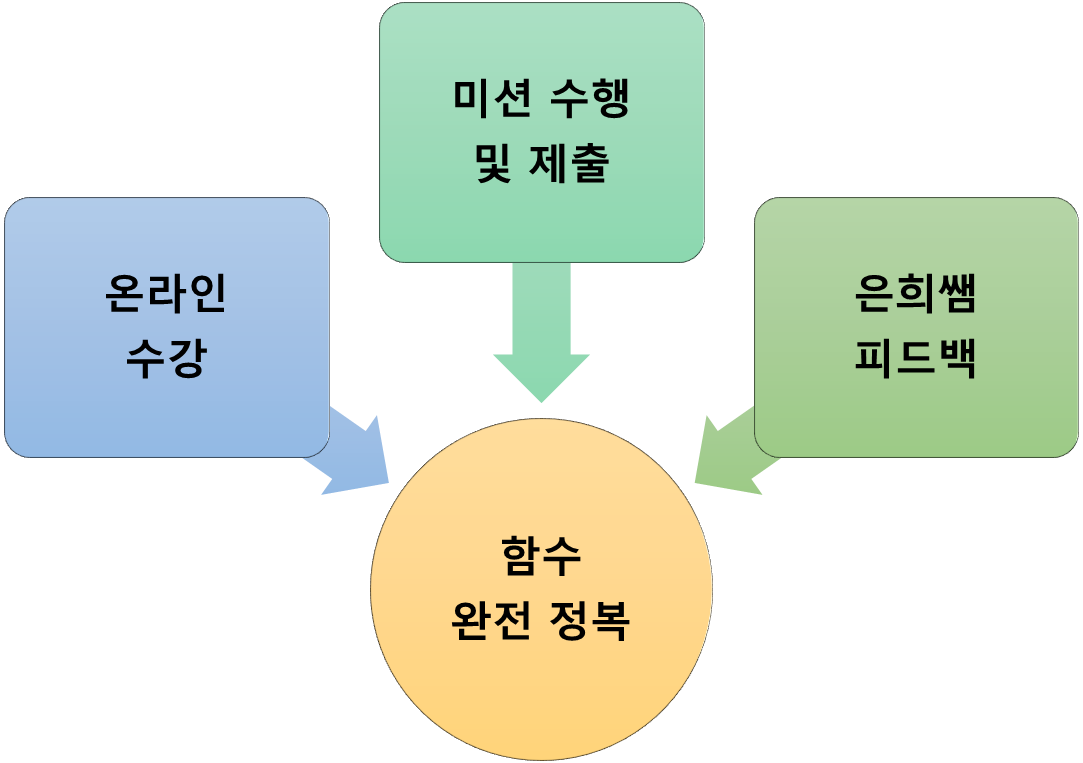
The 'Master Essential Functions' challenge course is structured in the following steps

  1. Learn functions while watching online lectures and

  2. You complete and submit missions for each function

  3. You will be able to accurately understand and use functions while receiving professional feedback


How to complete the mission

A mission for each function is prepared below the last lecture of each function.
Read the mission description, download the mission attachment, solve it according to the instructions, and submit it.


Professional feedback provided by Teacher Eunhee

When you receive feedback, you can identify shortcomings or habits that you don't easily notice on your own, and you can find solutions faster through others' opinions rather than struggling alone.
Additionally, positive feedback gives you confidence, and advice on areas that need improvement provides motivation for growth.
In other words, you can feel a sense of achievement by reinforcing what you do well and補lementing what you lack.
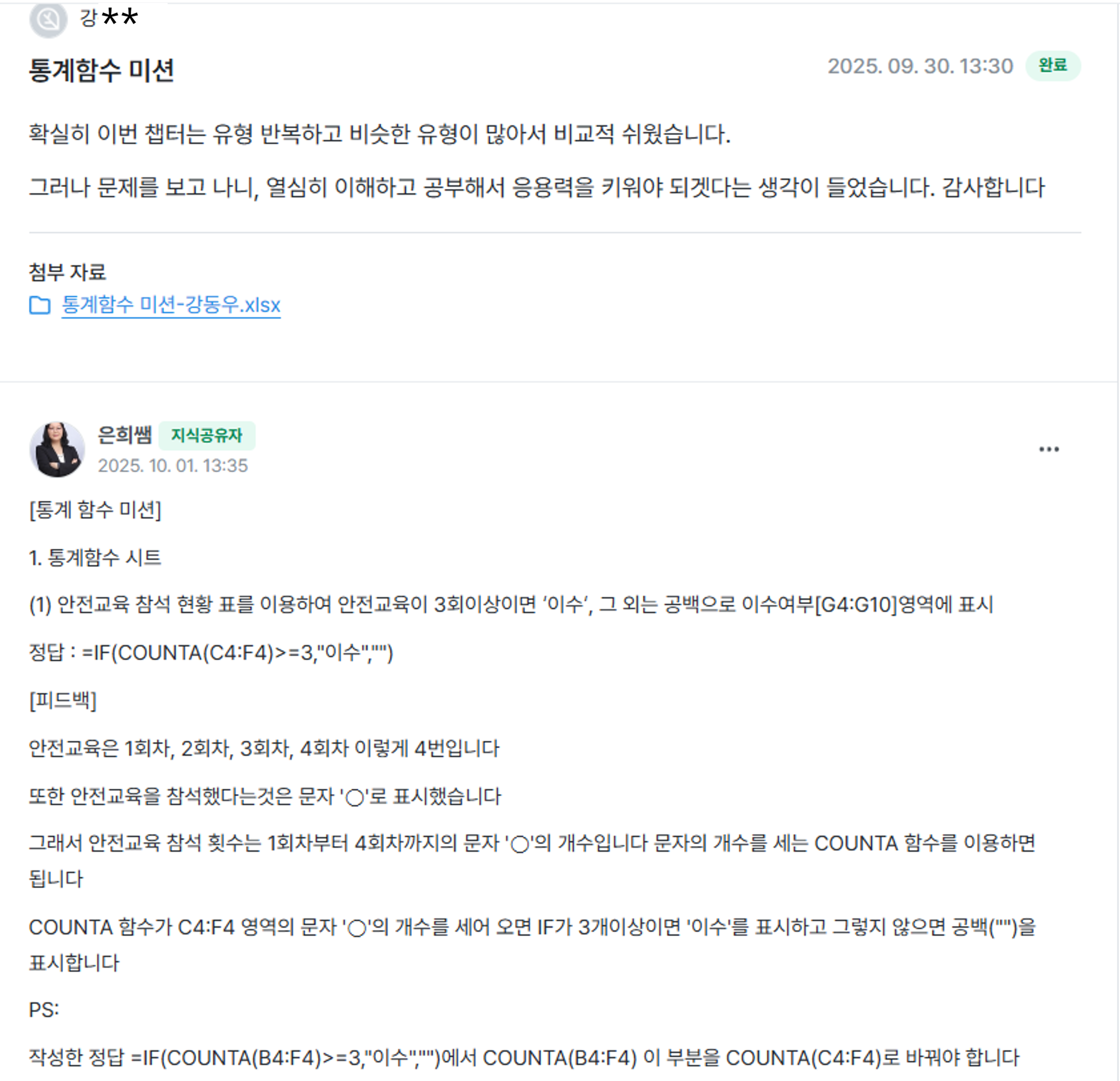
The missions you submit will help you fill in your gaps through Teacher Eunhee's thorough feedback


The photo below is feedback on a macro mission from the 1st challenge


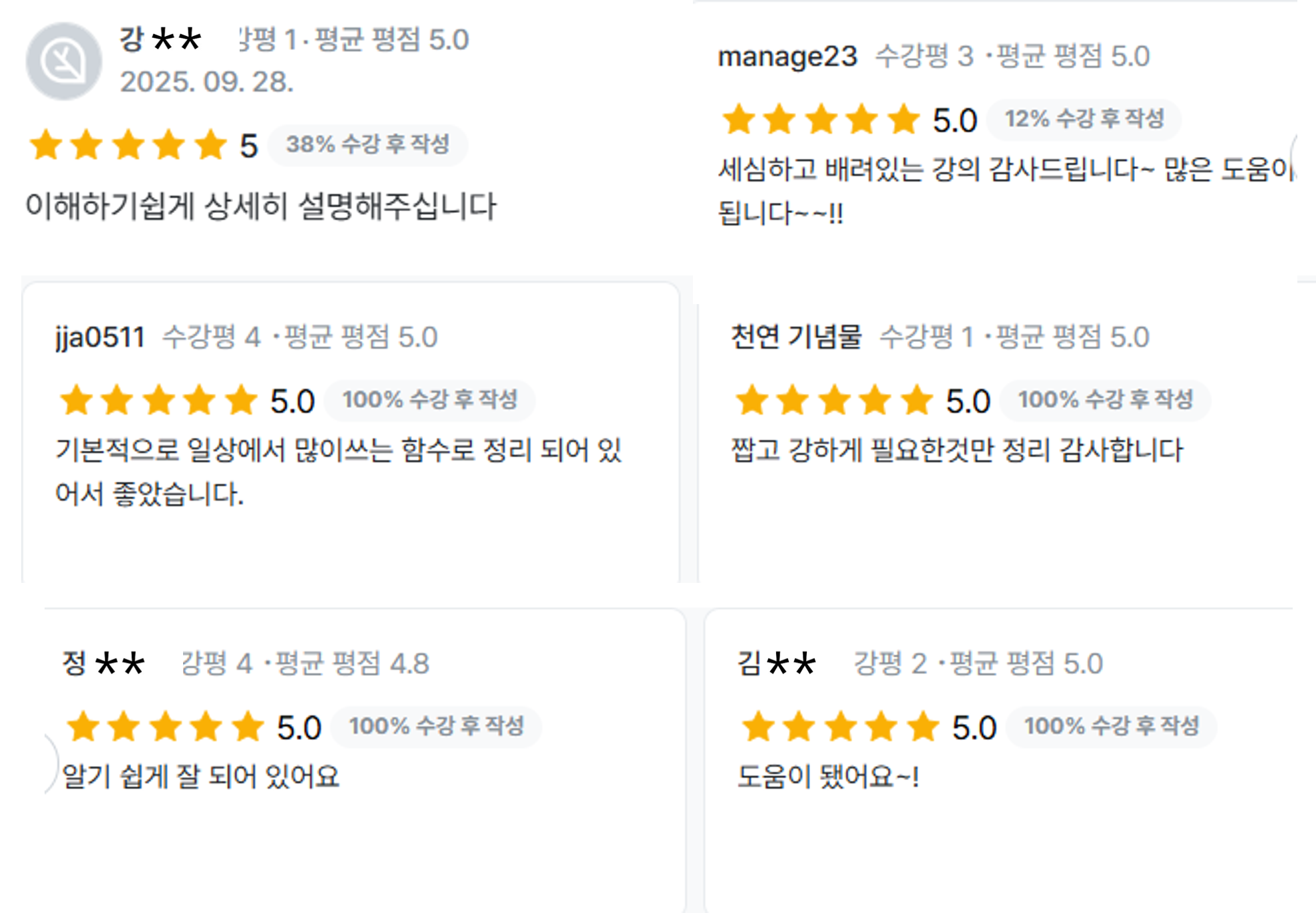
Student reviews from those who took the [Master Functions Completely] course


By the time the challenge course is coming to an end, functions that once felt vague

You'll naturally become familiar with them,
and be able to apply them on your own when needed in real work situations.


🎯 Recommended for

  • People who waste time looking up functions every time they create reports or analysis materials

  • People who can do simple cell input and sorting but aren't confident with functions

  • People who want to properly utilize Excel to reduce work time

  • Those who want to not just learn but immediately apply it to their actual work


🌿 Course Features

✔ Step-by-step explanations that even beginners can understand
✔ Principle-based approach rather than fragmented knowledge
Repetitive learning through challenge missions you solve yourself at each stage
✔ Q&A board support for direct communication with the instructor


This course aims to help you recall 'exactly when you need it' those functions you always found confusing even while using Excel every day.

When you're preparing work, creating reports, or organizing data, I'll help you so your hands move naturally without having to wonder "which function should I use?"

Also, rather than just watching and moving on, you'll be able to build the ability to freely apply these skills to your own work situations by following along and solving problems yourself.


✅ Prerequisites

If you've never used Excel before, it would be good to first familiarize yourself with basic input, formatting, and sorting.

However, if you've found functions intimidating, you can learn all the rules and usage methods in this course.

Anyone who can perform basic operations can follow along.


🎁 Course Benefits

  • You can ask questions anytime during the course → The instructor will answer directly

  • When you write a review, we'll provide you with the "Excel Tips PDF for Boosting Work Efficiency (100 pages)" e-book along with practice examples


When you master functions, Excel truly transforms.
Repetitive tasks decrease, data becomes organized at a glance, and reports become much cleaner.
Most importantly, work efficiency improves and you gain more time.

Through this challenge course, let go of the fear that "Excel is intimidating because functions are difficult," and transform into a confident Excel user who can naturally apply them whenever needed.


Without pressure, but with certainty.

We're rooting for your growth. 🌱


11월

16일

챌린지 시작일

2025년 11월 16일 PM 03:00

챌린지 종료일

2025년 12월 21일 PM 02:59

챌린지 커리큘럼

All

35 lectures ∙ (7hr 34min)

Course Materials:

Lecture resources
챌린지 전용 수업
Live

챌린지에서 배워요

  • I'm not intimidated just by looking at the function name

  • Functions you can use right away in practice become organized in your mind

  • You'll naturally learn by following along with the explanations

  • Work speed increases by more than 2x!

Recommended for
these people

Who is this course right for?

  • An Excel beginner whose head throbs just from looking at function descriptions

  • For those who want to quickly learn only the functions they need in practice

  • Practitioners who want to develop practical skills through examples

  • - Those who need confidence in Excel

Need to know before starting?

  • It's entirely possible even if you only know data entry, cell selection, and basic formatting.

Reviews

Not enough reviews.
Please write a valuable review that helps everyone!

이 강의의 지난 수강평

취소 및 환불 규정
챌린지는 지식공유자가 설정한 수업 최소 정원이 충족되지 않을 경우, 폐강 안내가 고지되며 결제 내역이 자동취소됩니다.

dmsgml1030's other courses

Check out other courses by the instructor!

$29.70