


![성공적인 진짜 iOS Design Guide - [Autolayout With Code]강의 썸네일](https://cdn.inflearn.com/public/courses/332142/cover/4c1ff99b-27a5-4c1c-b2c1-194b170e5144/332142-eng.png?w=420)
성공적인 진짜 iOS Design Guide - [Autolayout With Code]
iOS Developer - 이정
₩154,000
초급 / iOS Autolayout, 모바일 디자인, iOS, autolayout, Swift
5.0
(3)
iOS UIKit 디자인 시스템을 배우는 실전 강의 - 11년차 개발자가 말해주는 진짜 Design Guide를 배울 수 있습니다.

초급
iOS Autolayout, 모바일 디자인, iOS


강의 추천하고 성장과 수익을 만들어 보세요!

마케팅 파트너스
강의 추천하고 성장과 수익을 만들어 보세요!
먼저 경험한 수강생들의 후기
5.0
김진수
SwiftUI 가 처음 출시되었을 때 튜토리얼 정도 해보면서 컨셉에 흥미를 가졌었는데, 회사의 모든 앱들이 스토리보드 기반인데다 스토리보드만으로도 부족함없이 개발을 잘해왔었기에 SwiftUI에 대한 관심은 점점 멀어졌습니다. 그러다 우연히 강사님의 오토레이아웃 강의를 듣게 되었고, 거기서 정말 많은 도움을 받았습니다. 자연히 강사님 자체에도 관심이 갔죠~ ㅎㅎ 그렇게 이 강의를 듣게 되었습니다. SwiftUI 알아두면 좋을것 같아서요.. 그런데, 이 강의를 듣고 난 이후의 느낌을 좀 말해보자면, "진작 SwiftUI 로 전환할 걸!!" 이었습니다. 그간 스토리보드 상에서 개고생 해가며 완성했던 기능들이 SwiftUI에서는 단 몇줄의 코딩으로 완성되는것을 보았고, 재사용성에 있어서도 여러가지 영감을 갖게 해주네요. 앞으로 진행되는 신규 프로젝트들은 적극적으로 SwiftUI 도입을 해야겠습니다. (수강평을 남기는 시점에 벌써 1개의 프로젝트는 주변의 만류를 뿌리치고 SwiftUI로 진행하기로 결정하였습니다. ㅎㅎ) 좋은 강의 너무 감사드리며, 강사님의 강의 스타일, 그리고 아낌없이 공유하는 공감되는 실무노하우에 좀 더 많은 영감을 받기위해, UIKit은 충분히 익숙하지만 한번 더 놓친게 있는지 점검해보자는 마음으로 최근 등록된 UIKit 수강했습니다!! UIKit 수강평으로 다시 인사드리겠습니다. ㅎㅎ
5.0
문종원
SwiftUI에 대해 처음 접하는 사람이었는데 이제 UIKit만큼 자신감이 생긴 것 같네요. 클론코딩 같이 실제 적용하는 강좌 만들어주셨으면 좋겠어요. 감사합니다^^
5.0
clamp
유익한 강의였습니다.!! 다시 복습겸한번더 들어야겠어요.
새로운 애플의 패러다임 SwiftUI를 완벽하게 배울 수 있는 절호의 기회!!
최신 기능으로 기초부터 하나씩 실전 프로젝트까지 진행할 수 있도록 다양한 예제를 준비했습니다.
SwiftUI 1.0 ~ 2.0을 배울 수 있어요
iOS14 버전에 맞춘 SwiftUI 최신 내용을 완벽하게 배울 수 있는 기회!

SwiftUI는 Swift의 성능을 바탕으로 모든 Apple 플랫폼에서 사용자 인터페이스를 구축할 수 있는 혁신적이고 간소화된 방법입니다. 읽기 쉽고 작성하기 편한 선언적 Swift 구문을 통해 SwiftUI는 새로운 Xcode 디자인 도구와 매끄럽게 연동되면서 코드와 디자인이 완벽하게 동기화되도록 합니다.
또한 유동적 글자 크기 조절, 다크 모드, 현지화 및 손쉬운 사용을 자동 지원하므로 SwiftUI 코딩 첫 줄부터 가장 강력한 UI 코드를 작성할 수 있습니다.
iOS의 개발 패러다임이 다시한번 변하고 있습니다. 앞으로는 SwiftUI를 사용할 수 있어야 제대로 개발을 할 수 있게 될 것입니다. 발빠르게 준비해 누구보다 멋지고 완성도 높은 앱을 개발할 수 있도록 도와드리겠습니다.
iOS14 버전에 맞춘 SwiftUI 최신 내용을 담았으며, iOS13 버전 기본 강의 또한 포함되어 버전에 맞는 개발이 가능합니다.
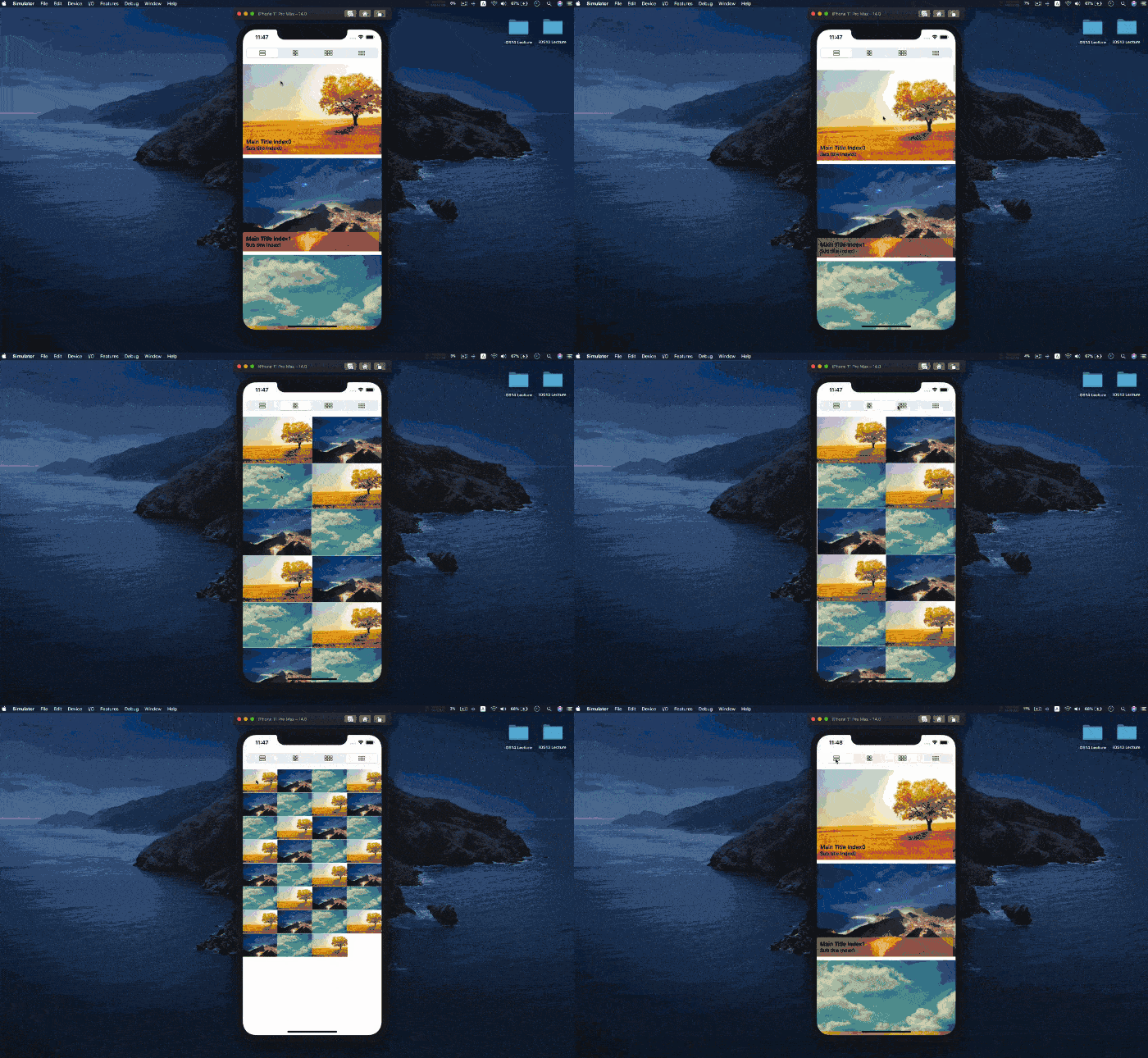
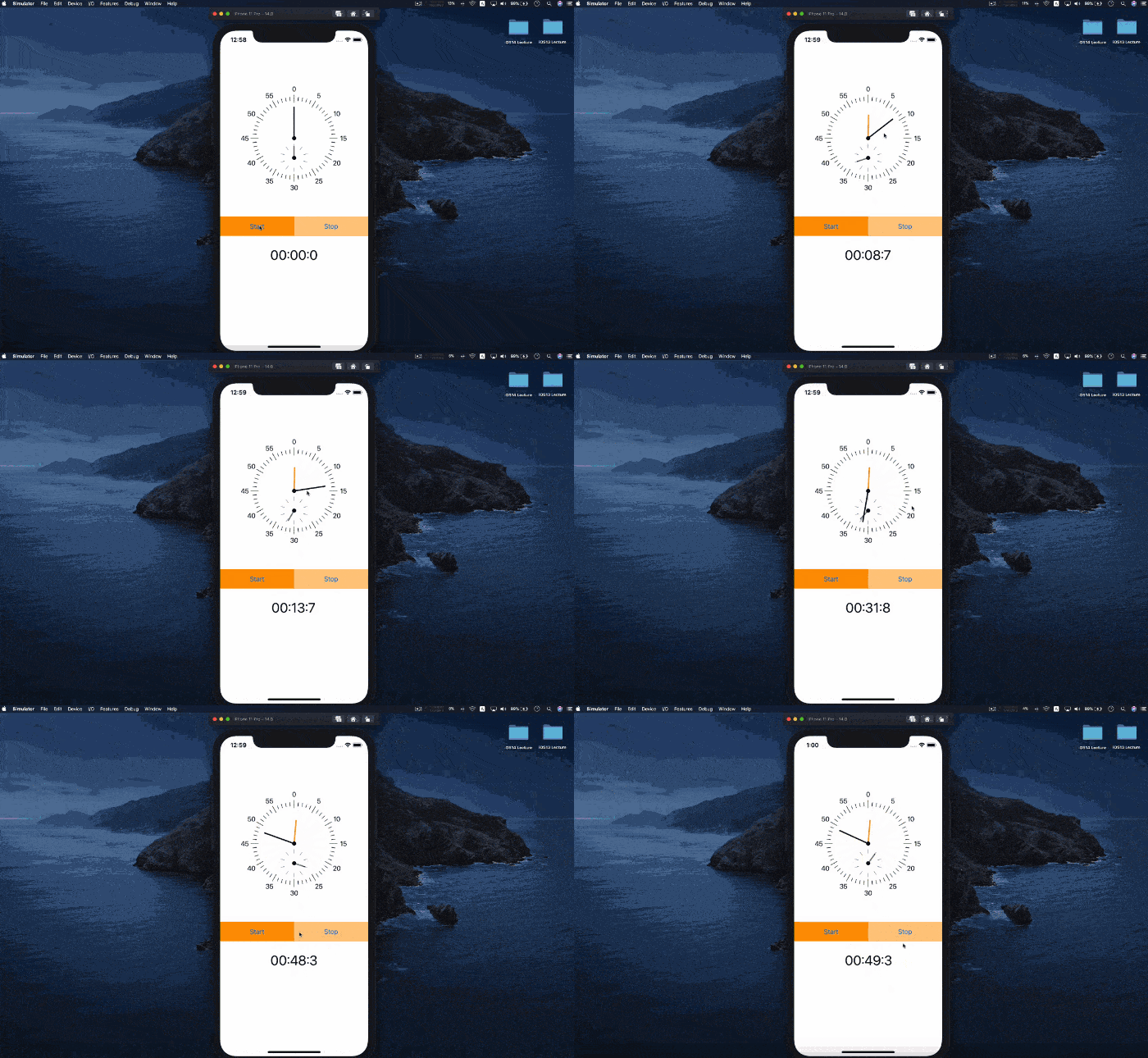
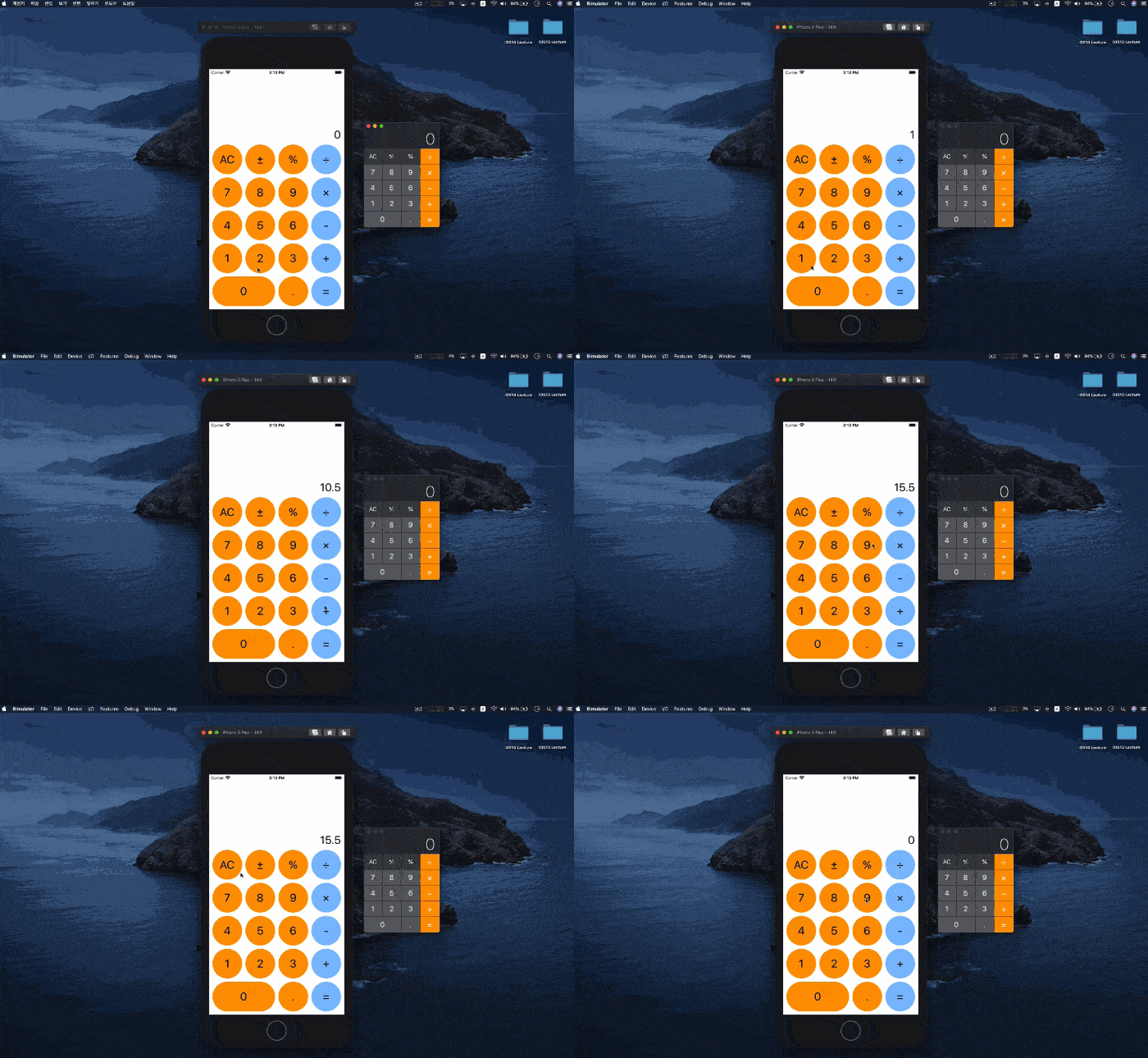
기본에 충실한 구성으로 기초를 탄탄히 잡을 수 있도록 체계적으로 구성하였습니다. 다양한 갤러리 스타일, json을 통한 네트워크 처리, shape 응용하여 만들면서 실제 프로젝트를 진행하는데 무리 없도록 준비했습니다.
Grid View Gallery
StopWatch
Calculator
학습 대상은
누구일까요?
iOS개발을 처음 접하는 분
SwiftUI로 프로젝트를 진행하고 싶은 분

3,061
명
수강생
214
개
수강평
271
개
답변
4.8
점
강의 평점
7
개
강의
안녕하세요.
강의 금액이 부담되시는 분들은 강의명을 아래 이메일로 보내주시면 할인쿠폰을 보내드립니다.
apple-developer@kakao.com
iOS 개발의 세계에 발을 들이게 된 지 벌써 10년이 흘렀습니다.
그 동안 다양한 환경에서 100여개가 넘는 프로젝트를 성공적으로 런칭하는 데 참여하였습니다. 이런 다양한 경험을 통해, 실무에서의 깊은 노하우와 통찰을 얻을 수 있었습니다.
이런 지식을 모아 저와 같은 열정을 가진 개발자 분들과 함께 성장하기 위해. 항상 더 나은 방법, 더 효율적인 경로를 연구하며, 그 결과를 강의 형태로 제작하여 여러분들과 공유하고 있습니다.
함께 성장하는 여정에 동행하실 준비가 되셨다면, 저와 함께 시작해봅시다.
전체
66개 ∙ (15시간 8분)
1. 1 Intro
07:54
2. 2 Stack
14:42
3. 3 Text
09:22
4. 4 Image
12:10
6. 6 Shape
13:31
7. 7 Button
16:07
8. 8 Toggle
10:56
9. 9 List ForEach
18:12
10. 10 List Section
26:25
11. 11 ViewModifier
13:08
12. 12 Alert View
10:10
13. 13 WebView Basic
25:32
15. 15 Grid
12:23
16. 16 Placeholder
07:12
18. 18 TabView
04:35
19. 19 Toggle Basic
01:43
20. 20 Toggle Custom
22:10
21. 21 TextEditor
09:26
23. 23 State
07:47
24. 24 Binding
08:32
27. 27 StateObject
11:54
28. 28 AppStoreage
05:56
29. 1 Grid View
01:44
30. 2 Grid View
28:47
31. 3 Grid View
19:50
32. Network JSON
23:08
전체
26개
4.5
26개의 수강평

수강평 18
∙
평균 평점 4.7
5
SwiftUI 가 처음 출시되었을 때 튜토리얼 정도 해보면서 컨셉에 흥미를 가졌었는데, 회사의 모든 앱들이 스토리보드 기반인데다 스토리보드만으로도 부족함없이 개발을 잘해왔었기에 SwiftUI에 대한 관심은 점점 멀어졌습니다. 그러다 우연히 강사님의 오토레이아웃 강의를 듣게 되었고, 거기서 정말 많은 도움을 받았습니다. 자연히 강사님 자체에도 관심이 갔죠~ ㅎㅎ 그렇게 이 강의를 듣게 되었습니다. SwiftUI 알아두면 좋을것 같아서요.. 그런데, 이 강의를 듣고 난 이후의 느낌을 좀 말해보자면, "진작 SwiftUI 로 전환할 걸!!" 이었습니다. 그간 스토리보드 상에서 개고생 해가며 완성했던 기능들이 SwiftUI에서는 단 몇줄의 코딩으로 완성되는것을 보았고, 재사용성에 있어서도 여러가지 영감을 갖게 해주네요. 앞으로 진행되는 신규 프로젝트들은 적극적으로 SwiftUI 도입을 해야겠습니다. (수강평을 남기는 시점에 벌써 1개의 프로젝트는 주변의 만류를 뿌리치고 SwiftUI로 진행하기로 결정하였습니다. ㅎㅎ) 좋은 강의 너무 감사드리며, 강사님의 강의 스타일, 그리고 아낌없이 공유하는 공감되는 실무노하우에 좀 더 많은 영감을 받기위해, UIKit은 충분히 익숙하지만 한번 더 놓친게 있는지 점검해보자는 마음으로 최근 등록된 UIKit 수강했습니다!! UIKit 수강평으로 다시 인사드리겠습니다. ㅎㅎ
수강평 7
∙
평균 평점 5.0
수강평 2
∙
평균 평점 5.0
수강평 1
∙
평균 평점 5.0
수강평 8
∙
평균 평점 5.0
지식공유자님의 다른 강의를 만나보세요!
같은 분야의 다른 강의를 만나보세요!
월 ₩17,600
5개월 할부 시
₩88,000
![성공적인 진짜 iOS 개발자 되기 [기초부터 실무까지]강의 썸네일](https://cdn.inflearn.com/public/courses/329824/cover/da94c23b-67bc-4600-877c-9cb9c74758f1/329824-eng.jpg?w=420)




![RPG 게임 어플 만들기 [iOS 아이폰]강의 썸네일](https://cdn.inflearn.com/public/courses/324527/course_cover/90d24f33-c1fb-4d19-aec5-ec0a802e3ef1/onarcher_rpg.png?w=420)

![MAUI [Cross-Platform Applications & C#]강의 썸네일](https://cdn.inflearn.com/public/courses/332442/cover/89ee60dc-f139-4b63-ae28-abd8a6036cb8/332442-eng.png?w=420)