


workspace 값이 읽히지 않습니다.(prototype)
490
작성한 질문수 4
채널에서 워크스페이스 정보가 뜨지 않아 검사 창을 열어보니, 제 UserData 객체에 Workspace객체가 없고, prototype 객체가 하나 있는 것을 발견했습니다.
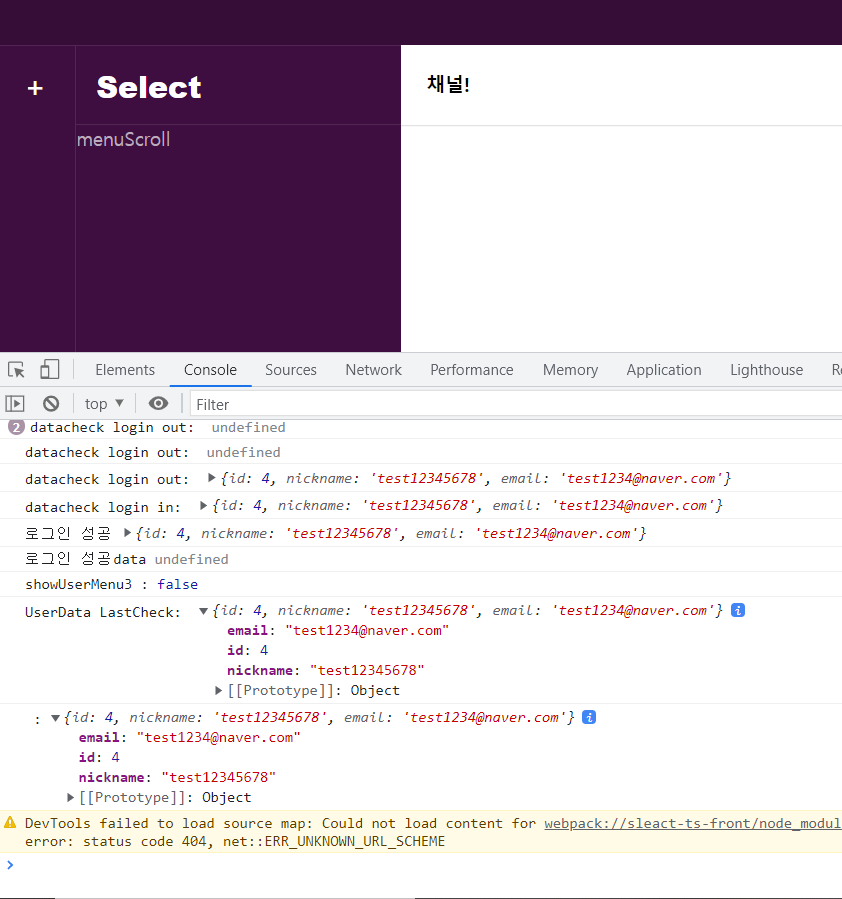
이후 네트워크에서 값을 확인해보니, 서버는 user의 data에 정상적으로 워크스페이스를 보내고 있는 것도 확인했습니다.
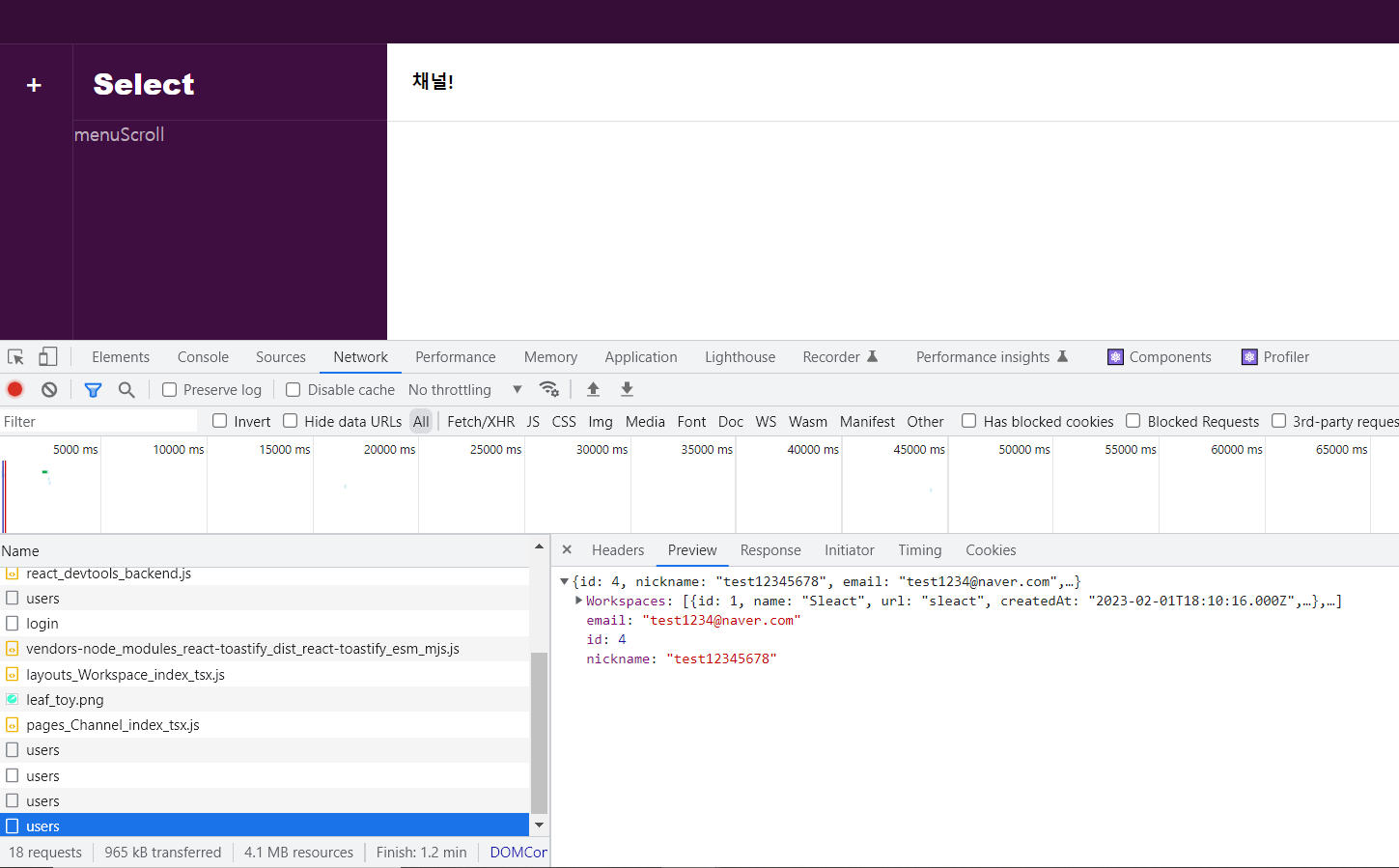
혹시나 싶어, 새 워크스페이스를 만들어서 보내도 서버에서는 정상적으로 처리해주었지만, 클라이언트에선 전혀 받지 못하고있습니다. 이럴 경우 어떻게 처리해주어야 하는지 여쭤보고싶습니다.
워크스페이스 부분의 코드를 첨부하며 리액트(+dom)의 버전은 17, axios의 버전은 0.26.1, swr의 버전은 2.0.3 입니다.
import Menu from '../../components/Menu';
import loadable from '@loadable/component';
import axios from 'axios';
import React, { useCallback, useState, VFC } from 'react';
import { Route, Switch } from 'react-router';
import useSWR from 'swr';
import fetcher from '../../utills/fetcher';
import {
  AddButton,
  Channels,
  Chats,
  Header,
  LogOutButton,
  MenuScroll,
  ProfileImg,
  ProfileModal,
  RightMenu,
  WorkspaceButton,
  WorkspaceModal,
  WorkspaceName,
  Workspaces,
  WorkspaceWrapper,
} from '../Workspace/styles';
import { IUser } from '../../typings/db';
import { Link } from 'react-router-dom';
import Modal from '@components/Modal';
import { Button, Input, Label } from '@pages/Login/styles';
import useInput from '@hooks/useInput';
import { toast } from 'react-toastify';

const Channel = loadable(() => import('../../pages/Channel'));
const DirectMessage = loadable(() => import('../../pages/DirectMessage'));

const Workspace: VFC = () => {
  const {
    data: UserData,
    error,
    mutate,
  } = useSWR<IUser | false>('/api/users', fetcher, {
    dedupingInterval: 2000,
  });

  const [showUserMenu, setShowUserMenu] = useState(false);
  const [showCreateWorkspaceModal, setShowCreateWorkspaceModal] = useState(false);
  const [newWorkspace, onChangeNewWorkspace, setNewWorkpsace] = useInput('');
  const [newUrl, onChangeNewUrl, setNewUrl] = useInput('');

  const onClickUserProfile = useCallback((e) => {
    e.stopPropagation();
    setShowUserMenu((prev) => !prev);
  }, []);

  const onClickCreateWorkspace = useCallback(() => {
    setShowCreateWorkspaceModal(true);
  }, []);

  console.log('showUserMenu3 :', showUserMenu);

  console.log('UserData LastCheck: ', UserData);

  const onLogout = useCallback(() => {
    axios
      .post('http://localhost:3095/api/users/logout', null, {
        withCredentials: true,
      })
      .then((response) => {
        mutate(response.data, false);
        console.log('onLogOut :', response.data);
      })
      .catch((error) => {
        alert(error.response.data ? error.response.data : '애러 캐치 실패');
      });
  }, []);
  const onCloseModal = useCallback(() => {
    setShowCreateWorkspaceModal(false);
  }, []);

  const onCreateWorkspace = useCallback(
    (e) => {
      e.preventDefault();
      if (!newWorkspace || !newWorkspace.trim()) return;
      if (!newUrl || !newUrl.trim()) return;
      axios
        .post(
          '/api/workspaces',
          {
            workspace: newWorkspace,
            url: newUrl,
          },
          {
            withCredentials: true,
          },
        )
        .then((response) => {
          console.log('modalData :', response);
          mutate();

          setShowCreateWorkspaceModal(false);
          setNewWorkpsace('');
          setNewUrl('');
          console.log('data check CreateWS: ', UserData);
        })
        .catch((error) => {
          console.dir(error);
          toast.error(error.response?.data, { position: 'bottom-center' });
        });
    },
    [newWorkspace, newUrl],
  );

  // if (!data) {
  //   console.log('data check back to login: ', data);
  //   return <Redirect to="/login" />;
  // }
  console.log(' :', UserData);
  return (
    <div>
      <Header>
        <span onClick={onClickUserProfile}>
          <ProfileImg src="../../img/leaf_toy.png" alt="fail to load profile" />
          {showUserMenu && (
            <Menu style={{ right: 0, top: 38 }} show={showUserMenu} onCloseModal={onClickUserProfile}>
              <ProfileModal>
                <img src="../../img/leaf_toy.png" />
                <div>
                  <span id="profile-name">{UserData ? UserData.nickname : 'false'}</span>
                  <span id="profile-active">Active</span>
                </div>
              </ProfileModal>
              <LogOutButton onClick={onLogout}>로그아웃</LogOutButton>
            </Menu>
          )}
        </span>
      </Header>

      <WorkspaceWrapper>
        <Workspaces>
          {UserData !== false &&
            UserData?.Workspaces?.map((ws) => {
              return (
                <Link key={ws.id} to={`/workspace/${ws.id}/channel/일반`}>
                  <WorkspaceButton>{ws.name.slice(0, 1).toUpperCase()}</WorkspaceButton>
                </Link>
              );
            })}
          <AddButton onClick={onClickCreateWorkspace}>+</AddButton>
        </Workspaces>
        <Channels>
          <WorkspaceName>Select</WorkspaceName>
          <MenuScroll>menuScroll</MenuScroll>
        </Channels>
        <Chats>
          <Switch>
            <Route path="/workspace/channel" component={Channel} />
            <Route path="/workspace/dm" component={DirectMessage} />
          </Switch>
        </Chats>
      </WorkspaceWrapper>
      <Modal show={showCreateWorkspaceModal} onCloseModal={onCloseModal}>
        <form onSubmit={onCreateWorkspace}>
          <Label id="workspace-label">
            <span>workspace 이름</span>
            <Input id="workspace" value={newWorkspace} onChange={onChangeNewWorkspace}></Input>
          </Label>
          <Label id="workspace-url-label">
            <span>workspace url</span>
            <Input id="workspace" value={newUrl} onChange={onChangeNewUrl}></Input>
          </Label>
          <Button type="submit">생성하기</Button>
        </form>
      </Modal>
    </div>
  );
};

export default Workspace;
또, fetcher의 문제일 수 있을 것 같아, fetcher의 코드 또한 올려봅니다.
import axios from 'axios';
import React from 'react';


const fetcher = <Data,>(url: string): any => {
  axios.get<Data>(url, { withCredentials: true }).then((response) => response.data);
};

export default fetcher;
기본 셋팅과 관련하여
0
109
1
초기 셋팅 back과 front만 남겨두고 다 지운 후 진행 방법
0
110
2
focus 시에만 화면 업데이트 되는 이유 + 해결방법
0
167
2
useEffect 개수 관리
0
123
2
라이브러리 서치 방법
0
118
2
함수 정의 패턴
0
81
1
npm run dev 에러
0
157
3
npx webpack 후 에러
0
189
2
'void' 형식 식의 truthiness를 테스트할 수 없습니다.ts(1345)
0
154
2
사용자 가입시 에러발생 (TypeError: Cannot read properties of null (reading 'addMembers')
1
193
2
초기세팅중 packge.json 에러떠요
0
163
2
CORS - Access-Control-Allow-Origin 누락 문제
0
440
3
로그인 페이지 무한 새로고침 현상
0
610
2
Module not found: Error: Can't resolve './App' 에러
0
971
1
배포 방법
0
307
2
npm run dev 시 빌드가 매우 느려졌습니다
0
1017
2
alias 경로 설정 오류
0
463
2
fetcher 함수의 data 값이 두번 찍히는 이유
0
284
1
제네릭 질문
0
227
2
ts-node 대신 tsx 사용여부
0
380
1
배포 관련 질문
0
249
1
[nginx + https] 서비스를 실행하면 niginx가 아닌 서비스 화면을 보여주게 하고 싶습니다.
0
396
2
[배포하기] webpack에 aws 퍼블릭 IPv4 주소 와 포트 주소를 작성하고 나서 빌드후 실행하면 오류가 발생합니다.
0
343
1
users 호출 시 쿠키가 담기지 않는 이슈 질문드립니다.
0
255
2