


emotion global theme 설정관련 질문
1408
작성한 질문수 5
emotion global theme을 설정하는 과정에서 오류가 발생해서 질문드립니다.
자주 사용되는 css속성 단위를 전역에서 사용하고 싶어서 다음과 같이 설정을 진행했습니다.
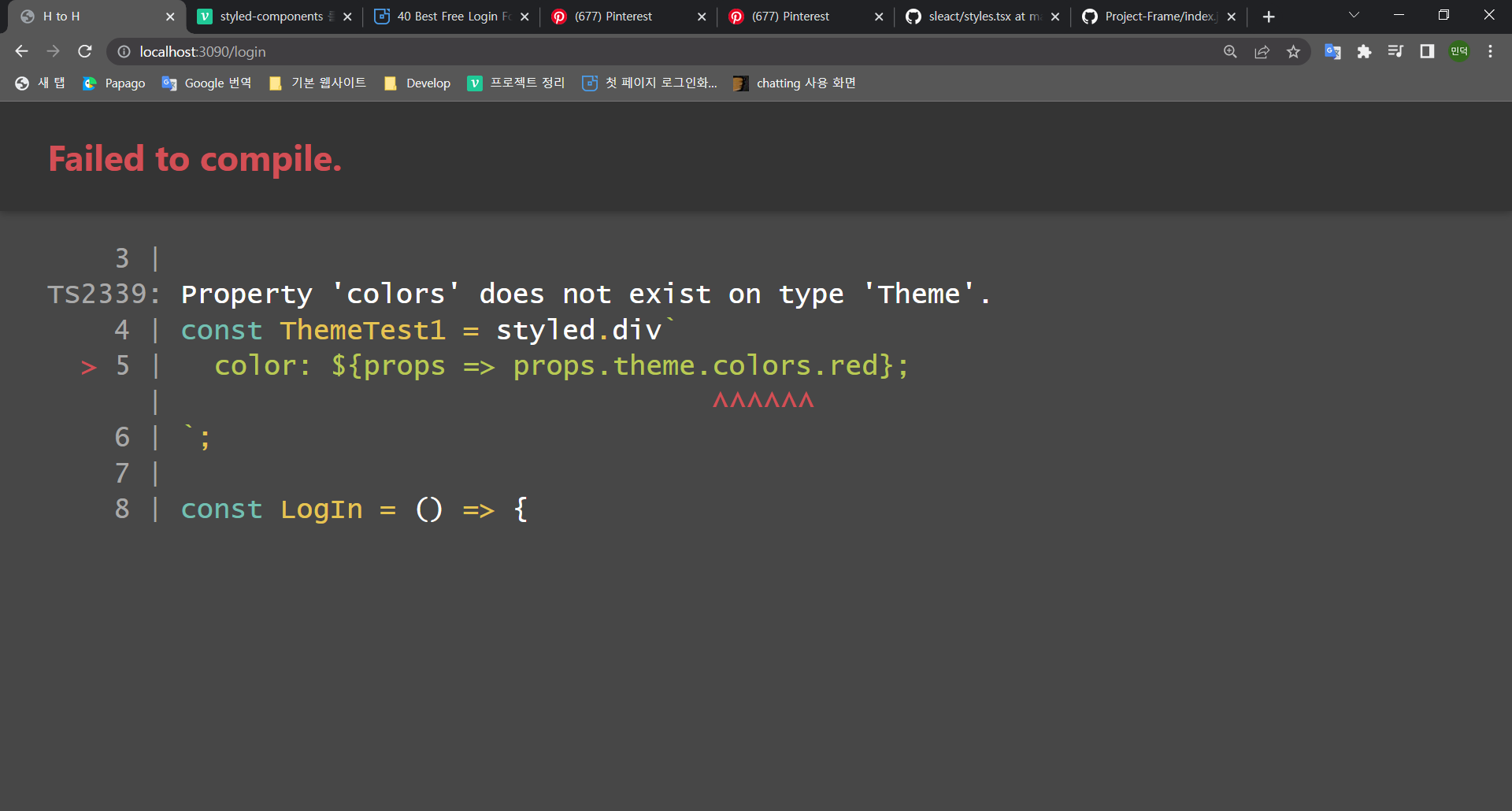
근데 알 수 없는 속성을 참조하고 있다고 반복해서 에러가 발생하고 있습니다.
해당 문제에 관해서 피드백 부탁드리겠습니다.
제가 설정한 코드는 다음과 같습니다.
styles/theme.tsx
import { Theme } from '@emotion/react';

const theme: Theme = {
  size: {
    tablet: '640px',
    laptop: '1200px',
    desktop: '1800px',
  },
  colors: {
    red: '#f26462',
    primaryGray: '#3f4150',
    border: '#EFEFEF',
    selected: '#f2f2f2',
  },
  calcRem: (pxSize: number) => {
    `${pxSize / 16}rem`;
  },
  flexSet: (just = 'center', align = 'center') => {
    return `display: flex;
    justify-content: ${just};
    align-items: ${align};`;
  },
  flexColumnSet: (just = 'center', align = 'center') => {
    return `display: flex;
    flex-direction: column;
    justify-content: ${just};
    align-items: ${align};`;
  },
};

export default theme;
styles/emotion.d.tsx
import '@emotion/react';

declare module '@emotion/react' {
  export interface DefaultTheme {
    size: {
      tablet: string;
      laptop: string;
      desktop: string;
    };
    colors: {
      red: string;
      primaryGray: string;
      border: string;
      selected: string;
    };
    calcRem: string;
    flexSet: string;
    flexColumnSet: string;
  }
}
client.tsx
import 'core-js/stable';
import 'regenerator-runtime/runtime';
import React from 'react';
import { render } from 'react-dom';
import { BrowserRouter } from 'react-router-dom';
import { ThemeProvider } from '@emotion/react';
import axios from 'axios';

import App from './layouts/App';
import GlobalStyle from './styles/global';
import theme from './styles/theme';

axios.defaults.withCredentials = true;
axios.defaults.baseURL =
  process.env.NODE_ENV === 'production' ? 'https://sleact.nodebird.com' : 'http://localhost:3090';

render(
  <BrowserRouter>
    <ThemeProvider theme={theme}>
      <GlobalStyle />
      <App />
    </ThemeProvider>
  </BrowserRouter>,
  document.querySelector('#app'),
);
발생 오류
import React from 'react';
import styled from '@emotion/styled';

const ThemeTest1 = styled.div`
  // Property 'colors' does not exist on type 'Theme'.
  color: ${props => props.theme.colors.red};
`;

const LogIn = () => {
  return (
    <>
      <div>로그인</div>
      <ThemeTest1 >theme test1</div>
    </>
  );
};

export default LogIn;
![● index.tsx - Sleact - Visual Studio Code [Administrator] 2022-12-07 오후 9_06_15.png](https://cdn.inflearn.com/public/files/posts/8046b638-cbfb-4a93-b176-cb3baa6800f3/● index.tsx - Sleact - Visual Studio Code [Administrator] 2022-12-07 오후 9_06_15.png "● index.tsx - Sleact - Visual Studio Code [Administrator] 2022-12-07 오후 9_06_15.png")
답변 1
0
export interface Theme 해야하지 않나요??
0
늦은시간에 답변 감사합니다!!
말씀해주신대로 수정하니 size, colors와 같은 객체?는 정상적으로 적용이 됬습니다 ㅎㅎ
근데 calcRem, flexSet, flexColumnSet과 같은 화살표함수는 다음과 같이 void유형이 string에 할당할 수 없다고 오류가 발생하더라고요
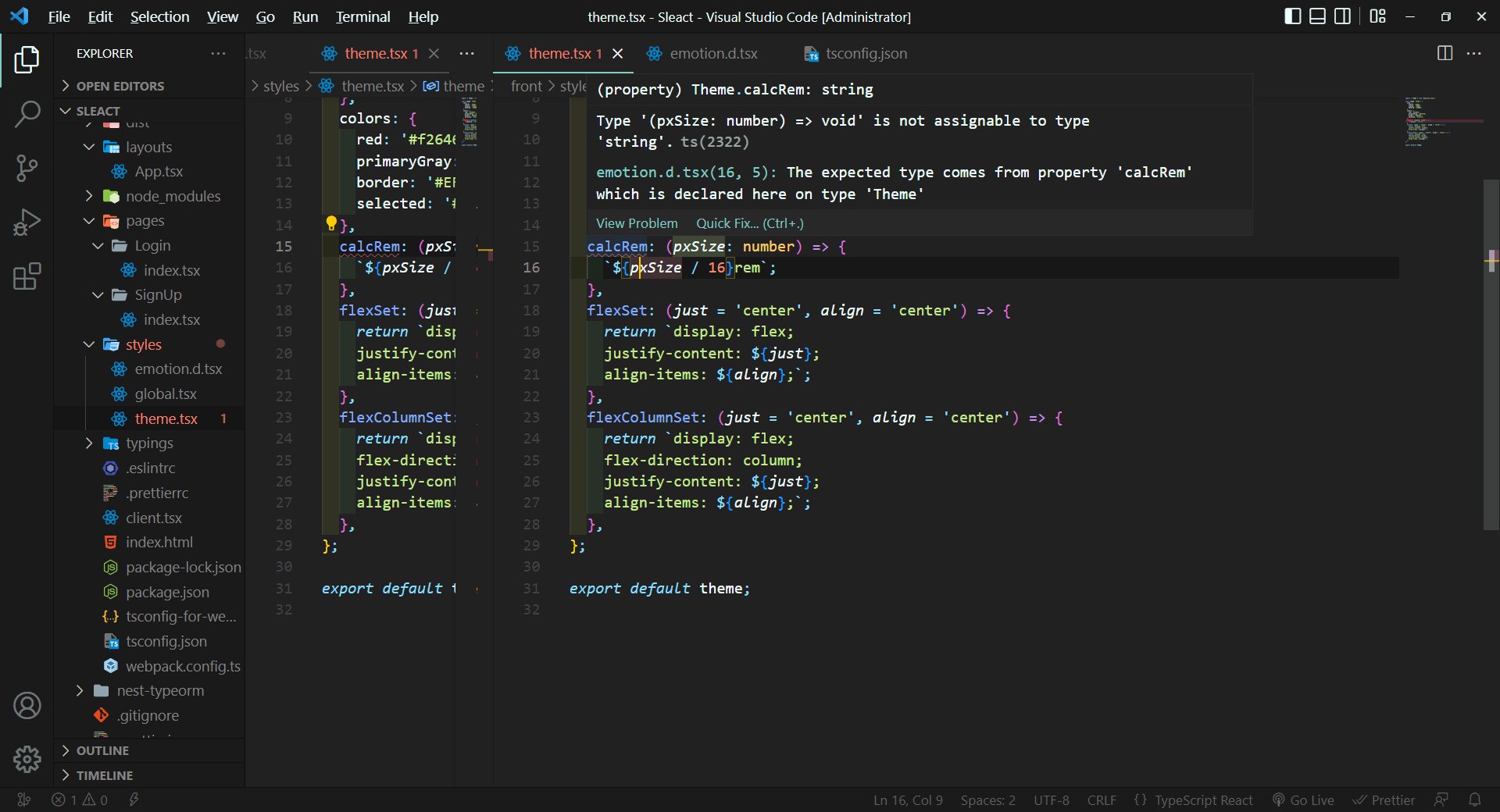
Type '(pxSize: number) => void' is not assignable to type 'string'.ts(2322)
emotion.d.tsx(16, 5): The expected type comes from property 'calcRem' which is declared here on type '
string을 return해서 다음과 같이 설정을 했는데 혹시 잘못된 부분이 있을까요?
// theme.tsx
import { Theme } from '@emotion/react';

const theme: Theme = {
  size: {
    tablet: '640px',
    laptop: '1200px',
    desktop: '1800px',
  },
  colors: {
    red: '#f26462',
    primaryGray: '#3f4150',
    border: '#EFEFEF',
    selected: '#f2f2f2',
  },

  // error 발생
  // Type '(pxSize: number) => void' is not assignable to type 'string'.ts(2322)
  // emotion.d.tsx(16, 5): The expected type comes from property 'calcRem' which is declared here on type '

  calcRem: (pxSize: number) => {
    `${pxSize / 16}rem`;
  },

  flexSet: (just = 'center', align = 'center') => {
    return `display: flex;
    justify-content: ${just};
    align-items: ${align};`;
  },

  flexColumnSet: (just = 'center', align = 'center') => {
    return `display: flex;
    flex-direction: column;
    justify-content: ${just};
    align-items: ${align};`;
  },
};

export default theme;
// emotion.d.tsx
import '@emotion/react';

declare module '@emotion/react' {
  export interface Theme {
    size: {
      tablet: string;
      laptop: string;
      desktop: string;
    };
    colors: {
      red: string;
      primaryGray: string;
      border: string;
      selected: string;
    };
    calcRem: string;
  }
}
0
답변 감사합니다 말씀해주신 조언 참고해서 문제를 해결했습니다.
근데 설정하면서 궁금한 점이 추가로 질문드립니다.
calcRem 함수는 return값으로 string을 반환한다고 생각해서 다음과 같이 시도했습니다.
// theme.tsx
 calcRem: pxSize => {
    `${pxSize / 16}rem`;
  },

// emotion.d.tsx
calcRem: (pxSize: number) => string;
근데 반환값이 void타입은 string에 할당할 수 없다고 에러가 발생했습니다.
그래서 다음과 같이 return을 적어서 수정했더니 오류를 해결하고 정상적으로 동작합니다.
// theme.tsx
calcRem: pxSize => {
    return `${pxSize / 16}rem`; // return키워드를 입력하니 정상적으로 동작
  },

// emotion.d.tsx
calcRem: (pxSize: number) => string;
제가 알기로는 return절이 한줄이면 생략해도 자동으로 return이 적용되서 string을 반환하는 것 같았는데
굳이 return키워드를 입력한 뒤에서야 코드가 정상적으로 동작하는 이유가 무엇인가요?
아래는 최종적으로 오류를 해결한 코드입니다.
// theme.tsx
import { Theme } from '@emotion/react';

const theme: Theme = {
  size: {
    tablet: '640px',
    laptop: '1200px',
    desktop: '1800px',
  },
  colors: {
    red: '#f26462',
    primaryGray: '#3f4150',
    border: '#EFEFEF',
    selected: '#f2f2f2',
  },
  calcRem: pxSize => {
    return `${pxSize / 16}rem`;
  },
  flexSet: (just = 'center', align = 'center') => {
    return `display: flex;
    justify-content: ${just};
    align-items: ${align};`;
  },
  flexColumnSet: (just = 'center', align = 'center') => {
    return `display: flex;
    flex-direction: column;
    justify-content: ${just};
    align-items: ${align};`;
  },
};

export default theme;
// emotion.d.tsx
import '@emotion/react';

declare module '@emotion/react' {
  export interface Theme {
    size: {
      tablet: string;
      laptop: string;
      desktop: string;
    };
    colors: {
      red: string;
      primaryGray: string;
      border: string;
      selected: string;
    };
    calcRem: (pxSize: number) => string;
    flexSet: () => string;
    flexColumnSet: () => string;
  }
}
// pages/login/index.tsx
 import React from 'react';
import styled from '@emotion/styled';

const ThemeWrapper = styled.div`
  ${props => props.theme.flexColumnSet()}
`;

const ThemeTest1 = styled.span`
  color: ${props => props.theme.colors.red};
  font-size: ${props => props.theme.calcRem(40)};
`;

const LogIn = () => {
  return (
    <>
      <div>로그인</div>

      <ThemeWrapper>
        <ThemeTest1>theme test1</ThemeTest1>
        <ThemeTest1>theme test2</ThemeTest1>
        <ThemeTest1>theme test3</ThemeTest1>
      </ThemeWrapper>
    </>
  );
};

export default LogIn;
0
제가 알기로는 return절이 한줄이면 생략해도 자동으로 return이 적용되서 string을 반환하는 것 같았는데
굳이 return키워드를 입력한 뒤에서야 코드가 정상적으로 동작하는 이유가 무엇인가요?
전혀 아닙니다.
화살표함수에서만 그렇습니다
기본 셋팅과 관련하여
0
111
1
초기 셋팅 back과 front만 남겨두고 다 지운 후 진행 방법
0
112
2
focus 시에만 화면 업데이트 되는 이유 + 해결방법
0
171
2
useEffect 개수 관리
0
124
2
라이브러리 서치 방법
0
119
2
함수 정의 패턴
0
82
1
npm run dev 에러
0
157
3
npx webpack 후 에러
0
195
2
'void' 형식 식의 truthiness를 테스트할 수 없습니다.ts(1345)
0
155
2
사용자 가입시 에러발생 (TypeError: Cannot read properties of null (reading 'addMembers')
1
196
2
초기세팅중 packge.json 에러떠요
0
164
2
CORS - Access-Control-Allow-Origin 누락 문제
0
446
3
로그인 페이지 무한 새로고침 현상
0
615
2
Module not found: Error: Can't resolve './App' 에러
0
977
1
배포 방법
0
308
2
npm run dev 시 빌드가 매우 느려졌습니다
0
1024
2
alias 경로 설정 오류
0
466
2
fetcher 함수의 data 값이 두번 찍히는 이유
0
287
1
제네릭 질문
0
231
2
ts-node 대신 tsx 사용여부
0
380
1
배포 관련 질문
0
249
1
[nginx + https] 서비스를 실행하면 niginx가 아닌 서비스 화면을 보여주게 하고 싶습니다.
0
396
2
[배포하기] webpack에 aws 퍼블릭 IPv4 주소 와 포트 주소를 작성하고 나서 빌드후 실행하면 오류가 발생합니다.
0
344
1
users 호출 시 쿠키가 담기지 않는 이슈 질문드립니다.
0
255
2