


kubeadm init시 connection refuse에러
1305
작성한 질문수 8
환경은 AWS 환경이며, 실습환경과 똑같은 아이피로 해서
centos 7으로 동일하게 구성하고 있습니다(제 커널버전은 Linux 3.10.0-1160.76.1.el7.x86_64)
그런데 마지막에 kubeadm init 하는데 connection refused 이 뜨며 진행이 되지 않습니다.
해당 에러 발생시 daemon.json을 확인하라는 내용이 있던데(구글링시) 이상이 없었습니다.
아래는 전체로그 입니다.
회신 주시면 감사드리겠습니다.
[root@k8s-master centos]# kubeadm init --pod-network-cidr=20.96.0.0/12 --apiserver-advertise-address=192.168.0.30
I0827 06:11:16.046030 2520 version.go:248] remote version is much newer: v1.25.0; falling back to: stable-1.15
[init] Using Kubernetes version: v1.15.12
[preflight] Running pre-flight checks
[WARNING SystemVerification]: this Docker version is not on the list of validated versions: 20.10.17. Latest validated version: 18.09
[preflight] Pulling images required for setting up a Kubernetes cluster
[preflight] This might take a minute or two, depending on the speed of your internet connection
[preflight] You can also perform this action in beforehand using 'kubeadm config images pull'
[kubelet-start] Writing kubelet environment file with flags to file "/var/lib/kubelet/kubeadm-flags.env"
[kubelet-start] Writing kubelet configuration to file "/var/lib/kubelet/config.yaml"
[kubelet-start] Activating the kubelet service
[certs] Using certificateDir folder "/etc/kubernetes/pki"
[certs] Generating "etcd/ca" certificate and key
[certs] Generating "etcd/server" certificate and key
[certs] etcd/server serving cert is signed for DNS names [k8s-master localhost] and IPs [192.168.0.30 127.0.0.1 ::1]
[certs] Generating "etcd/healthcheck-client" certificate and key
[certs] Generating "apiserver-etcd-client" certificate and key
[certs] Generating "etcd/peer" certificate and key
[certs] etcd/peer serving cert is signed for DNS names [k8s-master localhost] and IPs [192.168.0.30 127.0.0.1 ::1]
[certs] Generating "ca" certificate and key
[certs] Generating "apiserver" certificate and key
[certs] apiserver serving cert is signed for DNS names [k8s-master kubernetes kubernetes.default kubernetes.default.svc kubernetes.default.svc.cluster.local] and IPs [10.96.0.1 192.168.0.30]
[certs] Generating "apiserver-kubelet-client" certificate and key
[certs] Generating "front-proxy-ca" certificate and key
[certs] Generating "front-proxy-client" certificate and key
[certs] Generating "sa" key and public key
[kubeconfig] Using kubeconfig folder "/etc/kubernetes"
[kubeconfig] Writing "admin.conf" kubeconfig file
[kubeconfig] Writing "kubelet.conf" kubeconfig file
[kubeconfig] Writing "controller-manager.conf" kubeconfig file
[kubeconfig] Writing "scheduler.conf" kubeconfig file
[control-plane] Using manifest folder "/etc/kubernetes/manifests"
[control-plane] Creating static Pod manifest for "kube-apiserver"
[control-plane] Creating static Pod manifest for "kube-controller-manager"
[control-plane] Creating static Pod manifest for "kube-scheduler"
[etcd] Creating static Pod manifest for local etcd in "/etc/kubernetes/manifests"
[wait-control-plane] Waiting for the kubelet to boot up the control plane as static Pods from directory "/etc/kubernetes/manifests". This can take up to 4m0s
[kubelet-check] Initial timeout of 40s passed.
[kubelet-check] It seems like the kubelet isn't running or healthy.
[kubelet-check] The HTTP call equal to 'curl -sSL http://localhost:10248/healthz' failed with error: Get http://localhost:10248/healthz: dial tcp [::1]:10248: connect: connection refused.
[kubelet-check] It seems like the kubelet isn't running or healthy.
[kubelet-check] The HTTP call equal to 'curl -sSL http://localhost:10248/healthz' failed with error: Get http://localhost:10248/healthz: dial tcp [::1]:10248: connect: connection refused.
[kubelet-check] It seems like the kubelet isn't running or healthy.
[kubelet-check] The HTTP call equal to 'curl -sSL http://localhost:10248/healthz' failed with error: Get http://localhost:10248/healthz: dial tcp [::1]:10248: connect: connection refused.
답변 4
0
해결하였습니다.
위에 말씀주신대로 호출한 URL이 잘못되었었습니다.
구축하면서 느낀게, 참 가이드 잘 만들어 주셨다. 입니다.
가이드가 꼼꼼하고, 매우 깔끔합니다.
겨우 이제야 깔았으니 이제야 실습시작이네요.
지원 감사합니다!
0
거의 다 오셨네요.
Dashboard로 호출한 URL이 어떻게 되나요?
그리고 아래 명령어 호출 시 결과도 확인이 필요하겠네요.
ps -ef | grep proxy
kubectl get pods -n kubernetes-dashboard -o yaml
kubectl logs -n kubernetes-dashboard kubernetes-dashboard-<pod-id>
0
안녕하세요. 말씀주신대로 vagrant로 설치완료하였습니다.
그런데 가이드에 나온대로 ServiceUnavailable이 뜹니다.
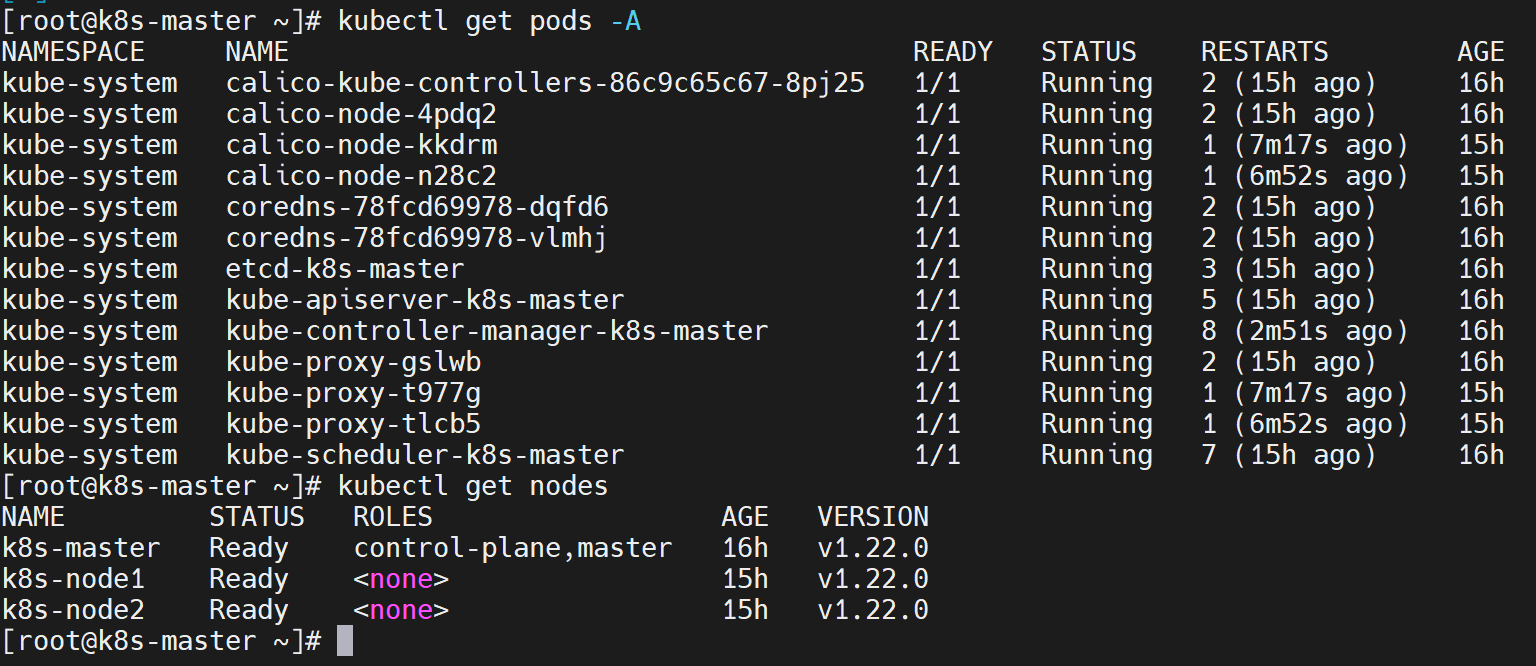
그래서 가이드에 나온 조치대로 kubectl get pods -A 확인 한 결과 기동안된 Pod 없이
모두 Running 입니다.
알려 주시면 감사드리겠습니다.
참고) 웹브라우저 오류
{
  "kind": "Status",
  "apiVersion": "v1",
  "metadata": {

  },
  "status": "Failure",
  "message": "no endpoints available for service \"kubernetes-dashboard\"",
  "reason": "ServiceUnavailable",
  "code": 503
}
참고) 현재 상태 캡쳐 해 보여드립니다. 모두 running 상태, 그리고 노드들의 ready상태
0
안녕하세요.
저도 겪어본 에러가 아니라 마찬가지로 구글링해보니 언급하신 해결방법이 나오네요.
swapoff -a 를 해보라는 내용도 있었는데, 제 가이드에 있는 내용이라 혹시 빠뜨리셨는지 확인이 필요할 것 같네요.
아니면 1.22 버전으로 설치 권장 드립니다.
1.22 버전이 Vagrant로 설치지만, 기본 설치 구성은 1.15 버전의 가이드를 보시되 주요 명령어는 아래 파일을 보시면 됩니다.
운영환경에서의 secret 관리
0
14
2
7강 설치 질문
0
14
2
ClusterIP 실습 시 Connection refused
0
18
2
virtualbox 설치시
1
46
1
이거 지금 부터 들어도 괜찮을까요 ?? 시간이 꽤지난거같은데 .. 뭐 최신하고 아에 안맞을까요 .
0
111
1
pod kubetm/app 에서 image를 갑자기 못가져 오는거 같습니다.
1
97
2
3. Node Schedule 중 pod-5가 마스터 노드에 배치됩니다.
1
96
2
volume hostpath의 강의에 관해 질문이 있습니다.
1
84
2
컨트롤러
1
99
2
네임스페이스+파드
0
98
3
강의영상 과 자료
0
99
2
IP 가 어딨나요?
1
88
2
설치 문제 없는건가요?
1
83
1
xshell 접속오류
1
136
2
[15. ConfigMap, Secret - 실습] Env (File) 실습 시 문의사항
1
109
2
Node Schedule 실습 시 pod3 생성 시 메모리 요청량이 올라가지 않는 사항
1
92
1
Guest OS
1
99
2
kubeTM Blog는 없어진건가요????
1
120
2
yml 작성하다가 에러 발생해서 문의 드립니다.
0
127
2
설치수업중에 질문드립니다.
1
164
2
기초다지기 설치 문의드립니다.
1
232
4
HPA 부분 Auto Scaler 설치하는 링크가 없습니다!!
1
122
3
클러스터 초기화 및 팟 네트워크 세팅시 문제가 있습니다
1
156
1
환경 구성에 있어서 질문드립니다
1
156
2