


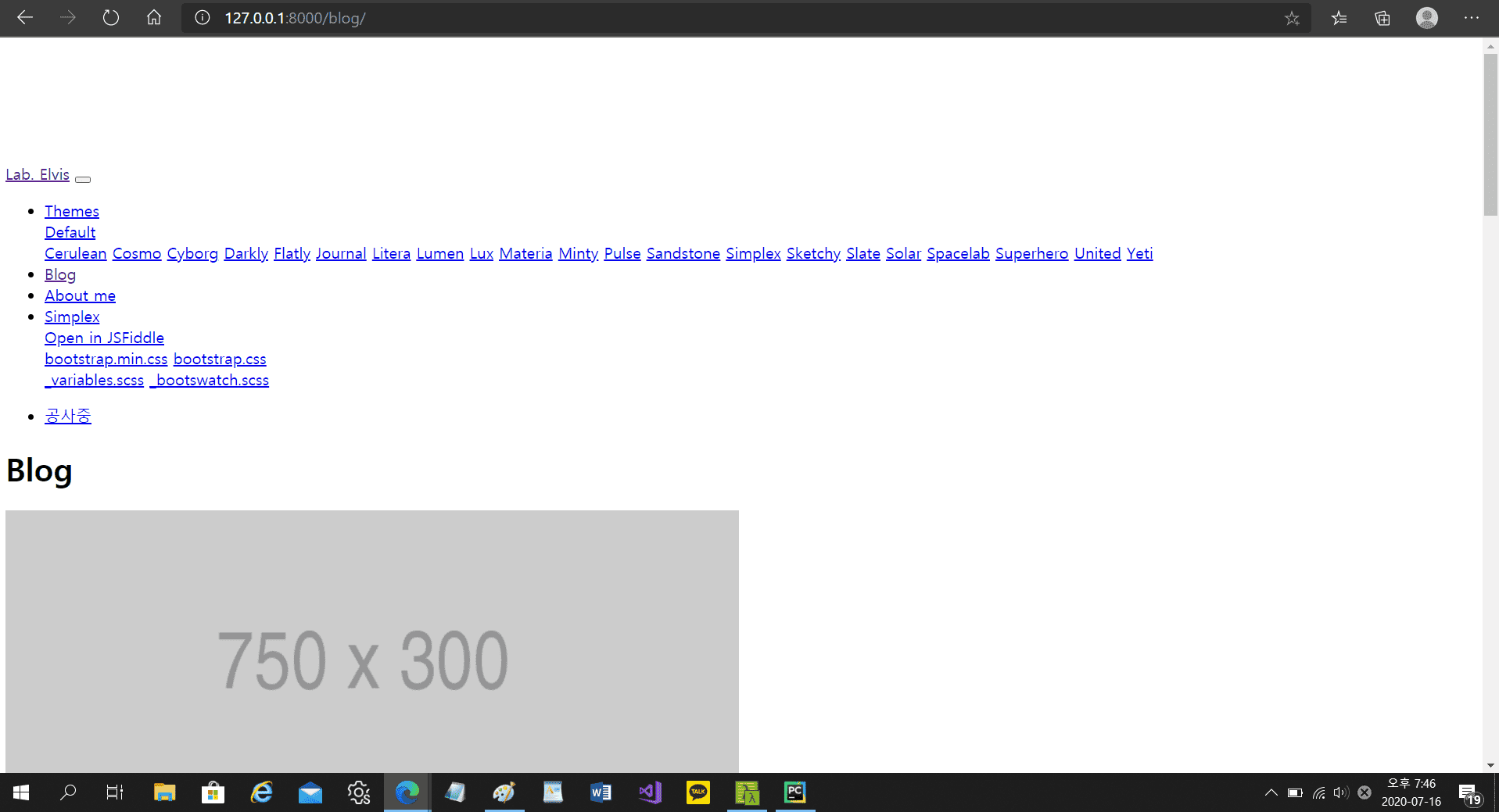
템플릿이 뜨지 않습니다.
bootstrip grid 강의를 따라하고 있었는데 이전까지는 문제가 없었는데 (템플릿이 적용되어 화면이 떴었습니다. 그런데 어느순간부터인지) 페이지를 새로 고침했는데
답변 7
0
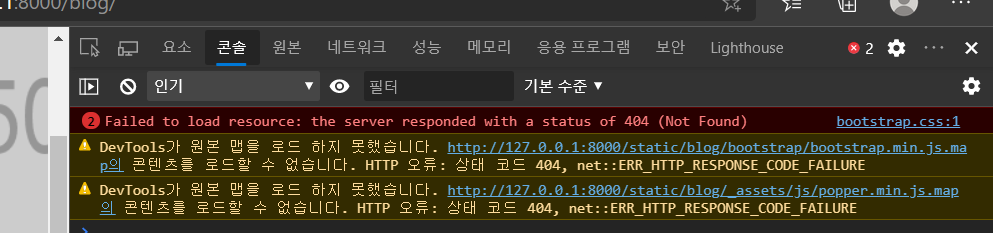
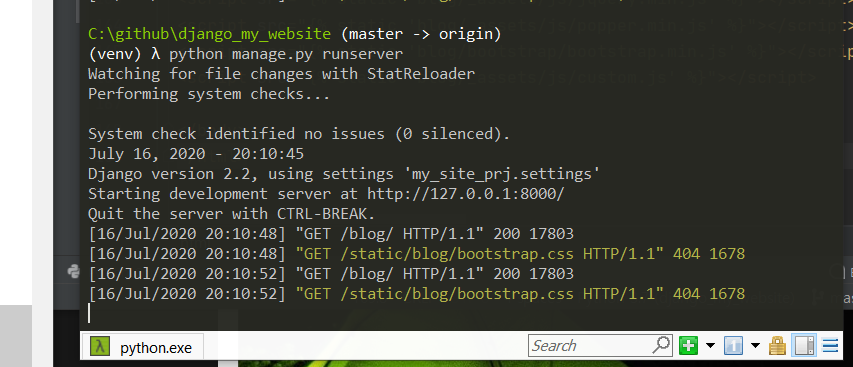
찾은 것 같아요.
<link rel="stylesheet" href="{% static 'blog/bootstrap.css' %}" media="screen">
이 부분에서 blog/bootstrap/bootstrap.css 로 수정해야 하지 않을까요?
0
<!DOCTYPE html>
{% load static %}
<html lang="ko">
<head>
<meta charset="UTF-8">
<title>Blog</title>
<meta name="viewport" content="width=device-width, initial-scale=1">
<meta http-equiv="X-UA-Compatible" content="IE=edge"/>
<link rel="stylesheet" href="{% static 'blog/bootstrap.css' %}" media="screen">
<link rel="stylesheet" href="{% static 'blog/_assets/css/custom.min.css' %}">
</head>
<body>
<div class="navbar navbar-expand-lg fixed-top navbar-light bg-light">
<div class="container">
<a href="../" class="navbar-brand">Lab. Elvis</a>
<button class="navbar-toggler" type="button" data-toggle="collapse" data-target="#navbarResponsive" aria-controls="navbarResponsive" aria-expanded="false" aria-label="Toggle navigation">
<span class="navbar-toggler-icon"></span>
</button>
<div class="collapse navbar-collapse" id="navbarResponsive">
<ul class="navbar-nav">
<li class="nav-item dropdown">
<a class="nav-link dropdown-toggle" data-toggle="dropdown" href="#" id="themes">Themes <span class="caret"></span></a>
<div class="dropdown-menu" aria-labelledby="themes">
<a class="dropdown-item" href="../default/">Default</a>
<div class="dropdown-divider"></div>
<a class="dropdown-item" href="../cerulean/">Cerulean</a>
<a class="dropdown-item" href="../cosmo/">Cosmo</a>
<a class="dropdown-item" href="../cyborg/">Cyborg</a>
<a class="dropdown-item" href="../darkly/">Darkly</a>
<a class="dropdown-item" href="../flatly/">Flatly</a>
<a class="dropdown-item" href="../journal/">Journal</a>
<a class="dropdown-item" href="../litera/">Litera</a>
<a class="dropdown-item" href="../lumen/">Lumen</a>
<a class="dropdown-item" href="../lux/">Lux</a>
<a class="dropdown-item" href="../materia/">Materia</a>
<a class="dropdown-item" href="../minty/">Minty</a>
<a class="dropdown-item" href="../pulse/">Pulse</a>
<a class="dropdown-item" href="../sandstone/">Sandstone</a>
<a class="dropdown-item" href="../simplex/">Simplex</a>
<a class="dropdown-item" href="../sketchy/">Sketchy</a>
<a class="dropdown-item" href="../slate/">Slate</a>
<a class="dropdown-item" href="../solar/">Solar</a>
<a class="dropdown-item" href="../spacelab/">Spacelab</a>
<a class="dropdown-item" href="../superhero/">Superhero</a>
<a class="dropdown-item" href="../united/">United</a>
<a class="dropdown-item" href="../yeti/">Yeti</a>
</div>
</li>
<li class="nav-item">
<a class="nav-link" href="/blog/">Blog</a>
</li>
<li class="nav-item">
<a class="nav-link" href="/about_me/">About me</a>
</li>
<li class="nav-item dropdown">
<a class="nav-link dropdown-toggle" data-toggle="dropdown" href="#" id="download">Simplex <span class="caret"></span></a>
<div class="dropdown-menu" aria-labelledby="download">
<a class="dropdown-item" target="_blank" href="https://jsfiddle.net/bootswatch/3he50zsf/">Open in JSFiddle</a>
<div class="dropdown-divider"></div>
<a class="dropdown-item" href="../4/simplex/bootstrap.min.css" download>bootstrap.min.css</a>
<a class="dropdown-item" href="../4/simplex/bootstrap.css" download>bootstrap.css</a>
<div class="dropdown-divider"></div>
<a class="dropdown-item" href="../4/simplex/_variables.scss" download>_variables.scss</a>
<a class="dropdown-item" href="../4/simplex/_bootswatch.scss" download>_bootswatch.scss</a>
</div>
</li>
</ul>
<ul class="nav navbar-nav ml-auto">
<li class="nav-item">
<a class="nav-link" href="#" target="_blank">공사중</a>
</li>
</ul>
</div>
</div>
</div>
<div class="container">
<div class="row">
<!-- Blog Entries Column -->
<div class="col-md-8">
<h1 class="my-4">Blog</h1>
{% for p in object_list %}
<div class="card mb-4">
<img class="card-img-top" src="http://placehold.it/750x300" alt="Card image cap">
<div class="card-body">
<h2 class="card-title">{{ p.title }}</h2>
<p class="card-text">{{ p.content }}</p>
<a href="#" class="btn btn-primary">Read More →</a>
</div>
<div class="card-footer text-muted">
Posted on {{ p.create }} by
<a href="#">{{ p.author }}</a>
</div>
</div>
{% endfor %}
</div>
<!-- Sidebar Widgets Column -->
<div class="col-md-4">
<!-- Search Widget -->
<div class="card my-4">
<h5 class="card-header">Search</h5>
<div class="card-body">
<div class="input-group">
<input type="text" class="form-control" placeholder="Search for...">
<span class="input-group-append">
<button class="btn btn-secondary" type="button">Go!</button>
</span>
</div>
</div>
</div>
<!-- Categories Widget -->
<div class="card my-4">
<h5 class="card-header">Categories</h5>
<div class="card-body">
<div class="row">
<div class="col-lg-6">
<ul class="list-unstyled mb-0">
<li>
<a href="#">Web Design</a>
</li>
<li>
<a href="#">HTML</a>
</li>
<li>
<a href="#">Freebies</a>
</li>
</ul>
</div>
<div class="col-lg-6">
<ul class="list-unstyled mb-0">
<li>
<a href="#">JavaScript</a>
</li>
<li>
<a href="#">CSS</a>
</li>
<li>
<a href="#">Tutorials</a>
</li>
</ul>
</div>
</div>
</div>
</div>
</div>
</div>
<!-- /.row -->
</div>
<script src="{% static 'blog/_assets/js/jquery.min.js' %}"></script>
<script src="{% static 'blog/_assets/js/popper.min.js' %}"></script>
<script src="{% static 'blog/bootstrap/bootstrap.min.js' %}"></script>
<script src="{% static 'blog/_assets/js/custom.js' %}"></script>
</body>
</html>
0
안녕하세요. 혹시 해결하셨나요?
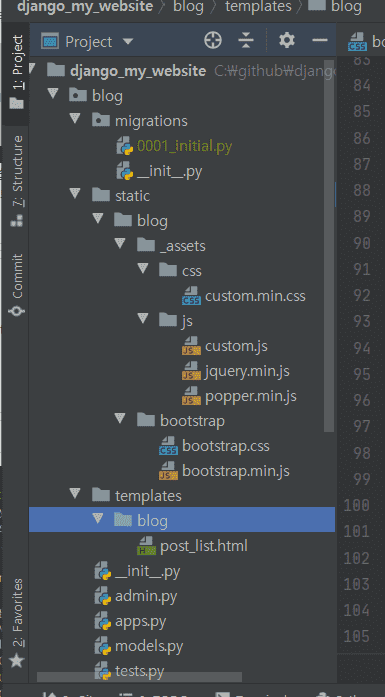
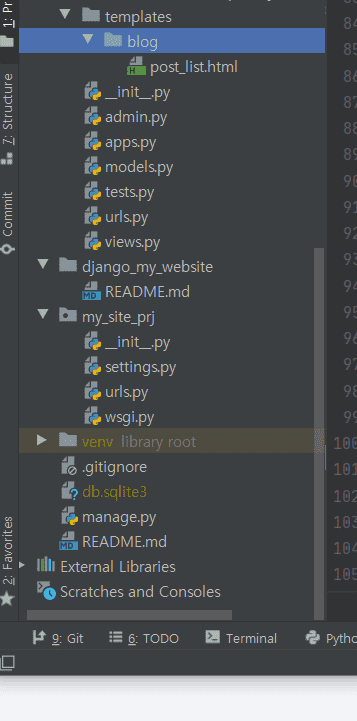
일단 화면만 봐서 알기는 어려우니, html 파일 소스코드를 보여주시고, 디렉토리 구조도 볼 수 있도록 해주세요.
확인해보겠습니다.
후속 강의
0
413
1
완성했습니다. 감사합니다
0
351
2
오늘 vps 에 domain 을 지정해주고 아직 활성화되지 않았는데
0
328
1
test 결과 두 가지 error 가 발생했습니다. 뭐가 잘못된 건지 도저히 모르겠습니다.
0
443
1
accounts/login 이 존재하지 않는다고 나옵니다
0
290
2
코드 질문입니다
0
273
1
포스트에 markdown을 사용해서 이미지를 추가할때
0
335
1
New Post 관련 질문드립니다.
0
196
1
이번 영상부터 각 포스트에 프리뷰 사진이 달라지셔서 질문 드립니다.
0
354
1
base 작업한 후 Category가 블로그 하단으로 내려갔습니다.
0
272
1
혹시 소스코드 전체가 담긴 주소를 좀 알 수 있을까요?
0
280
1
9분 경 테스트에서 Assretion Error가 발생합니다.
0
250
1
파이참 초기 설치 후 설정 관련해서 git에 항상 add되는 옵션을 체크했습니다.
0
381
3
F12를 눌러 console 창에서 오류를 확인할때 몇번째 줄인지 나오지 않습니다.
0
421
1
post view도 delete하려는데 막혀서 ㅠㅠ
0
220
1
"GET / HTTP/1.1" 400 143 그리고 "GET / HTTP/1.1" 404 2031
0
3341
3
연결이 안됩니다
0
555
8
서버에 연결하고 나면 그 후에 Cmder가 작동이 안되요
0
415
2
서버에 배포후 어드민계정
0
621
2
안녕하세요! 실서버에 올린 sqlite3의 데이터를 직접 확인하려면 어찌하나요?
0
2075
3
gitignore안먹히는현상
0
304
1
cmder 종료시 서버도 같이 종료됩니다.
0
228
1
' python manage.py makemigration blog ' 명령어 에러
0
605
2
python manage.py makemigrations 를 했을 때 오류가 납니다.
0
586
2