
강의

멘토링

커뮤니티

인프런 커뮤니티 질문&답변

홍영애님의 프로필 이미지
홍영애

작성한 질문수

HTML+CSS+JS 포트폴리오 실전 퍼블리싱(시즌2)

CSS 섹션 UI 디자인 - 폰트어썸 UI(2)

a:before 부분 언더라인 없애는 법

작성

·

443

1

■ 질문 남기실 때 꼭! 참고해주세요.

- 먼저 유사한 질문이 있었는지 검색해주세요.
- 궁금한 부분이 있으시면 해당 강의의 타임라인 부분을 표시해주시면 좋습니다.
- HTML, CSS, JQUERY 코드 소스를 텍스트 형태로 첨부해주시고 스크린샷도 첨부해주세요.- 다운로드가 필요한 파일은 해당 강의의 마지막 섹션에 모두 있습니다.
 
html
<!DOCTYPE html>
<html lang="ko">

<head>
    <meta charset="UTF-8">
    <title>CSS 섹션 UI 디자인 - 폰트어썸 UI</title>
    <link rel="stylesheet" href="CSS섹션UI디자인_폰트어썸UI.css">
</head>

<body>
    <div class="frame">
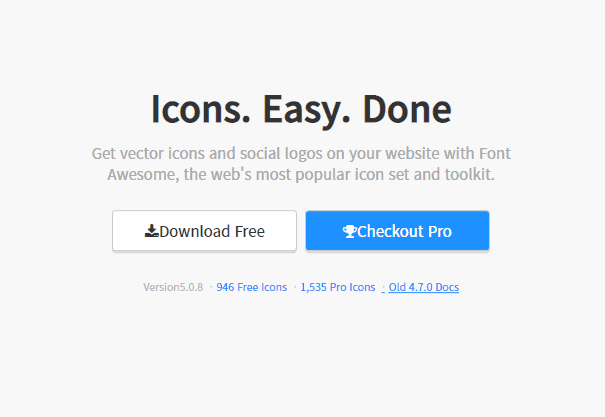
        <h1>Icons. Easy. Done</h1>
        <p>
            Get vector icons and social logos on your website with Font Awesome, the web's most popular icon set and
            toolkit.
        </p>
        <div class="btns">
            <a href="#none" class="btn download"><i class="fa fa-download" aria-hidden="true"></i>Download Free</a>
            <a href="#none" class="btn checkout"><i class="fa fa-trophy" aria-hidden="true"></i>Checkout Pro</a>
        </div>
        <div class="links">
            <span>Version5.0.8</span>
            <a href="#none">946 Free Icons</a>
            <a href="#none">1,535 Pro Icons</a>
            <a href="#none">Old 4.7.0 Docs</a>
        </div>
    </div>

</body>

</html>
 
 
CSS
 
/* 구글 웹폰트 */
@import url('https://fonts.googleapis.com/css2?family=Noto+Sans+KR:wght@300;400;500&display=swap');


/* Fontawesome 4.7 */
@import url('https://stackpath.bootstrapcdn.com/font-awesome/4.7.0/css/font-awesome.min.css');


body {
    margin: 0;
    font-family: 'Noto Sans KR', sans-serif;
    color: #333;
    font-size: 18px;
    line-height: 1.6em;
    background-color: #f8f8f8;
}

a {
    text-decoration: none;
    color: #333;
}

/* Font Icon UI Design */
.frame {
    width: 600px;
    text-align: center;
    position: absolute;
    top: 50%;
    left: 50%;
    transform: translate(-50%, -50%);
}

.frame h1 {
    font-size: 48px;
}

.frame p {
    font-size: 20px;
    color: #aaa;
    margin-bottom: 30px;
}

.btns {
    margin-bottom: 30px;
}

.btn {
    border: 1px solid #ccc;
    padding: 12px;
    margin: 3px;
    border-radius: 5px;
    background-color: #fff;
    box-shadow: 0 3px 0 #ddd;
    width: 220px;
    display: inline-block;
    font-size: 20px;
}

.btn.download {}

.btn.checkout {
    background-color: dodgerblue;
    color: #fff;
}

.links {
    font-size: 14px;
}

.links span {
    color: #bbb;
}

.links a {
    color: dodgerblue;
}

.links a:before {
    content: '·';
    color: #ccc;
    margin: 5px;
    text-decoration: none;
}

.links a:hover {
    text-decoration: underline;
}
 
 
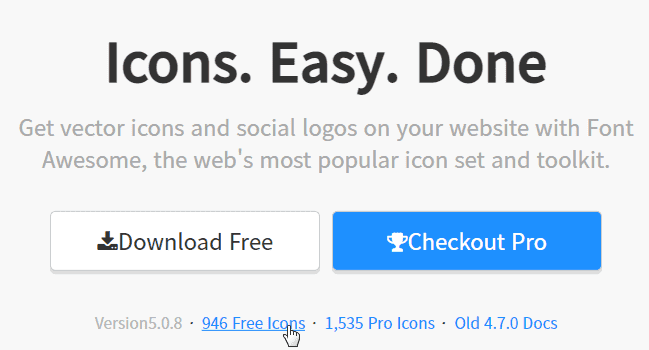
선생님 .links a:before에 링크가 같이 잡히는데 저 부분은 글씨 부분만 text-decoration: underline;되도록 하려면 어떻게 해야할까요? before부분에 text-decoration: none; 줬는데도 같이 잡혀서 여쭤봅니다.

답변 1

0

a에 text-decoration이 들아가 있어서 자식요소인 a:before 무조건 text-decoration 속성이 상속됩니다. 지금과 같은 html 구조로는 할 수 없습니다. 아래 처럼 하시려면 a:before를 사용하지 마시고 html 구조에 간단하게 추가해주셔야 합니다.
<div class="links">
      <span>Version5.0.8</span><em>·</em>
      <a href="#none">946 Free Icons</a><em>·</em>
      <a href="#none">1,535 Pro Icons</a><em>·</em>
      <a href="#none">Old 4.7.0 Docs</a>
    </div>


.links em {
  margin: 5px;
}

<em>·</em>

em 태그로 하지 않고 b 태그로 하셔도 상관없습니다.

그리고 · 특수기호는 한글 키보드 ㄱ 을 누르고 한자 키를 누르면 찾으실 수 있습니다.


좋은 강의 감사드립니다!

현재 html 구조 유지하고도 css 약간만 바꾸면 가능해져서 대댓글 남겼습니다

.links a {
  color: dodgerblue;
  position: relative;
  margin-left: 10px;
}
.links a:before {
  content: '|';
  color: #ccc;
  font-size: 12px;
  margin: 5px;
  position: absolute;
  left: -14px;
  top: -9px;
}

이렇게 하면 underline이 a 태그에만 나옵니다!

홍영애님의 프로필 이미지
홍영애

작성한 질문수

질문하기