


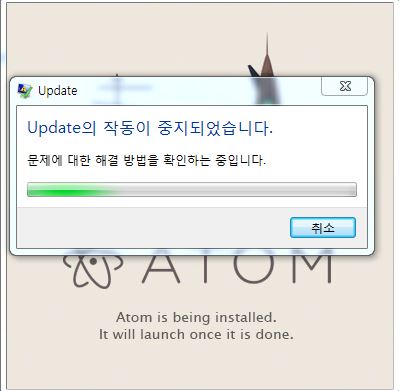
atom 설치가 되지 않습니다..
507
작성한 질문수 1
안녕하세요
수업때 안내해주신대로 atom 설치파일 다운로드 후 설치를 하려하는데 계속
오류가 발생하여 구글링하고 조치를 해봐도 개선되지를 않아서 질문올립니다..
2017-02-14 16:42:32> Program: Starting Squirrel Updater: --install .
2017-02-14 16:42:32> Program: Starting install, writing to C:\Users\chocopks\AppData\Local\SquirrelTemp
2017-02-14 16:42:32> Program: About to install to: C:\Users\chocopks\AppData\Local\JandiApp
2017-02-14 16:42:32> CheckForUpdateImpl: Couldn't write out staging user ID, this user probably shouldn't get beta anything: System.IO.DirectoryNotFoundException: 'C:\Users\chocopks\AppData\Local\JandiApp\packages\.betaId' 경로의 일부를 찾을 수 없습니다.
위치: System.IO.__Error.WinIOError(Int32 errorCode, String maybeFullPath)
위치: System.IO.FileStream.Init(String path, FileMode mode, FileAccess access, Int32 rights, Boolean useRights, FileShare share, Int32 bufferSize, FileOptions options, SECURITY_ATTRIBUTES secAttrs, String msgPath, Boolean bFromProxy, Boolean useLongPath, Boolean checkHost)
위치: System.IO.FileStream..ctor(String path, FileMode mode, FileAccess access, FileShare share, Int32 bufferSize, FileOptions options, String msgPath, Boolean bFromProxy, Boolean useLongPath, Boolean checkHost)
위치: System.IO.StreamWriter.CreateFile(String path, Boolean append, Boolean checkHost)
위치: System.IO.StreamWriter..ctor(String path, Boolean append, Encoding encoding, Int32 bufferSize, Boolean checkHost)
위치: System.IO.File.InternalWriteAllText(String path, String contents, Encoding encoding, Boolean checkHost)
위치: System.IO.File.WriteAllText(String path, String contents, Encoding encoding)
위치: Squirrel.UpdateManager.CheckForUpdateImpl.getOrCreateStagedUserId()
2017-02-14 16:42:32> CheckForUpdateImpl: Failed to load local releases, starting from scratch: System.IO.DirectoryNotFoundException: 'C:\Users\chocopks\AppData\Local\JandiApp\packages\RELEASES' 경로의 일부를 찾을 수 없습니다.
위치: System.IO.__Error.WinIOError(Int32 errorCode, String maybeFullPath)
위치: System.IO.FileStream.Init(String path, FileMode mode, FileAccess access, Int32 rights, Boolean useRights, FileShare share, Int32 bufferSize, FileOptions options, SECURITY_ATTRIBUTES secAttrs, String msgPath, Boolean bFromProxy, Boolean useLongPath, Boolean checkHost)
위치: System.IO.FileStream..ctor(String path, FileMode mode, FileAccess access, FileShare share)
위치: Squirrel.Utility.LoadLocalReleases(String localReleaseFile)
위치: Squirrel.UpdateManager.CheckForUpdateImpl.<CheckForUpdate>d__2.MoveNext()
2017-02-14 16:42:32> CheckForUpdateImpl: Reading RELEASES file from C:\Users\chocopks\AppData\Local\SquirrelTemp
2017-02-14 16:42:32> CheckForUpdateImpl: First run or local directory is corrupt, starting from scratch
2017-02-14 16:42:32> ApplyReleasesImpl: Writing files to app directory: C:\Users\chocopks\AppData\Local\JandiApp\app-0.11.2
2017-02-14 16:42:35> ApplyReleasesImpl: Squirrel Enabled Apps: [C:\Users\chocopks\AppData\Local\JandiApp\app-0.11.2\jandiapp.exe]
2017-02-14 16:42:39> ApplyReleasesImpl: Starting fixPinnedExecutables
2017-02-14 16:42:39> ApplyReleasesImpl: Examining Pin: Chrome.lnk
2017-02-14 16:42:39> ApplyReleasesImpl: Examining Pin: GOM.EXE.lnk
2017-02-14 16:42:39> ApplyReleasesImpl: Examining Pin: Internet Explorer.lnk
2017-02-14 16:42:39> ApplyReleasesImpl: Examining Pin: Microsoft Excel 2010.lnk
2017-02-14 16:42:39> ApplyReleasesImpl: Examining Pin: Microsoft PowerPoint 2010.lnk
2017-02-14 16:42:39> ApplyReleasesImpl: Examining Pin: Notepad++.lnk
2017-02-14 16:42:39> ApplyReleasesImpl: Examining Pin: sqldeveloper.lnk
2017-02-14 16:42:39> ApplyReleasesImpl: Examining Pin: Windows Explorer.lnk
2017-02-14 16:42:39> ApplyReleasesImpl: Examining Pin: 곰오디오.lnk
2017-02-14 16:42:39> ApplyReleasesImpl: Examining Pin: 한글과컴퓨터 한글 2007.lnk
2017-02-14 16:42:39> ApplyReleasesImpl: Fixing up tray icons
2017-02-14 16:42:39> ApplyReleasesImpl: Couldn't rewrite shim RegKey, most likely no apps are shimmed: System.NullReferenceException: 개체 참조가 개체의 인스턴스로 설정되지 않았습니다.
위치: Squirrel.UpdateManager.ApplyReleasesImpl.<unshimOurselves>b__13_0(RegistryView view)
2017-02-14 16:42:39> ApplyReleasesImpl: Couldn't rewrite shim RegKey, most likely no apps are shimmed: System.NullReferenceException: 개체 참조가 개체의 인스턴스로 설정되지 않았습니다.
위치: Squirrel.UpdateManager.ApplyReleasesImpl.<unshimOurselves>b__13_0(RegistryView view)
2017-02-14 16:42:39> ApplyReleasesImpl: cleanDeadVersions: for version 0.11.2
2017-02-14 16:42:39> ApplyReleasesImpl: cleanDeadVersions: exclude folder app-0.11.2
2017-02-14 16:42:39> InstallHelperImpl: Couldn't write uninstall icon, don't care: System.Net.WebException: 'C:\dev\jandi_desktop\resources\windows\jandi.ico' 경로의 일부를 찾을 수 없습니다. ---> System.Net.WebException: 'C:\dev\jandi_desktop\resources\windows\jandi.ico' 경로의 일부를 찾을 수 없습니다. ---> System.IO.DirectoryNotFoundException: 'C:\dev\jandi_desktop\resources\windows\jandi.ico' 경로의 일부를 찾을 수 없습니다.
위치: System.IO.__Error.WinIOError(Int32 errorCode, String maybeFullPath)
위치: System.IO.FileStream.Init(String path, FileMode mode, FileAccess access, Int32 rights, Boolean useRights, FileShare share, Int32 bufferSize, FileOptions options, SECURITY_ATTRIBUTES secAttrs, String msgPath, Boolean bFromProxy, Boolean useLongPath, Boolean checkHost)
위치: System.IO.FileStream..ctor(String path, FileMode mode, FileAccess access, FileShare share, Int32 bufferSize, FileOptions options, String msgPath, Boolean bFromProxy)
위치: System.IO.FileStream..ctor(String path, FileMode mode, FileAccess access, FileShare share, Int32 bufferSize, Boolean useAsync)
위치: System.Net.FileWebStream..ctor(FileWebRequest request, String path, FileMode mode, FileAccess access, FileShare sharing, Int32 length, Boolean async)
위치: System.Net.FileWebResponse..ctor(FileWebRequest request, Uri uri, FileAccess access, Boolean asyncHint)
--- 내부 예외 스택 추적의 끝 ---
위치: System.Net.FileWebResponse..ctor(FileWebRequest request, Uri uri, FileAccess access, Boolean asyncHint)
위치: System.Net.FileWebRequest.GetResponseCallback(Object state)
--- 내부 예외 스택 추적의 끝 ---
위치: System.Net.FileWebRequest.EndGetResponse(IAsyncResult asyncResult)
위치: System.Net.WebClient.GetWebResponse(WebRequest request, IAsyncResult result)
위치: System.Net.WebClient.DownloadBitsResponseCallback(IAsyncResult result)
--- 예외가 throw된 이전 위치의 스택 추적 끝 ---
위치: System.Runtime.CompilerServices.TaskAwaiter.ThrowForNonSuccess(Task task)
위치: System.Runtime.CompilerServices.TaskAwaiter.HandleNonSuccessAndDebuggerNotification(Task task)
위치: System.Runtime.CompilerServices.TaskAwaiter.ValidateEnd(Task task)
위치: Squirrel.UpdateManager.InstallHelperImpl.<CreateUninstallerRegistryEntry>d__5.MoveNext()
2017-03-21 08:28:01> Program: Starting Squirrel Updater: --install .
2017-03-21 08:28:01> Program: Starting install, writing to C:\Users\chocopks\AppData\Local\SquirrelTemp
2017-03-21 08:28:01> Program: About to install to: C:\Users\chocopks\AppData\Local\atom
2017-03-21 08:28:01> CheckForUpdateImpl: Couldn't write out staging user ID, this user probably shouldn't get beta anything: System.IO.DirectoryNotFoundException: 'C:\Users\chocopks\AppData\Local\atom\packages\.betaId' 경로의 일부를 찾을 수 없습니다.
위치: System.IO.__Error.WinIOError(Int32 errorCode, String maybeFullPath)
위치: System.IO.FileStream.Init(String path, FileMode mode, FileAccess access, Int32 rights, Boolean useRights, FileShare share, Int32 bufferSize, FileOptions options, SECURITY_ATTRIBUTES secAttrs, String msgPath, Boolean bFromProxy, Boolean useLongPath, Boolean checkHost)
위치: System.IO.FileStream..ctor(String path, FileMode mode, FileAccess access, FileShare share, Int32 bufferSize, FileOptions options, String msgPath, Boolean bFromProxy, Boolean useLongPath, Boolean checkHost)
위치: System.IO.StreamWriter.CreateFile(String path, Boolean append, Boolean checkHost)
위치: System.IO.StreamWriter..ctor(String path, Boolean append, Encoding encoding, Int32 bufferSize, Boolean checkHost)
위치: System.IO.File.InternalWriteAllText(String path, String contents, Encoding encoding, Boolean checkHost)
위치: System.IO.File.WriteAllText(String path, String contents, Encoding encoding)
위치: Squirrel.UpdateManager.CheckForUpdateImpl.getOrCreateStagedUserId()
2017-03-21 08:28:01> CheckForUpdateImpl: Failed to load local releases, starting from scratch: System.IO.DirectoryNotFoundException: 'C:\Users\chocopks\AppData\Local\atom\packages\RELEASES' 경로의 일부를 찾을 수 없습니다.
위치: System.IO.__Error.WinIOError(Int32 errorCode, String maybeFullPath)
위치: System.IO.FileStream.Init(String path, FileMode mode, FileAccess access, Int32 rights, Boolean useRights, FileShare share, Int32 bufferSize, FileOptions options, SECURITY_ATTRIBUTES secAttrs, String msgPath, Boolean bFromProxy, Boolean useLongPath, Boolean checkHost)
위치: System.IO.FileStream..ctor(String path, FileMode mode, FileAccess access, FileShare share)
위치: Squirrel.Utility.LoadLocalReleases(String localReleaseFile)
위치: Squirrel.UpdateManager.CheckForUpdateImpl.<CheckForUpdate>d__2.MoveNext()
2017-03-21 08:28:01> CheckForUpdateImpl: Reading RELEASES file from C:\Users\chocopks\AppData\Local\SquirrelTemp
2017-03-21 08:28:01> CheckForUpdateImpl: First run or local directory is corrupt, starting from scratch
2017-03-21 08:28:02> ApplyReleasesImpl: Writing files to app directory: C:\Users\chocopks\AppData\Local\atom\app-1.15.0
2017-03-21 08:28:02> LogHost: Rigging execution stub for lib/net45/atom_ExecutionStub.exe to C:\Users\chocopks\AppData\Local\atom\atom.exe
2017-03-21 08:28:02> LogHost: Rigging execution stub for lib/net45/resources/app/apm/bin/node_ExecutionStub.exe to C:\Users\chocopks\AppData\Local\atom\app-1.15.0\resources\app\apm\node.exe
2017-03-21 08:28:05> LogHost: Rigging execution stub for lib/net45/resources/app.asar.unpacked/node_modules/symbols-view/vendor/ctags-win32_ExecutionStub.exe to C:\Users\chocopks\AppData\Local\atom\app-1.15.0\resources\app.asar.unpacked\node_modules\symbols-view\ctags-win32.exe
2017-03-21 08:28:07> ApplyReleasesImpl: Squirrel Enabled Apps: [C:\Users\chocopks\AppData\Local\atom\app-1.15.0\atom.exe]
2017-03-21 08:28:12> ApplyReleasesImpl: Starting fixPinnedExecutables
2017-03-21 08:28:12> ApplyReleasesImpl: Examining Pin: Chrome.lnk
2017-03-21 08:28:12> ApplyReleasesImpl: Examining Pin: eclipse.exe.lnk
2017-03-21 08:28:12> ApplyReleasesImpl: Examining Pin: Internet Explorer.lnk
2017-03-21 08:28:12> ApplyReleasesImpl: Examining Pin: LINE.lnk
2017-03-21 08:28:12> ApplyReleasesImpl: Examining Pin: Microsoft Excel 2010.lnk
2017-03-21 08:28:12> ApplyReleasesImpl: Examining Pin: Microsoft PowerPoint 2010.lnk
2017-03-21 08:28:12> ApplyReleasesImpl: Examining Pin: Notepad++.lnk
2017-03-21 08:28:12> ApplyReleasesImpl: Examining Pin: PLSQL Developer.lnk
2017-03-21 08:28:12> ApplyReleasesImpl: Examining Pin: Snipping Tool.lnk
2017-03-21 08:28:12> ApplyReleasesImpl: File 'C:\Users\chocopks\AppData\Roaming\Microsoft\Internet Explorer\Quick Launch\User Pinned\TaskBar\Snipping Tool.lnk' could not be converted into a valid ShellLink: System.IO.FileNotFoundException: 지정된 파일을 찾을 수 없습니다. (예외가 발생한 HRESULT: 0x80070002)
위치: Squirrel.Shell.ShellLink.IShellLinkW.Resolve(IntPtr hWnd, UInt32 fFlags)
위치: Squirrel.Shell.ShellLink.Open(String linkFile, IntPtr hWnd, EShellLinkResolveFlags resolveFlags, UInt16 timeOut)
위치: Squirrel.UpdateManager.ApplyReleasesImpl.<fixPinnedExecutables>b__11_0(FileInfo file)
2017-03-21 08:28:12> ApplyReleasesImpl: Examining Pin: sqldeveloper.lnk
2017-03-21 08:28:12> ApplyReleasesImpl: Examining Pin: UltraEdit.lnk
2017-03-21 08:28:12> ApplyReleasesImpl: Examining Pin: Windows Explorer.lnk
2017-03-21 08:28:12> ApplyReleasesImpl: Examining Pin: 카카오톡.lnk
2017-03-21 08:28:12> ApplyReleasesImpl: Examining Pin: 한글과컴퓨터 한글 2007.lnk
2017-03-21 08:28:12> ApplyReleasesImpl: Fixing up tray icons
2017-03-21 08:28:12> ApplyReleasesImpl: Couldn't rewrite shim RegKey, most likely no apps are shimmed: System.NullReferenceException: 개체 참조가 개체의 인스턴스로 설정되지 않았습니다.
위치: Squirrel.UpdateManager.ApplyReleasesImpl.<unshimOurselves>b__13_0(RegistryView view)
2017-03-21 08:28:12> ApplyReleasesImpl: Couldn't rewrite shim RegKey, most likely no apps are shimmed: System.NullReferenceException: 개체 참조가 개체의 인스턴스로 설정되지 않았습니다.
위치: Squirrel.UpdateManager.ApplyReleasesImpl.<unshimOurselves>b__13_0(RegistryView view)
2017-03-21 08:28:12> ApplyReleasesImpl: cleanDeadVersions: for version 1.15.0
2017-03-21 08:28:12> ApplyReleasesImpl: cleanDeadVersions: exclude folder app-1.15.0
답변 1
0
안녕하세요.
해당 에러는 운영체제 설치 중에 발생하는 에러라 저도 처음 겪어보는 내용이라 확실한 답변이 어려울 것 같습니다.
보통 관리자 권한 및 새로 계정을 만들어서 클린하게 설치를 해보시는 경우가 가장 좋은 해결책으로 생각합니다.
감사합니다.
실행이 안 되는데요.
0
4
0
print 문법 실행 안 돼요.
0
5
1
영문 계정
0
9
1
맥북에서 아이패드로 연결해서 보려고 하면 화면이 안뜹니다.
0
9
1
인스턴스 변수 문의
0
56
1
챕터 03_04 (튜플) 교육자료
0
56
2
Package(3-1) Sub 폴더 자료
0
48
1
아톰 출력 안됨
0
85
2
강의자료 메일 발송 요청 드립니다.
0
91
1
강의자료 메일로 보내주실 수 있으실까요?
1
59
0
Iterable 요소는 리스트로 작성해야하는 것 맞나요?
1
83
2
강의자료 부탁드립니다
0
76
2
if Flase: print('Bad')
0
76
1
=와 == 의 차이
0
93
1
functions 함수 섭들을려고하는데요
0
74
1
강의자료 부타드리겠습니다!
0
62
0
VSCODE에 VIEW에서 SELECTED INTERPRETER조회가 안됩니다.
0
71
1
강의자료 부탁드립니다.
0
59
0
dict의 Key를 바꾸는 방법
0
83
1
강의자료부탁드립니다
0
72
1
run withount 디버깅 및 F5+ctrl이 안먹혀요
0
69
1
강의 자료와 예정 다운로드
0
80
2
객체지향 vs 함수형
0
66
1
어렵네요 설정도
0
98
1