


인스턴스 만들기 n8n-container-instance
148
작성한 질문수 1
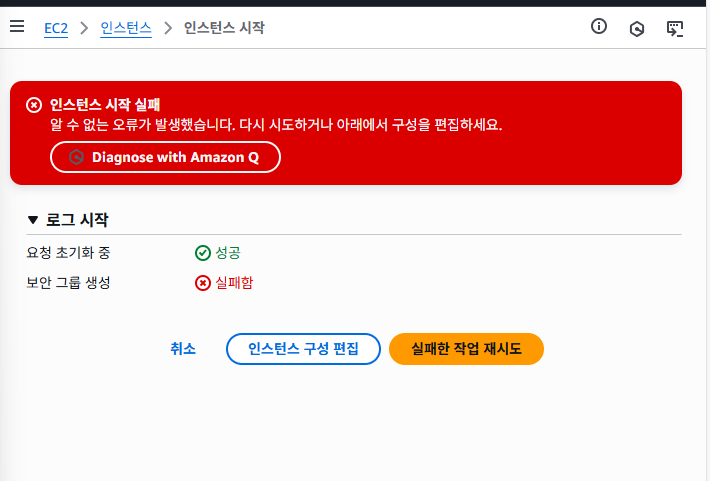
안만들어져요.......ㅠㅠㅠㅠㅠㅠㅠ
강의랑 똑같이 만들었는데..
답변 3
0
안녕하세요! 음 일단 에러메세지가 unknown error라서 저도 상당히 당황스러운데요
AWS 이슈로 생성이 되지 않는거일 수 있어서 30분즈음 뒤에 다시 시도해주시고 답글을 달아주세요!
기다리시는 동안 사용하시는 AWS 계정에 EC2 관련 권한들이 모두 있는지 한번 확인 부탁 드립니다
0
Analysis
The instance failed to start due to an unknown error. This could be caused by a variety of factors, such as a temporary service disruption, resource constraints, or an issue with the instance configuration. You will need to review the instance details and logs to determine the root cause of the failure.
Resolution
Try the following steps to resolve your error:
Navigate to the EC2 dashboard in the AWS Management Console
Locate the failed instance launch attempt in the 'Instances' section
Review the instance details and configuration:
Check the instance type
Verify the AMI selection
Examine the network settings (VPC, subnet, security group)
Review any user data or advanced settings
Check the EC2 service health status in the AWS Service Health Dashboard for any ongoing issues in your region
Verify that you have not exceeded any service quotas:
Go to the Service Quotas console
Search for 'EC2' and review your current usage against the quotas
If the issue persists, create a new launch template:
In the EC2 console, go to 'Launch Templates'
Click 'Create launch template'
Configure the instance settings carefully
Use this new template to launch the instance
If the problem continues, try launching the instance in a different Availability Zone or region
Check CloudTrail logs for any relevant error messages or API calls related to the failed launch:
Go to the CloudTrail console
Look for events related to EC2 instance launches
If all else fails, contact AWS Support for further assistance:
Go to the AWS Support Center
Create a new case, providing details about the error and steps you've taken
docker 실행 등 오류해결 도움 요청
0
142
1
LLM 지침시 헤더 관련해서 궁금한게 있습니다
0
95
1
테스트 환경 확인 -chat 사용 시 에러
0
151
2
docker port 충돌 문제
0
140
3
n8n으로 context를 고려한 이메일 답장 드래프트 작성 봇 생성 강의
0
118
2
Streamlit 사용하기 위한 과정 진행 중 email_agent.py 작성 후 실행 부분 오류
0
157
2
구글 드라이브 연결 에러
0
157
2
웹훅 설정 시
0
126
2
배포과정 금액이 상관 없다면 N8N 월간 비용으로 결제하고 수업따라가도 괜찮을까요?
0
144
2
Basic LLM Chain 에서 모델 추가 시 API 키
0
129
2
이해가 안됩니다.
0
111
1
트리거의 Ignore SSL Issues 옵션
0
114
1
Gmail 트리거 생성 후 fetch 테스트 시 에러
0
110
2
야매버전 마지막에서 막힙니다 ㅠ
0
164
2
호스팅영역 질문
0
108
2
route 53 오류메시지
0
100
2
docker 설치 후
0
138
2
스크랩한 뉴스를 이메일로 보내는 n8n 봇
0
149
2
이메일 답장 드래프트 작성 봇 생성에서 에러
0
147
2
n8n Self-signed Certificate in certificate chain 이슈
0
239
2
Notion 강의 자료가 보이지 않습니다.
0
147
1
24강 코드리뷰 에이전트 질문
0
130
2
10강 google sheet 관련 질문
0
106
1
19강에 있는 postgres account 계정 로그인이 안돼요
0
133
2