


mini-blog 프로젝트 질문합니다
138
작성한 질문수 1
// PostListItem.jsx

import React from "react";
import styled from "styled-components";

const Wrapper = styled.div`
  width: calc(100% -32px);
  padding: 16px;
  display: flex;
  flex-direction: column;
  align-items: flex-start;
  justify-content: center;
  border: 1px solid grey;
  border-radius: 8px;
  cursor: pointer;
  background: white;
  :hover {
    background: lightgrey;
  }
`;

const TitleText = styled.p`
  font-size: 20px;
  font-weight: 500;
`;

// 글의 제목만 표시
function PostListItem(props) {
  const { post, onClick } = props;

  return (
    <Wrapper onClick={onClick}>
      <TitleText>{post.title}</TitleText>
    </Wrapper>
  );
}

export default PostListItem;
// PostList.jsx


import React from "react";
import styled from "styled-components";
import PostListItem from "./PostListItem";

const Wrapper = styled.div`
  display: flex;
  flex-direction: column;
  align-items: flex-start;
  justify-content: center;

  :not(:last-child) {
    margin-bottom: 16px;
  }
`;

function PostList(props) {
  const { posts, onClickItem } = props;

  return (
    <Wrapper>
      {posts.map((post) => {
        return (
          <PostListItem
            key={post.id}
            post={post}
            onClick={() => {
              onClickItem(post);
            }}
          />
        );
      })}
    </Wrapper>
  );
}

export default PostList;
안녕하세요, 소플님. mini-blog 프로젝트 실습 질문합니다.
박스 테두리가 강의 영상과 다르게 나오는데 style부분에서 어느 파일을 고쳐야 할지 잘 모르겠습니다.
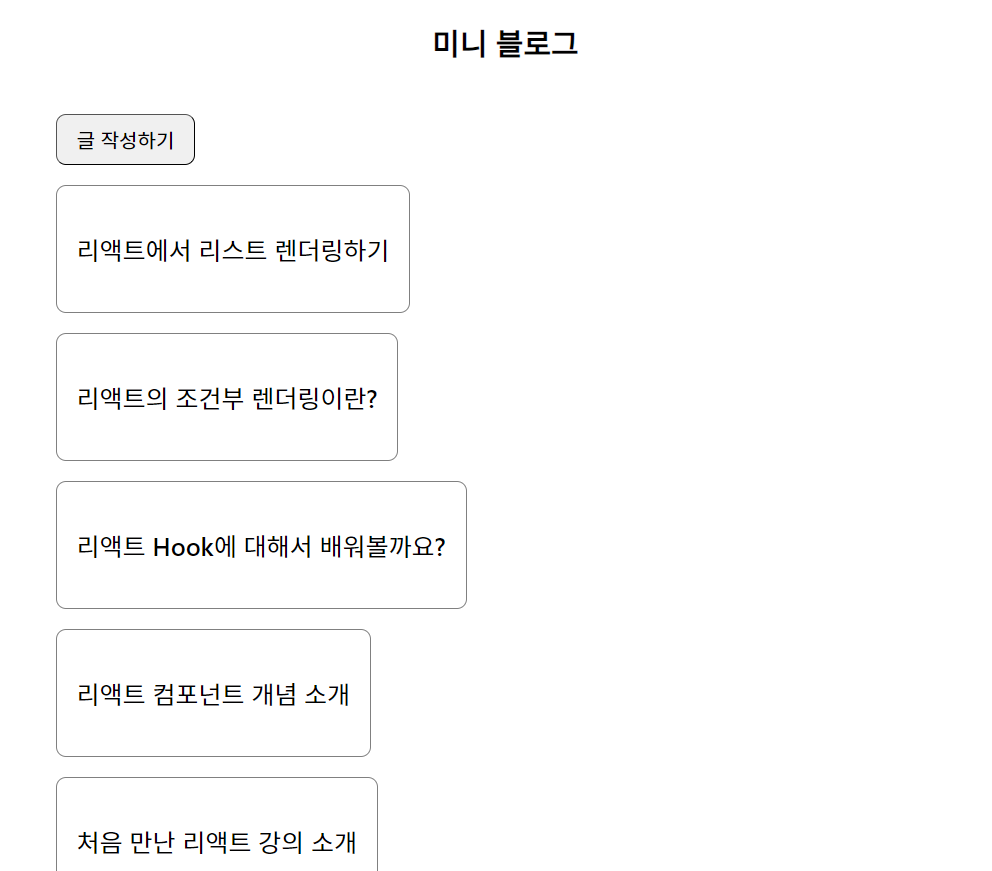 좋은 강의 무료로 해주셔서 감사합니다!
답변 1
0
안녕하세요, 소플입니다.
먼저 PostListItem의 width속성을 한 번 확인해보시기 바랍니다.
그래도 잘 해결되지 않으면 현재 작성하신 스타일 코드를 첨부해주시면 더 정확한 답변이 가능할 것 같습니다!
감사합니다.
1
답변 감사합니다! 게시글에 PostList.jsx와 PostListItem.jsx 코드를 첨부했습니다.
width: calc(100% -32px);
깃허브에 올려주신 것과 비교를 해봤는데 어디가 잘못되었는지 모르겠습니다.
0
width: calc(100% -32px);위 코드에서 - 양쪽으로 공백이 들어가야 합니다.
아래와 같이 수정한 이후에 다시 한 번 해보시기 바랍니다!
width: calc(100% - 32px);
강의가 삭제되었다고 합니다
0
134
1
이거 왜 존재하지 않는다고 뜨는건가요
0
151
1
존재하지 않는 수업이라고 떠요
0
197
1
안드로이드 에뮬레이터 오류
0
114
1
교재 구입해서 강의 들으려고 하는데 커리큘럼이 없어졌어요.
0
143
1
prevIsConfiromed 질문
1
156
2
chapter14 잘이해가 되지않습니다..
1
150
2
2025년 3월 리액트버전
1
218
2
npm 설치 오류
1
199
1
chapter_07 콘솔로그 질문드려요~!
1
140
2
안녕하세요 미니블로그 실습 질문드립니다.
1
192
3
에러가 떠요
1
231
3
Chapter6 질문 드립니다
1
221
2
실습 코드 있을까요?
1
219
2
상태가 업데이트될때 컴포넌트 최상단의 console.log 코드가 두번 실행되는 이유가 궁금합니다.
1
250
2
npx create-react-app my-app 명령어 입력이 잘못된 것 같습니다
0
322
3
이름과 코멘트 줄바꿈이 안 됩니다.
0
151
1
버튼이 안 뜹니다
0
313
2
npx create-react-app my-app
1
478
2
jsx 코드 작성해보기에서 index.js 수정 후 에러 뜹니다.
1
388
3
Chapter_05 터미널, 리액트 에러
0
201
2
npx create-react-app my-app 명령어 반응없음
1
440
3
import 코드 에러
1
217
1
백틱
1
126
1