


code 강조가 안됨니다..
코드블럭 테스트
language::typescript
export const { auth, signIn, signOut, handlers } = NextAuth({
등등을 존재하는데
아래와같이 코드는 작성했는데 코드 강조가 안되고있습니다. 뭐가문제일까요?
import React from 'react'
import {
  ContentfulRichTextGatsbyReference,
  renderRichText,
} from 'gatsby-source-contentful/rich-text'
import { getImage } from 'gatsby-plugin-image'
import { NodeRenderer, Options } from '@contentful/rich-text-react-renderer'
import { BLOCKS, INLINES, MARKS } from '@contentful/rich-text-types'
import {
  Blockquote,
  Heading,
  Image,
  HorizontalRule,
  OrderedList,
  UnorderedList,
  Link,
  Code,
} from './node'

export const HEADERS = [
  BLOCKS.HEADING_1,
  BLOCKS.HEADING_2,
  BLOCKS.HEADING_3,
] as const
const CODE_METADATA_REGEX = /^language::(\w+)/

const options: Options = {
  renderMark: {
    [MARKS.CODE]: text => {
      const isBlock = !!text && CODE_METADATA_REGEX.test(text.toString())

      if (!isBlock) return <Code>{text}</Code>
      else
        return (
          <Code
            isBlock
            className={`language-${
              CODE_METADATA_REGEX.exec(text.toString())?.[1]
            }`}
          >
            {text.toString().replace(CODE_METADATA_REGEX, '').trimStart()}
          </Code>
        )
    },
  },
  renderNode: {
    ...HEADERS.reduce<{ [block: string]: NodeRenderer }>((nodes, header) => {
      nodes[header] = (node, children) => (
        <Heading type={header}>{children}</Heading>
      )

      return nodes
    }, {}),
    [BLOCKS.OL_LIST]: (_node, children) => (
      <OrderedList>{children}</OrderedList>
    ),
    [BLOCKS.UL_LIST]: (_node, children) => (
      <UnorderedList>{children}</UnorderedList>
    ),
    [BLOCKS.HR]: () => <HorizontalRule />,
    [BLOCKS.QUOTE]: (_node, children) => <Blockquote>{children}</Blockquote>,
    [BLOCKS.EMBEDDED_ASSET]: node => {
      const { gatsbyImageData, description } = node.data.target
      const image = getImage(gatsbyImageData)

      if (image) return <Image image={image} alt={description} />
    },
    [INLINES.HYPERLINK]: (node, children) => (
      <Link
        href={node.data.uri as string}
        target="_blank"
        rel="noopener noreferrer"
      >
        {children}
      </Link>
    ),
  },
}

export default function useRenderRichText({
  raw,
  references,
}: Queries.ContentfulPostContent) {
  if (!raw) return null

  return renderRichText(
    {
      raw,
      references: references as unknown as ContentfulRichTextGatsbyReference[],
    },
    options,
  )
}
import React from 'react' import { GatsbyBrowser } from 'gatsby' import Layout from './src/components/common/Layout' import 'prismjs/themes/prism-tomorrow.min.css' export const wrapPageElement: GatsbyBrowser['wrapPageElement'] = ({ element, props, }) => { return <Layout {...props}>{element}</Layout> }
import React from 'react'
import { GatsbyBrowser } from 'gatsby'
import Layout from './src/components/common/Layout'
import 'prismjs/themes/prism-tomorrow.min.css'

export const wrapPageElement: GatsbyBrowser['wrapPageElement'] = ({
  element,
  props,
}) => {
  return <Layout {...props}>{element}</Layout>
}
import React, { useEffect } from 'react' import styled from 'styled-components' import { TPostBodyProps } from '../../types/PostBody' import Prism from 'prismjs' import 'prismjs/components/prism-typescript' import useRenderRichText from '../../hooks/useRenderRichText' const Wrapper = styled.div` position: relative; display: grid; grid-template-columns: 1fr 220px; grid-gap: 30px; justify-content: space-between; align-items: flex-start; padding-top: 100px; ` const Content = styled.div` overflow: auto; display: flex; flex-direction: column; gap: 100px; font-size: 16px; line-height: 2; word-break: break-word; ` export default function PostBody({ content }: TPostBodyProps) { const richText = useRenderRichText(content) useEffect(() => { Prism.highlightAll() }, []) return ( <Wrapper> <Content> <div id="content">{richText}</div> {/* 댓글 컴포넌트가 들어갈 자리 */} </Content> {/* 플로팅 목차 컴포넌트가 들어갈 자리 */} </Wrapper> ) }
답변 3
1
Contentful 게시글을 렌더링하는 과정에서 모든 요소들이 각각 p 태그로 래핑되는데, 해당 강의에서 코드를 표현하기 위한 목적으로 사용되는 pre 태그 또한 p 태그로 래핑됩니다. 그래서 p 태그 내에 pre 태그가 위치하여 해당 에러가 발생하는데, 동작 과정에서 문제가 되는 부분은 없기에 무시하고 넘어가셔도 상관없습니다!
0
감사합니다 해결되었습니다!!
그런데 해당 부분이 해결되고나니
head-export-handler-for-browser.js:72 Warning: validateDOMNesting(...): <pre> cannot appear as a descendant of <p>.
이러한 에러가 발생하는데 뭐가 문제일까요?
0
안녕하세요 정훈님!
정확한 확인을 위해 블로그 페이지 캡쳐본과 Contentful에 작성한 코드 부분을 올려주실 수 있나요?
그리고 Contentful에서 코드를 작성하는 과정에서 코드 영역이 제대로 인식되지 않는 경우도 존재합니다.
따라서 명확하게 코드 영역을 다시 설정하신 후, pnpm clean && pnpm develop 명령어를 통해 캐시를 삭제하고 다시 로컬 서버를 실행해보시겠어요?
1
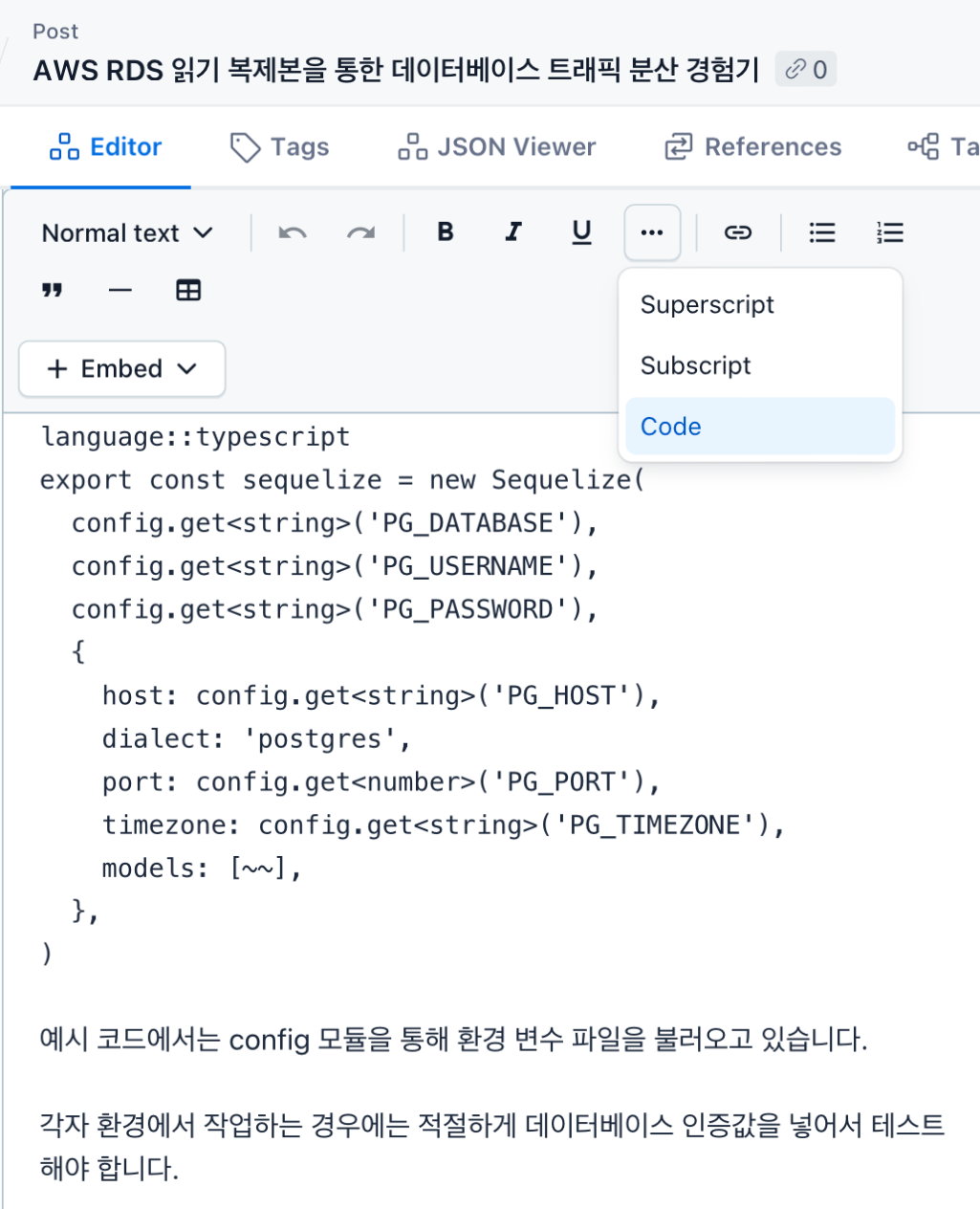
Contentful에서 위 사진과 같이 코드 영역을 등록하면 다른 일반 텍스트와 다른 폰트가 적용되는데, 정훈님께서 올려주신 사진은 그렇지 않아보입니다!
사진과 같이 코드 설정을 하신 후에 다시 로컬 서버를 실행해보시겠어요?
2605 이후 최신 클로드코드 강의 추가 부탁드립니다.
0
6
1
커리큘럼 문서 제공받을 수 있을까요?
0
9
0
ThemeProvider를 이용해서 NextThemeProvider를 따로 생성하여 Layout.tsx에 적용하는 이유는 뭘까요?
0
8
1
인덱스드 엑세스타입 실무질문
0
8
2
mission 09-01 을 수행할 수 없어요
0
16
1
outputStyle 설정하는데 어디서 문제일까요?
0
13
2
test.txt파일 삭제시 rm명령어이니 클로드의 질문이 있어야 한다고 하셨는데
0
8
1
검은화면
0
18
2
강의교환링크안열려요.....
0
15
1
영상재생에러 [확인부탁드려요!!!]
0
15
1
클로드 채팅에서 코드로 넘어가기
0
24
1
Context API vs Zustand 그리고 Auth
0
28
2
110강부터 따라가기가 힘듭니다...
0
47
1
커서에서 붙여넣기
0
27
1
깃허브 사용시 폴더경로 관련질문
0
22
1
[reducer] 기능별 폴더 구조 설계/ 파일 분리로 유지 보수 가능한 아키텍처 구축
0
20
2
순수 함수 / 순수 컴포넌트
0
21
1
깃허브 배포시 하얀화면
0
116
1
GaphQL reference 질문
0
173
2
렌더링 문제
0
321
2
깃 액션 활용
0
413
3
Github Actions 배포 이후 ReadMe만 보이는 에러
0
394
1
Property 'references' does not exist on type 'ContentfulPostContent' 에러
0
365
2
정규 표현식 질문
1
289
2