


--spring.profiles.active=prod 가 실행이 안됩니다.
959
작성한 질문수 35
[질문 템플릿]
1. 강의 내용과 관련된 질문인가요? (예)
2. 인프런의 질문 게시판과 자주 하는 질문에 없는 내용인가요? (예)
3. 질문 잘하기 메뉴얼을 읽어보셨나요? (예)
[질문 내용]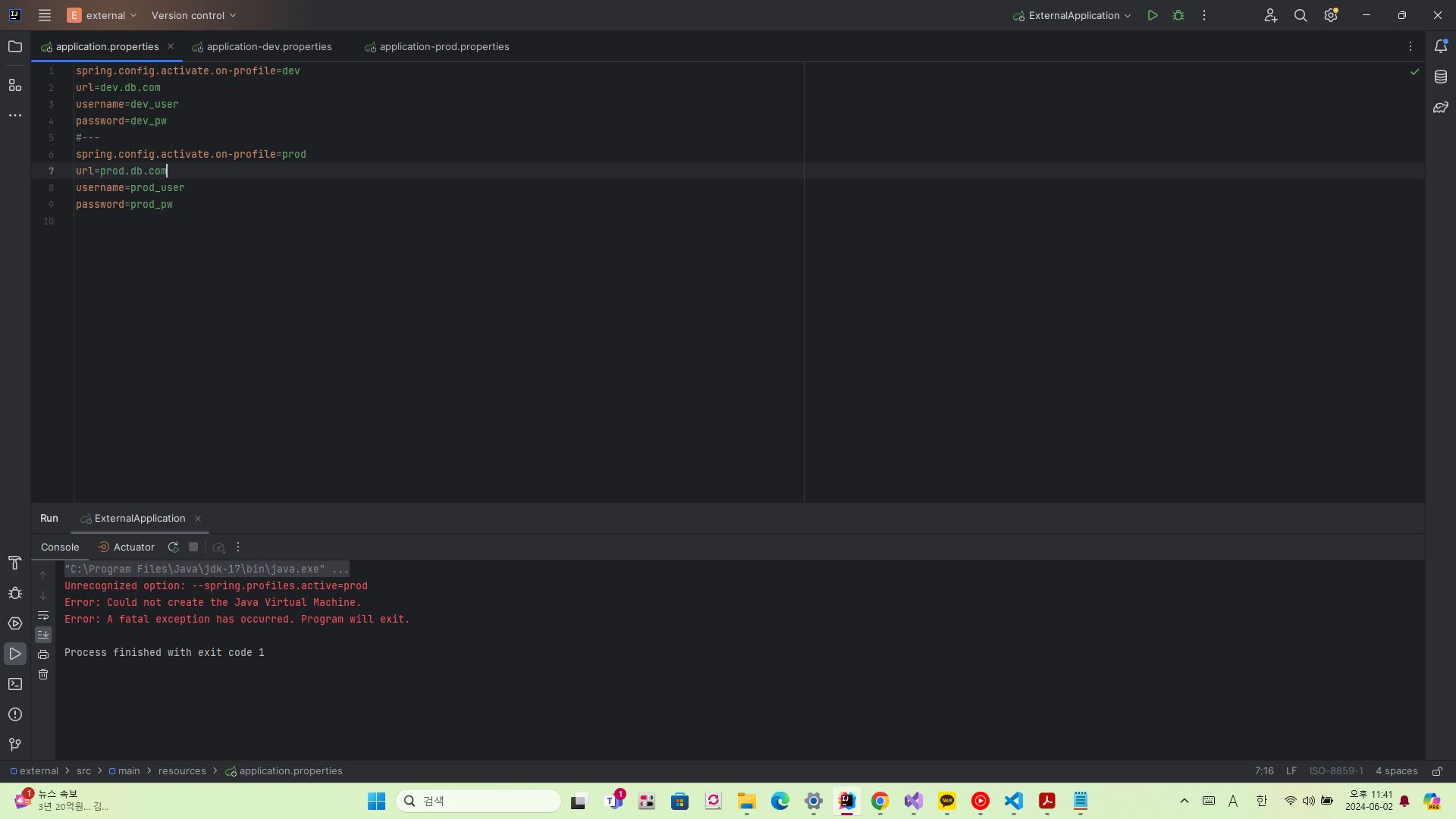
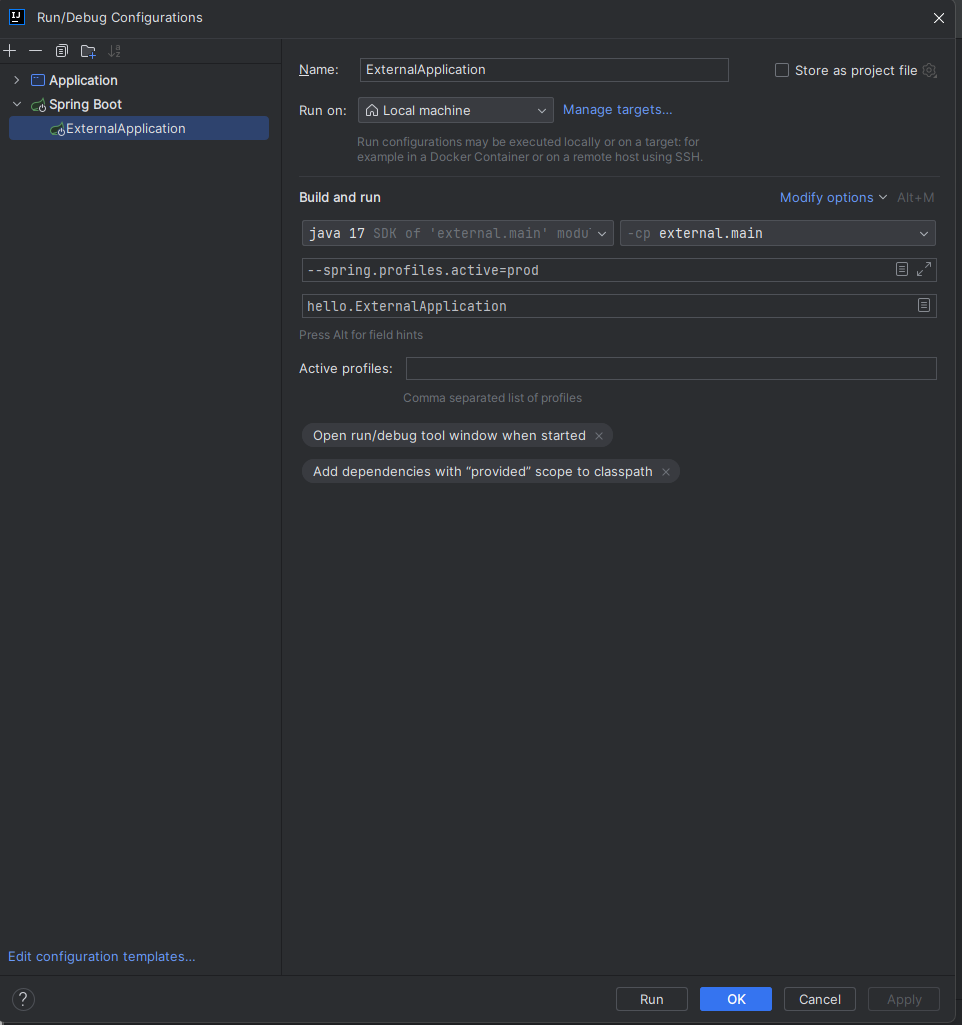
"C:\Program Files\Java\jdk-17\bin\java.exe" --spring.profiles.active=prod -XX:TieredStopAtLevel=1 -Dspring.output.ansi.enabled=always -Dcom.sun.management.jmxremote -Dspring.jmx.enabled=true -Dspring.liveBeansView.mbeanDomain -Dspring.application.admin.enabled=true "-Dmanagement.endpoints.jmx.exposure.include=*" "-javaagent:C:\Program Files\JetBrains\IntelliJ IDEA 2023.2\lib\idea_rt.jar=58809:C:\Program Files\JetBrains\IntelliJ IDEA 2023.2\bin" -Dfile.encoding=UTF-8 -classpath C:\study\spring-boot\external\build\classes\java\main;C:\study\spring-boot\external\build\resources\main;C:\Users\lgh80\.gradle\caches\modules-2\files-2.1\org.projectlombok\lombok\1.18.24\13a394eed5c4f9efb2a6d956e2086f1d81e857d9\lombok-1.18.24.jar;C:\Users\lgh80\.gradle\caches\modules-2\files-2.1\org.springframework.boot\spring-boot-starter\3.0.2\a9426629b5a83ad64fbe4e1d24081cccf4cdab14\spring-boot-starter-3.0.2.jar;C:\Users\lgh80\.gradle\caches\modules-2\files-2.1\org.springframework.boot\spring-boot-autoconfigure\3.0.2\42ad589ec930e05a2ed702a4940955ff97b16a8c\spring-boot-autoconfigure-3.0.2.jar;C:\Users\lgh80\.gradle\caches\modules-2\files-2.1\org.springframework.boot\spring-boot\3.0.2\69d2e0a07f7df180a4aacdc47c47a3db656857dc\spring-boot-3.0.2.jar;C:\Users\lgh80\.gradle\caches\modules-2\files-2.1\org.springframework.boot\spring-boot-starter-logging\3.0.2\1c5c71058a0297534d5c5f33a5d125bbbdb6a390\spring-boot-starter-logging-3.0.2.jar;C:\Users\lgh80\.gradle\caches\modules-2\files-2.1\jakarta.annotation\jakarta.annotation-api\2.1.1\48b9bda22b091b1f48b13af03fe36db3be6e1ae3\jakarta.annotation-api-2.1.1.jar;C:\Users\lgh80\.gradle\caches\modules-2\files-2.1\org.springframework\spring-core\6.0.4\8e24ad493887023cf5fac93541c72516f8ed9f6a\spring-core-6.0.4.jar;C:\Users\lgh80\.gradle\caches\modules-2\files-2.1\org.yaml\snakeyaml\1.33\2cd0a87ff7df953f810c344bdf2fe3340b954c69\snakeyaml-1.33.jar;C:\Users\lgh80\.gradle\caches\modules-2\files-2.1\org.springframework\spring-context\6.0.4\4fffcbb7eb4f1e9f1a4c9d3ca60098f7c063fc05\spring-context-6.0.4.jar;C:\Users\lgh80\.gradle\caches\modules-2\files-2.1\ch.qos.logback\logback-classic\1.4.5\28e7dc0b208d6c3f15beefd73976e064b4ecfa9b\logback-classic-1.4.5.jar;C:\Users\lgh80\.gradle\caches\modules-2\files-2.1\org.apache.logging.log4j\log4j-to-slf4j\2.19.0\30f4812e43172ecca5041da2cb6b965cc4777c19\log4j-to-slf4j-2.19.0.jar;C:\Users\lgh80\.gradle\caches\modules-2\files-2.1\org.slf4j\jul-to-slf4j\2.0.6\c4d348977a83a0bfcf42fd6fd1fee6e7904f1a0c\jul-to-slf4j-2.0.6.jar;C:\Users\lgh80\.gradle\caches\modules-2\files-2.1\org.springframework\spring-jcl\6.0.4\2d6523d00fc40cdb2c2f409113447940d2c872b5\spring-jcl-6.0.4.jar;C:\Users\lgh80\.gradle\caches\modules-2\files-2.1\org.springframework\spring-aop\6.0.4\c47b65c09a5a6fc41293b6aa981fcbe24a3adcd0\spring-aop-6.0.4.jar;C:\Users\lgh80\.gradle\caches\modules-2\files-2.1\org.springframework\spring-beans\6.0.4\7d903607ecfcdefccd0d48aea8724632479b3e83\spring-beans-6.0.4.jar;C:\Users\lgh80\.gradle\caches\modules-2\files-2.1\org.springframework\spring-expression\6.0.4\a908e6d3c46fcd6b58221d8427bbaf284bbbee0c\spring-expression-6.0.4.jar;C:\Users\lgh80\.gradle\caches\modules-2\files-2.1\ch.qos.logback\logback-core\1.4.5\e9bb2ea70f84401314da4300343b0a246c8954da\logback-core-1.4.5.jar;C:\Users\lgh80\.gradle\caches\modules-2\files-2.1\org.slf4j\slf4j-api\2.0.6\88c40d8b4f33326f19a7d3c0aaf2c7e8721d4953\slf4j-api-2.0.6.jar;C:\Users\lgh80\.gradle\caches\modules-2\files-2.1\org.apache.logging.log4j\log4j-api\2.19.0\ea1b37f38c327596b216542bc636cfdc0b8036fa\log4j-api-2.19.0.jar hello.ExternalApplicationUnrecognized option: --spring.profiles.active=prodError: Could not create the Java Virtual Machine.Error: A fatal exception has occurred. Program will exit.Process finished with exit code 1다음과 같은 에러가 뜨는데 Chat GPT로 해도 이해가 안돼서 질문 남깁니다.
답변 2
0
안녕하세요, 인프런 AI 인턴입니다. lgh8079님, 질문하신 내용에 대한 유사한 상황에 대한 해결책을 제공해 드릴 수 있습니다.
문제의 핵심은 JVM(Java Virtual Machine) 실행 옵션에 --spring.profiles.active=prod를 잘못 지정한 것으로 보입니다. 대시(--) 대신에 올바른 JVM 옵션 형식을 사용하지 않아 발생한 문제입니다. 일반적으로 JVM 옵션은 -D를 사용하여 프로퍼티를 정의하고, 스프링 프로파일을 설정할 때는 -Dspring.profiles.active=prod와 같이 지정하여야 합니다.
유사한 문제 및 해결 방법을 소개한 글이 여기 있습니다:
- java -Dspring.profiles.active=dev -jar .\external-0.0.1-SNAPSHOT.jar 오류가 발생합니다에서는
java -jar커맨드라인 실행 시-D옵션을 사용하여spring.profiles.active를 설정하는 방법이 나와 있습니다. 질문 보기
Unrecognized option: --spring.profiles.active=prod 오류를 해결하려면, 실행 명령에서 --spring.profiles.active=prod 대신 올바른 형식인 -Dspring.profiles.active=prod를 사용해야 합니다. java.exe 실행 명령을 다음과 같이 수정해 보세요:
"C:\Program Files\Java\jdk-17\bin\java.exe" -Dspring.profiles.active=prod -XX:TieredStopAtLevel=1 -Dspring.output.ansi.enabled=always -Dcom.sun.management.jmxremote -Dspring.jmx.enabled=true -Dspring.liveBeansView.mbeanDomain -Dspring.application.admin.enabled=true "-Dmanagement.endpoints.jmx.exposure.include=*" "-javaagent:C:\Program Files\JetBrains\IntelliJ IDEA 2023.2\lib\idea_rt.jar=58809:C:\Program Files\JetBrains\IntelliJ IDEA 2023.2\bin" -Dfile.encoding=UTF-8 -classpath C:\study\spring-boot\external\build\classes\java\main;C:\study\spring-boot\external\build\resources\main;...
이렇게 변경한 후에 다시 실행해 보시기 바랍니다.
저는 질문자님의 이해를 돕고자 지식공유자님의 기존 답변을 참고하여 유사한 답변 링크를 추천해드리고 있습니다.
현재 베타 기능으로 답변이 만족스럽지 않을 수 있는 점 양해 부탁드립니다. 🙏
추가적으로 궁금한 점이 있으시면, 이어서 질문해 주세요. 곧 지식공유자께서 답변해 주실 것입니다.
임포트 오류
0
34
2
보안이 엄격한 데이터
0
85
1
MyProperties 자체를 클라이언트 코드에서 사용
1
59
1
http://localhost:8080/actuator/prometheus
0
106
3
jar 추가에대한 질문드려도될까요?
0
77
1
build.gradle bom link 변경
0
77
2
@Counted 초기화
0
54
1
@Validated를 적용해도 빈 검증이 안되는 경우에 대한 조치 공유..
0
111
2
springboot에서 actuator없이 micrometer를 사용할수 있나요?
0
70
1
@Configuration 질문드립니다.
0
89
2
[공유] 터미널 말고 IDE 에서 jar 실행하기
0
116
1
localhost:8080/hello-servlet 404오류
0
129
2
내장톰캣2 서블릿 톰켓 실행이 안됩니다
1
166
2
최대 Tomcat 스레드 수를 확인하는 지표
0
166
1
mac m2에서 startup.sh 실행후 아무 반응이 없습니다.
0
101
2
내장 톰캣 실행 오류 관련 질문드립니다.
0
171
1
스프링 발전 과정들도 자세히 알아둬야하나요??
1
139
1
스프링부트 ioc 컨테이너 갯수
0
94
1
404 페이지
0
144
3
actuator 호출시 타임스탬프 질문
0
96
1
순수 라이브러리 사용하기 2 - memory-v1
0
131
1
외부설정 @ConfigurationProperties의 내부 클래스에서 static을 사용하는 이유를 알고 싶습니다.
0
113
1
서블릿 컨테이너 초기화1 강의 관련 질문입니다~
0
101
1
Thread Config Max 패널 설정 변경 질문
0
132
1