

다음과 같은 error가 나는데 원인을 못찾겠네요..
2262
3 câu hỏi đã được viết
구글링 해봐도 잘 나오지 않는데, 혹시 해결방법이 있을까요?
여기에 ChromeDriverManager().install() 이부분이 명암처리 되는거 보면, 여기서 에러 나는거 같은데,
확인좀 부탁드리겠습니다. 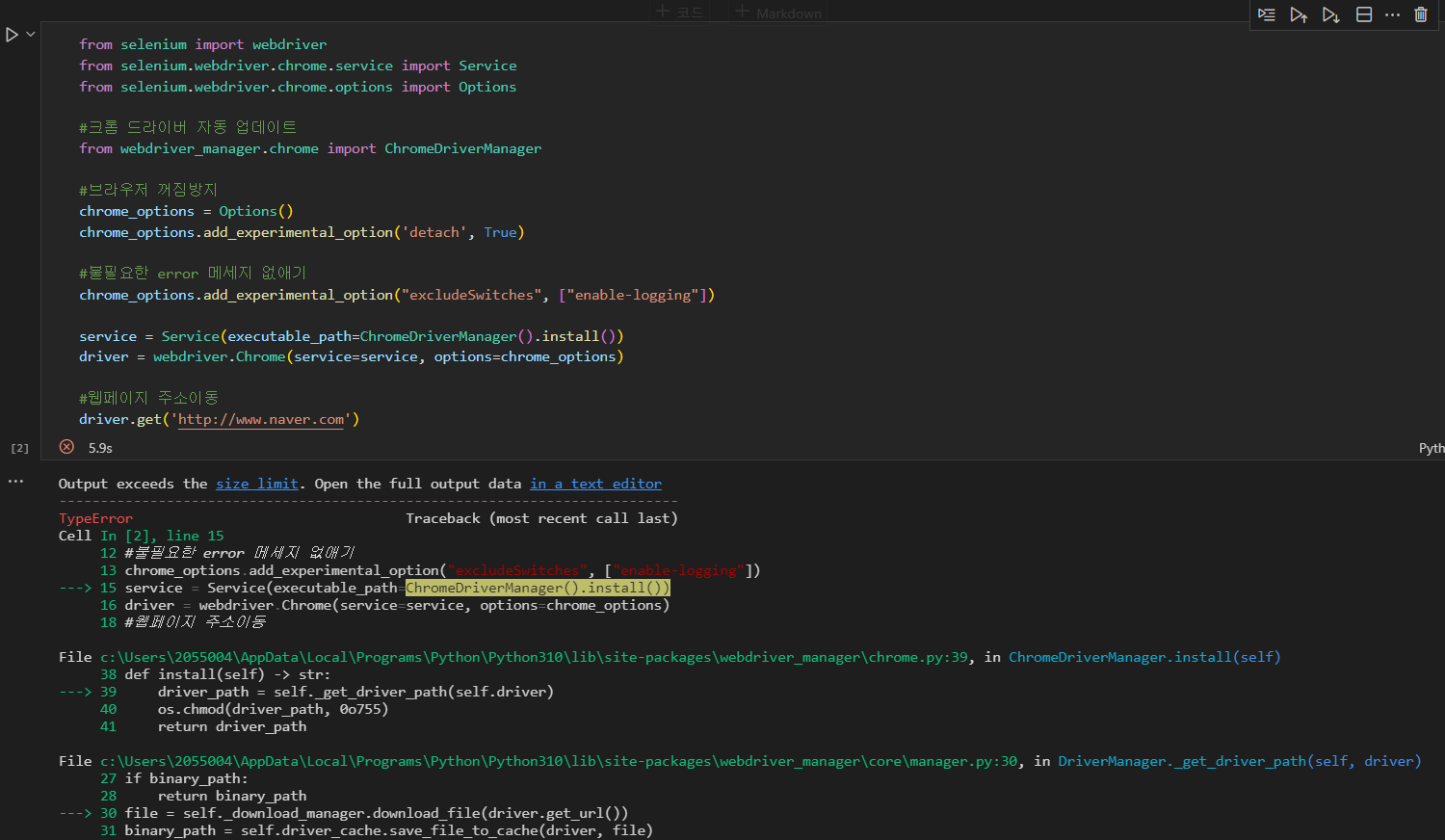
Câu trả lời 2
0
from selenium import webdriver
# from selenium.webdriver.chrome.service import Service
from selenium.webdriver.chrome.options import Options
from selenium.webdriver.common.keys import Keys
from selenium.webdriver.common.by import By
import time
import pyautogui
import pyperclip


# 크롬 드라이버 자동 업데이트
# from webdriver_manager.chrome import ChromeDriverManager

# 브라우저 꺼짐 방지
chrome_options = Options()
chrome_options.add_experimental_option("detach", True)

# 불필요한 에러 메시지 없애기
chrome_options.add_experimental_option("excludeSwitches", ["enable-logging"])

# service = Service(executable_path=ChromeDriverManager().install())  # 최신 드라이버를 자동으로 설치
# driver = webdriver.Chrome(service=service)
driver = webdriver.Chrome(options=chrome_options)
driver.implicitly_wait(5)  # 웹페이지가 로딩될때까지 5초 기다림
driver.maximize_window()  # 화면 최대화

# 웹페이지 열기
url = "https://nid.naver.com/nidlogin.login?mode=form&url=https%3A%2F%2Fwww.naver.com"
driver.get(url)  # 처음 실행시 시간이 좀 걸림(다운로드+설치)

# 아이디 입력창
id = driver.find_element(By.CSS_SELECTOR, "#id")
id.click()
# id.send_keys("아이디")
pyperclip.copy("id1234")
pyautogui.hotkey("ctrl", "v")
time.sleep(2)

# 비밀번호 입력창
pw = driver.find_element(By.CSS_SELECTOR, "#pw")
pw.click()
# pw.send_keys("비밀번호")
pyperclip.copy("pw1234")
pyautogui.hotkey("ctrl", "v")
time.sleep(2)

# log.login
login_btn = driver.find_element(By.CSS_SELECTOR, "#log\.login")  # \. : 이스케이프 문자
login_btn.click()
0
제가 눈으로 봤을 때는 오타가 없어 보이는데
우선 제가 드리는 코드로 확인해 보시겠어요?
그래도 안된다면, 직접 크롬 드라이버를 다운 받아서 작업하시는 쪽으로 진행해 보세요 :)
강의 내용에서
find_element_by_css_selector 들을
find_element(By.CSS_SELECTOR, ~) 형태로 수정해 주면 됩니다.
from selenium import webdriver
from selenium.webdriver.chrome.service import Service
from selenium.webdriver.chrome.options import Options

# 크롬 드라이버 자동 업데이트
from webdriver_manager.chrome import ChromeDriverManager

# 브라우저 꺼짐 방지
chrome_options = Options()
chrome_options.add_experimental_option("detach", True)

# 불필요한 에러 메시지 없애기
chrome_options.add_experimental_option("excludeSwitches", ["enable-logging"])

service = Service(executable_path=ChromeDriverManager().install())
driver = webdriver.Chrome(service=service, options=chrome_options)

# 웹페이지 해당 주소 이동
driver.get("https://www.naver.com")
Live server 를 이용 해보고 싶은데 확장메뉴 설치가 막혀 있어요
0
113
2
'팀 단위 AI 업무 혁신' 자문 관련하여 문의드리고자 합니다. (연락처 요청)
0
84
1
import requests from bs4 import BeatifulSoup 이 단계에서 안 되네요
0
145
2
requests 관련 질문
1
176
2
설치 관련
0
166
2
vs code 결과출력이 안됩니다
0
184
1
크롤링 관련 질문입니다
0
252
2
word wrap 체크 후에도 콘솔 한줄로 출력되는현상
0
226
1
주피터에서 pip오류가 계속납니다
0
1158
3
강의 "requests, Beautifulsoup4 사용법 빠르게 알아보기"에서 질문이있습니다.
0
213
2
네이버쇼핑 검색창 넘어가기전 팝업창이 안사라져요
0
424
1
html주소를 다른 컴터에서도 접속하기
0
291
2
pandas 설치하는데 오류가 나서요
0
2868
1
실행오류
0
252
1
네이버쇼핑 무한스크롤 안되시는분들 모바일네이버로 실습해보세요
0
301
1
뉴스 페이지에 페이지 번호가 없는데 어떻게 가져오나요?
0
271
2
네이버 쇼핑에 팝업창이 뜨기 시작했어요 도와주세요 ㅠㅠ
0
788
3
셀레니움 실습 시 창이 자동 차단되면서 꺼집니다.
0
718
2
낮은 가격순을 클릭하는 문을 추가하고싶습니다.
0
327
2
pip는 내부 또는 외부명령 ,실행할 수 있는 프로그램
0
3530
2
이런오류는 어떤 오류인가요
0
682
1
창이 두개떠요/쇼핑검색도 안되요 ㅜ
0
355
2
약간 변태(?)같지만 해당 코드를 깔끔하게 함수로 리팩토링해보았습니다
0
365
2
과제 답안을 보지않고 스스로 구글링해서 만든 웹 크롤링 프로그램(10페이지 단위) 코드입니다.
0
799
2