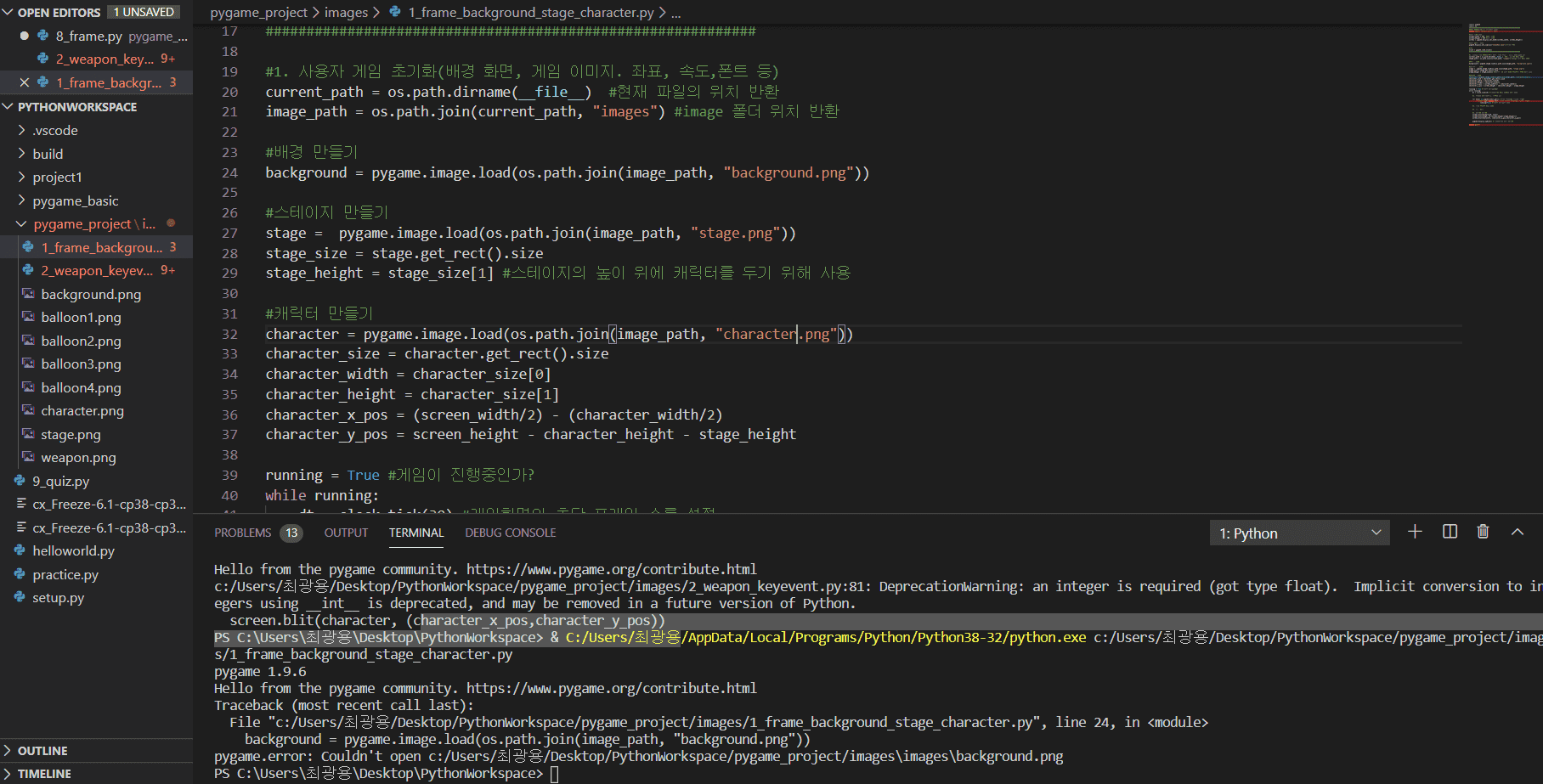
import os
import pygame
###############################################################
#
pygame.init()
screen_width=640
screen_height=480
screen=pygame.display.set_mode((screen_width, screen_height))
pygame.display.set_caption("나도 팡")
clock = pygame.time.Clock()
##################################################################
# 1. 사용자 게임 초기화
current_path = os.path.dirname(__file__)
image_path = os.path.join(current_path, "images")
# background make
background = pygame.image.load(os.path.join(image_path, "background.png"))
#stage make
stage = pygame.image.load(os.path.join(image_path, "stage.png"))
stage_size = stage.get_rect().size
stage_height = stage_size[1]
#
character = pygame.image.load(os.path.join(image_path, "character.png"))
character_size = character.get_rect().size
character_width = character_size[0]
character_height = character_size[1]
character_x_pos = (screen_width / 2) - (character_width / 2)
character_y_pos = screen_height - character_height - stage_height
#
character_to_x = 0
character_speed = 5
#
weapon = pygame.image.load(os.path.join(image_path, "weapon.png"))
weapon_size = weapon.get_rect().size
weapon_width = weapon_size[0]
#
weapons = []
#
weapon_speed = 10
#
ball_images = [
pygame.image.load(os.path.join(image_path, "balloon1.png")),
pygame.image.load(os.path.join(image_path, "balloon2.png")),
pygame.image.load(os.path.join(image_path, "balloon3.png")),
pygame.image.load(os.path.join(image_path, "balloon4.png"))]
# ball
ball_speed_y = [-18, -15, -12, -9]
#
balls = []
#
balls.append({
"pos_x" : 50,
"pos_y" : 50,
"img_idx" : 0,
"to_x": 3,
"to_y": -6,
"init_spd_y": ball_speed_y[0]})
#
weapon_to_remove = -1
ball_to_remove = -1
#
game_font = pygame.font.Font(None, 40)
total_time = 5
start_ticks = pygame.time.get_ticks()
#
#
#
#
game_result = "Game Over"
running=True
while running:
dt=clock.tick(30)
print("fps : " + str(clock.get_fps()))
for event in pygame.event.get():
if event.type==pygame.QUIT:
running=False
if event.type == pygame.KEYDOWN:
if event.key == pygame.K_LEFT:
character_to_x -= character_speed
elif event.key == pygame.K_RIGHT:
character_to_x += character_speed
elif event.key == pygame.K_SPACE:
weapon_x_pos = character_x_pos + (character_width / 2) - (weapon_width / 2)
weapon_y_pos = character_y_pos
weapons.append([weapon_x_pos, weapon_y_pos])
if event.type == pygame.KEYUP:
if event.key == pygame.K_LEFT or event.key == pygame.K_RIGHT:
character_to_x = 0
#3. 게임 캐릭터 위치 정의
character_x_pos += character_to_x
if character_x_pos <0:
character_x_pos = 0
elif character_x_pos > screen_width - character_width:
character_x_pos = screen_width - character_width
#
#
#
weapons = [ [w[0], w[1] - weapon_speed] for w in weapons]
#
weapons = [[w[0], w[1]] for w in weapons if w[1] > 0]
#
for ball_idx, ball_val in enumerate(balls):
ball_pos_x = ball_val["pos_x"]
ball_pos_y = ball_val["pos_y"]
ball_img_idx = ball_val["img_idx"]
ball_size = ball_images[ball_img_idx].get_rect().size
ball_width = ball_size[0]
ball_height = ball_size[1]
#
if ball_pos_x < 0 or ball_pos_x > screen_width - ball_width:
ball_val["to_x"] = ball_val["to_x"] *-1
#
#
if ball_pos_y >= screen_height - stage_height - ball_height:
ball_val["to_y"] = ball_val["init_spd_y"]
else:
ball_val["to_y"] += 0.5
ball_val["pos_x"] += ball_val["to_x"]
ball_val["pos_y"] += ball_val["to_y"]
#4.충돌 체크
#
character_rect = character.get_rect()
character_rect.left = character_x_pos
character_rect.top = character_y_pos
for ball_idx, ball_val in enumerate(balls):
ball_pos_x = ball_val["pos_x"]
ball_pos_y = ball_val["pos_y"]
ball_img_idx = ball_val["img_idx"]
#
ball_rect = ball_images[ball_img_idx].get_rect()
ball_rect.left = ball_pos_x
ball_rect.top = ball_pos_y
#
if character_rect.colliderect(ball_rect):
running = False
break
#
for weapon_idx, weapon_val in enumerate(weapons):
weapon_pos_x = weapon_val[0]
weapon_pos_y = weapon_val[1]
#
weapon_rect = weapon.get_rect()
weapon_rect.left = weapon_pos_x
weapon_rect.top = weapon_pos_y
#
if weapon_rect.colliderect(ball_rect):
weapon_to_remove = weapon_idx
ball_to_remove = ball_idx
#
if ball_img_idx < 3:
#
ball_width = ball_rect.size[0]
ball_height = ball_rect.size[1]
#
small_ball_rect = ball_images[ball_img_idx + 1].get_rect()
small_ball_width = small_ball_rect.size[0]
small_ball_height = small_ball_rect.size[1]
#
balls.append({
"pos_x" : ball_pos_x + (ball_width / 2) - (small_ball_width / 2),
"pos_y" : ball_pos_y + (ball_height / 2) - (small_ball_height / 2),
"img_idx" : ball_img_idx + 1,
"to_x": -3,
"to_y": -6,
"init_spd_y": ball_speed_y[ball_img_idx + 1]})
#
balls.append({
"pos_x" : ball_pos_x + (ball_width / 2) - (small_ball_width / 2),
"pos_y" : ball_pos_y + (ball_height / 2) - (small_ball_height / 2),
"img_idx" : ball_img_idx + 1,
"to_x": 3,
"to_y": -6,
"init_spd_y": ball_speed_y[ball_img_idx + 1]})
break
#
if ball_to_remove > -1:
del balls[ball_to_remove]
ball_to_remove = -1
if weapon_to_remove > -1:
del weapons[weapon_to_remove]
weapon_to_remove = -1
#5.화면의 그리기
screen.blit(background, (0, 0))
for weapon_x_pos, weapon_y_pos in weapons:
screen.blit(weapon, (weapon_x_pos, weapon_y_pos))
for idx, val in enumerate(balls):
ball_pos_x = val["pos_x"]
ball_pos_y = val["pos_y"]
ball_img_idx = val["img_idx"]
screen.blit(ball_images[ball_img_idx], (ball_pos_x, ball_pos_y))
screen.blit(stage, (0, screen_height - stage_height))
screen.blit(character, (character_x_pos, character_y_pos))
#
elapsed_time = (pygame.time.get_ticks() - start_ticks) / 1000
timer = game_font.render("Time: {}".format(int(total_time - elapsed_time)), True, (255, 255, 255,))
screen.blit(timer, (10, 10))
#
if total_time - elapsed_time <= 0:
game_result = "Time Over"
running = False
pygame.display.update()
#
msg = game_font.render(game_result, True (255, 255, 0))
msg_rect = msg.get_rect(center=(int(screen_width / 2), int(screen_height / 2)))
screen.blit(msg, msg_rect)
pygame.display.update()
#
time.sleep(2)
pygame.quit()


 다시 살펴봐도 똑같이 적었는데 오류가 뜨네요. 그냥 일단 저번에 배운 절대값 넣는걸로 진행중인데 파일경로가 왜 저렇게 되는지 모르겠어요