

magicGrid.positionItems(); 코드를 작성한 이후부터 div 태그들의 위치가 고정되어 나타납니다.
443
6 câu hỏi đã được viết
안녕하세요
실습 중 magicgrid.js에
var masonrys = document.getElementByTagName('img');

for (let i = 0; i< masonrys.length; i++) {
    masonrys[i].addEventListener('load', function() {
        magicGrid.positionItems();
    }, false);
}
위 코드를 작성하면, 다음과 같이 화면이 뜹니다.
div 태그들의 위치가 한 곳에 고정되어 모두 겹쳐서 나타나요.
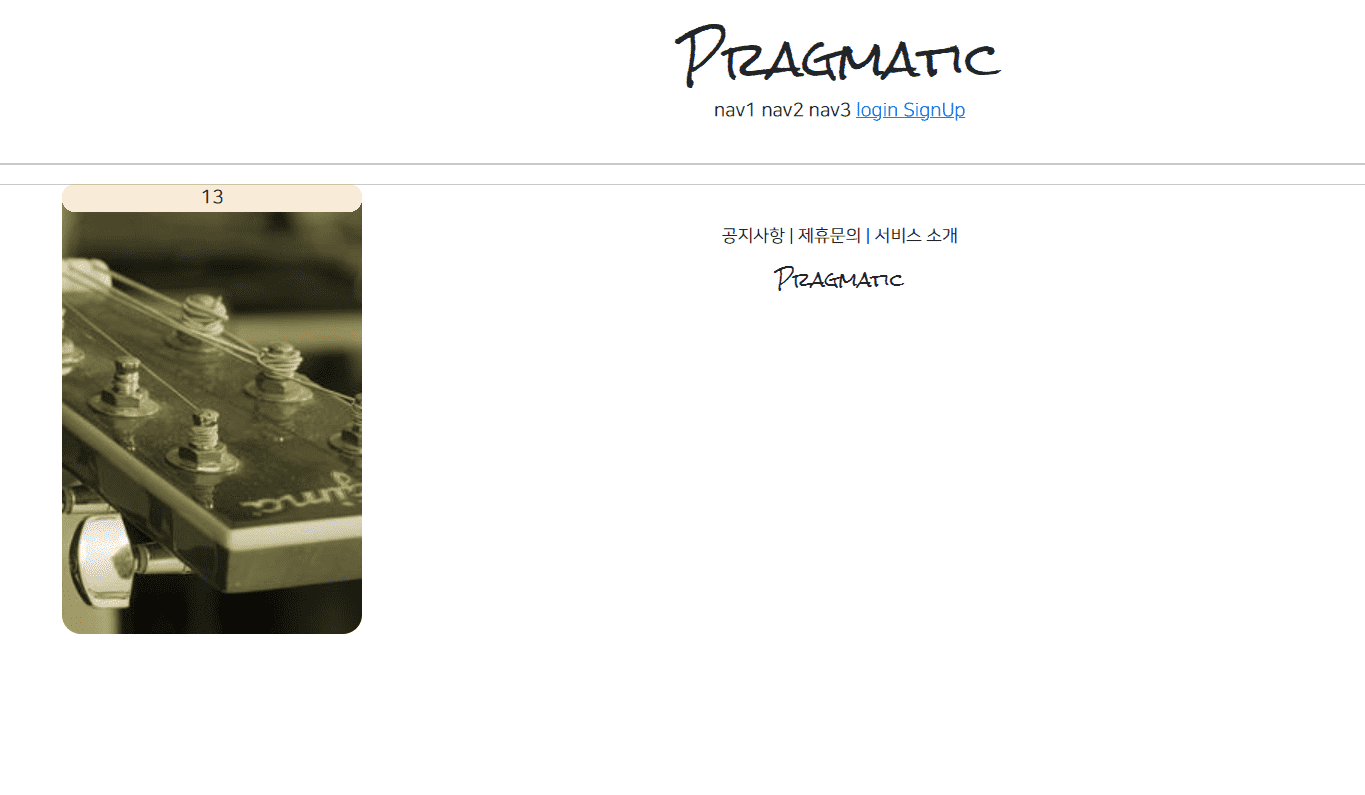
이유가 무엇일까요?
작성한 코드를 첨부합니다..
{% extends 'base.html' %}
{% load static %}

{% block content %}

<style>
.container div {
  width: 250px;
  background-color: antiquewhite;
  display: flex;
  justify-content: center;
  align-items: center;
  border-radius: 1rem;
}

.container img {
  width : 100%;
  border-radius : 1rem;
 }

</style>

<div class="container">
<div class="item1">
  <img src="https://picsum.photos/200/300">
</div>
<div class="item2">2</div>
<div class="item3">3</div>
<div class="item4">4</div>
<div class="item5">5</div>
<div class="item6">6</div>
<div class="item7">7</div>
<div class="item8">8</div>
<div class="item9">9</div>
<div class="item10">10</div>
<div class="item11">11</div>
<div class="item12">12</div>
<div class="item13">13</div>
</div>

<script src="{% static 'js/magicgrid.js' %}"></script>

{% endblock %}
'use strict';

/**
* @author emmanuelolaojo
* @since 11/11/18
*/

/**
* Validates the configuration object.
*
* @param config - configuration object
*/
var checkParams = function (config) {
var DEFAULT_GUTTER = 25;
var booleanProps = ["useTransform", "center"];


if (!config) {
throw new Error("No config object has been provided.");
}

for(var prop of booleanProps){
if(typeof config[prop] !== "boolean"){
config[prop] = true;
}
}


if(typeof config.gutter !== "number"){
config.gutter = DEFAULT_GUTTER;
}

if (!config.container) { error("container"); }
if (!config.items && !config.static) { error("items or static"); }
};


/**
* Handles invalid configuration object
* errors.
*
* @param prop - a property with a missing value
*/
var error = function (prop) {
throw new Error(("Missing property '" + prop + "' in MagicGrid config"));
};

/**
* Finds the shortest column in
* a column list.
*
* @param cols - list of columns
*
* @return shortest column
*/
var getMin = function (cols) {
var min = cols[0];

for (var col of cols) {
if (col.height < min.height) { min = col; }
}

return min;
};

/**
* @author emmanuelolaojo
* @since 11/10/18
*
* The MagicGrid class is an
* implementation of a flexible
* grid layout.
*/

var MagicGrid = function MagicGrid (config) {
checkParams(config);

if (config.container instanceof HTMLElement) {
this.container = config.container;
this.containerClass = config.container.className;
}
else {
this.containerClass = config.container;
this.container = document.querySelector(config.container);
}

this.items = this.container.children;
this.static = config.static || false;
this.size = config.items;
this.gutter = config.gutter;
this.maxColumns = config.maxColumns || false;
this.useMin = config.useMin || false;
this.useTransform = config.useTransform;
this.animate = config.animate || false;
this.started = false;
this.center = config.center;

this.init();
};

/**
* Initializes styles
*
* @private
*/
MagicGrid.prototype.init = function init () {
if (!this.ready() || this.started) { return; }

this.container.style.position = "relative";

for (var i = 0; i < this.items.length; i++) {
var style = this.items[i].style;

style.position = "absolute";

if (this.animate) {
style.transition = (this.useTransform ? "transform" : "top, left") + " 0.2s ease";
}
}

this.started = true;
};

/**
* Calculates the width of a column.
*
* @return width of a column in the grid
* @private
*/
MagicGrid.prototype.colWidth = function colWidth () {
return this.items[0].getBoundingClientRect().width + this.gutter;
};

/**
* Initializes an array of empty columns
* and calculates the leftover whitespace.
*
* @return {{cols: Array, wSpace: number}}
* @private
*/
MagicGrid.prototype.setup = function setup () {
var width = this.container.getBoundingClientRect().width;
var colWidth = this.colWidth();
var numCols = Math.floor(width/colWidth) || 1;
var cols = [];

if (this.maxColumns && numCols > this.maxColumns) {
numCols = this.maxColumns;
}

for (var i = 0; i < numCols; i++) {
cols[i] = {height: 0, index: i};
}

var wSpace = width - numCols * colWidth + this.gutter;

return {cols: cols, wSpace: wSpace};
};

/**
* Gets the next available column.
*
* @param cols list of columns
* @param i index of dom element
*
* @return {*} next available column
* @private
*/
MagicGrid.prototype.nextCol = function nextCol (cols, i) {
if (this.useMin) {
return getMin(cols);
}

return cols[i % cols.length];
};

/**
* Positions each item in the grid, based
* on their corresponding column's height
* and index then stretches the container to
* the height of the grid.
*/
MagicGrid.prototype.positionItems = function positionItems () {
var ref = this.setup();
var cols = ref.cols;
var wSpace = ref.wSpace;
var maxHeight = 0;
var colWidth = this.colWidth();

wSpace = this.center ? Math.floor(wSpace / 2) : 0;

for (var i = 0; i < this.items.length; i++) {
var col = this.nextCol(cols, i);
var item = this.items[i];
var topGutter = col.height ? this.gutter : 0;
var left = col.index * colWidth + wSpace + "px";
var top = col.height + topGutter + "px";

if(this.useTransform){
item.style.transform = "translate(" + left + ", " + top + ")";
}
else{
item.style.top = top;
item.style.left = left;
}

col.height += item.getBoundingClientRect().height + topGutter;

if(col.height > maxHeight){
maxHeight = col.height;
}
}

this.container.style.height = maxHeight + this.gutter + "px";
};

/**
* Checks if every item has been loaded
* in the dom.
*
* @return {Boolean} true if every item is present
*/
MagicGrid.prototype.ready = function ready () {
if (this.static) { return true; }
return this.items.length >= this.size;
};

/**
* Periodically checks that all items
* have been loaded in the dom. Calls
* this.listen() once all the items are
* present.
*
* @private
*/
MagicGrid.prototype.getReady = function getReady () {
var this$1 = this;

var interval = setInterval(function () {
this$1.container = document.querySelector(this$1.containerClass);
this$1.items = this$1.container.children;

if (this$1.ready()) {
clearInterval(interval);

this$1.init();
this$1.listen();
}
}, 100);
};

/**
* Positions all the items and
* repositions them whenever the
* window size changes.
*/
MagicGrid.prototype.listen = function listen () {
var this$1 = this;

if (this.ready()) {
var timeout;

window.addEventListener("resize", function () {
if (!timeout){
timeout = setTimeout(function () {
this$1.positionItems();
timeout = null;
}, 200);
}
});

this.positionItems();
}
else { this.getReady(); }
};

let magicGrid = new MagicGrid({
container: '.container',
animate: true,
gutter: 30,
static: true,
useMin: true
});

var masonrys = document.getElementByTagName('img');

for (let i = 0; i< masonrys.length; i++) {
    masonrys[i].addEventListener('load', function() {
        magicGrid.positionItems();
    }, false);
}


magicGrid.listen();
Câu trả lời 2
2
안녕하세요.
질문 확인했습니다.
질문주신 해당 코드로 실행을 해보니 저도 작동이 되지 않더라구요.
코드 디버깅을 해보니,
var masonrys = document.getElementByTagName('img');
위의 코드에 문제가 있었습니다.
getElementByTagName 이라는 메서드를 사용하셨는데,
getElementsByTagName 으로 수정하신 후 시도해보시길 바랍니다.
오타가 아무래도 찾기가 힘들죠 ㅠㅠ
아무튼 이렇게 수정한 이후 정상 작동하는 것을 확인했습니다.
답변이 도움이 되셨길 바랍니다.
좋은하루 보내시구요!
감사합니다-
강의에 나왔던 js 파일이 깃허브에 없습니다
1
123
1
모바일 디버깅, 반응형 레이아웃 4분48초 질문
0
120
2
decorator 관련질문입니다.
0
103
1
PasswordChangeView
0
148
2
로그아웃뷰 작동 관련 (2025년 3월)
1
186
1
실행에러질문
0
205
1
@login_required 데코레이터 사용시 리다이렉트는 어디서 참조하여 설정을 하는걸까요?
0
143
1
CacheBackend 관련 에러
0
225
1
21강 CreateView를 통한 회원가입 구현 질문
0
362
1
53강 disallowedhost
0
388
2
502 Bad Gateway
0
503
0
mariadb 접근권한 오류
0
589
1
logout 후 빈 화면으로 이동합니다 ㅠㅠ
0
509
2
로그아웃 후 빈 화면으로 이동
0
375
1
서버 운영 관련 질문 드립니다.(Unable to retirve...)
0
274
1
static/base.css파일을 인식을 못합니다
0
411
1
안녕하세요 19강 디버깅 설정 질문있습니다.
0
335
1
프로필 update편 질문있습니다.
0
406
1
수업질문
0
421
1
COOP error
0
569
1
61강 Dockerfile error
0
653
1
static안에 base.css 에서 정의한 클래스가 적용되지 않습니다.
0
519
1
static 파일 중 jpg 파일만 로드 불가
0
456
1
58강 static 파일 적용 안됨
0
592
1