강의

멘토링

커뮤니티

Cộng đồng Hỏi & Đáp của Inflearn

Hình ảnh hồ sơ của akwntlsrja59672092
akwntlsrja59672092

câu hỏi đã được viết

Một trại huấn luyện phát triển toàn diện thực sự dành cho những người không chuyên ngành

Tính năng upload sản phẩm - 2

안녕하세요 강의 잘 듣고 있습니다 다름이 아니라 안 되는게 있어서 질문을 드립니다.

Viết

·

655

1

          1. Request URL:
            http://localhost:8080/products
          2. Request Method:
            POST
          3. Status Code:
            200 OK
          4. Remote Address:
            [::1]:8080
          5. Referrer Policy:
            strict-origin-when-cross-origin
        1. Response HeadersView source
          1. Access-Control-Allow-Origin:
            *
          2. Connection:
            keep-alive
          3. Content-Length:
            50
          4. Content-Type:
            text/html; charset=utf-8
          5. Date:
            Tue, 22 Jun 2021 07:41:03 GMT
          6. ETag:
            W/"32-M3FXDluQXEAVLv+t1yb0yasB290"
          7. Keep-Alive:
            timeout=5
          8. X-Powered-By:
            Express
        2. Request HeadersView source
          1. Accept:
            application/json, text/plain, */*
          2. Accept-Encoding:
            gzip, deflate, br
          3. Accept-Language:
            ko-KR,ko;q=0.9,en-US;q=0.8,en;q=0.7
          4. Connection:
            keep-alive
          5. Content-Length:
            146
          6. Content-Type:
            application/json;charset=UTF-8
          7. Host:
            localhost:8080
          8. Origin:
            http://localhost:3000
          9. Referer:
            http://localhost:3000/
          10. sec-ch-ua:
            " Not;A Brand";v="99", "Google Chrome";v="91", "Chromium";v="91"
          11. sec-ch-ua-mobile:
            ?0
          12. Sec-Fetch-Dest:
            empty
          13. Sec-Fetch-Mode:
            cors
          14. Sec-Fetch-Site:
            same-site
          15. User-Agent:
            Mozilla/5.0 (Windows NT 10.0; Win64; x64) AppleWebKit/537.36 (KHTML, like Gecko) Chrome/91.0.4472.114 Safari/537.36
        3. Request Payloadview source
          1. {name: "키보드", description: "그랩이 사용하던 키보드입니다", seller: "그랩", price: 50000,…}
            1. description"그랩이 사용하던 키보드입니다"
            2. imageUrl"uploads\\keyboard1.jpg"
            3. name"키보드"
            4. price50000
            5. seller"그랩"
    1. 정상적으로 나오는거 같은데 정작 프리뷰에 가면 아래와 같이 오류가 뜹니다.
    2. 상품 업로드 중에 문제가 생겼습니다.
import {FormDividerInputInputNumberButtonUploadfrom 'antd';
import axios from 'axios';
import { useState } from 'react';
import { API_URL } from '../config/constants';
import './index.css'

function UploadPage() {
    const [imageUrlsetImageUrl] = useState(null);
    const onSubmit = (values=> {
        axios.post(`${API_URL}/products`, {
            name: values.name,
            description: values.description,
            seller: values.seller,
            price: parseInt(values.price),
            imageUrl: imageUrl,
          })
          .then((result=> {
            console.log(result);
          });
      };
    const onChangeImage = (info=>{
        if(info.file.status === 'uploading') {
            return;
        }
        if(info.file.status === 'done') {
            const response = info.file.response;
            const imageUrl = response.imageUrl;
            setImageUrl(imageUrl);
        }
    }
    return (
        <div id = "upload-container">
            <Form name = "상품 업로드" onFinish={onSubmit}>
                <Form.Item name="upload"label={<div className="upload-label">상품 사진</div>}>
                    <Upload
                    name = "image" 
                    action={`${API_URL}/image`}
                    listType="picture"
                    showUploadList{false}
                    onChange={onChangeImage}
                    >
                        {
                            imageUrl ?( <img id="upload-img" src={`${API_URL}/${imageUrl}`} alt="image" /> ): (
                            <div id="upload-img-placeholder">
                                <img src="/images/icons/camera.png" alt="이미지" />
                                <span>이미지를 업로드해 주세요.</span>
                            </div>
                            
                        )}
                        
                    </Upload>
                </Form.Item>
                <Divider />
                <Form.Item
                 label={<div className="upload-label"
                 
                 >판매자 명</div>
                 }
                 name = "seller"
                 rules={[{required:truemessage:"판매자 이름을 입력해 주세요."}]}
                 >

                    <Input  className="upload-name" size = "large"   placeholder="이름을 입력하세요" />
                </Form.Item>
                <Divider/>
                <Form.Item
                name="name"
                label={<div className="upload-label">상품 이름</div>}
                rules={[{required:truemessage:"상품 이름을 입력해 주세요."}]}
                >
                    <input className="upload-name" size="large" placeholder="상품 이름을 입력해주세요." />
                </Form.Item>
                <Divider/>
                <Form.Item
                    name="price"
                    label={<div className="upload-label">상품 가격</div>}
                    rules={[{required:true,message:"상품 가격을 입력해 주세요"}]}
                >
                    <InputNumber
                    defaultValue={0}
                    className="upload-price"
                    size="large"
                    />
                </Form.Item>
                <Divider/>
                <Form.Item
                    name="description"
                    label={<div className="upload-label">상품 소개</div>}
                    rules={[{required:true,message:"상품 소개를 입력해 주세요."}]}
                >
                    <Input.TextArea
                    size="large"
                    id="product-description"
                    showCount
                    maxLength={300}
                    placeholder="상품 소개를 적어주세요."
                    />
                </Form.Item>
                <Form.Item>
                    {/* htmlType은 꼭 설정을 해줘야 한다. */}
                    <Button id = "submit-button" size="large" htmlType = "submit" > 
                        문제 등록하기.
                    </Button>
                </Form.Item>
            </Form>
        </div>
    )
}
export default UploadPage;

코드 입니다
시작 할 때 config라는 폴더가 없어서 따로 만들고 한거 외엔
다 똑같이 했다고 생각을 했는데 이렇게 오류가 나오네요..

nodejsreact-nativeHTML/CSSreactjavascripttensorflowexpress머신러닝 배워볼래요?

Câu trả lời 7

1

Kay potato님의 프로필 이미지
Kay potato
Người đặt câu hỏi

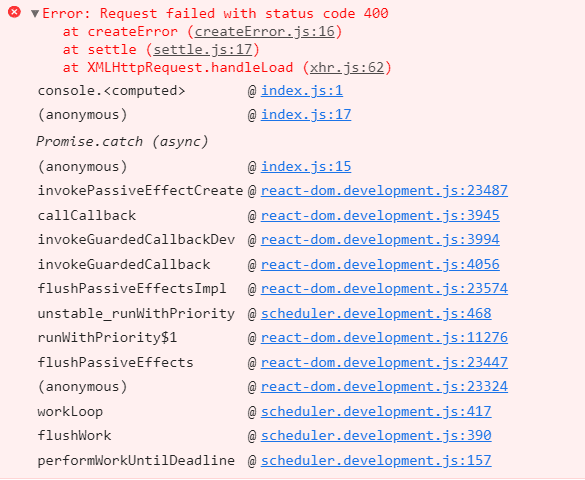
그리고 기존에 있던 상품을 클릭하면 상세 페이지로 이동을 하게 되어있는데 거기서도 또 오류가 뜨기 시작합니다..ㅜㅜ
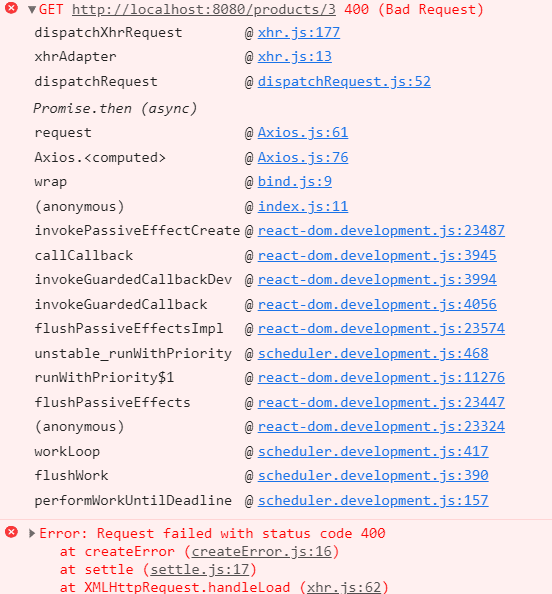
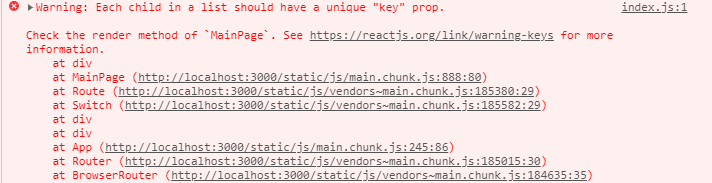
마지막으로 메인화면으로 돌아갈 때, 그리고 리엑트를 실행 했을 때 메인화면이 뜨면서 오류가 한가지 더 뜨고 있습니다...
Kay potato님의 프로필 이미지
Kay potato
Người đặt câu hỏi

아 해결됐습니다!! 단순 문제였습니다..ㅜㅜ

grab님의 프로필 이미지
grab
Người chia sẻ kiến thức

다행입니다! 쭉 화이팅하세요!!

0

Kay potato님의 프로필 이미지
Kay potato
Người đặt câu hỏi

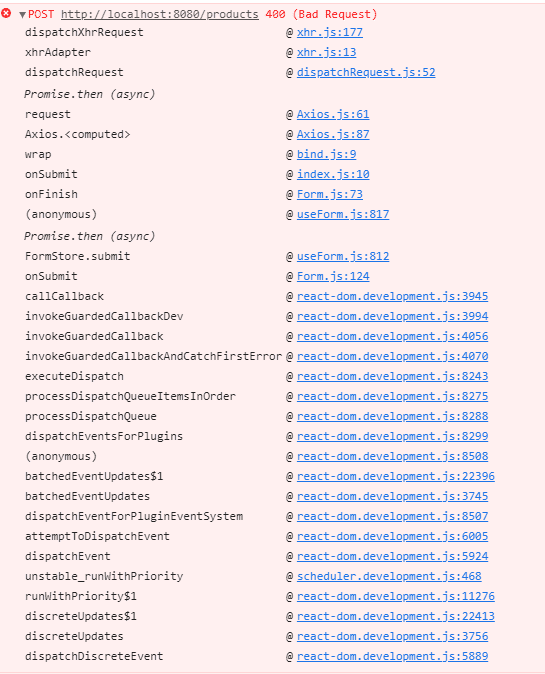
죄송한데 한번만 더 봐주실 수 있습니까? 그 뒤로 계속 다른 오류가 나서 소스코드 올려주신 걸로 적용을 해 봤는데도 오류가 계속 떠서 대체 뭐가 원인인지 잘 모르겠네요..바쁘실텐데 죄송합니다..

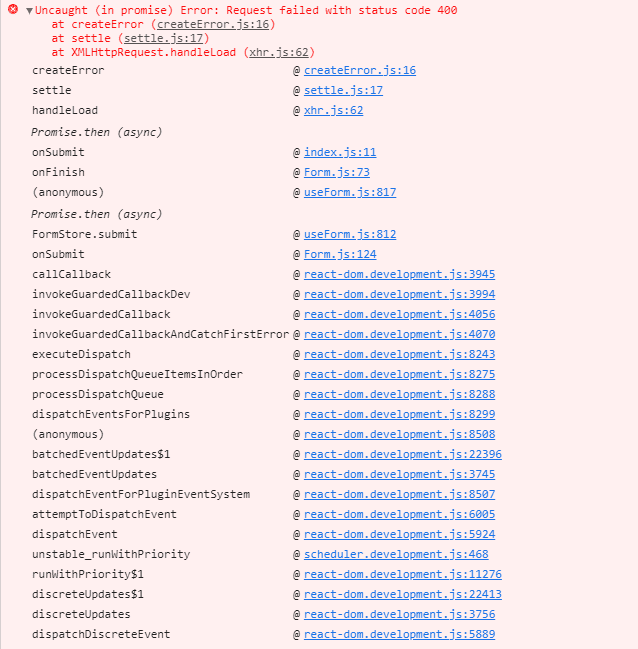
상품 등록하기를 누르면 저런 오류가 뜨고 있습니다.
0

Kay potato님의 프로필 이미지
Kay potato
Người đặt câu hỏi

워..혼자 고쳐보겠다고 했었는데..저걸 확인을 못했었네요 감사드립니다!

0

grab님의 프로필 이미지
grab
Người chia sẻ kiến thức

로그를 본 결과 서버 쪽에 Product model을 보시면 discription으로 설정되어있는 것 같습니다.

프론트엔드에서는 description이라는 데이터를 보내지만 서버쪽에 Product의 discription이라고 되어있어 오류가 발생하고 있네요! 서버 Product Model에서 discription을 description으로 바꿔주세요!

0

Kay potato님의 프로필 이미지
Kay potato
Người đặt câu hỏi

Warning: A component is changing an uncontrolled input to be controlled. This is likely caused by the value changing from undefined to a defined value, which should not happen. Decide between using a controlled or uncontrolled input element for the lifetime of the component.

0

Kay potato님의 프로필 이미지
Kay potato
Người đặt câu hỏi

\dongyoungkim\inflearn\grab-market-server\node_modules\sequelize\lib\instance-validator.js:93:12)

    at async model.save (C:\Users\kimcc\OneDrive\바탕 화면\자바\개인 웹 사이트 만들기\dongyoungkim\inflearn\grab-market-server\node_modules\sequelize\lib\model.js:3877:7)

    at async Function.create (C:\Users\kimcc\OneDrive\바탕 화면\자바\개인 웹 사이트 만들기\dongyoungkim\inflearn\grab-market-server\node_modules\sequelize\lib\model.js:2207:12) {    

  errors: [

    ValidationErrorItem {

      message: 'Product.discription cannot be null',

      type: 'notNull Violation',

      path: 'discription',

      value: null,

      origin: 'CORE',

      instance: [Product],

      validatorKey: 'is_null',

      validatorName: null,

      validatorArgs: []

    }

  ]

}

서버 쪽에서는 이런 오류가 뜨고 있고,

Warning: A component is changing an uncontrolled input to be controlled. This is likely caused by the value changing from undefined to a defined value, which should not happen. Decide between using a controlled or uncontrolled input element for the lifetime of the component. More info: https://reactjs.org/link/controlled-components

    at input

    at http://localhost:3000/static/js/vendors~main.chunk.js:72366:23

    at div

    at div

    at div

    at http://localhost:3000/static/js/vendors~main.chunk.js:73368:75

    at FormItemInput (http://localhost:3000/static/js/vendors~main.chunk.js:72687:25)

    at div

    at http://localhost:3000/static/js/vendors~main.chunk.js:73558:34

    at Field (http://localhost:3000/static/js/vendors~main.chunk.js:113696:94)

    at WrapperField (http://localhost:3000/static/js/vendors~main.chunk.js:114203:20)

    at FormItem (http://localhost:3000/static/js/vendors~main.chunk.js:72381:20)

    at form

    at Form (http://localhost:3000/static/js/vendors~main.chunk.js:114316:19)

    at SizeContextProvider (http://localhost:3000/static/js/vendors~main.chunk.js:69729:23)

    at InternalForm (http://localhost:3000/static/js/vendors~main.chunk.js:72189:69)

    at div

    at UploadPage (http://localhost:3000/static/js/main.chunk.js:1658:89)

    at Route (http://localhost:3000/static/js/vendors~main.chunk.js:185380:29)

    at Switch (http://localhost:3000/static/js/vendors~main.chunk.js:185582:29)

    at div

    at div

    at App (http://localhost:3000/static/js/main.chunk.js:245:86)

    at Router (http://localhost:3000/static/js/vendors~main.chunk.js:185015:30)

    at BrowserRouter (http://localhost:3000/static/js/vendors~main.chunk.js:184635:35)

console.<computed> @ index.js:1

F12를 누르고 확인을 하니 저런 오류도 뜹니다 혹시 몰라서 둘다 올려봅니다..

  1. {data: "상품 업로드 중에 문제가 생겼습니다.", status: 200, statusText: "OK", headers: {…}, config: {…}, …}
    1. config:
      1. data"{\"name\":\"키보드\",\"description\":\"그랩이 사용하던 키보드\",\"seller\":\"그랩\",\"price\":50000,\"imageUrl\":\"uploads\\\\keyboard1.jpg\"}"
      2. maxBodyLength-1
      3. maxContentLength-1
      4. method"post"
      5. timeout0
      6. url"http://localhost:8080/products"
      7. xsrfCookieName"XSRF-TOKEN"
      8. xsrfHeaderName"X-XSRF-TOKEN"
    2. data"상품 업로드 중에 문제가 생겼습니다."
    3. headers:
      1. content-length"50"
      2. content-type"text/html; charset=utf-8"
    4. requestXMLHttpRequest
      1. onloadnull
      2. onloadendnull
      3. onloadstartnull
      4. onprogressnull
      5. readyState4
      6. response"상품 업로드 중에 문제가 생겼습니다."
      7. responseText"상품 업로드 중에 문제가 생겼습니다."
      8. responseType""
      9. responseURL"http://localhost:8080/products"
      10. responseXMLnull
      11. status200
      12. statusText"OK"
      13. timeout0
      14. uploadXMLHttpRequestUpload
        1. onabortnull
        2. onerrornull
        3. onloadnull
        4. onloadendnull
        5. onloadstartnull
        6. onprogressnull
        7. ontimeoutnull
      15. withCredentialsfalse
    5. status200
    6. statusText"OK"

0

grab님의 프로필 이미지
grab
Người chia sẻ kiến thức

어떤 에러가 뜨는지 올려주실 수 있으실까요~?

Hình ảnh hồ sơ của akwntlsrja59672092
akwntlsrja59672092

câu hỏi đã được viết

Đặt câu hỏi