

Phát triển blog công nghệ với Gatsby dựa trên React
Thực hiện thành phần một phần danh sách bài viết
썸네일 이미지가 보이지 않습니다!
125
29 câu hỏi đã được viết
PostItem.tsx
import React, { FunctionComponent } from 'react'
import styled from '@emotion/styled'
import { Link } from 'gatsby'

type PostItemProps = {
  title: string
  date: string
  categories: string[]
  summary: string
  thumbnail: string
  link: string
}

const PostItemWrapper = styled(Link)`
  display: flex;
  flex-direction: column;
  border-radius: 10px;
  box-shadow: 0 0 8px rgba(0, 0, 0, 0.15);
  transition: 0.3s box-shadow;
  cursor: pointer;

  &:hover {
    box-shadow: 0 0 10px rgba(0, 0, 0, 0.3);
  }
`

const ThumbnailImage = styled.img`
  width: 100%;
  height: 200px;
  border-radius: 10px 10px 0 0;
  object-fit: cover;
`

const PostItemContent = styled.div`
  flex: 1;
  display: flex;
  flex-direction: column;
  padding: 15px;
`

const Title = styled.div`
  display: -webkit-box;
  overflow: hidden;
  margin-bottom: 3px;
  text-overflow: ellipsis;
  white-space: normal;
  overflow-wrap: break-word;
  -webkit-line-clamp: 2;
  -webkit-box-orient: vertical;
  font-size: 20px;
  font-weight: 700;
`

const Date = styled.div`
  font-size: 14px;
  font-weight: 400;
  opacity: 0.7;
`

const Category = styled.div`
  display: flex;
  flex-wrap: wrap;
  margin-top: 10px;
  margin: 10px -5px;
`

const CategoryItem = styled.div`
  margin: 2.5px 5px;
  padding: 3px 5px;
  border-radius: 3px;
  background: black;
  font-size: 14px;
  font-weight: 700;
  color: white;
`

const Summary = styled.div`
  display: -webkit-box;
  overflow: hidden;
  margin-top: auto;
  text-overflow: ellipsis;
  white-space: normal;
  overflow-wrap: break-word;
  -webkit-line-clamp: 2;
  -webkit-box-orient: vertical;
  font-size: 16px;
  opacity: 0.8;
`

const PostItem: FunctionComponent<PostItemProps> = function ({
  title,
  date,
  categories,
  summary,
  thumbnail,
  link,
}) {
  return (
    <PostItemWrapper to={link}>
      <ThumbnailImage src={thumbnail} alt="Post Item Image" />

      <PostItemContent>
        <Title>{title}</Title>
        <Date>{date}</Date>
        <Category>
          {categories.map(category => (
            <CategoryItem key={category}>{category}</CategoryItem>
          ))}
        </Category>
        <Summary>{summary}</Summary>
      </PostItemContent>
    </PostItemWrapper>
  )
}

export default PostItem
PostList.tsx
import React, { FunctionComponent } from 'react'
import styled from '@emotion/styled'
import PostItem from 'components/Main/PostItem'

const POST_ITEM_DATA = {
  title: 'Post Item Title',
  date: '2020.01.29.',
  categories: ['Web', 'Frontend', 'Testing'],
  summary:
    'Lorem ipsum dolor sit amet consectetur adipisicing elit. Provident repellat doloremque fugit quis rem temporibus! Maxime molestias, suntrem debitis odit harum impedit. Modi cupiditate harum dignissimos eos in corrupti!',
  thumbnail:
    'https://i.ytimg.com/vi/pmnv2J2fyJg/hqdefault.jpg?sqp=-oaymwEnCNACELwBSFryq4qpAxkIARUAAIhCGAHYAQHiAQoIGBACGAY4AUAB&rs=AOn4CLCIBVaOEdLTo8W392meul19B3RFeQ',
  link: 'https://www.google.co.kr/',
}

const PostListWrapper = styled.div`
  display: grid;
  grid-template-columns: 1fr 1fr;
  grid-gap: 20px;
  width: 768px;
  margin: 0 auto;
  padding: 50px 0 100px;
`

const PostList: FunctionComponent = function () {
  return (
    <PostListWrapper>
      <PostItem {...POST_ITEM_DATA} />
      <PostItem {...POST_ITEM_DATA} />
      <PostItem {...POST_ITEM_DATA} />
      <PostItem {...POST_ITEM_DATA} />
    </PostListWrapper>
  )
}

export default PostList
index.tsx
import React, { FunctionComponent } from 'react'
import styled from '@emotion/styled'
import GlobalStyle from 'components/Common/GlobalStyle'
import Footer from 'components/Common/Footer'
import CategoryList from 'components/Main/CategoryList'
import Introduction from 'components/Main/Introduction'

const CATEGORY_LIST = {
  All: 5,
  Web: 3,
  Mobile: 2,
}

const Container = styled.div`
  display: flex;
  flex-direction: column;
  height: 100vh;
`

const IndexPage: FunctionComponent = function () {
  return (
    <Container>
      <GlobalStyle />
      <Introduction />
      <CategoryList selectedCategory="Web" categoryList={CATEGORY_LIST} />
      <Footer />
    </Container>
  )
}

export default IndexPage
전 단계인 태그까지는 됐는데, 게시글 목록 부분 컴포넌트 구현하기부터 뭔가 잘 안 뜹니다.
게시글 썸네일 바꿔보고, 꺾쇠도 없애봤는데 별 반응이 없네요... 어느 부분을 놓친 건지, 더 확인할 부분이 있는지 알려주시면 감사드리겠습니다.
Câu trả lời 2
0
자문자답입니다.
index.tsx에 PostList를 import하지 않았네요.
어쩐지 게시글 목록부터가 안 뜨더니, 게시글을 안 불러왔었던 거였습니다.
import React, { FunctionComponent } from 'react'
import styled from '@emotion/styled'
import GlobalStyle from 'components/Common/GlobalStyle'
import Footer from 'components/Common/Footer'
import CategoryList from 'components/Main/CategoryList'
import Introduction from 'components/Main/Introduction'
import PostList from 'components/Main/PostList'

const CATEGORY_LIST = {
  All: 5,
  Web: 3,
  Mobile: 2,
}

const Container = styled.div`
  display: flex;
  flex-direction: column;
  height: 100%;
`

const IndexPage: FunctionComponent = function () {
  return (
    <Container>
      <GlobalStyle />
      <Introduction />
      <CategoryList selectedCategory="Web" categoryList={CATEGORY_LIST} />
      <PostList />
      <Footer />
    </Container>
  )
}

export default IndexPage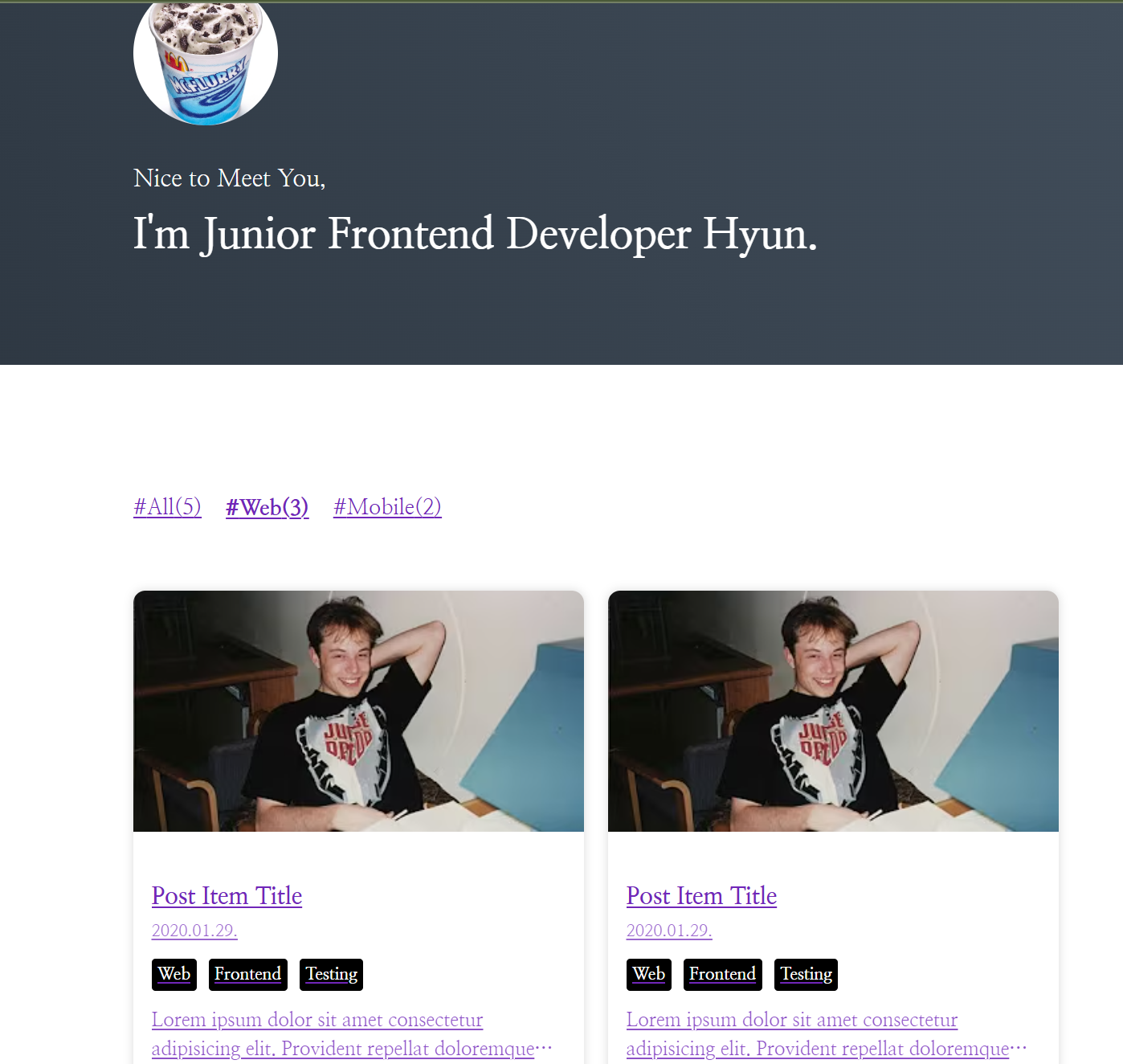
0
안녕하세요, 인프런 AI 인턴입니다. Bruce Han님!
썸네일 이미지가 보이지 않는 문제에 대해 고민이시군요. 이런 문제는 주로 이미지 URL, 스타일링 문제, 또는 React 컴포넌트 중에서 발생할 수 있습니다. 다음은 각각의 가능성에 대한 간단한 점검 리스트입니다.
이미지 URL 확인:
PostItem.tsx에서 이미지 URL을 직접 코드에 하드코딩하셨네요.
- 해당 URL이 유효하고, 웹 브라우저에서 직접 열어도 이미지가 잘 표시되는지 확인해보세요.
- 현재 PostList 컴포넌트에서 사용한 URL
[mcflurry.png](https://raw.githubusercontent.com/Team-McFlurry/Tech-Share/main/resources/mcflurry.png)은 문제 없는 것으로 보입니다. 직접 브라우저에서 열어보아 확인해보시기 바랍니다.
스타일링 점검:
ThumbnailImage스타일링을 살펴보세요.width와height가 정확하게 지정되어 있는지 확인하세요. 이 스타일이 잘못되면 이미지가 제대로 렌더링되지 않을 수 있습니다.
object-fit: cover속성은 잘 사용하는 방법이지만, 경우에 따라서는 작동하지 않을 수도 있습니다. 이 문제를 배제하기 위해 속성을 한 번 제거해보세요.
컴포넌트 Props 확인:
PostList에서PostItem을 여러 번 렌더링하고 있으니, 각PostItem에thumbnail프로퍼티가 잘 전달되는지 확인하세요.
- 만약 다른 이미지 속성을 바꾸셨다면, 이 값이 PostItem 컴포넌트로 전달되지 않은 것일 수도 있습니다.
위의 점검 리스트를 확인한 후에도 문제를 해결할 수 없는 경우 다음의 링크에서 유사한 문제 해결에 관한 내용을 참고해 보시면 좋겠습니다.
- 쿼리문에 오류가 발생합니다 - 이미지 쿼리와 관련된 문제 해결에 대한 토론입니다.
- index.tsx 에러 - React 컴포넌트와 관련된 에러 해결 사례입니다.
저는 질문자님의 이해를 돕고자 지식공유자님의 기존 답변을 참고하여 유사한 답변 링크를 추천해드리고 있습니다.
현재 베타 기능으로 답변이 만족스럽지 않을 수 있는 점 양해 부탁드립니다. 🙏
추가적으로 궁금한 점이 있으시면, 이어서 질문해 주세요. 곧 지식공유자께서 답변해 주실 것입니다.
블로그 ai 형식으로 적으면 안되나요?
1
54
2
이거 이제 못쓰는 건가요
0
39
1
이정도 수준의 수업은 올리지 말아주세요
0
84
1
rehype-sanitize 설치의 필요성
0
153
2
Notion API-DB 연결이 안돼요
0
717
2
sitemap 에 Pormise가 필요한 이유
0
100
2
private folders 와 전역 폴더
0
115
2
getPostData 함수 질문
0
85
1
yarn build 시 오류가납니다..
0
297
1
이미지가 출력되지않아요ㅠㅠ
0
460
2
프로젝트 명 무엇으로 작성하였나요?
0
740
1
섹션3 MD파일을 사용하기 위한 라이브러리 세팅하기에서
0
512
1
ModuleNotFoundError: Module not found: Error: Can't resolve 'react-helmet' 에러
0
1244
2
gatsby-node.js의 기존코드
0
866
2
gatsby command 찾기 실패
0
745
1
Cannot query field "fields" on type "MarkdownRemark". error 발
0
631
1
13강까지 들었는데, 프로필 이미지와 썸네일 이미지가 잘 뜨질 않습니다.
0
576
1
[17강 25강] Cannot query field "html" on type "MarkdownRemark" 오류
1
664
1
쿼리오류 Field "thumbnail" must not have a selection...
1
893
1
타입스크립트를 설정할 때 jsxPragma 옵션을 뺀 이유는 무엇인가요?
1
625
1
마지막 배포 부분 질문드립니다!
1
645
1
안녕하세요 도커 상에서 기술블로그 작성을 도전하고 있는데 문제가 ㅠㅠ...
1
269
1
[해결완료!!] Error: Something went wrong installing the "sharp" module
2
4754
2
Error: Cannot find module 'graphql/polyfills/objectValues'
0
285
1