

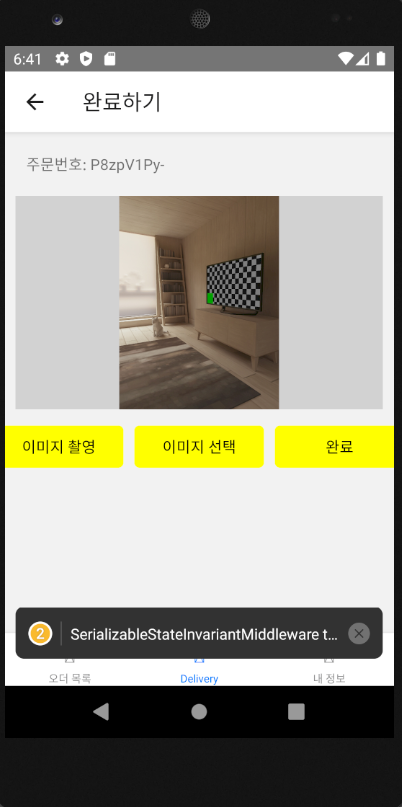
이미지 촬영 후 완료 버튼 반응 없음
709
投稿した質問数 8
 LOG  {"addListener": [Function addListener], "canGoBack": [Function canGoBack], "dispatch": [Function dispatch], "getId": [Function getId], "getParent": [Function getParent], "getState": [Function anonymous], "goBack": [Function anonymous], "isFocused": [Function isFocused], "jumpTo": [Function anonymous], "navigate": [Function anonymous], "pop": [Function anonymous], "popToTop": [Function anonymous], "push": [Function anonymous], "removeListener": [Function removeListener], "replace": [Function anonymous], "reset": [Function anonymous], "setOptions": [Function setOptions], "setParams": [Function anonymous]}
 LOG  {"end": {"latitude": 37.577, "longitude": 127.045}, "orderId": "DXCbe0Q55", "price": 6000, "rider": "LlnQ3qTJvU", "start": {"latitude": 37.516999999999996, "longitude": 126.944}}
 LOG  960 1280 {"DateTime": "2023:02:23 18:11:22", "DateTimeDigitized": "2023:02:23 18:11:22", "ExposureTime": "0.01", "FNumber": "2.8", "Flash": "0", "FocalLength": "5000/1000", "GPSAltitude": null, "GPSAltitudeRef": null, "GPSDateStamp": null, "GPSLatitude": null, "GPSLatitudeRef": null, "GPSLongitude": null, "GPSLongitudeRef": null, "GPSProcessingMethod": null, "GPSTimeStamp": null, "ISOSpeedRatings": "100", "ImageLength": "1280", "ImageWidth": "960", "Make": "Google", "Model": "sdk_gphone_x86", "Orientation": "1", "SubSecTime": "063", "SubSecTimeDigitized": "063", "SubSecTimeOriginal": "063", "WhiteBalance": "0"}
 LOG  orientation 1
 LOG  file:///data/user/0/com.zzz.fooddeliveryapp/cache/2dfe7384-6463-4c9c-b07a-e86a4184388b.JPEG 2dfe7384-6463-4c9c-b07a-e86a4184388b.JPEG
원래는 완료버튼을 누른 후 내 정보로 가야하고 수익금이 정산되어야하는데,
일단 완료버튼을 눌러도 아무런 반응이 없습니다
Complete.tsx
import React, {useCallback, useState} from 'react';
import {
  Alert,
  Dimensions,
  Image,
  Pressable,
  StyleSheet,
  Text,
  View,
} from 'react-native';
import {
  NavigationProp,
  RouteProp,
  useNavigation,
  useRoute,
} from '@react-navigation/native';
import {LoggedInParamList} from '../../AppInner';
import ImagePicker from 'react-native-image-crop-picker';
import ImageResizer from 'react-native-image-resizer';
import axios, {AxiosError} from 'axios';
import Config from 'react-native-config';
import {useSelector} from 'react-redux';
import {RootState} from '../store/reducer';
import orderSlice from '../slices/order';
import {useAppDispatch} from '../store';

function Complete() {
  const dispatch = useAppDispatch();
  const route = useRoute<RouteProp<LoggedInParamList>>();
  const navigation = useNavigation<NavigationProp<LoggedInParamList>>();
  const [image, setImage] =
    useState<{uri: string; name: string; type: string}>();
  const [preview, setPreview] = useState<{uri: string}>();
  const accessToken = useSelector((state: RootState) => state.user.accessToken);

  // { uri: '경로', name: '파일이름', type: '확장자' }
  // multipart/form-data 통해서 업로드

  const onResponse = useCallback(async (response: any) => {
    console.log(response.width, response.height, response.exif);
    setPreview({uri: `data:${response.mime};base64,${response.data}`});
    const orientation = (response.exif as any)?.Orientation;
    console.log('orientation', orientation);

    return ImageResizer.createResizedImage(
      response.path,  // 파일 경로 (file:///안드로이드 경로)
      600,  // width
      600,  // height
      response.mime.includes('jpeg') ? 'JPEG' : 'PNG',  // format
      100,  // quality
      0,    // rotation
    ).then(r => {
      console.log(r.uri, r.name);

      setImage({
        uri: r.uri,
        name: r.name,
        type: response.mime,
      });
    });
  }, []);

  const onTakePhoto = useCallback(() => {
    return ImagePicker.openCamera({
      includeBase64: true,
      includeExif: true,
      // saveToPhotos: true,
    })
      .then(onResponse)
      .catch(console.log);
  }, [onResponse]);

  const onChangeFile = useCallback(() => {
    return ImagePicker.openPicker({
      includeExif: true,
      includeBase64: true,
      mediaType: 'photo',
    })
      .then(onResponse)
      .catch(console.log);
  }, [onResponse]);

  const orderId = route.params?.orderId;
  const onComplete = useCallback(async () => {
    if (!image) {
      Alert.alert('알림', '파일을 업로드해주세요.');
      return;
    }
    if (!orderId) {
      Alert.alert('알림', '유효하지 않은 주문입니다.');
      return;
    }
    const formData = new FormData();
    formData.append('image', image);
    formData.append('orderId', orderId);
    try {
      await axios.post(`${Config.API_URL}/complete`, formData, {
        headers: {
          authorization: `Bearer ${accessToken}`,
        },
      });
      Alert.alert('알림', '완료처리 되었습니다.');
      navigation.goBack();
      navigation.navigate('Settings');
      dispatch(orderSlice.actions.rejectOrder(orderId));
    } catch (error) {
      const errorResponse = (error as AxiosError).response;
      if (errorResponse) {
        Alert.alert('알림', (errorResponse.data as any).message);
      }
    }
  }, [dispatch, navigation, image, orderId, accessToken]);

  return (
    <View>
      <View style={styles.orderId}>
        <Text>주문번호: {orderId}</Text>
      </View>
      <View style={styles.preview}>
        {preview && <Image style={styles.previewImage} source={preview} />}
      </View>
      <View style={styles.buttonWrapper}>
        <Pressable style={styles.button} onPress={onTakePhoto}>
          <Text style={styles.buttonText}>이미지 촬영</Text>
        </Pressable>
        <Pressable style={styles.button} onPress={onChangeFile}>
          <Text style={styles.buttonText}>이미지 선택</Text>
        </Pressable>
        <Pressable
          style={
            image
              ? styles.button
              : StyleSheet.compose(styles.button, styles.buttonDisabled)
          }
          onPress={onComplete}>
          <Text style={styles.buttonText}>완료</Text>
        </Pressable>
      </View>
    </View>
  );
}

const styles = StyleSheet.create({
  orderId: {
    padding: 20,
  },
  preview: {
    marginHorizontal: 10,
    width: Dimensions.get('window').width - 20,
    height: Dimensions.get('window').height / 3,
    backgroundColor: '#D2D2D2',
    marginBottom: 10,
  },
  previewImage: {
    height: Dimensions.get('window').height / 3,
    resizeMode: 'contain',
    // cover(꽉 차게), contain(딱 맞게), stretch(비율 무시하고 딱 맞게), repeat(반복되게), center(중앙 정렬)
  },
  buttonWrapper: {flexDirection: 'row', justifyContent: 'center'},
  button: {
    paddingHorizontal: 20,
    paddingVertical: 10,
    width: 120,
    alignItems: 'center',
    backgroundColor: 'yellow',
    borderRadius: 5,
    margin: 5,
  },
  buttonText: {
    color: 'black',
  },
  buttonDisabled: {
    backgroundColor: 'gray',
  },
});

export default Complete;
중간에 이 에러가 나는데 혹시 관련이 있나요?
 WARN  SerializableStateInvariantMiddleware took 123ms, which is more than the warning threshold of 32ms.
If your state or actions are very large, you may want to disable the middleware as it might cause too much of a slowdown in development mode. See https://redux-toolkit.js.org/api/getDefaultMiddleware for instructions.
It is disabled in production builds, so you don't need to worry about that.
回答 2
0
네 저 부분은 상관없고 백엔드 서버 콘솔을 봐야할 것 같습니다
0
POST /refreshToken 200 0.859 ms - 256
ClyjrFyXI8QaucSSAAAi 연결되었습니다.
{
  orderId: 'P8zpV1Py-',
  start: { latitude: 37.574, longitude: 127.045 },
  end: { latitude: 37.58, longitude: 126.946 },
  price: 7000,
  rider: 'zzz@naver.com'
}
POST /accept 200 3.069 ms - 2
이후 반응 없습니다..
0
  const onComplete = useCallback(async () => {
    Alert.alert('알림', '알림확인')
    if (!image) {
      Alert.alert('알림', '파일을 업로드해주세요.');
      return;
    }
    console.log('orderId', orderId);
    console.log('image', image);
    if (!orderId) {
      Alert.alert('알림', '유효하지 않은 주문입니다.');
      return;
    }
    const formData = new FormData();
    formData.append('orderId', orderId);
    formData.append('image', {
      name: image.name,
      type: image.type || 'image/jpeg',
      uri:
        Platform.OS === 'android'
          ? image.uri
          : image.uri.replace('file://', ''),
    });
    console.log(formData.getParts());
    try {
      await axios.post(`${Config.API_URL}/complete`, formData, {
        headers: {
          authorization: `Bearer ${accessToken}`,
        },
      });
      Alert.alert('알림', '완료처리 되었습니다.');
      navigation.goBack();
      navigation.navigate('Settings');
      dispatch(orderSlice.actions.rejectOrder(orderId));
    } catch (error) {
      const errorResponse = (error as AxiosError).response;
      if (errorResponse) {
        Alert.alert('알림', (errorResponse.data as any).message);
      }
    }
  }, [dispatch, navigation, image, orderId, accessToken]);
으로 제일 처음에 Alert 넣고 진행해봤는데 alert 작동합니다.
try 문 제일 처음에도 alert을 넣어봤는데 alert가 잘 작동하는 것으로 보아, try 문에서 axios post 부분이 문제인 것 같은데 맞나요...? 백엔드 서버에서도 post/complete가 실행이 안되고 있습니다
0
 LOG  960 1280 {"DateTime": "2023:02:24 16:00:05", "DateTimeDigitized": "2023:02:24 16:00:05", "ExposureTime": "0.01", "FNumber": "2.8", "Flash": "0", "FocalLength": "5000/1000", "GPSAltitude": null, "GPSAltitudeRef": null, "GPSDateStamp": null, "GPSLatitude": null, "GPSLatitudeRef": null, "GPSLongitude": null, "GPSLongitudeRef": null, "GPSProcessingMethod": null, "GPSTimeStamp": null, "ISOSpeedRatings": "100", "ImageLength": "1280", "ImageWidth": "960", "Make": "Google", "Model": "sdk_gphone_x86", "Orientation": "1", "SubSecTime": "665", "SubSecTimeDigitized": "665", "SubSecTimeOriginal": "665", "WhiteBalance": "0"}
 LOG  orientation 1
 LOG  file:///data/user/0/com.zzz.fooddeliveryapp/cache/9113c999-6ece-49be-898f-64ed61964a5f.JPEG 9113c999-6ece-49be-898f-64ed61964a5f.JPEG

 LOG  orderId 39tGwXnon
 LOG  image {"name": "9113c999-6ece-49be-898f-64ed61964a5f.JPEG", "type": "image/jpeg", "uri": "file:///data/user/0/com.zzz.fooddeliveryapp/cache/9113c999-6ece-49be-898f-64ed61964a5f.JPEG"}
 LOG  [{"fieldName": "orderId", "headers": {"content-disposition": "form-data; name=\"orderId\""}, "string": "39tGwXnon"}, {"fieldName": "image", "headers": {"content-disposition": "form-data; name=\"image\"; filename=\"9113c999-6ece-49be-898f-64ed61964a5f.JPEG\"", "content-type": "image/jpeg"}, "name": "9113c999-6ece-49be-898f-64ed61964a5f.JPEG", "type": "image/jpeg", "uri": "file:///data/user/0/com.zzz.fooddeliveryapp/cache/9113c999-6ece-49be-898f-64ed61964a5f.JPEG"}]

 LOG  http://10.0.2.2:3105
API_URL log도 잘 나옵니다
1
찾았습니다ㅠㅠㅠㅠ
      await axios.post(`${Config.API_URL}/complete`, formData, {
        headers: {
          authorization: `Bearer ${accessToken}`,
          'Content-Type': 'multipart/form-data',
        },
      });
headers에 이 문장을 추가해주어야 되네요
'Content-Type': 'multipart/form-data'앱실행시 네이버맵 [401] 에러
0
1129
2
스타일링 라이브러리
0
169
2
expo, cli 선택 중에 고민이 있습니다.
0
191
2
JDK 버전이 달라도 괜찮나요?
0
255
2
dimenstion usewindowdeminstion
0
142
3
[맥 전용]환경 설정하기 1편 & [맥 전용]환경 설정하기 2편의 영상이 안나옵니다.
0
222
1
jdk11 버전과 gradle 버전의 호환성 관련 질문드립니다.
0
417
2
강의 외 질문입니다!
0
171
2
react native랑 맞는 ui 라이브러리 어떤게 좋을까요?
0
1611
2
react native와 spring boot 연결
0
372
1
java가 아닌 .kt에서 code push 에러가 발생합니다.
0
228
2
flipper 239 에러가 발생합니다.
0
184
2
package.json에 /lib/panino.js 문제입니다.
0
495
2
window - mac 협업 과정 질문합니다
0
230
1
ios 빌드 중 RCTBridgeDelegate.h import 오류
0
302
2
ios 앱 빌드 중 hermesEnabled 관련 오류발생
0
257
2
Socket 연결시 질문 드립니다.!
0
162
2
wifi 환경에서 axios 통신이 로컬서버에서 안됩니다.
0
443
2
iOS render error 질문드립니다.
0
433
2
iOS 가상머신 오류
0
173
2
npc react init 명령어 실행시 발생되는 오류
0
229
1
nom start 시 오류
0
132
1
NextJS 기반으로 만들어서 웹뷰 React Native로 배포 가능한가요?
0
1039
2
안드로이드 rn75 버전에 맞게 설정 중에 android13 다운로드에 대해서 막혔습니다!
0
197
2