

npm run android 했을때 빌드 에러
4002
작성자 없음
C:\Users\user\Food-Delivery-App>npm run android

> FoodDeliveryApp@0.0.1 android
> react-native run-android

info Starting JS server...
info Installing the app...
Starting a Gradle Daemon, 1 incompatible and 1 stopped Daemons could not be reused, use --status for details

> Configure project :app
Reading env from: .env
5 actionable tasks: 2 executed, 3 up-to-date

FAILURE: Build completed with 2 failures.

1: Task failed with an exception.
-----------
* Where:
Build file 'C:\Users\user\Food-Delivery-App\android\app\build.gradle' line: 10

* What went wrong:
A problem occurred evaluating project ':app'.
> Could not find method react() for arguments [build_5l1ot47ojj8km5ma6mc1eopey$_run_closure1@4d477756] on project ':app' of type org.gradle.api.Project.

* Try:
> Run with --stacktrace option to get the stack trace.
> Run with --info or --debug option to get more log output.
> Run with --scan to get full insights.
==============================================================================

2: Task failed with an exception.
-----------
* What went wrong:
A problem occurred configuring project ':app'.
> compileSdkVersion is not specified. Please add it to build.gradle

* Try:
> Run with --stacktrace option to get the stack trace.
> Run with --info or --debug option to get more log output.
> Run with --scan to get full insights.
==============================================================================

* Get more help at https://help.gradle.org

BUILD FAILED in 1m 15s

error Failed to install the app. Make sure you have the Android development environment set up: https://reactnative.dev/docs/environment-setup.
Error: Command failed: gradlew.bat app:installDebug -PreactNativeDevServerPort=8081

FAILURE: Build completed with 2 failures.

1: Task failed with an exception.
-----------
* Where:
Build file 'C:\Users\user\Food-Delivery-App\android\app\build.gradle' line: 10

* What went wrong:
A problem occurred evaluating project ':app'.
> Could not find method react() for arguments [build_5l1ot47ojj8km5ma6mc1eopey$_run_closure1@4d477756] on project ':app' of type org.gradle.api.Project.

* Try:
> Run with --stacktrace option to get the stack trace.
> Run with --info or --debug option to get more log output.
> Run with --scan to get full insights.
==============================================================================

2: Task failed with an exception.
-----------
* What went wrong:
A problem occurred configuring project ':app'.
> compileSdkVersion is not specified. Please add it to build.gradle

* Try:
> Run with --stacktrace option to get the stack trace.
> Run with --info or --debug option to get more log output.
> Run with --scan to get full insights.
==============================================================================

* Get more help at https://help.gradle.org

BUILD FAILED in 1m 15s

    at makeError (C:\Users\user\Food-Delivery-App\node_modules\execa\index.js:174:9)
    at C:\Users\user\Food-Delivery-App\node_modules\execa\index.js:278:16
    at process.processTicksAndRejections (node:internal/process/task_queues:95:5)
    at async runOnAllDevices (C:\Users\user\Food-Delivery-App\node_modules\@react-native-community\cli-platform-android\build\commands\runAndroid\runOnAllDevices.js:85:5)
    at async Command.handleAction (C:\Users\user\Food-Delivery-App\node_modules\@react-native-community\cli\build\index.js:108:9)
info Run CLI with --verbose flag for more details.
에러코드입니다
android/app/build.gradle
apply plugin: "com.android.application"
apply from: project(':react-native-config').projectDir.getPath() + "/dotenv.gradle"

import com.android.build.OutputFile

/**
 * This is the configuration block to customize your React Native Android app.
 * By default you don't need to apply any configuration, just uncomment the lines you need.
 */
react {
    /* Folders */
    //   The root of your project, i.e. where "package.json" lives. Default is '..'
    // root = file("../")
    //   The folder where the react-native NPM package is. Default is ../node_modules/react-native
    // reactNativeDir = file("../node-modules/react-native")
    //   The folder where the react-native Codegen package is. Default is ../node_modules/react-native-codegen
    // codegenDir = file("../node-modules/react-native-codegen")
    //   The cli.js file which is the React Native CLI entrypoint. Default is ../node_modules/react-native/cli.js
    // cliFile = file("../node_modules/react-native/cli.js")

    /* Variants */
    //   The list of variants to that are debuggable. For those we're going to
    //   skip the bundling of the JS bundle and the assets. By default is just 'debug'.
    //   If you add flavors like lite, prod, etc. you'll have to list your debuggableVariants.
    // debuggableVariants = ["liteDebug", "prodDebug"]

    /* Bundling */
    //   A list containing the node command and its flags. Default is just 'node'.
    // nodeExecutableAndArgs = ["node"]
    //
    //   The command to run when bundling. By default is 'bundle'
    // bundleCommand = "ram-bundle"
    //
    //   The path to the CLI configuration file. Default is empty.
    // bundleConfig = file(../rn-cli.config.js)
    //
    //   The name of the generated asset file containing your JS bundle
    // bundleAssetName = "MyApplication.android.bundle"
    //
    //   The entry file for bundle generation. Default is 'index.android.js' or 'index.js'
    // entryFile = file("../js/MyApplication.android.js")
    //
    //   A list of extra flags to pass to the 'bundle' commands.
    //   See https://github.com/react-native-community/cli/blob/main/docs/commands.md#bundle
    // extraPackagerArgs = []

    /* Hermes Commands */
    //   The hermes compiler command to run. By default it is 'hermesc'
    // hermesCommand = "$rootDir/my-custom-hermesc/bin/hermesc"
    //
    //   The list of flags to pass to the Hermes compiler. By default is "-O", "-output-source-map"
    // hermesFlags = ["-O", "-output-source-map"]
}

/**
 * Set this to true to create four separate APKs instead of one,
 * one for each native architecture. This is useful if you don't
 * use App Bundles (https://developer.android.com/guide/app-bundle/)
 * and want to have separate APKs to upload to the Play Store.
 */
def enableSeparateBuildPerCPUArchitecture = false

/**
 * Set this to true to Run Proguard on Release builds to minify the Java bytecode.
 */
def enableProguardInReleaseBuilds = false

/**
 * The preferred build flavor of JavaScriptCore (JSC)
 *
 * For example, to use the international variant, you can use:
 * `def jscFlavor = 'org.webkit:android-jsc-intl:+'`
 *
 * The international variant includes ICU i18n library and necessary data
 * allowing to use e.g. `Date.toLocaleString` and `String.localeCompare` that
 * give correct results when using with locales other than en-US. Note that
 * this variant is about 6MiB larger per architecture than default.
 */
def jscFlavor = 'org.webkit:android-jsc:+'

/**
 * Private function to get the list of Native Architectures you want to build.
 * This reads the value from reactNativeArchitectures in your gradle.properties
 * file and works together with the --active-arch-only flag of react-native run-android.
 */
def reactNativeArchitectures() {
    def value = project.getProperties().get("reactNativeArchitectures")
    return value ? value.split(",") : ["armeabi-v7a", "x86", "x86_64", "arm64-v8a"]
}

android {
    ndkVersion rootProject.ext.ndkVersion

    compileSdkVersion rootProject.ext.compileSdkVersion

    namespace "com.fooddeliveryapp"
    defaultConfig {
        applicationId "com.fooddeliveryapp"
        minSdkVersion rootProject.ext.minSdkVersion
        targetSdkVersion rootProject.ext.targetSdkVersion
        versionCode 1
        versionName "1.0"
        resValue "string", "build_config_package", "com.fooddeliveryapp"
    }

    splits {
        abi {
            reset()
            enable enableSeparateBuildPerCPUArchitecture
            universalApk false  // If true, also generate a universal APK
            include (*reactNativeArchitectures())
        }
    }
    signingConfigs {
        debug {
            storeFile file('debug.keystore')
            storePassword 'android'
            keyAlias 'androiddebugkey'
            keyPassword 'android'
        }
    }
    buildTypes {
        debug {
            signingConfig signingConfigs.debug
        }
        release {
            // Caution! In production, you need to generate your own keystore file.
            // see https://reactnative.dev/docs/signed-apk-android.
            signingConfig signingConfigs.debug
            minifyEnabled enableProguardInReleaseBuilds
            proguardFiles getDefaultProguardFile("proguard-android.txt"), "proguard-rules.pro"
        }
    }

    // applicationVariants are e.g. debug, release
    applicationVariants.all { variant ->
        variant.outputs.each { output ->
            // For each separate APK per architecture, set a unique version code as described here:
            // https://developer.android.com/studio/build/configure-apk-splits.html
            // Example: versionCode 1 will generate 1001 for armeabi-v7a, 1002 for x86, etc.
            def versionCodes = ["armeabi-v7a": 1, "x86": 2, "arm64-v8a": 3, "x86_64": 4]
            def abi = output.getFilter(OutputFile.ABI)
            if (abi != null) {  // null for the universal-debug, universal-release variants
                output.versionCodeOverride =
                        defaultConfig.versionCode * 1000 + versionCodes.get(abi)
            }

        }
    }
}

dependencies {
    // The version of react-native is set by the React Native Gradle Plugin
    implementation("com.facebook.react:react-android")

    implementation("androidx.swiperefreshlayout:swiperefreshlayout:1.0.0")

    debugImplementation("com.facebook.flipper:flipper:${FLIPPER_VERSION}")
    debugImplementation("com.facebook.flipper:flipper-network-plugin:${FLIPPER_VERSION}") {
        exclude group:'com.squareup.okhttp3', module:'okhttp'
    }

    debugImplementation("com.facebook.flipper:flipper-fresco-plugin:${FLIPPER_VERSION}")
    if (hermesEnabled.toBoolean()) {
        implementation("com.facebook.react:hermes-android")
    } else {
        implementation jscFlavor
    }
}

apply from: file("../../node_modules/@react-native-community/cli-platform-android/native_modules.gradle"); applyNativeModulesAppBuildGradle(project)
여기서 에러가 났다고 적혀져 있는거 같은데
apply plugin: "com.android.application"
apply from: project(':react-native-config').projectDir.getPath() + "/dotenv.gradle"
저는 제일 앞에 이 두 줄만 추가해줬습니다.
근데 계속 빌드하는 데 에러가 납니다.
두 부분이 실패했다고 하는데 어딘지 잘 모르겠어요....
android/app/src/main/AndroidManifest.xml
<manifest xmlns:android="http://schemas.android.com/apk/res/android">

    <uses-permission android:name="android.permission.INTERNET" />

    <application
      android:userCLeartextTraffic="true"
      android:name=".MainApplication"
      android:label="@string/app_name"
      android:icon="@mipmap/ic_launcher"
      android:roundIcon="@mipmap/ic_launcher_round"
      android:allowBackup="false"
      android:theme="@style/AppTheme">
      <activity
        android:name=".MainActivity"
        android:label="@string/app_name"
        android:configChanges="keyboard|keyboardHidden|orientation|screenLayout|screenSize|smallestScreenSize|uiMode"
        android:launchMode="singleTask"
        android:windowSoftInputMode="adjustResize"
        android:exported="true">
        <intent-filter>
            <action android:name="android.intent.action.MAIN" />
            <category android:name="android.intent.category.LAUNCHER" />
        </intent-filter>
      </activity>
    </application>
</manifest>
android/app/proguard-rules.pro
pecific ProGuard rules here.
# By default, the flags in this file are appended to flags specified
# in /usr/local/Cellar/android-sdk/24.3.3/tools/proguard/proguard-android.txt
# You can edit the include path and order by changing the proguardFiles
# directive in build.gradle.
#
# For more details, see
#   http://developer.android.com/guide/developing/tools/proguard.html

# Add any project specific keep options here:

-keep class com.fooddeliveryapp.BuildConfig { *; }
回答 2
0
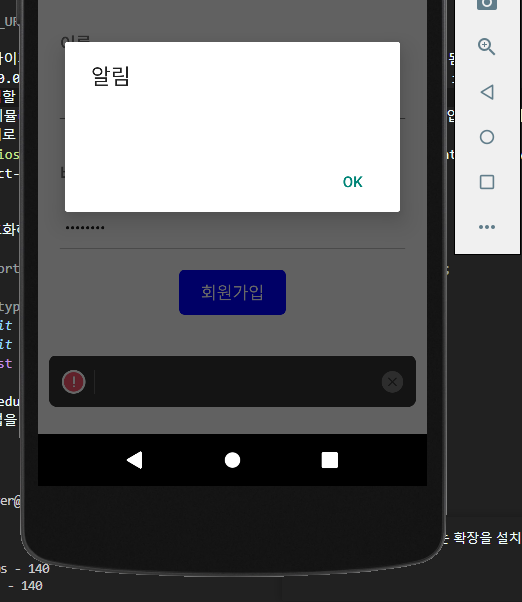
빌드는 됐는데 404 에러가 나네요
근데 어느 부분에서 에러가 났는지 잘 모르겠어요...

0
무슨 액션을 하신 거 아닌가요? 예를 들어 회원가입 버튼을 눌렀다거나요. 질문하실 때 상황을 구체적으로 말씀해주세요. 알림이 떴으면 에러 표시한 Alert.alert 부분일 것이고요.
0
> food-delivery-server@1.0.0 start
> node app.js

연결되었습니다.
POST / 404 115.512 ms - 140
POST / 404 27.772 ms - 140
POST / 404 22.358 ms - 140
이것 말하는 건가요??
0
const response = await axios.post(`${Config.API_URL}/user`, {
  email,
  name,
  password, // hash화(일반적), 양방향 암호와
});
저기서 user을 뺐었네요...ㅎㅎㅎ 감사합니다
0
원래는 됐는데 react-native-config를 설치할 때 에러가 발생한 건가요?
0
일단 두 에러 중 하나는 android/build.gradle에
compileSdkVersion = 30
이게 없는 것 같습니다.
https://github.com/ZeroCho/food-delivery-app/blob/67e2eec626c4db371489171789ffc02ce63ad68f/ch6/android/build.gradle#L7
0
다시 에러 코드 확인해보니까
AndoridManifest.xml 파일에 코드를 잘못 썼더라구요...
android:usesCleartextTraffic="true"이 코드 추가했을 때 부터 문제였었나봐요
그리고
apply plugin: "com.facebook.react"이 코드를 추가하니까 에러 해결됐고 빌드가 잘 됩니다~
앱실행시 네이버맵 [401] 에러
0
1129
2
스타일링 라이브러리
0
169
2
expo, cli 선택 중에 고민이 있습니다.
0
192
2
JDK 버전이 달라도 괜찮나요?
0
256
2
dimenstion usewindowdeminstion
0
143
3
[맥 전용]환경 설정하기 1편 & [맥 전용]환경 설정하기 2편의 영상이 안나옵니다.
0
222
1
jdk11 버전과 gradle 버전의 호환성 관련 질문드립니다.
0
418
2
강의 외 질문입니다!
0
172
2
react native랑 맞는 ui 라이브러리 어떤게 좋을까요?
0
1611
2
react native와 spring boot 연결
0
373
1
java가 아닌 .kt에서 code push 에러가 발생합니다.
0
229
2
flipper 239 에러가 발생합니다.
0
185
2
package.json에 /lib/panino.js 문제입니다.
0
495
2
window - mac 협업 과정 질문합니다
0
231
1
ios 빌드 중 RCTBridgeDelegate.h import 오류
0
302
2
ios 앱 빌드 중 hermesEnabled 관련 오류발생
0
257
2
Socket 연결시 질문 드립니다.!
0
162
2
wifi 환경에서 axios 통신이 로컬서버에서 안됩니다.
0
444
2
iOS render error 질문드립니다.
0
435
2
iOS 가상머신 오류
0
174
2
npc react init 명령어 실행시 발생되는 오류
0
230
1
nom start 시 오류
0
132
1
NextJS 기반으로 만들어서 웹뷰 React Native로 배포 가능한가요?
0
1040
2
안드로이드 rn75 버전에 맞게 설정 중에 android13 다운로드에 대해서 막혔습니다!
0
198
2