

저는 스타일이 이상하게 적용되네요 ㅠ
839
投稿した質問数 9
<template>
<div class="inputBox shadow">
<input type="text" v-model="newTodoItem">
<span class="addContainer" @click="addTodo">
<i class="fa-solid fa-plus addBtn"></i>
</span>
</div>
</template>
<style scoped>
input:focus {
outline: none;
}
.inputBox {
background: white;
height: 50px;
line-height: 50px;
border-radius: 5px;
}
.inputBox input {
border-style: none;
font-size: 0.9rem;
}
.addContainer {
float: right;
background: linear-gradient(to right, #6478FB, #8763F8);
display: block;
width: 3rem;
border-radius: 0 5px 5px 0;
}
.addBtn {
color: white;
vertical-align: middle;
}
</style>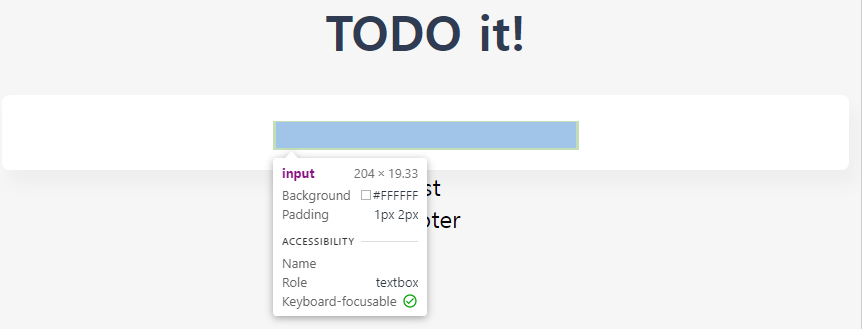 위처럼 아예 input창 크기도 안맞춰지고 span 태그도 사라져있더라구요..
왜 이상하게 나왔는지를 몰라서 임시로 아래처럼 바꿨는데 요즘은 flex를 현업에 안쓴다고 들었는데 그게 맞을까요 ??
아직 git 허가를 못받아서 ..😭
input:focus {
    outline: none;
  }
  .inputBox {
    display: flex;
    align-items: center;
    background: white;
    height: 50px;
    line-height: 50px;
    border-radius: 5px;
  }
  .inputBox input {
    height: 100%;
    width: calc(100% - 3rem);
    border-style: none;
    font-size: 0.9rem;
  }
  .addContainer {
    background: linear-gradient(to right, #6478FB, #8763F8);
    display: block;
    height: 100%;
    width: 3rem;
    border-radius: 0 5px 5px 0;
  }
  .addBtn {
    color: white;
    vertical-align: middle;
}回答 2
0
안녕하세요, 회사랑 팀마다 다르겠지만 flex나 grid 모두 최신 문법에 속하는 편이라 쓰시는게 좋습니다 ㅎㅎ 저도 레이아웃 구성할 때는 float 기반의 예전 방식보다는 최신 문법으로 하는 편이에요
깃권한요청드립니다
0
51
1
Chrome 개발자 모드 확장이 안됨
0
406
1
깃 권한 요청드립니다
0
152
1
vue.js 중급 리포지토리 권한 관련
0
160
1
vuex + axios 질문 있습니다!
1
241
2
깃 권한 요청드립니다!
0
196
1
강의 깃주소 문의
0
169
1
router-view에 props를 어떻게 넘길 수 있나요?
1
327
2
Vue가 인식되지 않는 현상
0
234
1
기초강좌는 어디있나요?
1
226
2
App.vue가 필요한 이유
0
234
1
getter가 정의되어 있지 않아 오류가 발생합니다.
1
295
1
뷰 라이프사이클
1
220
1
TSLint 말고 TSLint Vue 설치해도 되나요?
1
411
3
로컬 스토리지는 어디에 있나요?
1
321
1
vuex 실행시 새로고침해야지만 리스트에 나타나는 현상
1
444
2
export default 관련한 질문
0
404
2
깃허브 vue-todo 접근불가에 따른 확인요청
1
393
2
깃허브에 문제있는것 같습니다.
1
318
2
인프런 강의 재생 화면 구성 변경 문의드립니다
1
350
2
addTodo Helper 함수 적용
1
272
1
vuex 헬퍼 전역 설정
1
306
2
github 권한요청드립니다.
1
292
2
이벤트 위치에 대한 궁금증 입니다.
1
259
2